INTERNET AND WEB APPLICATIONS
UNIT-3
S. Vasuki, M.C.A.,
Assistant Professor,
Department of Computer Science
Sri Sarada Niketan College of Science for Women,
Karur.
Internet Basics: A
Comprehensive Guide
Welcome! Today we'll explore the fascinating world of the internet, from its
origins to its everyday applications.
Evolution of the Internet
Early Networks
The internet's roots lie in early
computer networks like ARPANET,
developed in the 1960s by the US
Department of Defense.
World Wide Web
In the 1990s, Tim Berners-Lee invented
the World Wide Web, making the
internet accessible to the public
through web browsers.
Modern Internet
Today, the internet is ubiquitous, with
smartphones, social media, and cloud
computing playing a crucial role in our
lives.
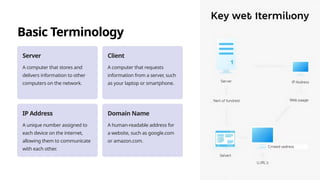
Basic Terminology
Server
A computer that stores and
delivers information to other
computers on the network.
Client
A computer that requests
information from a server, such
as your laptop or smartphone.
IP Address
A unique number assigned to
each device on the internet,
allowing them to communicate
with each other.
Domain Name
A human-readable address for
a website, such as google.com
or amazon.com.
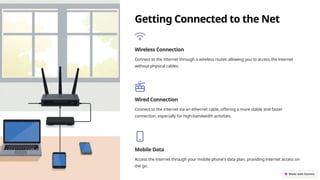
Getting Connected to the Net
Wireless Connection
Connect to the internet through a wireless router, allowing you to access the internet
without physical cables.
Wired Connection
Connect to the internet via an ethernet cable, offering a more stable and faster
connection, especially for high-bandwidth activities.
Mobile Data
Access the internet through your mobile phone's data plan, providing internet access on
the go.
Web Browsers and Navigation
Web Browsers
Software applications like Chrome,
Firefox, and Safari that allow you to
access websites and navigate the
internet.
Navigation
Use the address bar to enter URLs,
bookmarks to save frequently visited
sites, and tabs to open multiple
websites simultaneously.
Search Engines
Tools like Google, Bing, and Yahoo help
you find information on the web by
entering keywords or phrases.
Applications of the Internet
1
Communication
Email, instant messaging, video calls, and social media platforms connect people worldwide.
2
Information
Access to vast information resources, online libraries, news sites, and educational
platforms.
3
Entertainment
Streaming services, music platforms, online gaming, and social media provide a
wide range of entertainment.
4
Commerce
Online shopping, e-commerce, and digital marketplaces have
revolutionized the way we buy and sell goods.
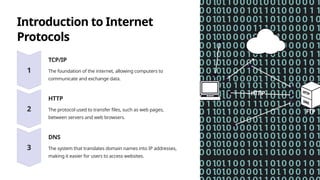
Introduction to Internet
Protocols
TCP/IP
The foundation of the internet, allowing computers to
communicate and exchange data.
HTTP
The protocol used to transfer files, such as web pages,
between servers and web browsers.
DNS
The system that translates domain names into IP addresses,
making it easier for users to access websites.
The Language of the Internet
1
HTML
The markup language used to create web pages, defining the structure and content of websites.
2
CSS
A language that controls the presentation and styling of web pages, defining the
visual appearance of websites.
3
JavaScript
A programming language that adds interactivity and
dynamic behavior to web pages.
E-mail, Voicemail, and Messaging
1
Email
Asynchronous communication, allowing you to send and receive messages at your convenience.
2
Voicemail
Leave messages for others to listen to later, offering a convenient way to communicate when
someone is unavailable.
3
Messaging
Real-time communication, enabling instant conversations with individuals or groups.
Creating an Email Address and Net Meeting
Create a free email account with popular services like Gmail, Outlook, or Yahoo Mail, enabling you to send and receive emails.

unit 3 internet and web application.pptx

  • 1.
    INTERNET AND WEBAPPLICATIONS UNIT-3 S. Vasuki, M.C.A., Assistant Professor, Department of Computer Science Sri Sarada Niketan College of Science for Women, Karur.
  • 2.
    Internet Basics: A ComprehensiveGuide Welcome! Today we'll explore the fascinating world of the internet, from its origins to its everyday applications.
  • 3.
    Evolution of theInternet Early Networks The internet's roots lie in early computer networks like ARPANET, developed in the 1960s by the US Department of Defense. World Wide Web In the 1990s, Tim Berners-Lee invented the World Wide Web, making the internet accessible to the public through web browsers. Modern Internet Today, the internet is ubiquitous, with smartphones, social media, and cloud computing playing a crucial role in our lives.
  • 4.
    Basic Terminology Server A computerthat stores and delivers information to other computers on the network. Client A computer that requests information from a server, such as your laptop or smartphone. IP Address A unique number assigned to each device on the internet, allowing them to communicate with each other. Domain Name A human-readable address for a website, such as google.com or amazon.com.
  • 5.
    Getting Connected tothe Net Wireless Connection Connect to the internet through a wireless router, allowing you to access the internet without physical cables. Wired Connection Connect to the internet via an ethernet cable, offering a more stable and faster connection, especially for high-bandwidth activities. Mobile Data Access the internet through your mobile phone's data plan, providing internet access on the go.
  • 6.
    Web Browsers andNavigation Web Browsers Software applications like Chrome, Firefox, and Safari that allow you to access websites and navigate the internet. Navigation Use the address bar to enter URLs, bookmarks to save frequently visited sites, and tabs to open multiple websites simultaneously. Search Engines Tools like Google, Bing, and Yahoo help you find information on the web by entering keywords or phrases.
  • 7.
    Applications of theInternet 1 Communication Email, instant messaging, video calls, and social media platforms connect people worldwide. 2 Information Access to vast information resources, online libraries, news sites, and educational platforms. 3 Entertainment Streaming services, music platforms, online gaming, and social media provide a wide range of entertainment. 4 Commerce Online shopping, e-commerce, and digital marketplaces have revolutionized the way we buy and sell goods.
  • 8.
    Introduction to Internet Protocols TCP/IP Thefoundation of the internet, allowing computers to communicate and exchange data. HTTP The protocol used to transfer files, such as web pages, between servers and web browsers. DNS The system that translates domain names into IP addresses, making it easier for users to access websites.
  • 9.
    The Language ofthe Internet 1 HTML The markup language used to create web pages, defining the structure and content of websites. 2 CSS A language that controls the presentation and styling of web pages, defining the visual appearance of websites. 3 JavaScript A programming language that adds interactivity and dynamic behavior to web pages.
  • 10.
    E-mail, Voicemail, andMessaging 1 Email Asynchronous communication, allowing you to send and receive messages at your convenience. 2 Voicemail Leave messages for others to listen to later, offering a convenient way to communicate when someone is unavailable. 3 Messaging Real-time communication, enabling instant conversations with individuals or groups.
  • 11.
    Creating an EmailAddress and Net Meeting Create a free email account with popular services like Gmail, Outlook, or Yahoo Mail, enabling you to send and receive emails.