Assignment on Crawling a website
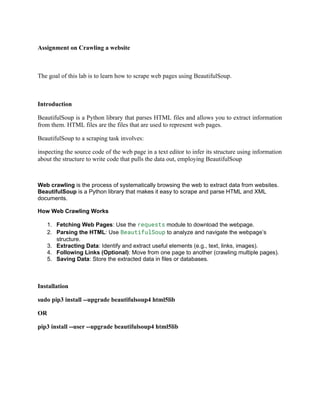
The goal of this lab is to learn how to scrape web pages using BeautifulSoup.
Introduction
BeautifulSoup is a Python library that parses HTML files and allows you to extract information
from them. HTML files are the files that are used to represent web pages.
BeautifulSoup to a scraping task involves:
inspecting the source code of the web page in a text editor to infer its structure using information
about the structure to write code that pulls the data out, employing BeautifulSoup
Web crawling is the process of systematically browsing the web to extract data from websites.
BeautifulSoup is a Python library that makes it easy to scrape and parse HTML and XML
documents.
How Web Crawling Works
1. Fetching Web Pages: Use the requests module to download the webpage.
2. Parsing the HTML: Use BeautifulSoup to analyze and navigate the webpage’s
structure.
3. Extracting Data: Identify and extract useful elements (e.g., text, links, images).
4. Following Links (Optional): Move from one page to another (crawling multiple pages).
5. Saving Data: Store the extracted data in files or databases.
Installation
sudo pip3 install --upgrade beautifulsoup4 html5lib
OR
pip3 install --user --upgrade beautifulsoup4 html5lib
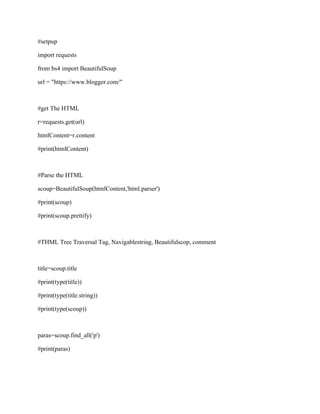
#setpup
import requests
from bs4 import BeautifulSoup
url = "https://www.blogger.com/"
#get The HTML
r=requests.get(url)
htmlContent=r.content
#print(htmlContent)
#Parse the HTML
scoup=BeautifulSoup(htmlContent,'html.parser')
#print(scoup)
#print(scoup.prettify)
#THML Tree Traversal Tag, Navigablestring, Beautifulscop, comment
title=scoup.title
#print(type(title))
#print(type(title.string))
#print(type(scoup))
paras=scoup.find_all('p')
#print(paras)
anchors=scoup.find_all('a')
#print(anchors)
#print(scoup.find('p'))
#print(scoup.find('p').get_text())
Example Code: Scraping Quotes from a Website
import requests
from bs4 import BeautifulSoup
# Step 1: Fetch the webpage content
url = "https://quotes.toscrape.com/"
response = requests.get(url)
# Step 2: Parse the HTML
soup = BeautifulSoup(response.text, "html.parser")
# Step 3: Extract specific data (quotes and authors)
quotes = soup.find_all("span", class_="text")
authors = soup.find_all("small", class_="author")
# Step 4: Display the extracted data
for i in range(len(quotes)):
print(f"Quote: {quotes[i].text}")
print(f"Author: {authors[i].text}")
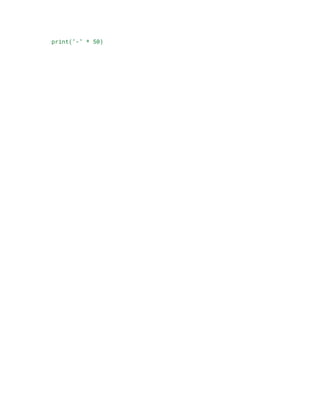
print("-" * 50)

Unit 2_Crawling a website data collection, search engine indexing, and cybersecurity testing.
  • 1.
    Assignment on Crawlinga website The goal of this lab is to learn how to scrape web pages using BeautifulSoup. Introduction BeautifulSoup is a Python library that parses HTML files and allows you to extract information from them. HTML files are the files that are used to represent web pages. BeautifulSoup to a scraping task involves: inspecting the source code of the web page in a text editor to infer its structure using information about the structure to write code that pulls the data out, employing BeautifulSoup Web crawling is the process of systematically browsing the web to extract data from websites. BeautifulSoup is a Python library that makes it easy to scrape and parse HTML and XML documents. How Web Crawling Works 1. Fetching Web Pages: Use the requests module to download the webpage. 2. Parsing the HTML: Use BeautifulSoup to analyze and navigate the webpage’s structure. 3. Extracting Data: Identify and extract useful elements (e.g., text, links, images). 4. Following Links (Optional): Move from one page to another (crawling multiple pages). 5. Saving Data: Store the extracted data in files or databases. Installation sudo pip3 install --upgrade beautifulsoup4 html5lib OR pip3 install --user --upgrade beautifulsoup4 html5lib
  • 2.
    #setpup import requests from bs4import BeautifulSoup url = "https://www.blogger.com/" #get The HTML r=requests.get(url) htmlContent=r.content #print(htmlContent) #Parse the HTML scoup=BeautifulSoup(htmlContent,'html.parser') #print(scoup) #print(scoup.prettify) #THML Tree Traversal Tag, Navigablestring, Beautifulscop, comment title=scoup.title #print(type(title)) #print(type(title.string)) #print(type(scoup)) paras=scoup.find_all('p') #print(paras)
  • 3.
    anchors=scoup.find_all('a') #print(anchors) #print(scoup.find('p')) #print(scoup.find('p').get_text()) Example Code: ScrapingQuotes from a Website import requests from bs4 import BeautifulSoup # Step 1: Fetch the webpage content url = "https://quotes.toscrape.com/" response = requests.get(url) # Step 2: Parse the HTML soup = BeautifulSoup(response.text, "html.parser") # Step 3: Extract specific data (quotes and authors) quotes = soup.find_all("span", class_="text") authors = soup.find_all("small", class_="author") # Step 4: Display the extracted data for i in range(len(quotes)): print(f"Quote: {quotes[i].text}") print(f"Author: {authors[i].text}")
  • 4.