DNS Spoofing ina BadUSB Attack Step-
by-Step
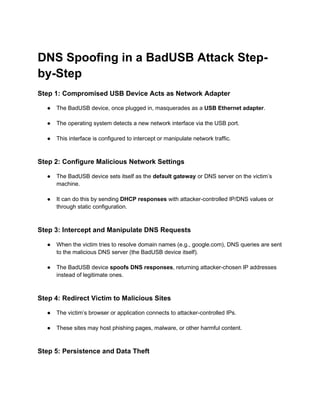
Step 1: Compromised USB Device Acts as Network Adapter
● The BadUSB device, once plugged in, masquerades as a USB Ethernet adapter.
● The operating system detects a new network interface via the USB port.
● This interface is configured to intercept or manipulate network traffic.
Step 2: Configure Malicious Network Settings
● The BadUSB device sets itself as the default gateway or DNS server on the victim’s
machine.
● It can do this by sending DHCP responses with attacker-controlled IP/DNS values or
through static configuration.
Step 3: Intercept and Manipulate DNS Requests
● When the victim tries to resolve domain names (e.g., google.com), DNS queries are sent
to the malicious DNS server (the BadUSB device itself).
● The BadUSB device spoofs DNS responses, returning attacker-chosen IP addresses
instead of legitimate ones.
Step 4: Redirect Victim to Malicious Sites
● The victim’s browser or application connects to attacker-controlled IPs.
● These sites may host phishing pages, malware, or other harmful content.
Step 5: Persistence and Data Theft
2.
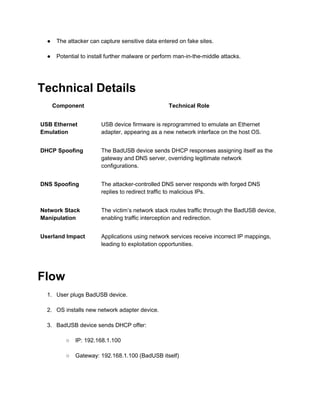
● The attackercan capture sensitive data entered on fake sites.
● Potential to install further malware or perform man-in-the-middle attacks.
Technical Details
Component Technical Role
USB Ethernet
Emulation
USB device firmware is reprogrammed to emulate an Ethernet
adapter, appearing as a new network interface on the host OS.
DHCP Spoofing The BadUSB device sends DHCP responses assigning itself as the
gateway and DNS server, overriding legitimate network
configurations.
DNS Spoofing The attacker-controlled DNS server responds with forged DNS
replies to redirect traffic to malicious IPs.
Network Stack
Manipulation
The victim’s network stack routes traffic through the BadUSB device,
enabling traffic interception and redirection.
Userland Impact Applications using network services receive incorrect IP mappings,
leading to exploitation opportunities.
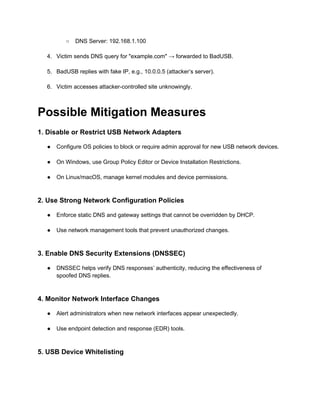
Flow
1. User plugs BadUSB device.
2. OS installs new network adapter device.
3. BadUSB device sends DHCP offer:
○ IP: 192.168.1.100
○ Gateway: 192.168.1.100 (BadUSB itself)
3.
○ DNS Server:192.168.1.100
4. Victim sends DNS query for "example.com" → forwarded to BadUSB.
5. BadUSB replies with fake IP, e.g., 10.0.0.5 (attacker’s server).
6. Victim accesses attacker-controlled site unknowingly.
Possible Mitigation Measures
1. Disable or Restrict USB Network Adapters
● Configure OS policies to block or require admin approval for new USB network devices.
● On Windows, use Group Policy Editor or Device Installation Restrictions.
● On Linux/macOS, manage kernel modules and device permissions.
2. Use Strong Network Configuration Policies
● Enforce static DNS and gateway settings that cannot be overridden by DHCP.
● Use network management tools that prevent unauthorized changes.
3. Enable DNS Security Extensions (DNSSEC)
● DNSSEC helps verify DNS responses’ authenticity, reducing the effectiveness of
spoofed DNS replies.
4. Monitor Network Interface Changes
● Alert administrators when new network interfaces appear unexpectedly.
● Use endpoint detection and response (EDR) tools.
5. USB Device Whitelisting
4.
● Use USBdevice control solutions to whitelist only trusted devices.
● Block unknown or untrusted USB devices from connecting.
6. User Awareness and Training
● Educate users about risks of unknown USB devices.
● Encourage use of only trusted USB peripherals.
7. Use VPNs and Encrypted Traffic
● VPNs encrypt DNS and traffic, preventing interception and manipulation.
● Use DNS over HTTPS (DoH) or DNS over TLS (DoT).
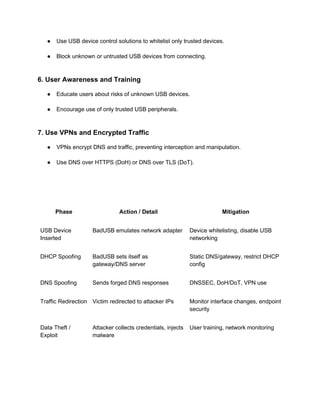
Phase Action / Detail Mitigation
USB Device
Inserted
BadUSB emulates network adapter Device whitelisting, disable USB
networking
DHCP Spoofing BadUSB sets itself as
gateway/DNS server
Static DNS/gateway, restrict DHCP
config
DNS Spoofing Sends forged DNS responses DNSSEC, DoH/DoT, VPN use
Traffic Redirection Victim redirected to attacker IPs Monitor interface changes, endpoint
security
Data Theft /
Exploit
Attacker collects credentials, injects
malware
User training, network monitoring