Unit 2
Software Development (Program Development)
flutterjunction.com
Chapter Outline
●Introduction to program development/ software development
●Program Development Life Cycle
●Programming Tools
What is Program?
Program is a group of instruction set together to obtain specified output
after supplying the input information to the computer in systematic order.
A program is a set of instructions that tell a computer what to do. When
you run a program on your computer, the computer reads the instructions
in the program and follows them. Programs can be written in many
different programming languages, such as C, C++, Java, and Python. Each
programming language has its own set of rules and syntax for writing
programs.
Programs are made up of one or more "functions," which are individual
blocks of code that perform a specific task. A program may have just a
single function, or it may have many functions, each of which performs a
different task.
Programs can also include data, such as numbers, strings of text, or
other types of information that the program uses while it is running.
This data is often stored in variables, which are named storage locations
in the computer's memory.
Programs are written by programmers, who use special software called
an "integrated development environment" (IDE) to write, test, and
debug the code. Once a program is written, it can be compiled, or
translated, into a form that the computer can understand and execute.
The compiled program is then run, or "executed," on the computer,
which follows the instructions in the program to perform the tasks it
was designed to do
Program/ Software Development
Program development is the process of creating a computer program. It
involves writing the code, testing it, and debugging any errors that are
found.
The process of program development typically begins with the
identification of a need for a new program, or the desire to modify an
existing program. This need is often identified by a user or a group of
users who have a specific task that they want the program to perform.
Once the need for a new program has been identified, the programmer
will typically begin by designing the overall structure and flow of the
program. This may involve creating a flowchart or other diagram that
outlines the steps the program will take to perform its tasks.
Next, the programmer will begin writing the code for the program. This
may involve writing individual functions or blocks of code that perform
specific tasks, as well as defining any variables or data that the program
will use. The programmer will also need to consider how the program
will handle any errors or exceptions that may occur while it is running.
As the programmer writes the code, they will typically use an integrated
development environment (IDE) to test and debug it. This may involve
running the code and checking to see if it produces the expected
results, as well as fixing any errors or bugs that are discovered.
Once the program is complete, it will typically be compiled, or
translated, into a form that the computer can understand and execute.
The compiled program can then be tested on a variety of different
devices and operating systems to ensure that it functions properly.
Program development or software development can be a complex and
time-consuming process, depending on the size and complexity of the
program. It may involve multiple programmers working together, as
well as significant testing and debugging to ensure that the program is
reliable and performs its intended tasks.
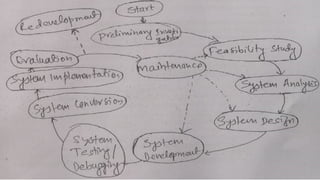
It is a step by step wise approach, with each stage serving as a
foundation for a successful and efficient program. So, the software
development cycle can be broken down into stages and the phases are
often completed in a precise order.
Programmers construct the software in phases or steps are well
planned.
Preliminary investigation
It is the first stage of the system or program development life cycle. In
this stage the following phases are studied:
●Understanding the problem
●Feasibility Study
Understanding the problem
The programmer would be able to develop the program if he/she is
familiar about the requested program or system. So the following
points should are very important:
⮚The system analyst or programmer must exactly know what we are
trying to do
⮚They must have working experience and knowledge about the project
so that he/she confirms about how the task should be done.
The user and programmer must know about the pattern of the
problems and their probable solutions. The problem identification is the
concept of getting good decision about the solutions of the problems.
The problem must be stated clearly, understood and agreed upon by
the user and the analyst (programmer). The objectives must be clear.
Feasibility Study
It is also the primary study about the system or program for evaluation.
After the problem is defined the selection committee requests the
information system department to conduct a feasibility study. It
determines the best method to achieve the objectives of new
information system that would solve the problem. Feasibility study is
the most important study that expresses the real image of the project.
1. Economical Feasibility
It is the study of monetary and non-monetary benefits of the project. It
measures the cost effectiveness of a project. It is also called cost-benefit
analysis. It is necessary to estimate following investigation:
●Whether the project is economically feasible
●If enough funds are not available, then what are the sources of funds
●Where there are sufficient benefits when compared to the costs
incurred
2. Operational Feasibility
Operational feasibility refers to the ability of a proposed project or
solution to be successfully implemented and integrated into the
existing business operations. It is a measure of how well the proposed
solution aligns with the organization's goals and objectives, and
whether the necessary resources and infrastructure are available to
support it. Factors that are typically considered when assessing
operational feasibility include costs, technical requirements,
organizational structure, and human resources.
3. Technical Feasibility
It measures the practicality of a specific technical solution and the
availability of technical resources and expertise (including
hardware/software). he technical feasibility assessment should include
an analysis of the technical risks associated with the proposed project
and should identify any necessary technical enhancements or upgrades
that would be required to implement it.
4. Time Feasibility
It helps to determine whether a proposed project can be implemented
fully within a required time frame. If a project takes so much time then
it will be rejected.
5. Social Feasibility
It determines whether it is acceptable to the people or not. It is a
measure of whether the proposed project aligns with the values,
beliefs, and culture of the community and whether it will have a positive
impact on the community. Factors that are typically considered when
assessing social feasibility include community attitudes, social and
cultural norms, and any potential impact on vulnerable groups or
6. Management Feasibility
It determines whether the proposed project is acceptable to the
management or not. If the management doesn't accept the project then the
project is non feasible.
7. Legal Feasibility
It is the determination of the project whether it would be acceptable to act,
status as well as other legislation.
8. Political Feasibility
Need to determine whether the proposed system or project is favorable to
the political situation and conditions.
Project approval
The outcome of the feasibility is the recommendation of a new system
proposal. This new information system proposal is to be sanctioned by the
higher decision support group. The sanctioned project is only started to
implement for system analysis.
System analysis
It includes the total analysis of system (program and hardware
composition of a machine). It can be completed in two stages:
●System study
●Requirement analysis
System study (Data collection)
It deals with the techniques of collecting and validating the data and
information. Different methods are followed to collect the data.
oBy conducting interviews: The programmer or analyst makes
interviews to the necessary resources to collect the data. The
interviews are taken from the members of the system of project. This is
very important to collect different types of views, ideas and the
solutions of the existing problems. This is the time consuming method.
oBy Questionnaires
In this method, the system analyst or programmer wets some
questionnaires and distributes to get the response. In this case the
collection of the data is very difficult because the collecting of the small data
the large group of people is associated. The major advantage is large
number of people can participate, less time consuming and pure data can
be collected.
oOn-site observation
In this method, data are collected by absorbing the actual job environment.
it is more reliable, time consuming and real data are collected.
oRecord inspection
Record inspection is a method of data collection that involves reviewing and
analyzing existing records, such as documents, reports, and databases, to
gather information about a system or organization. This method is useful
for understanding the system's past performance, identifying trends, and
understanding how the system functions.
Requirement Analysis
Requirement analysis is the process of gathering, documenting, and
analyzing the requirements for a system or project. It is a critical step in
the software development process as it helps to ensure that the final
product meets the needs and expectations of the users.
Two major concepts fall in this analysis, what are the necessary
requirements to build the system? The hardware and software
requirement also comes under this and the input, output and process
requirement of the program too.
Other concept is the objectives of system builder, user and system
owner. It means, why do they build the system? All the points have to
understand by the system analyst (programmer).
To get better performance and popularity of the program, programmer
should think various points:
●Program designing style and presentation
●Program reliability
●Program efficiency
●Program maintainability
●Readability
●Program development time period
●Program development cost
●Program documentation
●Program Designing Style and Presentation
To develop a particular program the layout or structure of the program can
directly contribute to the overall quality of the programs. Good program
design follows principles such as modularity, readability, and maintainability
to make the code easy to understand and modify. Good presentation
involves using consistent formatting, clear and descriptive variable and
function names, and proper commenting to enhance readability. These are
important to improve the overall quality of the software.
●The use of long meaningful identifiers for the program like constants,
variables and sub-programs.
●The structure of programming code must be highlighted.
●The use of appropriate program structure.
●The programs must provide effective result and should occupy minimum
memory space.
●Comments section to explain what is being done and how it is done.
●Program Reliability
Program reliability refers to the ability of a software program to perform its
intended tasks correctly and consistently. Reliable software should be free
from errors, crashes, or unexpected behavior. After development of the
program it should be tested for the time being before selling into the
market.
●Program Efficiency
The program efficiency may express in terms of its use of resources such
as time and storage space.
●Program maintainability
The program need to be easy to change or modify when needed.
●Readability
The program must be written in a simplest format so that it should be
readable.
●Program development time period
There is a limited time to develop a particular program as well as to get
output of the program. The estimated time should be appropriate for the
programmer as well, otherwise program may not develop in efficient way.
●Program development cost
Before writing a program we need to create better economical plan so
that the program can be developed in low cost and can take better
market. The program development time directly affects the development
cost.
●Program documentation
The most important factor of software development is program
documentation. After development of software it should be documented
either in softcopy or hardcopy format. It also provides better knowledge to
handle the program.
The documentation includes statement of the problem (System
specification), pseudocode, flowcharts, tables, test data, result’s
technical details, details and instruction for the user etc. A good
documentation will aid the maintenance of program during its lifetime.
Some programs have very long lives. For example, some programs
written during 1960 and are still in use, although they should be
subjected to regular maintenance i.e modification or bringing up to
date.
So, in order to create an appropriate program, the programmer should
have the objectives listed above. This is referred to as programming
aims. To acquire the best results from the program or system, the
programmer and user must both understand the requirements analysis
system.
System Design
System design is the process of defining the architecture, components,
interfaces, and data for a system to satisfy specified requirements. It can
also include the design of subsystems and the interfaces between them.
The goal of system design is to create a system that is efficient, reliable,
and easy to maintain.
The primary objective is to identify user requirements and to build system
that satisfies these requirement in the form of blueprint or softcopy
format. The design of system is mostly the logical design. These
specifications called the logical system design, includes the details of
output, input files, database interaction, controls, procedures and reports.
System design is the most challenging and creative part of system
development life cycle that determines how the system should work. To
get efficient output of the program following designs should be well
designed. Different tools are used to design system.
▪Output design
▪Input design
▪File design
▪Procedure design
Output design
The outer framework of the program or system is output design.
Output is important and direct source of information for the user. User-
defined output design improve the system’s relationship with user and
help in decision-making. The output design is available either on the
paper or the surface of the computer screen. The media used for output
design are: monitor, MICR, OMR, OCR, printers, computer output on
microfilms, audio media etc.
Input design
Input design refers to the process of creating and implementing the
methods and interfaces by which users interact with the system. This can
include designing graphical user interfaces (GUIs), touchscreen interfaces,
and command-line interfaces, as well as determining how input data is
collected, validated, and processed by the system. The goal of input
design is to make the system easy and intuitive to use, while also ensuring
that the input data is accurate and reliable.
Programmer should decides:
●What is data types and availability
●What media to use
●What arrangement of the data has provided
●The dialogue to guide users for providing inputs
●Input validation style and steps for error validation
File design
After gathering the data, the input design has to be done to the system.
The verified data are to be stored into the logical storing devices for
their further processing. The data are measured in certain units known
as bit and byte. The preparation of database system is known as file
design. It describes how records are stored in a file.
Procedure design
It is concentrated to the steps of the designing of the input, output and
the file design. creating the detailed instructions and flow of the
application's processes and functions. This includes identifying the
steps, inputs, outputs, and decision points of each procedure, and
determining the logical flow and dependencies between procedures.
The goal of procedure design is to create a clear and efficient set of
instructions that the application can follow to accomplish its intended
tasks. It is important to consider usability, maintainability, and error-
handling during the procedure design phase.
Procedure design can be done using flowcharts, pseudocode, or
structured English to graphically represent the logic and flow of the
procedures.
System development and its construction (Program coding)
It comes with the concept of system building. The designed system
needs to be implemented to make it a workable system. This requires
the coding of design into computer understandable language that is
programming language. The designed system is started to built the real
image of the project is known as system development.
The programmer started to develop computer program using relevant
software is also called program coding. The designed specifications are
converted into the sourced of a programming language.
The programmers are responsible for carrying out activity. The
software, which is to be developed, is divided into many modules. The
modules have its independence. The individual modules are the section
of the main program. the simplest and easiest ways of program
development approach is modular approach.
System Testing and Debugging
It is the most important phase of system development life cycle what
improves the system by debugging the problems from the system. After
the completion of development part testing the program and finding out
the errors is needed before the actual implementation of system.
Testing is the process of making sure that the program performs the
intended task or we can say the purpose of testing is only to identify the
errors in the system. There are different types of testing approaches:
1. Applying judgement: Making different verification teams test the
program. Such teams test the program and find out the errors accruing
in the program or make sure that the program performs the intended
task.
2. Applying skill: We can also test the program by using our general
ideas or logic to determine whether the results of the program are as
we want.
3. Applying Knowledge: The program can be tested by our knowledge
or understanding the program.
Software testing approaches:
●Black box testing
●White box testing
System test falls under the black box testing category of software
testing.
White box testing is the testing of the internal workings or code of
software. System test involves the external workings of the software
from the user’s perspective.
System testing also includes:
Alpha testing: by the developer who is involved in coding phase
Beta testing: testing by the friendly customer
User acceptance testing: testing by the user
System (program) Implementation
Implementation is the process of taking the action of the system to the real use
but it covers wide range of meaning. The system or program implementation
process starts from the conversion of a basic application and ends at complete
computer system replacement. Therefore after development of program,
implementation of it is another important point about the system development
concept. Good program implementation creates the standard ness of the
program and its establishment. Market study and business policy will also
increase the implementation of program.
The three types of implementation are used:
a) Implementation of a computer system to replace a manual system
The manual system is replaced by the computer system to make work fast and
efficient. In this system the following works are done, file conversion, providing
users training, creating accurate files and verifying printout for integrity.
b)Implementation new computer system to replace an existing
system
This is the upgrading of the system or program so seriousness
conversion system is applied otherwise the problems may occur into
the system. Depending upon size of the system conversion time
depends.
c)Implementation of a modified application to replace an existing
system by using the same computer.
it is the easiest implementation method where serious problem may
not come into the system. Before implementation the system operator
training and user training should be provided by the system analyst or
by the programmer.
System Evaluation Maintenance and Monitory
System evaluation begins with the system maintenance. The
implementation and delivery phase of the system development is
finished then different types of suggestion and comments may come to
system analyst or programmer. On the basis of these types of reports
the higher decision levels can categories the system. This type of
system analysis is called system evaluation.
Proper maintenance and monitory of program is another important
aspect about the system development concept. Therefore frequent
maintenance and monitoring also needed to gain more popularity
about a program development sectors. After implementation of
program the maintenance begins. It is an iterative process.
●Fix: It is always not possible to locate all the errors during the testing
stage. When the system is put into usage some errors may arise. These
errors ought to be removed.
●Enhance: The system is to be expanded to take care of new
requirements.
●Adopt: The system is to be exposed to different environment.
Evaluation
The system should be evaluated to find its usefulness in terms of
response time, ease of use, reliability and suitability. It should be
evaluated in terms of organizational impact also.
System Security
The security is the system to give protection to the program or system.
Providing the good security to the system is one of the important stages
of the program development.
Programming Errors
●Design error
●Poor quality control
●Other utilization and overloading
●Wear out: out dating error
Bugs
Computer programs are programmed by human beings so these
programs will be subject to errors. These program errors or faults are
known as bugs and the process of finding out errors or fault by doing
various kinds of activities to the program or system is known as
debugging.
There are three types of errors
I. Syntax error
II. Logical error (sementic)
III. System errors
1. Syntax error
These are the grammatical errors spelling mistakes into the program.
These kinds of errors occur at the time of program development and
easily debug at the time of compilation.
Syntax error may include:
●Error in structure
●Missing operators
●Unbalanced parenthesis
●Variable not found
For example, the c statement for (j=1; j<10; j++ has a syntax error.
2. Logical errors
The error in the logical sequence of the program or in planning the
program’s logic. Logical errors are complex types of errors in the
program so it is very complex task to find these errors. At the time of
compilation computer doesn’t show any error and we will get the output.
The computer doesn’t know that an error has been made.
For example: if the logic loop is for 1 to 10 numbers but our requirement
is up to 15 then this is logical error (j=1; j<10; j++). In this condition
computer does not display any error message.
3. System errors
Errors occur due to hardware failure and software failure.
●Stack overflows: memory mismatching with respect to given data types
●Buffer mismatch: mismatching of programming file opening system
with respect to computer hardware etc. like config.sys, autoexec.bat etc
●Insufficient memory: Error due to memory mismatching like hardware
defect, ram, mismatching of buffer and file
Programming Tools
Algorithms: Out of the many programming tools used in program
development process algorithm is also one of them. Directly writing the
computer formatted codes called program is very difficult. So some
simple mechanism are necessary. A set of finite rules or instructions to
be followed in calculations or other problem-solving operations.
Algorithms are written to show how a program or a function performs
its calculation, data processing and automatic reasoning. Developing
algorithm requires a clear understanding of the problem it is usually
written in simple language in a sequence and may have repeated steps
in some cases.
Characteristics of algorithm:
●Each and every instructions should be accurate and clear.
●The steps must be finite, it should terminate after a finite time.
●After termination of the algorithm the definite output must appear.
●It should be independent of programming language.
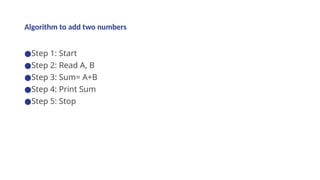
Algorithm to add two numbers
●Step 1: Start
●Step 2: Read A, B
●Step 3: Sum= A+B
●Step 4: Print Sum
●Step 5: Stop
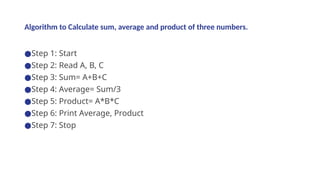
Algorithm to Calculate sum, average and product of three numbers.
●Step 1: Start
●Step 2: Read A, B, C
●Step 3: Sum= A+B+C
●Step 4: Average= Sum/3
●Step 5: Product= A*B*C
●Step 6: Print Average, Product
●Step 7: Stop
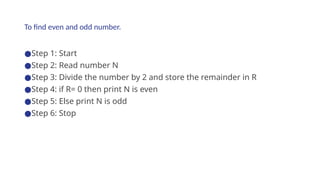
To find even and odd number.
●Step 1: Start
●Step 2: Read number N
●Step 3: Divide the number by 2 and store the remainder in R
●Step 4: if R= 0 then print N is even
●Step 5: Else print N is odd
●Step 6: Stop
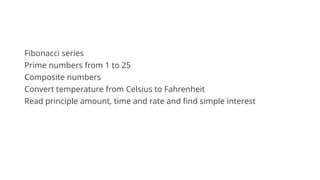
Fibonacci series
Prime numbers from 1 to 25
Composite numbers
Convert temperature from Celsius to Fahrenheit
Read principle amount, time and rate and find simple interest
Flow Chart
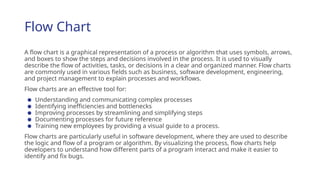
A flow chart is a graphical representation of a process or algorithm that uses symbols, arrows,
and boxes to show the steps and decisions involved in the process. It is used to visually
describe the flow of activities, tasks, or decisions in a clear and organized manner. Flow charts
are commonly used in various fields such as business, software development, engineering,
and project management to explain processes and workflows.
Flow charts are an effective tool for:
● Understanding and communicating complex processes
● Identifying inefficiencies and bottlenecks
● Improving processes by streamlining and simplifying steps
● Documenting processes for future reference
● Training new employees by providing a visual guide to a process.
Flow charts are particularly useful in software development, where they are used to describe
the logic and flow of a program or algorithm. By visualizing the process, flow charts help
developers to understand how different parts of a program interact and make it easier to
identify and fix bugs.
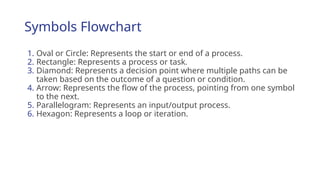
Symbols Flowchart
1. Oval or Circle: Represents the start or end of a process.
2. Rectangle: Represents a process or task.
3. Diamond: Represents a decision point where multiple paths can be
taken based on the outcome of a question or condition.
4. Arrow: Represents the flow of the process, pointing from one symbol
to the next.
5. Parallelogram: Represents an input/output process.
6. Hexagon: Represents a loop or iteration.
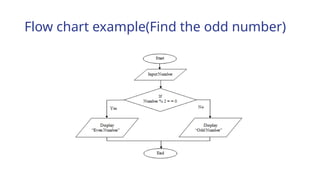
Flow chart example(Find the odd number)
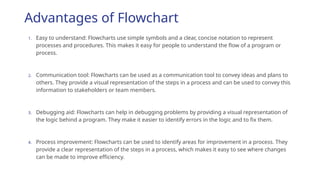
Advantages of Flowchart
1. Easy to understand: Flowcharts use simple symbols and a clear, concise notation to represent
processes and procedures. This makes it easy for people to understand the flow of a program or
process.
2. Communication tool: Flowcharts can be used as a communication tool to convey ideas and plans to
others. They provide a visual representation of the steps in a process and can be used to convey this
information to stakeholders or team members.
3. Debugging aid: Flowcharts can help in debugging problems by providing a visual representation of
the logic behind a program. They make it easier to identify errors in the logic and to fix them.
4. Process improvement: Flowcharts can be used to identify areas for improvement in a process. They
provide a clear representation of the steps in a process, which makes it easy to see where changes
can be made to improve efficiency.
Disadvantages of Flowchart
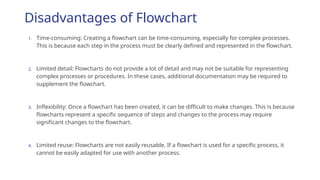
1. Time-consuming: Creating a flowchart can be time-consuming, especially for complex processes.
This is because each step in the process must be clearly defined and represented in the flowchart.
2. Limited detail: Flowcharts do not provide a lot of detail and may not be suitable for representing
complex processes or procedures. In these cases, additional documentation may be required to
supplement the flowchart.
3. Inflexibility: Once a flowchart has been created, it can be difficult to make changes. This is because
flowcharts represent a specific sequence of steps and changes to the process may require
significant changes to the flowchart.
4. Limited reuse: Flowcharts are not easily reusable. If a flowchart is used for a specific process, it
cannot be easily adapted for use with another process.
Decision Table
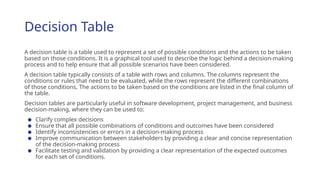
A decision table is a table used to represent a set of possible conditions and the actions to be taken
based on those conditions. It is a graphical tool used to describe the logic behind a decision-making
process and to help ensure that all possible scenarios have been considered.
A decision table typically consists of a table with rows and columns. The columns represent the
conditions or rules that need to be evaluated, while the rows represent the different combinations
of those conditions. The actions to be taken based on the conditions are listed in the final column of
the table.
Decision tables are particularly useful in software development, project management, and business
decision-making, where they can be used to:
● Clarify complex decisions
● Ensure that all possible combinations of conditions and outcomes have been considered
● Identify inconsistencies or errors in a decision-making process
● Improve communication between stakeholders by providing a clear and concise representation
of the decision-making process
● Facilitate testing and validation by providing a clear representation of the expected outcomes
for each set of conditions.
Decision Table example
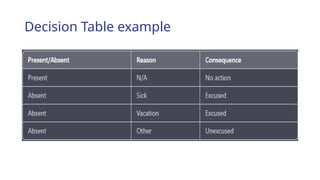
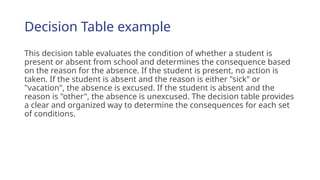
This decision table evaluates the condition of whether a student is
present or absent from school and determines the consequence based
on the reason for the absence. If the student is present, no action is
taken. If the student is absent and the reason is either "sick" or
"vacation", the absence is excused. If the student is absent and the
reason is "other", the absence is unexcused. The decision table provides
a clear and organized way to determine the consequences for each set
of conditions.
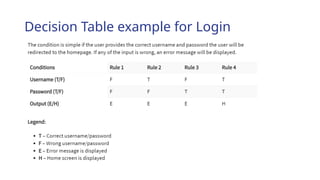
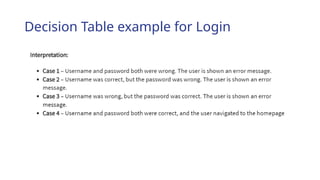
Decision Table example for Login
Decision Table Advantages
Clear and concise: Decision tables provide a clear and concise representation
of the conditions and actions involved in a decision-making process. This
makes it easy to understand and communicate the logic behind a decision.
Efficient: Decision tables are an efficient way of representing complex
decision-making processes. They allow multiple conditions and actions to be
represented in a compact and organized manner.
Modular: Decision tables can be created in a modular manner, making it easy
to update and maintain the logic behind a decision. If a change is required,
only the relevant section of the decision table needs to be updated.
Testable: Decision tables provide a structured and organized way of testing
the logic behind a decision. This makes it easy to identify and fix any errors or
bugs in the logic.
Decision Table Advantages
Limited flexibility: Once a decision table has been created, it can be difficult to change. This is
because decision tables represent a specific set of conditions and actions and changes to the
decision-making process may require significant changes to the decision table.
Limited detail: Decision tables do not provide a lot of detail and may not be suitable for
representing complex decision-making processes. In these cases, additional documentation
may be required to supplement the decision table.
Complexity: Decision tables can become complex and difficult to understand if they involve
many conditions and actions. This can make it difficult to maintain and update the logic behind
a decision.
Limited visualization: Decision tables do not provide a visual representation of the decision-
making process. This can make it difficult to understand the flow of the decision-making process
and to identify potential areas for improvement.
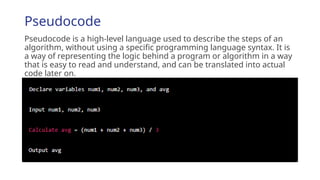
Pseudocode
Pseudocode is a high-level language used to describe the steps of an
algorithm, without using a specific programming language syntax. It is
a way of representing the logic behind a program or algorithm in a way
that is easy to read and understand, and can be translated into actual
code later on.
Advantages Pseudocode
Easy to understand: Pseudocode uses simple language and a clear, concise notation to represent the
logic behind a program. This makes it easy for people to understand the flow of a program or process.
Communication tool: Pseudocode can be used as a communication tool to convey ideas and plans to
others. It provides a written representation of the logic behind a program and can be used to convey this
information to stakeholders or team members.
Debugging aid: Pseudocode can help in debugging problems by providing a written representation of
the logic behind a program. It makes it easier to identify errors in the logic and to fix them.
Flexible: Pseudocode can be easily modified and changed, making it a flexible tool for representing the
logic behind a program. This makes it easy to update and refine the logic as requirements change.
Platform-independent: Pseudocode is not tied to any specific programming language or platform. This
makes it a versatile tool that can be used with any programming language or platform.
Disadvantages Pseudocode
Not a standard language: Pseudocode is not a standardized language and can vary greatly
from one person to another. This can make it difficult to understand pseudocode written by
others and can lead to confusion and errors.
Not executable: Pseudocode is not a machine-executable language and cannot be run directly
on a computer. It must be translated into a programming language before it can be executed.
Not detailed enough: Pseudocode does not provide a lot of detail and may not be suitable for
representing complex processes or procedures. In these cases, additional documentation may
be required to supplement the pseudocode.
Requires additional knowledge: To effectively use pseudocode, one must have a solid
understanding of programming concepts and algorithms. This makes it more difficult for non-
programmers to understand and use pseudocode.

Unit 2 -Software-Development (Programming Logic and Techniques)

  • 1.
    Unit 2 Software Development(Program Development) flutterjunction.com
  • 2.
    Chapter Outline ●Introduction toprogram development/ software development ●Program Development Life Cycle ●Programming Tools
  • 3.
    What is Program? Programis a group of instruction set together to obtain specified output after supplying the input information to the computer in systematic order. A program is a set of instructions that tell a computer what to do. When you run a program on your computer, the computer reads the instructions in the program and follows them. Programs can be written in many different programming languages, such as C, C++, Java, and Python. Each programming language has its own set of rules and syntax for writing programs. Programs are made up of one or more "functions," which are individual blocks of code that perform a specific task. A program may have just a single function, or it may have many functions, each of which performs a different task.
  • 4.
    Programs can alsoinclude data, such as numbers, strings of text, or other types of information that the program uses while it is running. This data is often stored in variables, which are named storage locations in the computer's memory. Programs are written by programmers, who use special software called an "integrated development environment" (IDE) to write, test, and debug the code. Once a program is written, it can be compiled, or translated, into a form that the computer can understand and execute. The compiled program is then run, or "executed," on the computer, which follows the instructions in the program to perform the tasks it was designed to do
  • 5.
    Program/ Software Development Programdevelopment is the process of creating a computer program. It involves writing the code, testing it, and debugging any errors that are found. The process of program development typically begins with the identification of a need for a new program, or the desire to modify an existing program. This need is often identified by a user or a group of users who have a specific task that they want the program to perform. Once the need for a new program has been identified, the programmer will typically begin by designing the overall structure and flow of the program. This may involve creating a flowchart or other diagram that outlines the steps the program will take to perform its tasks.
  • 6.
    Next, the programmerwill begin writing the code for the program. This may involve writing individual functions or blocks of code that perform specific tasks, as well as defining any variables or data that the program will use. The programmer will also need to consider how the program will handle any errors or exceptions that may occur while it is running. As the programmer writes the code, they will typically use an integrated development environment (IDE) to test and debug it. This may involve running the code and checking to see if it produces the expected results, as well as fixing any errors or bugs that are discovered. Once the program is complete, it will typically be compiled, or translated, into a form that the computer can understand and execute. The compiled program can then be tested on a variety of different devices and operating systems to ensure that it functions properly.
  • 7.
    Program development orsoftware development can be a complex and time-consuming process, depending on the size and complexity of the program. It may involve multiple programmers working together, as well as significant testing and debugging to ensure that the program is reliable and performs its intended tasks. It is a step by step wise approach, with each stage serving as a foundation for a successful and efficient program. So, the software development cycle can be broken down into stages and the phases are often completed in a precise order. Programmers construct the software in phases or steps are well planned.
  • 9.
    Preliminary investigation It isthe first stage of the system or program development life cycle. In this stage the following phases are studied: ●Understanding the problem ●Feasibility Study Understanding the problem The programmer would be able to develop the program if he/she is familiar about the requested program or system. So the following points should are very important: ⮚The system analyst or programmer must exactly know what we are trying to do ⮚They must have working experience and knowledge about the project so that he/she confirms about how the task should be done.
  • 10.
    The user andprogrammer must know about the pattern of the problems and their probable solutions. The problem identification is the concept of getting good decision about the solutions of the problems. The problem must be stated clearly, understood and agreed upon by the user and the analyst (programmer). The objectives must be clear. Feasibility Study It is also the primary study about the system or program for evaluation. After the problem is defined the selection committee requests the information system department to conduct a feasibility study. It determines the best method to achieve the objectives of new information system that would solve the problem. Feasibility study is the most important study that expresses the real image of the project.
  • 11.
    1. Economical Feasibility Itis the study of monetary and non-monetary benefits of the project. It measures the cost effectiveness of a project. It is also called cost-benefit analysis. It is necessary to estimate following investigation: ●Whether the project is economically feasible ●If enough funds are not available, then what are the sources of funds ●Where there are sufficient benefits when compared to the costs incurred 2. Operational Feasibility Operational feasibility refers to the ability of a proposed project or solution to be successfully implemented and integrated into the existing business operations. It is a measure of how well the proposed solution aligns with the organization's goals and objectives, and whether the necessary resources and infrastructure are available to support it. Factors that are typically considered when assessing operational feasibility include costs, technical requirements, organizational structure, and human resources.
  • 12.
    3. Technical Feasibility Itmeasures the practicality of a specific technical solution and the availability of technical resources and expertise (including hardware/software). he technical feasibility assessment should include an analysis of the technical risks associated with the proposed project and should identify any necessary technical enhancements or upgrades that would be required to implement it. 4. Time Feasibility It helps to determine whether a proposed project can be implemented fully within a required time frame. If a project takes so much time then it will be rejected. 5. Social Feasibility It determines whether it is acceptable to the people or not. It is a measure of whether the proposed project aligns with the values, beliefs, and culture of the community and whether it will have a positive impact on the community. Factors that are typically considered when assessing social feasibility include community attitudes, social and cultural norms, and any potential impact on vulnerable groups or
  • 13.
    6. Management Feasibility Itdetermines whether the proposed project is acceptable to the management or not. If the management doesn't accept the project then the project is non feasible. 7. Legal Feasibility It is the determination of the project whether it would be acceptable to act, status as well as other legislation. 8. Political Feasibility Need to determine whether the proposed system or project is favorable to the political situation and conditions. Project approval The outcome of the feasibility is the recommendation of a new system proposal. This new information system proposal is to be sanctioned by the higher decision support group. The sanctioned project is only started to implement for system analysis.
  • 14.
    System analysis It includesthe total analysis of system (program and hardware composition of a machine). It can be completed in two stages: ●System study ●Requirement analysis System study (Data collection) It deals with the techniques of collecting and validating the data and information. Different methods are followed to collect the data. oBy conducting interviews: The programmer or analyst makes interviews to the necessary resources to collect the data. The interviews are taken from the members of the system of project. This is very important to collect different types of views, ideas and the solutions of the existing problems. This is the time consuming method.
  • 15.
    oBy Questionnaires In thismethod, the system analyst or programmer wets some questionnaires and distributes to get the response. In this case the collection of the data is very difficult because the collecting of the small data the large group of people is associated. The major advantage is large number of people can participate, less time consuming and pure data can be collected. oOn-site observation In this method, data are collected by absorbing the actual job environment. it is more reliable, time consuming and real data are collected. oRecord inspection Record inspection is a method of data collection that involves reviewing and analyzing existing records, such as documents, reports, and databases, to gather information about a system or organization. This method is useful for understanding the system's past performance, identifying trends, and understanding how the system functions.
  • 16.
    Requirement Analysis Requirement analysisis the process of gathering, documenting, and analyzing the requirements for a system or project. It is a critical step in the software development process as it helps to ensure that the final product meets the needs and expectations of the users. Two major concepts fall in this analysis, what are the necessary requirements to build the system? The hardware and software requirement also comes under this and the input, output and process requirement of the program too. Other concept is the objectives of system builder, user and system owner. It means, why do they build the system? All the points have to understand by the system analyst (programmer). To get better performance and popularity of the program, programmer should think various points:
  • 17.
    ●Program designing styleand presentation ●Program reliability ●Program efficiency ●Program maintainability ●Readability ●Program development time period ●Program development cost ●Program documentation
  • 18.
    ●Program Designing Styleand Presentation To develop a particular program the layout or structure of the program can directly contribute to the overall quality of the programs. Good program design follows principles such as modularity, readability, and maintainability to make the code easy to understand and modify. Good presentation involves using consistent formatting, clear and descriptive variable and function names, and proper commenting to enhance readability. These are important to improve the overall quality of the software. ●The use of long meaningful identifiers for the program like constants, variables and sub-programs. ●The structure of programming code must be highlighted. ●The use of appropriate program structure. ●The programs must provide effective result and should occupy minimum memory space. ●Comments section to explain what is being done and how it is done.
  • 19.
    ●Program Reliability Program reliabilityrefers to the ability of a software program to perform its intended tasks correctly and consistently. Reliable software should be free from errors, crashes, or unexpected behavior. After development of the program it should be tested for the time being before selling into the market. ●Program Efficiency The program efficiency may express in terms of its use of resources such as time and storage space. ●Program maintainability The program need to be easy to change or modify when needed. ●Readability The program must be written in a simplest format so that it should be readable.
  • 20.
    ●Program development timeperiod There is a limited time to develop a particular program as well as to get output of the program. The estimated time should be appropriate for the programmer as well, otherwise program may not develop in efficient way. ●Program development cost Before writing a program we need to create better economical plan so that the program can be developed in low cost and can take better market. The program development time directly affects the development cost. ●Program documentation The most important factor of software development is program documentation. After development of software it should be documented either in softcopy or hardcopy format. It also provides better knowledge to handle the program.
  • 21.
    The documentation includesstatement of the problem (System specification), pseudocode, flowcharts, tables, test data, result’s technical details, details and instruction for the user etc. A good documentation will aid the maintenance of program during its lifetime. Some programs have very long lives. For example, some programs written during 1960 and are still in use, although they should be subjected to regular maintenance i.e modification or bringing up to date. So, in order to create an appropriate program, the programmer should have the objectives listed above. This is referred to as programming aims. To acquire the best results from the program or system, the programmer and user must both understand the requirements analysis system.
  • 22.
    System Design System designis the process of defining the architecture, components, interfaces, and data for a system to satisfy specified requirements. It can also include the design of subsystems and the interfaces between them. The goal of system design is to create a system that is efficient, reliable, and easy to maintain. The primary objective is to identify user requirements and to build system that satisfies these requirement in the form of blueprint or softcopy format. The design of system is mostly the logical design. These specifications called the logical system design, includes the details of output, input files, database interaction, controls, procedures and reports. System design is the most challenging and creative part of system development life cycle that determines how the system should work. To get efficient output of the program following designs should be well designed. Different tools are used to design system.
  • 23.
    ▪Output design ▪Input design ▪Filedesign ▪Procedure design Output design The outer framework of the program or system is output design. Output is important and direct source of information for the user. User- defined output design improve the system’s relationship with user and help in decision-making. The output design is available either on the paper or the surface of the computer screen. The media used for output design are: monitor, MICR, OMR, OCR, printers, computer output on microfilms, audio media etc.
  • 24.
    Input design Input designrefers to the process of creating and implementing the methods and interfaces by which users interact with the system. This can include designing graphical user interfaces (GUIs), touchscreen interfaces, and command-line interfaces, as well as determining how input data is collected, validated, and processed by the system. The goal of input design is to make the system easy and intuitive to use, while also ensuring that the input data is accurate and reliable. Programmer should decides: ●What is data types and availability ●What media to use ●What arrangement of the data has provided ●The dialogue to guide users for providing inputs ●Input validation style and steps for error validation
  • 25.
    File design After gatheringthe data, the input design has to be done to the system. The verified data are to be stored into the logical storing devices for their further processing. The data are measured in certain units known as bit and byte. The preparation of database system is known as file design. It describes how records are stored in a file. Procedure design It is concentrated to the steps of the designing of the input, output and the file design. creating the detailed instructions and flow of the application's processes and functions. This includes identifying the steps, inputs, outputs, and decision points of each procedure, and determining the logical flow and dependencies between procedures.
  • 26.
    The goal ofprocedure design is to create a clear and efficient set of instructions that the application can follow to accomplish its intended tasks. It is important to consider usability, maintainability, and error- handling during the procedure design phase. Procedure design can be done using flowcharts, pseudocode, or structured English to graphically represent the logic and flow of the procedures.
  • 27.
    System development andits construction (Program coding) It comes with the concept of system building. The designed system needs to be implemented to make it a workable system. This requires the coding of design into computer understandable language that is programming language. The designed system is started to built the real image of the project is known as system development. The programmer started to develop computer program using relevant software is also called program coding. The designed specifications are converted into the sourced of a programming language. The programmers are responsible for carrying out activity. The software, which is to be developed, is divided into many modules. The modules have its independence. The individual modules are the section of the main program. the simplest and easiest ways of program development approach is modular approach.
  • 28.
    System Testing andDebugging It is the most important phase of system development life cycle what improves the system by debugging the problems from the system. After the completion of development part testing the program and finding out the errors is needed before the actual implementation of system. Testing is the process of making sure that the program performs the intended task or we can say the purpose of testing is only to identify the errors in the system. There are different types of testing approaches: 1. Applying judgement: Making different verification teams test the program. Such teams test the program and find out the errors accruing in the program or make sure that the program performs the intended task. 2. Applying skill: We can also test the program by using our general ideas or logic to determine whether the results of the program are as we want.
  • 29.
    3. Applying Knowledge:The program can be tested by our knowledge or understanding the program. Software testing approaches: ●Black box testing ●White box testing System test falls under the black box testing category of software testing. White box testing is the testing of the internal workings or code of software. System test involves the external workings of the software from the user’s perspective.
  • 30.
    System testing alsoincludes: Alpha testing: by the developer who is involved in coding phase Beta testing: testing by the friendly customer User acceptance testing: testing by the user
  • 31.
    System (program) Implementation Implementationis the process of taking the action of the system to the real use but it covers wide range of meaning. The system or program implementation process starts from the conversion of a basic application and ends at complete computer system replacement. Therefore after development of program, implementation of it is another important point about the system development concept. Good program implementation creates the standard ness of the program and its establishment. Market study and business policy will also increase the implementation of program. The three types of implementation are used: a) Implementation of a computer system to replace a manual system The manual system is replaced by the computer system to make work fast and efficient. In this system the following works are done, file conversion, providing users training, creating accurate files and verifying printout for integrity.
  • 32.
    b)Implementation new computersystem to replace an existing system This is the upgrading of the system or program so seriousness conversion system is applied otherwise the problems may occur into the system. Depending upon size of the system conversion time depends. c)Implementation of a modified application to replace an existing system by using the same computer. it is the easiest implementation method where serious problem may not come into the system. Before implementation the system operator training and user training should be provided by the system analyst or by the programmer.
  • 33.
    System Evaluation Maintenanceand Monitory System evaluation begins with the system maintenance. The implementation and delivery phase of the system development is finished then different types of suggestion and comments may come to system analyst or programmer. On the basis of these types of reports the higher decision levels can categories the system. This type of system analysis is called system evaluation. Proper maintenance and monitory of program is another important aspect about the system development concept. Therefore frequent maintenance and monitoring also needed to gain more popularity about a program development sectors. After implementation of program the maintenance begins. It is an iterative process.
  • 34.
    ●Fix: It isalways not possible to locate all the errors during the testing stage. When the system is put into usage some errors may arise. These errors ought to be removed. ●Enhance: The system is to be expanded to take care of new requirements. ●Adopt: The system is to be exposed to different environment. Evaluation The system should be evaluated to find its usefulness in terms of response time, ease of use, reliability and suitability. It should be evaluated in terms of organizational impact also. System Security The security is the system to give protection to the program or system. Providing the good security to the system is one of the important stages of the program development.
  • 35.
    Programming Errors ●Design error ●Poorquality control ●Other utilization and overloading ●Wear out: out dating error
  • 36.
    Bugs Computer programs areprogrammed by human beings so these programs will be subject to errors. These program errors or faults are known as bugs and the process of finding out errors or fault by doing various kinds of activities to the program or system is known as debugging. There are three types of errors I. Syntax error II. Logical error (sementic) III. System errors
  • 37.
    1. Syntax error Theseare the grammatical errors spelling mistakes into the program. These kinds of errors occur at the time of program development and easily debug at the time of compilation. Syntax error may include: ●Error in structure ●Missing operators ●Unbalanced parenthesis ●Variable not found For example, the c statement for (j=1; j<10; j++ has a syntax error.
  • 38.
    2. Logical errors Theerror in the logical sequence of the program or in planning the program’s logic. Logical errors are complex types of errors in the program so it is very complex task to find these errors. At the time of compilation computer doesn’t show any error and we will get the output. The computer doesn’t know that an error has been made. For example: if the logic loop is for 1 to 10 numbers but our requirement is up to 15 then this is logical error (j=1; j<10; j++). In this condition computer does not display any error message. 3. System errors Errors occur due to hardware failure and software failure. ●Stack overflows: memory mismatching with respect to given data types ●Buffer mismatch: mismatching of programming file opening system with respect to computer hardware etc. like config.sys, autoexec.bat etc ●Insufficient memory: Error due to memory mismatching like hardware defect, ram, mismatching of buffer and file
  • 39.
    Programming Tools Algorithms: Outof the many programming tools used in program development process algorithm is also one of them. Directly writing the computer formatted codes called program is very difficult. So some simple mechanism are necessary. A set of finite rules or instructions to be followed in calculations or other problem-solving operations. Algorithms are written to show how a program or a function performs its calculation, data processing and automatic reasoning. Developing algorithm requires a clear understanding of the problem it is usually written in simple language in a sequence and may have repeated steps in some cases.
  • 40.
    Characteristics of algorithm: ●Eachand every instructions should be accurate and clear. ●The steps must be finite, it should terminate after a finite time. ●After termination of the algorithm the definite output must appear. ●It should be independent of programming language.
  • 41.
    Algorithm to addtwo numbers ●Step 1: Start ●Step 2: Read A, B ●Step 3: Sum= A+B ●Step 4: Print Sum ●Step 5: Stop
  • 42.
    Algorithm to Calculatesum, average and product of three numbers. ●Step 1: Start ●Step 2: Read A, B, C ●Step 3: Sum= A+B+C ●Step 4: Average= Sum/3 ●Step 5: Product= A*B*C ●Step 6: Print Average, Product ●Step 7: Stop
  • 43.
    To find evenand odd number. ●Step 1: Start ●Step 2: Read number N ●Step 3: Divide the number by 2 and store the remainder in R ●Step 4: if R= 0 then print N is even ●Step 5: Else print N is odd ●Step 6: Stop
  • 44.
    Fibonacci series Prime numbersfrom 1 to 25 Composite numbers Convert temperature from Celsius to Fahrenheit Read principle amount, time and rate and find simple interest
  • 45.
    Flow Chart A flowchart is a graphical representation of a process or algorithm that uses symbols, arrows, and boxes to show the steps and decisions involved in the process. It is used to visually describe the flow of activities, tasks, or decisions in a clear and organized manner. Flow charts are commonly used in various fields such as business, software development, engineering, and project management to explain processes and workflows. Flow charts are an effective tool for: ● Understanding and communicating complex processes ● Identifying inefficiencies and bottlenecks ● Improving processes by streamlining and simplifying steps ● Documenting processes for future reference ● Training new employees by providing a visual guide to a process. Flow charts are particularly useful in software development, where they are used to describe the logic and flow of a program or algorithm. By visualizing the process, flow charts help developers to understand how different parts of a program interact and make it easier to identify and fix bugs.
  • 46.
    Symbols Flowchart 1. Ovalor Circle: Represents the start or end of a process. 2. Rectangle: Represents a process or task. 3. Diamond: Represents a decision point where multiple paths can be taken based on the outcome of a question or condition. 4. Arrow: Represents the flow of the process, pointing from one symbol to the next. 5. Parallelogram: Represents an input/output process. 6. Hexagon: Represents a loop or iteration.
  • 47.
    Flow chart example(Findthe odd number)
  • 48.
    Advantages of Flowchart 1.Easy to understand: Flowcharts use simple symbols and a clear, concise notation to represent processes and procedures. This makes it easy for people to understand the flow of a program or process. 2. Communication tool: Flowcharts can be used as a communication tool to convey ideas and plans to others. They provide a visual representation of the steps in a process and can be used to convey this information to stakeholders or team members. 3. Debugging aid: Flowcharts can help in debugging problems by providing a visual representation of the logic behind a program. They make it easier to identify errors in the logic and to fix them. 4. Process improvement: Flowcharts can be used to identify areas for improvement in a process. They provide a clear representation of the steps in a process, which makes it easy to see where changes can be made to improve efficiency.
  • 49.
    Disadvantages of Flowchart 1.Time-consuming: Creating a flowchart can be time-consuming, especially for complex processes. This is because each step in the process must be clearly defined and represented in the flowchart. 2. Limited detail: Flowcharts do not provide a lot of detail and may not be suitable for representing complex processes or procedures. In these cases, additional documentation may be required to supplement the flowchart. 3. Inflexibility: Once a flowchart has been created, it can be difficult to make changes. This is because flowcharts represent a specific sequence of steps and changes to the process may require significant changes to the flowchart. 4. Limited reuse: Flowcharts are not easily reusable. If a flowchart is used for a specific process, it cannot be easily adapted for use with another process.
  • 50.
    Decision Table A decisiontable is a table used to represent a set of possible conditions and the actions to be taken based on those conditions. It is a graphical tool used to describe the logic behind a decision-making process and to help ensure that all possible scenarios have been considered. A decision table typically consists of a table with rows and columns. The columns represent the conditions or rules that need to be evaluated, while the rows represent the different combinations of those conditions. The actions to be taken based on the conditions are listed in the final column of the table. Decision tables are particularly useful in software development, project management, and business decision-making, where they can be used to: ● Clarify complex decisions ● Ensure that all possible combinations of conditions and outcomes have been considered ● Identify inconsistencies or errors in a decision-making process ● Improve communication between stakeholders by providing a clear and concise representation of the decision-making process ● Facilitate testing and validation by providing a clear representation of the expected outcomes for each set of conditions.
  • 51.
  • 52.
    Decision Table example Thisdecision table evaluates the condition of whether a student is present or absent from school and determines the consequence based on the reason for the absence. If the student is present, no action is taken. If the student is absent and the reason is either "sick" or "vacation", the absence is excused. If the student is absent and the reason is "other", the absence is unexcused. The decision table provides a clear and organized way to determine the consequences for each set of conditions.
  • 53.
  • 54.
  • 55.
    Decision Table Advantages Clearand concise: Decision tables provide a clear and concise representation of the conditions and actions involved in a decision-making process. This makes it easy to understand and communicate the logic behind a decision. Efficient: Decision tables are an efficient way of representing complex decision-making processes. They allow multiple conditions and actions to be represented in a compact and organized manner. Modular: Decision tables can be created in a modular manner, making it easy to update and maintain the logic behind a decision. If a change is required, only the relevant section of the decision table needs to be updated. Testable: Decision tables provide a structured and organized way of testing the logic behind a decision. This makes it easy to identify and fix any errors or bugs in the logic.
  • 56.
    Decision Table Advantages Limitedflexibility: Once a decision table has been created, it can be difficult to change. This is because decision tables represent a specific set of conditions and actions and changes to the decision-making process may require significant changes to the decision table. Limited detail: Decision tables do not provide a lot of detail and may not be suitable for representing complex decision-making processes. In these cases, additional documentation may be required to supplement the decision table. Complexity: Decision tables can become complex and difficult to understand if they involve many conditions and actions. This can make it difficult to maintain and update the logic behind a decision. Limited visualization: Decision tables do not provide a visual representation of the decision- making process. This can make it difficult to understand the flow of the decision-making process and to identify potential areas for improvement.
  • 57.
    Pseudocode Pseudocode is ahigh-level language used to describe the steps of an algorithm, without using a specific programming language syntax. It is a way of representing the logic behind a program or algorithm in a way that is easy to read and understand, and can be translated into actual code later on.
  • 58.
    Advantages Pseudocode Easy tounderstand: Pseudocode uses simple language and a clear, concise notation to represent the logic behind a program. This makes it easy for people to understand the flow of a program or process. Communication tool: Pseudocode can be used as a communication tool to convey ideas and plans to others. It provides a written representation of the logic behind a program and can be used to convey this information to stakeholders or team members. Debugging aid: Pseudocode can help in debugging problems by providing a written representation of the logic behind a program. It makes it easier to identify errors in the logic and to fix them. Flexible: Pseudocode can be easily modified and changed, making it a flexible tool for representing the logic behind a program. This makes it easy to update and refine the logic as requirements change. Platform-independent: Pseudocode is not tied to any specific programming language or platform. This makes it a versatile tool that can be used with any programming language or platform.
  • 59.
    Disadvantages Pseudocode Not astandard language: Pseudocode is not a standardized language and can vary greatly from one person to another. This can make it difficult to understand pseudocode written by others and can lead to confusion and errors. Not executable: Pseudocode is not a machine-executable language and cannot be run directly on a computer. It must be translated into a programming language before it can be executed. Not detailed enough: Pseudocode does not provide a lot of detail and may not be suitable for representing complex processes or procedures. In these cases, additional documentation may be required to supplement the pseudocode. Requires additional knowledge: To effectively use pseudocode, one must have a solid understanding of programming concepts and algorithms. This makes it more difficult for non- programmers to understand and use pseudocode.

Editor's Notes

  • #1 Jan 12
  • #6 Jan 12
  • #7 Jan 13
  • #13 Jan 13
  • #14 Jan 18
  • #21 Jan 18
  • #22 Flowchart, DFD, Data dictionary, Decision tables, Decision trees are the tools used to describe the designs of the systems.
  • #23 Output are of two types: hardcopy and softcopy
  • #24 Output are of two types: hardcopy and softcopy
  • #25 Output are of two types: hardcopy and softcopy
  • #26 Output are of two types: hardcopy and softcopy
  • #28 Unit testing, integration testing, system testing, Regression testing Unit testing: function, module or unit ko testing while the development phase Regression testing: in the time of maintenance, upgrade of the system
  • #29 Black box testing ma input provide garinxa ani output ko test garinxa without any internal structure knowledge.
  • #31 Feb 2
  • #35 Feb 2
  • #36 Feb 3 Unexpected output is error.
  • #37 Violation in rules is syntax error.
  • #39 Computer program that is used by software developers to create, debug, maintain or otherwise support