Unit 1
Domain Name & Web Hosting
Presentation By-Dr.Anshu Singh
What Is a Domain Name?
A domain is a part of the web address nomenclature someone
would use to find your website or a page of your website online.
In simple words, a domain name is the address or name of any
website which you want to access
Domain Name
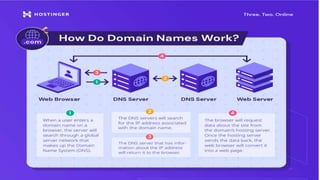
Every website has an IP address, which is a unique string of numbers that connect
computers to web servers. IP addresses are great for computers, but difficult for
people to memorize. That's where domains come in. A domain name is connected to a
website's IP address so people can more easily remember and search for a website by
its domain and their browser can still find the specific web server that hosts the
website via the associated IP address.
A domain is often compared to a home address
Unique
features of a
domain
name
• It is typed in the address bar of a browser to access
the website
• The domain name is unique to every website,
means there can not be two websites on a single
domain name.
• Domain names are managed through DNS (Domain
Name System) to avoid the duplicity of domain
names.
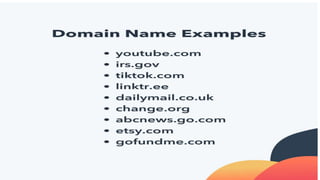
Here are few examples of domain name like
•1. www.puchd.ac.in
•2. www.amazon.in
3. www.flipkart.com
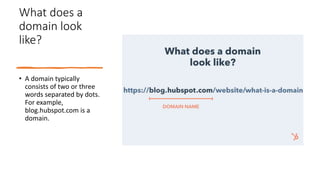
What does a
domain look
like?
• A domain typically
consists of two or three
words separated by dots.
For example,
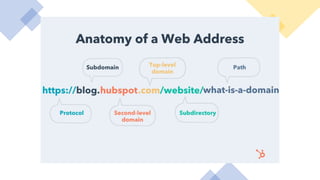
blog.hubspot.com is a
domain.
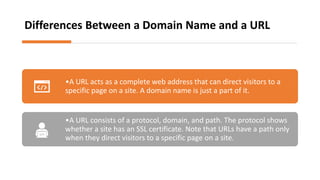
Differences Between a Domain Name and a URL
•A URL acts as a complete web address that can direct visitors to a
specific page on a site. A domain name is just a part of it.
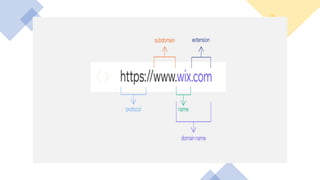
•A URL consists of a protocol, domain, and path. The protocol shows
whether a site has an SSL certificate. Note that URLs have a path only
when they direct visitors to a specific page on a site.
Why Do I Need a Domain Name?
•Memorability. Your audience can technically visit your website without a domain name by entering
its IP address. However, since it consists of a string of numbers, it is difficult to remember. A
domain helps a website be more accessible to internet users.
•Effective branding. A well-thought-out domain name will help communicate your project or
business in a way that aligns with your brand’s values and mission.
•Credibility. Websites that use a custom domain name are more professional-looking than those
with free domain names like yourwebsite.websitebuilder.com.
•Custom email addresses. Having a domain name lets you create unique and professional email
accounts, like name@yourdomain.com. It also makes your presentation consistent throughout
different online channels.
•SEO. A memorable domain name with relevant keywords will positively impact your website’s
search engine optimization, improving its rankings on search engines.
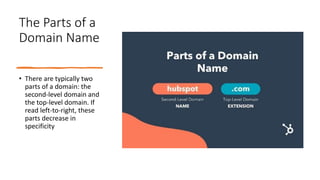
The Parts of a
Domain Name
• There are typically two
parts of a domain: the
second-level domain and
the top-level domain. If
read left-to-right, these
parts decrease in
specificity
Second-Level Domain (SLD)
The second-level domain is the unique identifier for your website. It's the part of your
domain that comes before “.com” or another extension.
If you're building a website for your business, consider buying a domain that reflects your
business's name. This will make it easier for people to find your website without needing to
spend a lot of time scouring Google for it. For instance, hubspot.com’s second-level domain is
“hubspot”.
Top-Level Domain
(TLD)
• The top-level domain is the extension, or the part
of your domain that comes after your second-level
domain.
• It specifies what type of entity your organization
registers as on the internet. For example, HubSpot’s
top-level domain is “.com”
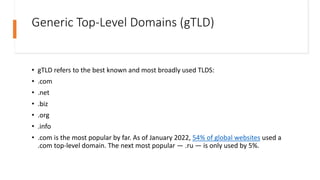
Generic Top-Level Domains (gTLD)
• gTLD refers to the best known and most broadly used TLDS:
• .com
• .net
• .biz
• .org
• .info
• .com is the most popular by far. As of January 2022, 54% of global websites used a
.com top-level domain. The next most popular — .ru — is only used by 5%.
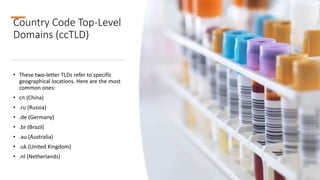
Country Code Top-Level
Domains (ccTLD)
• These two-letter TLDs refer to specific
geographical locations. Here are the most
common ones:
• cn (China)
• .ru (Russia)
• .de (Germany)
• .br (Brazil)
• .au (Australia)
• .uk (United Kingdom)
• .nl (Netherlands)
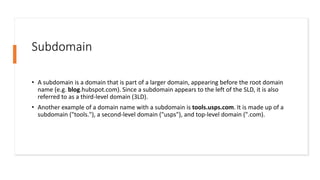
Subdomain
• A subdomain is a domain that is part of a larger domain, appearing before the root domain
name (e.g. blog.hubspot.com). Since a subdomain appears to the left of the SLD, it is also
referred to as a third-level domain (3LD).
• Another example of a domain name with a subdomain is tools.usps.com. It is made up of a
subdomain ("tools."), a second-level domain ("usps"), and top-level domain (".com).
Selecting a domain
•Leave the first impression of your business
•Defines your brand
•Improves search engine optimization
From where to buy the
domain name
•There are so many domain registrars in the market. Like
•Godaddy.com (https://in.godaddy.com/)
•Domain .com (https://www.domain.com/)
•Bluehost.com (https://www.bluehost.com/)
•Namecheap.com (https://www.namecheap.com/)
•Before making the final decision, compare their pricing plans,
services and customer care feedback
Process of
Buying
Domain
Name
• Domain names are unique that means there
can exist only one domain name.
• Therefore, first of all, you have the check the
availability of the domain name that you are
looking for your website.
• Start the search in the search bar with
keywords representing your business or
brand or any name you want to have a
domain name.
What is
Webhosting?
•After purchasing the Doman Name, there is a need to buy
the Webhosting.
•As, you know, you need a space to store your website
somewhere on the server that is called Hosting.
•From where to buy it the answer is Webhosting Service
Provider.
•Similar, to the Doman Name Service Providers, there are a
large number of Webhosting service providers from where
you can buy the space on the server to store your website
like
•Hostgator (hostgator.in)
•Bigrock (https://www.bigrock.in/)
•Godaddy (https://in.godaddy.com/)
•Bluehost (https://www.bluehost.com/)
The
difference
between
domain and
hosting
•To create a website you need both a domain name and web hosting.
•Codependent nature and the fact that - more often than not - they’re
provided by the same company,
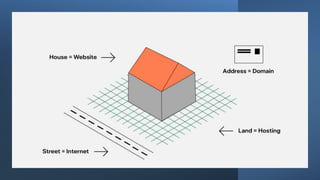
•The easiest way to understand what is web hosting and how it differs
from a domain name is to imagine your website as an apartment
complex, where each apartment is a different page of your site. For this
building to exist, you’ll first need a piece of land to construct it on. On
the internet, the land upon which you build your website is known as
web hosting. All the files and data that make up your site - think of them
as the foundations of the apartment complex - are stored on web
servers that send them out to people who visit your site.
•In order for people to be able to visit your site, however, they’ll need
to know where to find it, you could technically just share your site’s IP
with them and call it a day. Then again, we could technically just share
geographic coordinates instead of giving names and numbers to every
street and building. As you might have already guessed, domain names
serve as the address of your metaphorical apartment complex.
The
difference
between
domain and
hosting
• If you want to take it one step further and
direct visitors to a specific page of your site,
you simply need to add a path after your
domain name. Having something like “/blog”
is the online address equivalent to adding an
apartment number to your physical address.
• And, of course, the street people take to visit
your virtual apartment complex represents
the internet.
Unit 1- Domain Name and Web hosting.pptx

Unit 1- Domain Name and Web hosting.pptx

  • 1.
    Unit 1 Domain Name& Web Hosting Presentation By-Dr.Anshu Singh
  • 2.
    What Is aDomain Name? A domain is a part of the web address nomenclature someone would use to find your website or a page of your website online. In simple words, a domain name is the address or name of any website which you want to access
  • 3.
    Domain Name Every websitehas an IP address, which is a unique string of numbers that connect computers to web servers. IP addresses are great for computers, but difficult for people to memorize. That's where domains come in. A domain name is connected to a website's IP address so people can more easily remember and search for a website by its domain and their browser can still find the specific web server that hosts the website via the associated IP address. A domain is often compared to a home address
  • 4.
    Unique features of a domain name •It is typed in the address bar of a browser to access the website • The domain name is unique to every website, means there can not be two websites on a single domain name. • Domain names are managed through DNS (Domain Name System) to avoid the duplicity of domain names. Here are few examples of domain name like •1. www.puchd.ac.in •2. www.amazon.in 3. www.flipkart.com
  • 5.
    What does a domainlook like? • A domain typically consists of two or three words separated by dots. For example, blog.hubspot.com is a domain.
  • 6.
    Differences Between aDomain Name and a URL •A URL acts as a complete web address that can direct visitors to a specific page on a site. A domain name is just a part of it. •A URL consists of a protocol, domain, and path. The protocol shows whether a site has an SSL certificate. Note that URLs have a path only when they direct visitors to a specific page on a site.
  • 10.
    Why Do INeed a Domain Name? •Memorability. Your audience can technically visit your website without a domain name by entering its IP address. However, since it consists of a string of numbers, it is difficult to remember. A domain helps a website be more accessible to internet users. •Effective branding. A well-thought-out domain name will help communicate your project or business in a way that aligns with your brand’s values and mission. •Credibility. Websites that use a custom domain name are more professional-looking than those with free domain names like yourwebsite.websitebuilder.com. •Custom email addresses. Having a domain name lets you create unique and professional email accounts, like name@yourdomain.com. It also makes your presentation consistent throughout different online channels. •SEO. A memorable domain name with relevant keywords will positively impact your website’s search engine optimization, improving its rankings on search engines.
  • 11.
    The Parts ofa Domain Name • There are typically two parts of a domain: the second-level domain and the top-level domain. If read left-to-right, these parts decrease in specificity
  • 12.
    Second-Level Domain (SLD) Thesecond-level domain is the unique identifier for your website. It's the part of your domain that comes before “.com” or another extension. If you're building a website for your business, consider buying a domain that reflects your business's name. This will make it easier for people to find your website without needing to spend a lot of time scouring Google for it. For instance, hubspot.com’s second-level domain is “hubspot”.
  • 13.
    Top-Level Domain (TLD) • Thetop-level domain is the extension, or the part of your domain that comes after your second-level domain. • It specifies what type of entity your organization registers as on the internet. For example, HubSpot’s top-level domain is “.com”
  • 15.
    Generic Top-Level Domains(gTLD) • gTLD refers to the best known and most broadly used TLDS: • .com • .net • .biz • .org • .info • .com is the most popular by far. As of January 2022, 54% of global websites used a .com top-level domain. The next most popular — .ru — is only used by 5%.
  • 16.
    Country Code Top-Level Domains(ccTLD) • These two-letter TLDs refer to specific geographical locations. Here are the most common ones: • cn (China) • .ru (Russia) • .de (Germany) • .br (Brazil) • .au (Australia) • .uk (United Kingdom) • .nl (Netherlands)
  • 17.
    Subdomain • A subdomainis a domain that is part of a larger domain, appearing before the root domain name (e.g. blog.hubspot.com). Since a subdomain appears to the left of the SLD, it is also referred to as a third-level domain (3LD). • Another example of a domain name with a subdomain is tools.usps.com. It is made up of a subdomain ("tools."), a second-level domain ("usps"), and top-level domain (".com).
  • 18.
    Selecting a domain •Leavethe first impression of your business •Defines your brand •Improves search engine optimization
  • 19.
    From where tobuy the domain name •There are so many domain registrars in the market. Like •Godaddy.com (https://in.godaddy.com/) •Domain .com (https://www.domain.com/) •Bluehost.com (https://www.bluehost.com/) •Namecheap.com (https://www.namecheap.com/) •Before making the final decision, compare their pricing plans, services and customer care feedback
  • 20.
    Process of Buying Domain Name • Domainnames are unique that means there can exist only one domain name. • Therefore, first of all, you have the check the availability of the domain name that you are looking for your website. • Start the search in the search bar with keywords representing your business or brand or any name you want to have a domain name.
  • 21.
    What is Webhosting? •After purchasingthe Doman Name, there is a need to buy the Webhosting. •As, you know, you need a space to store your website somewhere on the server that is called Hosting. •From where to buy it the answer is Webhosting Service Provider. •Similar, to the Doman Name Service Providers, there are a large number of Webhosting service providers from where you can buy the space on the server to store your website like •Hostgator (hostgator.in) •Bigrock (https://www.bigrock.in/) •Godaddy (https://in.godaddy.com/) •Bluehost (https://www.bluehost.com/)
  • 22.
    The difference between domain and hosting •To createa website you need both a domain name and web hosting. •Codependent nature and the fact that - more often than not - they’re provided by the same company, •The easiest way to understand what is web hosting and how it differs from a domain name is to imagine your website as an apartment complex, where each apartment is a different page of your site. For this building to exist, you’ll first need a piece of land to construct it on. On the internet, the land upon which you build your website is known as web hosting. All the files and data that make up your site - think of them as the foundations of the apartment complex - are stored on web servers that send them out to people who visit your site. •In order for people to be able to visit your site, however, they’ll need to know where to find it, you could technically just share your site’s IP with them and call it a day. Then again, we could technically just share geographic coordinates instead of giving names and numbers to every street and building. As you might have already guessed, domain names serve as the address of your metaphorical apartment complex.
  • 23.
    The difference between domain and hosting • Ifyou want to take it one step further and direct visitors to a specific page of your site, you simply need to add a path after your domain name. Having something like “/blog” is the online address equivalent to adding an apartment number to your physical address. • And, of course, the street people take to visit your virtual apartment complex represents the internet.