Understanding your
website visitors
Nick Leech
Understanding your
Website Visitors
5 %
15 %
20 % 45 %
50 %
3 %
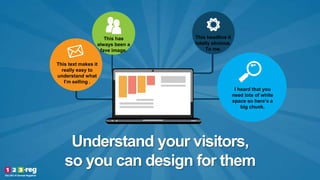
Understand your visitors,
so you can design for them
This text makes it
really easy to
understand what
I’m selling .
I heard that you
need lots of white
space so here’s a
big chunk.
This has
always been a
fave image.
This headline it
totally obvious.
To me.
Why would I do that?
My website is
AWESOME….
The Problem
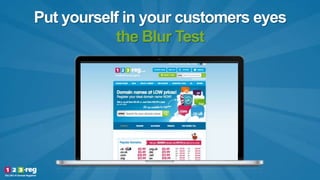
Put yourself in your customers eyes
the Blur Test
What’s the point?
#UKTOUR
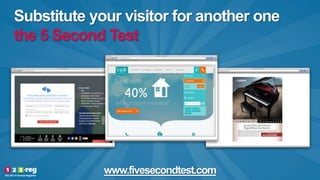
Substitute your visitor for another one
the 5 Second Test
www.fivesecondtest.com
Let them ask you a question
and learn directly from them
Live Chat
Watch how users complete the task on your site
UserTesting.com
Observation
Test
Put your
employees in the
customers eyes
heuristics
Ask them
questions
of lots of them
an Onpage Survey
Feedback & Exit Surveys
Let users
search for
content with
Site Search
Use a tool to watch people
Inspectlet
Google Analytics tells you what, Inspectlet tells you why.
Add screen grab here
Use data to see how they used the pages
Crazy Egg
Add screen grab here
Add screenshot here
Google
Analytics
Add screenshot here
Google
Analytics
Add screenshot here
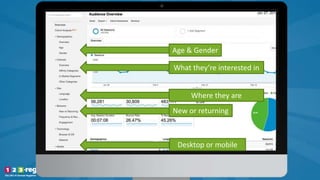
Age & Gender
What they’re interested in
Where they are
New or returning
Desktop or mobile
Add screenshot here
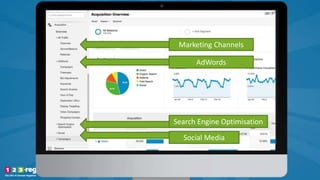
Marketing Channels
AdWords
Search Engine Optimisation
Social Media
Add screenshot here
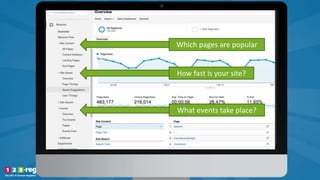
Which pages are popular
How fast is your site?
What events take place?
Add screenshot here
Add screenshot here
Add screenshot here
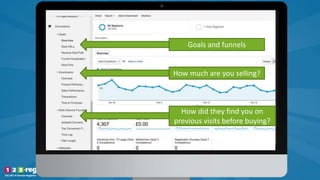
Goals and funnels
How much are you selling?
How did they find you on
previous visits before buying?
Deciding
what is right
for you
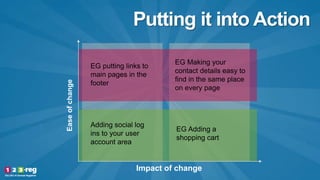
Putting it into Action
Easeofchange
Impact of change
EG putting links to
main pages in the
footer
Adding social log
ins to your user
account area
EG Making your
contact details easy to
find in the same place
on every page
EG Adding a
shopping cart
Never stop testing
Understanding your
website visitors
Nick Leech

Understanding your website visitors

Editor's Notes

  • #3 Hi, and welcome to understanding your website visitors with me, Nick Leech. I’m the Director of Digital marketing here at 123-reg, and I’m going to be taking you through a topic that is absolutely essential if you really want to get the most out of your online presence.
  • #4 Measuring, knowing more about and understanding your website visitors is critical to improving their experience when they’re on your site or interacting with your brand online. Simply put, if you know -who they are -what they want -how they use your website, and -what problems they have, then you know what your content should be focused on, and what needs your design must address
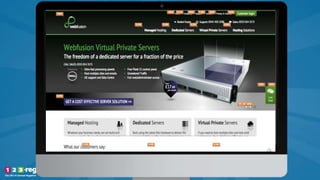
  • #5 You see, if you’re a small business or a start up, you’ve probably designed your website with yourself in mind. You’ve chosen a template or a design you like. You’ve picked your favourite colours, or one that stand out to you. When it comes to images, you might have even taken them yourself or used shots that you’ve always used in your offline material. And whether or not you’re on a shoestring budget, you have probably written most of the text for your website, using language that you think everyone uses to describe your products and services. But in actual fact the people you should really design it for are your visitors, as they’re the ones you’re trying to convince to buy from you. You need a site that is easy for them to understand, to navigate and to take action on whether that’s buying a product or getting in touch.
  • #6 If you manage to design and build a website that is easy to use and to understand for your visitors, the benefits are massive. It means you: -Encourage visitors to return -Increase sales and revenue through reducing visitor funnel drop off -can convert more visitors to customers, building your customer base -Gain more recommendations from happy visitors: A good user experience can have a direct impact on your Net Promoter Score, the likelihood that someone is going to positively recommend your brand to others. Get it right and your recommendation rate will get a real boost.
  • #7 The problem when it comes to the web, is that most visitors come and go without a trace. So how do you know they want? What there problems are? How do you know what would have persuaded them to buy? If you had owned a physical shop, you might hear hear what they muttered as they left the shop. Or you could ask them directly what are looking for. Listening to our visitors is more difficult online so I’m going to tell you about some tools and techniques you can use to understand them better.
  • #8 First off, the Blur Test, or Squint test is an old art school technique used to reveal a design’s focal point and visual hierarchy. The idea is to look at a blurred version of a page to see what elements stand out, if its not what you want to stand out its time to go back and make them more obvious. Blurring a page will reduce it to a bare bone representation of the layout, and should highlight a call to action To save you the time of blurring a page, you could just simply squint at a page until its no longer clearly visible (if you can read any text, squint harder)
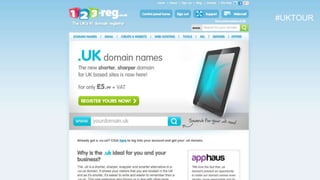
  • #9 Lets try here with a page on 123-reg. Can you tell me which are the main elements I want to stand out on this page? What are the things I want you to focus on with this page? What do I want you to click on? What really stands out as a call to action? **Reveal** Hopefully you chose the ‘Register yours now’ or the domain search bar. I guess the image might have been distracting. Try the squint test on your site and see what it reveals.
  • #10 Here’s another free test that you can do – the 5 second test This is a usability testing method in which the participant is shown an image of a webpage for just five seconds. Once the image is hidden, the participant is asked questions about what they remember. Now five seconds may seem like a short time, but research shows it is more than enough time for a website visitor to determine if there is enough quality in your website to make them want to stay. You can try this on your website. Go along to fivesecondtest.com, input your URL, and others will carry out a test on your site for free. Why not return the favour and do a few 5 second tests of other people’s sites. This test is used for evaluating how well the page communicates the purpose and content of your site, and will usually help you work out if your headlines are easy to understand, if your main image is an obvious one, and the single action you want users to complete on a page.
  • #11 Whilst technically not a usability tool in it self, Live Chat is a tool that can help you understand your website visitors better. Live chat allows you to hear from the group of visitors who wouldn’t call you before they left, but who are prepared to engage with you on live chat. Some people just prefer this low hassle, instant response way of interacting. Using live chat you will be able to find out: -What pages are causing visitors issues. The page that people will click on live chat will be the one where they need help. You know from this that the content or layout is hard to understand, so they need to ask a question -You’ll know what products visitors asking questions about. You will get a clear idea if some products are harder to understand, or if the people they’re aimed at need more explanation about what they do -You’ll find out what the users’ primary questions, concerns, or objections are. If you know what question they have in mind, you know exactly what information your should be putting on your site There’s some added bonuses of livechat. It often increases your conversion rate as your staff can personally help visitors to convert into customers. And it adds a real human touch to your website, showing that there are people behind the brand.
  • #12 Online testing, using services like UserTesting.com, is an easy to use way to watch how people use your website. With this type of user testing you to ask the visitor to complete tasks (for example, to find out a piece of information, to navigate to a particular section of the site, or to buy a product), comment out loud on their thought process and at the same time their screen is recorded. At the end, you get a video of their screen during the task along with their audio commentary. It’s a low cost way of getting detailed information on how your visitors behave on your site, including how they navigate, what they find difficult to understand, and what’s going on in their head whilst actually using your website. You can ask them post-test questions too, asking them to elaborate on what they found easy or difficult. You can also choose what type of user you want to take the test, so you can as closely as possible match the users to your own target market. Another idea with usertesting is to test how users interact with your competitors site. If you can find something that works there you might be able to use it yourself.
  • #13 Observation testing is like online user testing in that you ask a sample group to carry out tasks on your website. But this time its taken to the next stage, as you’re in the room whilst they’re completing the task, and you can question and interact with them to get direct feedback. Testing can either be done one-on-one or in a group. The good thing about a group you gain the knowledge of 5 people in the same time to do 1, and save on costs associated of repeating the test 5 times. But the downside is that some users may be intimidated by other participants and not put forth their ideas. Test participants may also alter their behaviour due to the presence of an observer. Observation test provide deep and extensive knowledge of problems and opportunities, which just aren’t possible with task based testing online. The downside is the financial cost, aside from having to pay a premium for the participants in-person time, providing a location for the testing, you also need to spend time on having someone administer the test itself. So whilst the quality of the data has gone up, so has the cost.
  • #14 Heuristics is the low cost alternative to observational tests! Here, you sit down with employees from all parts of your business – sales, production, marketing, development. Or if you only have a business with < 5 people make sure that everyone is involved. Set them 3 or 4 basic tasks to complete, similar to the other user tests. Ask them to instruct you to move the mouse and click on the buttons, and ask them why they are choosing those areas. This test opens your eyes to how even different people in your own business use your website, depending how familiar they are with it, what they use it for normally, and what they really value about your business. It helps you understand -what sticks out on the page, and what is hidden and difficult to understand. -why people made particular choices – was it because the button was big, was it because of the price. Use that information when you want to make your visitors do things -where people have problems with completing tasks So the great upside is that its cheap (you might want to offer to buy our colleagues lunch!). The downside is that you don’t capture the customer’s perspective
  • #15 The big downside of all online usertesting, observational tests and heuristics is that you’re using sample groups that you hope represent your wider users. And they’re usually very small in number. So to get more responses from people who actually use your site, consider an onpage survey These are often found in support articles, to find out whether a page was helpful. They’re a great way of getting feedback from many people about a particular page. Granted that usually people will only feedback if they are unsatisfied, so expect it to mostly be negative news, and its usually only about the page the survey is on… but none the less it will provide a wealth suggestions to improve.
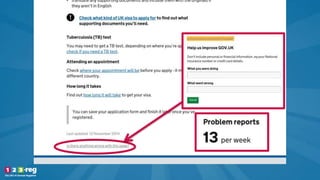
  • #16 Once of the best examples of onpage survey’s are to be found on Gov.uk, where every single page includes the link “Is there anything wrong with this page”. This gives the editors great information about the questions each page is not answering (which highlights content problems), or whether people have wrongly ended up on a particular page expecting to find certain information, (which highlights navigation problems). What’s fascinating about gov.uk is that they then publish the number of people reporting problems with a particular page, to enable everyone in the organisation see if particular pages of the website need to be improved.
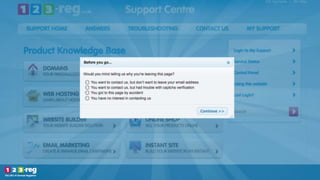
  • #17 Another direct way to get feedback from your customers is by asking questions in an exit survey. There are really low cost tools like Survey Monkey which you can use to create a custom on-exit questionnaires, which is easy way to collect the right answers.
  • #18 These are a quick and efficient way, you can ask a range of question, in different formats, in varying levels of complexity. You can use these to find out: -why they are leaving -if they found what they were looking for -would recommend you One thing to mention though, is that asking questions in this type of survey can be perceived to be intrusive, so consider carefully whether the feedback will be worth the potential impact on your website visitors experience.
  • #19 An often overlooked way to get direct feedback from customers is using a site search functionality. By pasting some code from the Google developer’s site you can add a search box to your website. People use site search as a either a quick way to find relevant content, or if they can’t find a particularly piece of information on a page. You get a report which shows you what pages people are searching from, and what they’re searching for. Searches are being made on the homepage will help to decide what pages your main menu should link to. For searches made on deeper pages on your site, will help you see if you need to start including more information on those pages, or give people obviously links to where that content exists elsewhere on the site.
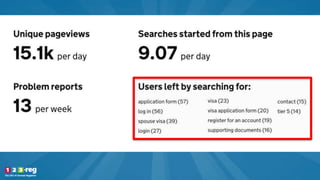
  • #20 Here’s a grab from gov.uk who again are very good about reporting on what searches were made on a page. You can see that users on the UK visa page, from which this grab is taken, are looking for the application form, to log into the site. Links to both of these clearly need to be made more obvious.
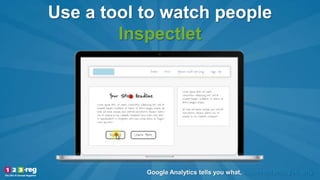
  • #21 A great tool that lets you understand your users by watching what they do is called Inspectlet. This require a small piece of javascript code to be added to every page of your website, so depending on your experience level you might need your web designer to do that. Inspectlet records your visitors as they’re on your site, so you can watch their mouse movements, see where they pause, and watch them filling out forms. If you see them pausing for a long time on a page or on a form field, or filling out information incorrectly within a field, you know that you need to improve the explanation for that field. Here’s a video of me completing a form on the Inspectlet site: http://www.inspectlet.com/dashboard/watchsession/259769975/3520174434?pn=1&accessResourceKey=9d96d634ab84c112f52e8cebfd4fb81a74599991 What’s great about this is that rather watching a sample group in a test environment, you’re watching your actual users, without them even being aware. The data is completely unmoderated. The downside is that you get no voice commentary so the conclusion you make will be based upon their mouse movements on the page, and inter page navigation.
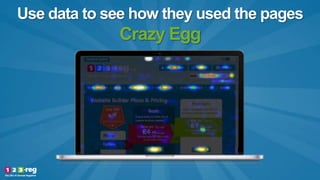
  • #22 A tool that aggregates users’ mouse movements and mouse clicks is called Crazyegg. Again you can install it by adding some simple javascript to your website It’s a great, low price tool that provides a heatmap overlay that shows clicks and scrolls of your pages. This information is the next step up from a blur test as it shows what part of the page your visitors are drawn to click on. If you can see the buttons or links that your users click on, you can understand what content your users are most interested in, and make it easier to find. You can also see if users click on pages where there are no buttons or links. Users clearly expect something to happen when they do this, so you might consider adding links to these elements.
  • #23 We now turn to one of the most common tools people use to understand how others use their website. Google Analytics is a free tool offered by Google which you can add to your website in order to get data about who visits your website, where they come from, and how they behave once they’ve arrived. Whilst you can’t ask them why they are doing things, you can identify trends and make some assumptions about where improvements could be made. Google Analytics also requires a small piece of javascript to be added to your site.
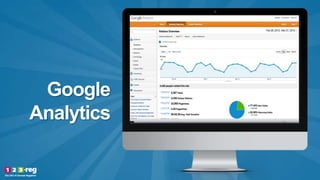
  • #24 In Google Analytics you get lots of reports about what people are doing on your website, all presented in easy to understand graphs, even for beginners.
  • #25 In Google Analytics there are 4 main areas to focus on. Under the audience menu you can understand more about who your website visitors are. **Their age and gender and **What they’re interested in – whether its travel, technology, shopping or a lots of other consumer data. This can help you focus your website with specific types of content appropriate to who they are and what they’re interested in. **Where they are and what language they speak – this will obviously help you decide if you content should be in more than 1 language or focus on particular geographic users **You can find out whether its their first time on your website or if they’ve been here before, how frequently they visit and how much time they stay. This helps you understand if you should design and write your site for people who are already familiar with your brand, or if you should focus on people who are completely new. If they’re new, you need to introduce topics in a much more simplistic way. **And you can find out if they’re visiting on a desktop or a mobile. This is highly important to help you understand if you site needs to be brilliant on a mobile, and how much depth of information visitors will be interested in seeing.
  • #26 Within the acquisition menu you can uncover how the visitor found your website. Channels tells you which of several pre-defined channels your visitors came from. The main ones are Direct, Organic Search, Paid Search, Email. Referral, or Social media. This gives you a top line view on which of your marketing channels are deliver the most visitors. And if you know where your customers are arriving from, you will know better what sort of content they might expect to see when they arrive.
  • #27 Within the behaviours menu you can see how users interact with your site, what pages they first landed on and what pages they went on to visit. Knowing this helps to structure your site and design to suit how its being used
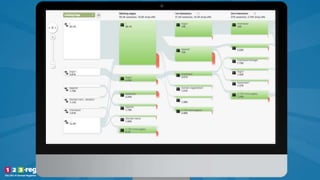
  • #28 One really interesting option in behaviours is called ‘behaviour flow’. This lets you see how people move around your website, where their visits leads from one page to another. This gives you a really good understanding of whether people are consuming your site in the order you expected, or maybe they’re jumping to areas which aren’t logical, which gives you a chance to change your pages around.
  • #29 Another option here is to look at ‘in page analytics’. This lets you see on the page what % of users clicked on each link. This helps to understand if people are navigating around your website in the way that you expected them to. It might be that they’re taking a difficult route, that you can improve by making more obvious with more leading copy.
  • #30 Finally, within conversions you to look at your sites sales information. If you’re a shop and you sell products, you’ll be able to see how particular products are selling, and keep an eye on your total revenue. With goals and funnels you can define particular paths – for example going from the homepage to a product page and then down the purchase journey, and understand where people drop out on that journey. If you can see the point at which people drop out, you can go and look at that page and work out why they’re leaving, and improve it. A classic one is usually when you introduce shipping charges really late in the journey, which is a nasty surprise for people to get, causing them to leave.
  • #31 Finally. I’ve shown you lots of tools and techniques here. Its important for your to decide which tool or technique is right for your business. It depends on lots of factors. -how much time you have to invest -what your budget is -how technical you are -and the type of feedback you understand most easily (graphs, videos & audio, raw data) Try to understand what you’re good at before investing your time and money in one of these techniques.
  • #32 And of course there’s no point in finding this information out if you’re not going to do anything with it Its easy to be overwhelmed by the things that you learn and the changes you need to make Make a decision about whether you need to start your website all over again or you’re able to work with what you’ve got, addressing issues on a page by page basis. Distill the action points you uncover into ones that are both easy to change and have the biggest impact, and address those first
  • #33 Last off, its important to remember that understanding your website visitors isn’t a one-off exercise, you should build it into your regular marketing activities. Your customers, and and your website visitors, are the most important people to understand and adapt to. So the changes you make need to be iterative and constant. You will never have the perfect site, so keep testing!
  • #34 Well that was Understanding more about your website visitors. My name is Nick Leech. Thanks very much.