


Understanding ROI Calculations for
Field Service Management Software
{Software for the Workforce on the Move}
What You’ll Find Inside
I. Bridging the Field Force Execution Gap
II. Investing in Technology
III. Knowing What to Look for
IV. Measuring the Return on Investment
V. Concrete ROI Example
{Software for the Workforce on the Move}
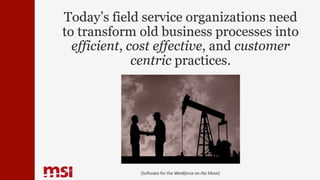
Today’s field service organizations need
to transform old business processes into
efficient, cost effective, and customer
centric practices.
{Software for the Workforce on the Move}
But some organizations struggle to
bridge the field force execution gap.
{Software for the Workforce on the Move}
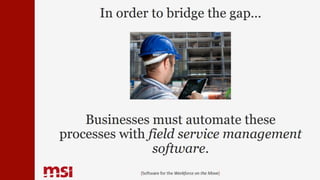
In order to bridge the gap…
Businesses must automate these
processes with field service management
software.
{Software for the Workforce on the Move}
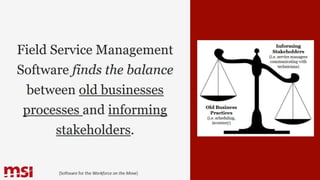
Field Service Management
Software finds the balance
between old businesses
processes and informing
stakeholders.
{Software for the Workforce on the Move}
Old Business
Practices
(i.e. scheduling,
inventory)
Informing
Stakeholders
(i.e. service managers
communicating with
technicians)
By automating old
business processes, you’ll
gain a greater Return on
Investment.
{Software for the Workforce on the Move}
ROI
Invest in Technology!
These are the key tools
you NEED to bridge the
field force execution gap.
- Enterprise
Management
Solution
- Visual Scheduler
- Mobile Application
- Stakeholder Web
Portals
- Alerts & Escalation
Workflows
- GPS Technology
{Software for the Workforce on the Move}
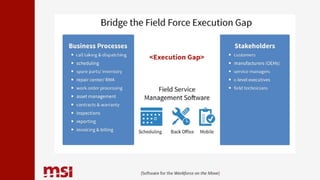
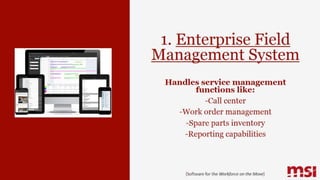
1. Enterprise Field
Management System
Handles service management
functions like:
-Call center
-Work order management
-Spare parts inventory
-Reporting capabilities
{Software for the Workforce on the Move}
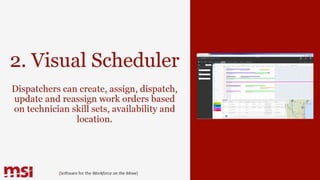
2. Visual Scheduler
Dispatchers can create, assign, dispatch,
update and reassign work orders based
on technician skill sets, availability and
location.
{Software for the Workforce on the Move}
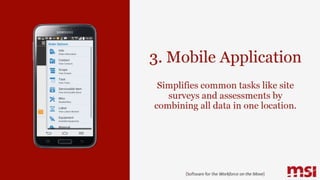
3. Mobile Application
Simplifies common tasks like site
surveys and assessments by
combining all data in one location.
{Software for the Workforce on the Move}
4. Stakeholder Web
Portals
Allow key stakeholders access to service
data through web portals. Guide better
business decisions.
{Software for the Workforce on the Move}
5. Alerts and
Escalation Workflows
Program system to watch out and notify you
of certain conditions when they occur.
{Software for the Workforce on the Move}
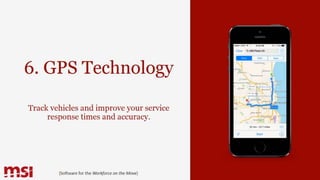
6. GPS Technology
Track vehicles and improve your service
response times and accuracy.
{Software for the Workforce on the Move}
The more of these tools you find
in your solution, the better your
results will be.
{Software for the Workforce on the Move}
Here are some steps you can take to
measure the return of a field service
software investment.
1. Review your current steps.
{Software for the Workforce on the Move}
2. Identify opportunities to reduce
costs, increase revenue, or increase
customer satisfaction.
3. Compare existing process to
proposed process and quantify
the benefit of updating your
process.
{Software for the Workforce on the Move}
Let’s look at an example:
ABC Company sells and services
industrial equipment.
{Software for the Workforce on the Move}
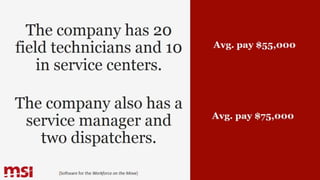
The company has 20
field technicians and 10
in service centers.
The company also has a
service manager and
two dispatchers.
{Software for the Workforce on the Move}
Avg. pay $55,000
Avg. pay $75,000
{Software for the Workforce on the Move}
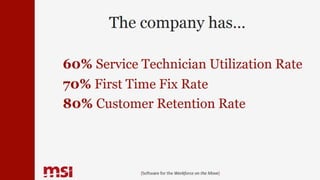
The company has…
60% Service Technician Utilization Rate
70% First Time Fix Rate
80% Customer Retention Rate
Keeping in mind these facts and
that ABC Company just
implemented a field service
software, let’s look at part of
their ROI chart.
{Software for the Workforce on the Move}
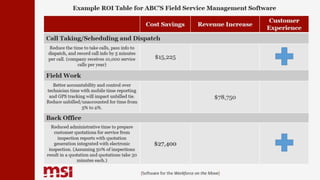
Cost Savings Revenue Increase
Customer
Experience
Call Taking/Scheduling and Dispatch
Reduce the time to take calls, pass info to
dispatch, and record call info by 5 minutes
per call. (company receives 10,000 service
calls per year)
$15,225
Field Work
Better accountability and control over
technician time with mobile time reporting
and GPS tracking will impact unbilled tie.
Reduce unbilled/unaccounted for time from
5% to 2%.
$78,750
Back Office
Reduced administrative time to prepare
customer quotations for service from
inspection reports with quotation
generation integrated with electronic
inspection. (Assuming 50% of inspections
result in a quotation and quotations take 30
minutes each.)
$27,400
Example ROI Table for ABC’S Field Service Management Software
Want to see a
complete example?
Download the full
report now!
{Software for the Workforce on the Move}

Understanding ROI Calculations for Field Service Management Software

  • 1.
    Understanding ROI Calculationsfor Field Service Management Software {Software for the Workforce on the Move}
  • 2.
    What You’ll FindInside I. Bridging the Field Force Execution Gap II. Investing in Technology III. Knowing What to Look for IV. Measuring the Return on Investment V. Concrete ROI Example {Software for the Workforce on the Move}
  • 3.
    Today’s field serviceorganizations need to transform old business processes into efficient, cost effective, and customer centric practices. {Software for the Workforce on the Move}
  • 4.
    But some organizationsstruggle to bridge the field force execution gap. {Software for the Workforce on the Move}
  • 5.
    In order tobridge the gap… Businesses must automate these processes with field service management software. {Software for the Workforce on the Move}
  • 6.
    {Software for theWorkforce on the Move}
  • 7.
    Field Service Management Softwarefinds the balance between old businesses processes and informing stakeholders. {Software for the Workforce on the Move} Old Business Practices (i.e. scheduling, inventory) Informing Stakeholders (i.e. service managers communicating with technicians)
  • 8.
    By automating old businessprocesses, you’ll gain a greater Return on Investment. {Software for the Workforce on the Move} ROI
  • 9.
    Invest in Technology! Theseare the key tools you NEED to bridge the field force execution gap. - Enterprise Management Solution - Visual Scheduler - Mobile Application - Stakeholder Web Portals - Alerts & Escalation Workflows - GPS Technology {Software for the Workforce on the Move}
  • 10.
    1. Enterprise Field ManagementSystem Handles service management functions like: -Call center -Work order management -Spare parts inventory -Reporting capabilities {Software for the Workforce on the Move}
  • 11.
    2. Visual Scheduler Dispatcherscan create, assign, dispatch, update and reassign work orders based on technician skill sets, availability and location. {Software for the Workforce on the Move}
  • 12.
    3. Mobile Application Simplifiescommon tasks like site surveys and assessments by combining all data in one location. {Software for the Workforce on the Move}
  • 13.
    4. Stakeholder Web Portals Allowkey stakeholders access to service data through web portals. Guide better business decisions. {Software for the Workforce on the Move}
  • 14.
    5. Alerts and EscalationWorkflows Program system to watch out and notify you of certain conditions when they occur. {Software for the Workforce on the Move}
  • 15.
    6. GPS Technology Trackvehicles and improve your service response times and accuracy. {Software for the Workforce on the Move}
  • 16.
    The more ofthese tools you find in your solution, the better your results will be. {Software for the Workforce on the Move}
  • 17.
    Here are somesteps you can take to measure the return of a field service software investment. 1. Review your current steps. {Software for the Workforce on the Move}
  • 18.
    {Software for theWorkforce on the Move} 2. Identify opportunities to reduce costs, increase revenue, or increase customer satisfaction.
  • 19.
    3. Compare existingprocess to proposed process and quantify the benefit of updating your process. {Software for the Workforce on the Move}
  • 20.
    {Software for theWorkforce on the Move} Let’s look at an example:
  • 21.
    ABC Company sellsand services industrial equipment. {Software for the Workforce on the Move}
  • 22.
    The company has20 field technicians and 10 in service centers. The company also has a service manager and two dispatchers. {Software for the Workforce on the Move} Avg. pay $55,000 Avg. pay $75,000
  • 23.
    {Software for theWorkforce on the Move} The company has… 60% Service Technician Utilization Rate 70% First Time Fix Rate 80% Customer Retention Rate
  • 24.
    Keeping in mindthese facts and that ABC Company just implemented a field service software, let’s look at part of their ROI chart. {Software for the Workforce on the Move}
  • 25.
    {Software for theWorkforce on the Move} Cost Savings Revenue Increase Customer Experience Call Taking/Scheduling and Dispatch Reduce the time to take calls, pass info to dispatch, and record call info by 5 minutes per call. (company receives 10,000 service calls per year) $15,225 Field Work Better accountability and control over technician time with mobile time reporting and GPS tracking will impact unbilled tie. Reduce unbilled/unaccounted for time from 5% to 2%. $78,750 Back Office Reduced administrative time to prepare customer quotations for service from inspection reports with quotation generation integrated with electronic inspection. (Assuming 50% of inspections result in a quotation and quotations take 30 minutes each.) $27,400 Example ROI Table for ABC’S Field Service Management Software
  • 26.
    Want to seea complete example? Download the full report now! {Software for the Workforce on the Move}