Understanding Memory in
Computing (II)
Pravash Chandra Das
Digital Forensic Specialist
FOREMOST
A File Recovery Tool
What is Foremost
?
• Definition: Foremost is a forensic data recovery tool that can
recover lost files based on their headers, footers, and internal
data structures. It can work on image files or physical disks,
such as those generated by drones, cameras, or computers.
Foremost is useful for extracting and analyzing data from
various sources of digital evidence.
• Purpose: Designed to recover files based on their headers,
footers, and data structures.
Why Use Foremost ?
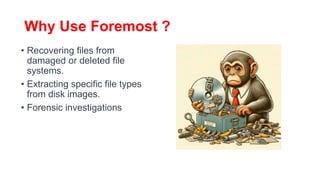
• Recovering files from
damaged or deleted file
systems.
• Extracting specific file types
from disk images.
• Forensic investigations
Basic
Commands
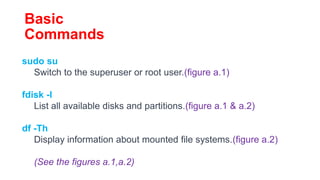
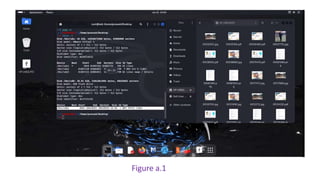
sudo su
Switch to the superuser or root user.(figure a.1)
fdisk -l
List all available disks and partitions.(figure a.1 & a.2)
df -Th
Display information about mounted file systems.(figure a.2)
(See the figures a.1,a.2)
Figure a.1
Figure a.2
I have listed all the contents (figure a.3) that are present inside the flash drive/Pen Drive
by using the command ls –lrt (for listing the contents)
Now I have deleted those files by going to that path
cd /media/pravash/HP USB321FD (for goto the Pendrive path{*here pravash is my user})
and
rm –r * (figure a.4) ( for demonstration purpose I am deleting all files inside the path)
For confirmation you can see the below Figure a.4
Note : Here *(star) denotes that all files
Figure a.3
Figure a.4
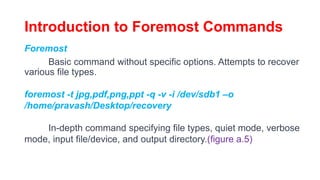
Introduction to Foremost Commands
Foremost
Basic command without specific options. Attempts to recover
various file types.
foremost -t jpg,pdf,png,ppt -q -v -i /dev/sdb1 –o
/home/pravash/Desktop/recovery
In-depth command specifying file types, quiet mode, verbose
mode, input file/device, and output directory.(figure a.5)
Detailed Explanation of Commands
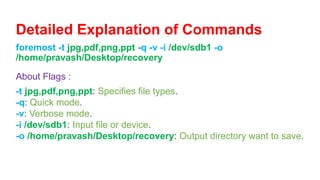
foremost -t jpg,pdf,png,ppt -q -v -i /dev/sdb1 -o
/home/pravash/Desktop/recovery
About Flags :
-t jpg,pdf,png,ppt: Specifies file types.
-q: Quick mode.
-v: Verbose mode.
-i /dev/sdb1: Input file or device.
-o /home/pravash/Desktop/recovery: Output directory want to save.
Figure a.5
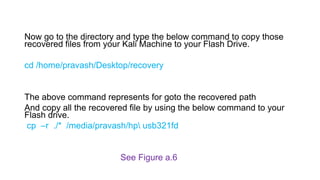
Now go to the directory and type the below command to copy those
recovered files from your Kali Machine to your Flash Drive.
cd /home/pravash/Desktop/recovery
The above command represents for goto the recovered path
And copy all the recovered file by using the below command to your
Flash drive.
cp –r ./* /media/pravash/hp usb321fd
See Figure a.6
Figure a.6
Additional Tips:
• Reminder to be cautious: File recovery tools may modify data;
always use on a copy.
• The importance of backups before performing recovery
operations.
• Note on potential overwriting: Successful file recovery depends
on ensuring that no recovered files overwrite existing data.
Always verify the recovered files to avoid unintentional data
loss.
List potential risks:
• Incomplete Wiping: Device exchanges may not thoroughly erase
personal data.
• Recovery Tools: Digital forensics tools like Foremost and Autopsy can
potentially recover deleted information.
• Unintentional Exposure: Inadvertent sharing of sensitive data during
the exchange process.
Offer suggestions for a safer
exchange:
• Data Erasure: Ensure completed encrypted wiping of
personal data before exchanging.
• Encryption: Use encryption tools to secure data during the
exchange.
• Verify Exchange Partners: Be cautious and use reputable
platforms or individuals for exchanges.

Understanding memory in computing part 2.pptx

  • 1.
    Understanding Memory in Computing(II) Pravash Chandra Das Digital Forensic Specialist
  • 2.
  • 3.
    What is Foremost ? •Definition: Foremost is a forensic data recovery tool that can recover lost files based on their headers, footers, and internal data structures. It can work on image files or physical disks, such as those generated by drones, cameras, or computers. Foremost is useful for extracting and analyzing data from various sources of digital evidence. • Purpose: Designed to recover files based on their headers, footers, and data structures.
  • 4.
    Why Use Foremost? • Recovering files from damaged or deleted file systems. • Extracting specific file types from disk images. • Forensic investigations
  • 5.
    Basic Commands sudo su Switch tothe superuser or root user.(figure a.1) fdisk -l List all available disks and partitions.(figure a.1 & a.2) df -Th Display information about mounted file systems.(figure a.2) (See the figures a.1,a.2)
  • 6.
  • 7.
  • 8.
    I have listedall the contents (figure a.3) that are present inside the flash drive/Pen Drive by using the command ls –lrt (for listing the contents) Now I have deleted those files by going to that path cd /media/pravash/HP USB321FD (for goto the Pendrive path{*here pravash is my user}) and rm –r * (figure a.4) ( for demonstration purpose I am deleting all files inside the path) For confirmation you can see the below Figure a.4 Note : Here *(star) denotes that all files
  • 9.
  • 10.
  • 11.
    Introduction to ForemostCommands Foremost Basic command without specific options. Attempts to recover various file types. foremost -t jpg,pdf,png,ppt -q -v -i /dev/sdb1 –o /home/pravash/Desktop/recovery In-depth command specifying file types, quiet mode, verbose mode, input file/device, and output directory.(figure a.5)
  • 12.
    Detailed Explanation ofCommands foremost -t jpg,pdf,png,ppt -q -v -i /dev/sdb1 -o /home/pravash/Desktop/recovery About Flags : -t jpg,pdf,png,ppt: Specifies file types. -q: Quick mode. -v: Verbose mode. -i /dev/sdb1: Input file or device. -o /home/pravash/Desktop/recovery: Output directory want to save.
  • 13.
  • 14.
    Now go tothe directory and type the below command to copy those recovered files from your Kali Machine to your Flash Drive. cd /home/pravash/Desktop/recovery The above command represents for goto the recovered path And copy all the recovered file by using the below command to your Flash drive. cp –r ./* /media/pravash/hp usb321fd See Figure a.6
  • 15.
  • 16.
    Additional Tips: • Reminderto be cautious: File recovery tools may modify data; always use on a copy. • The importance of backups before performing recovery operations. • Note on potential overwriting: Successful file recovery depends on ensuring that no recovered files overwrite existing data. Always verify the recovered files to avoid unintentional data loss.
  • 17.
    List potential risks: •Incomplete Wiping: Device exchanges may not thoroughly erase personal data. • Recovery Tools: Digital forensics tools like Foremost and Autopsy can potentially recover deleted information. • Unintentional Exposure: Inadvertent sharing of sensitive data during the exchange process.
  • 18.
    Offer suggestions fora safer exchange: • Data Erasure: Ensure completed encrypted wiping of personal data before exchanging. • Encryption: Use encryption tools to secure data during the exchange. • Verify Exchange Partners: Be cautious and use reputable platforms or individuals for exchanges.