Understanding Basic
C++ Program for
Arithmetic Operations
JAIDEV EDUCATION SOCIETY’S
JD COLLEGE OF ENGINEERING AND MANAGEMENT
KATOL ROAD , NAGPUR
(An Autonomous Institute , with NAAC “ A ” Grade)
Affiliated to DBATE, RTMNU & MSBTE Mumbai
Basic science & Humanities Department
2023-24 ( First Semester )
Group 04: Atharv donadkar, Aryan Khobragade, Ayush
mamulkar, Ashish katane, Aman Bansod
Contents
1. Introduction to C++ Programming for Arithmetic Operations
2. Getting Started with C++
3. Addition of Entered No in C++
4. Subtraction of Entered No in C++
5. Multiplication of Entered No in C++
6. Division of Entered No in C++
7. Coding the Program in C++
8. Running the Program and Viewing Results
9. Understanding the Output
10. Conclusion and Recap
11. Thank You
Introduction to C++ Programming for
Arithmetic Operations
C++ programming is a powerful language
used for performing arithmetic operations.
This presentation provides an overview of C+
+ programming and its applications in
arithmetic operations. It covers the basics of
C++ programming, its advantages, and how
to get started with it.
Getting Started with C++
What is C++?
•C++ is a powerful, general-purpose
programming language.
•Developed by Bjarne Stroustrup at Bell
Labs in the 1980s.
•An extension of the C programming
language with additional features.
Why C++?
•C++ allows direct manipulation of memory,
offering fine control over system resources.
•While it offers low-level control, C++ also
provides high-level abstractions, making
complex tasks more manageable.
•Many existing systems and libraries are
written in C++, making it essential for
maintenance and integration.
Addition of Entered No in C++
The Addition Algorithm
1 Step 1: Input two numbers
Begin by declaring variables to store the numbers and
the result. For example, int num1, num2, sum;
2 Step 2: Perform the addition
Add num1 and num2 and store the result in a
variable, such as sum = num1 + num2;
3 Step 3: Display the result
Output the result to the user using std::cout. For
example, std::cout << "Sum: " << sum << std::endl;.
Subtraction of Entered No in C++
The Subtraction Algorithm
Declare variables to store the numbers
and the result. For example, int num1,
num2, difference;
1 Step 1: Input two
numbers
Subtract num2 from num1 and store
the result in a variable, such as
difference = num1 - num2;
2 Step 2: Perform the
subtraction
Output the result to the user using
std::cout. For example, std::cout <<
"Difference: " << difference << std::endl;
3 Step 3: Display the result
If the result is negative, indicate it
appropriately.
4 Step 4: Handle negative
results
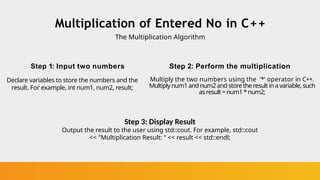
Multiplication of Entered No in C++
The Multiplication Algorithm
Step 1: Input two numbers
Declare variables to store the numbers and the
result. For example, int num1, num2, result;
Step 2: Perform the multiplication
Multiply the two numbers using the '*' operator in C++.
Multiply num1 andnum2and storetheresultin a variable, such
asresult = num1 *num2;
Step 3: Display Result
Output the result to the user using std::cout. For example, std::cout
<< "Multiplication Result: " << result << std::endl;
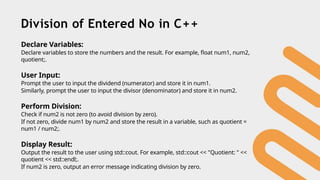
Division of Entered No in C++
Declare Variables:
Declare variables to store the numbers and the result. For example, float num1, num2,
quotient;.
User Input:
Prompt the user to input the dividend (numerator) and store it in num1.
Similarly, prompt the user to input the divisor (denominator) and store it in num2.
Perform Division:
Check if num2 is not zero (to avoid division by zero).
If not zero, divide num1 by num2 and store the result in a variable, such as quotient =
num1 / num2;.
Display Result:
Output the result to the user using std::cout. For example, std::cout << "Quotient: " <<
quotient << std::endl;.
If num2 is zero, output an error message indicating division by zero.
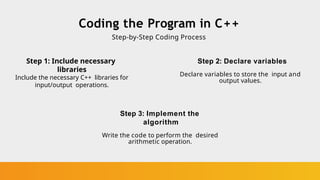
Coding the Program in C++
Step-by-Step Coding Process
Step 1: Include necessary
libraries
Include the necessary C++ libraries for
input/output operations.
Step 2: Declare variables
Declare variables to store the input and
output values.
Step 3: Implement the
algorithm
Write the code to perform the desired
arithmetic operation.
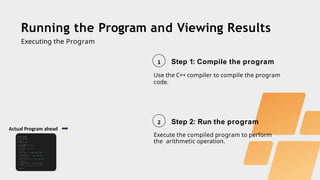
Running the Program and Viewing Results
Executing the Program
1 Step 1: Compile the program
Use the C++ compiler to compile the program
code.
2 Step 2: Run the program
Execute the compiled program to perform
the arithmetic operation.
Actual Program ahead
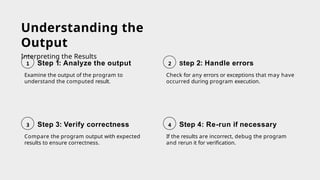
Understanding the
Output
Interpreting the Results
Examine the output of the program to
understand the computed result.
1 Step 1: Analyze the output
Check for any errors or exceptions that may have
occurred during program execution.
2 Step 2: Handle errors
Compare the program output with expected
results to ensure correctness.
3 Step 3: Verify correctness
If the results are incorrect, debug the program
and rerun it for verification.
4 Step 4: Re-run if necessary
Conclusion and Recap
In conclusion, this presentation provided an overview of C++
programming for arithmetic operations. It covered the basic
concepts of C++, getting started with the language, and
detailed explanations of addition, subtraction, multiplication,
and division operations. It also discussed the coding process,
running the program, understanding the output, and provided
a brief recap of the topics covered.
Thank You

Understanding Basic C++ Program for Arithmetic Operations.pptx

  • 1.
    Understanding Basic C++ Programfor Arithmetic Operations JAIDEV EDUCATION SOCIETY’S JD COLLEGE OF ENGINEERING AND MANAGEMENT KATOL ROAD , NAGPUR (An Autonomous Institute , with NAAC “ A ” Grade) Affiliated to DBATE, RTMNU & MSBTE Mumbai Basic science & Humanities Department 2023-24 ( First Semester ) Group 04: Atharv donadkar, Aryan Khobragade, Ayush mamulkar, Ashish katane, Aman Bansod
  • 2.
    Contents 1. Introduction toC++ Programming for Arithmetic Operations 2. Getting Started with C++ 3. Addition of Entered No in C++ 4. Subtraction of Entered No in C++ 5. Multiplication of Entered No in C++ 6. Division of Entered No in C++ 7. Coding the Program in C++ 8. Running the Program and Viewing Results 9. Understanding the Output 10. Conclusion and Recap 11. Thank You
  • 3.
    Introduction to C++Programming for Arithmetic Operations C++ programming is a powerful language used for performing arithmetic operations. This presentation provides an overview of C+ + programming and its applications in arithmetic operations. It covers the basics of C++ programming, its advantages, and how to get started with it.
  • 4.
    Getting Started withC++ What is C++? •C++ is a powerful, general-purpose programming language. •Developed by Bjarne Stroustrup at Bell Labs in the 1980s. •An extension of the C programming language with additional features. Why C++? •C++ allows direct manipulation of memory, offering fine control over system resources. •While it offers low-level control, C++ also provides high-level abstractions, making complex tasks more manageable. •Many existing systems and libraries are written in C++, making it essential for maintenance and integration.
  • 5.
    Addition of EnteredNo in C++ The Addition Algorithm 1 Step 1: Input two numbers Begin by declaring variables to store the numbers and the result. For example, int num1, num2, sum; 2 Step 2: Perform the addition Add num1 and num2 and store the result in a variable, such as sum = num1 + num2; 3 Step 3: Display the result Output the result to the user using std::cout. For example, std::cout << "Sum: " << sum << std::endl;.
  • 6.
    Subtraction of EnteredNo in C++ The Subtraction Algorithm Declare variables to store the numbers and the result. For example, int num1, num2, difference; 1 Step 1: Input two numbers Subtract num2 from num1 and store the result in a variable, such as difference = num1 - num2; 2 Step 2: Perform the subtraction Output the result to the user using std::cout. For example, std::cout << "Difference: " << difference << std::endl; 3 Step 3: Display the result If the result is negative, indicate it appropriately. 4 Step 4: Handle negative results
  • 7.
    Multiplication of EnteredNo in C++ The Multiplication Algorithm Step 1: Input two numbers Declare variables to store the numbers and the result. For example, int num1, num2, result; Step 2: Perform the multiplication Multiply the two numbers using the '*' operator in C++. Multiply num1 andnum2and storetheresultin a variable, such asresult = num1 *num2; Step 3: Display Result Output the result to the user using std::cout. For example, std::cout << "Multiplication Result: " << result << std::endl;
  • 8.
    Division of EnteredNo in C++ Declare Variables: Declare variables to store the numbers and the result. For example, float num1, num2, quotient;. User Input: Prompt the user to input the dividend (numerator) and store it in num1. Similarly, prompt the user to input the divisor (denominator) and store it in num2. Perform Division: Check if num2 is not zero (to avoid division by zero). If not zero, divide num1 by num2 and store the result in a variable, such as quotient = num1 / num2;. Display Result: Output the result to the user using std::cout. For example, std::cout << "Quotient: " << quotient << std::endl;. If num2 is zero, output an error message indicating division by zero.
  • 9.
    Coding the Programin C++ Step-by-Step Coding Process Step 1: Include necessary libraries Include the necessary C++ libraries for input/output operations. Step 2: Declare variables Declare variables to store the input and output values. Step 3: Implement the algorithm Write the code to perform the desired arithmetic operation.
  • 10.
    Running the Programand Viewing Results Executing the Program 1 Step 1: Compile the program Use the C++ compiler to compile the program code. 2 Step 2: Run the program Execute the compiled program to perform the arithmetic operation. Actual Program ahead
  • 12.
    Understanding the Output Interpreting theResults Examine the output of the program to understand the computed result. 1 Step 1: Analyze the output Check for any errors or exceptions that may have occurred during program execution. 2 Step 2: Handle errors Compare the program output with expected results to ensure correctness. 3 Step 3: Verify correctness If the results are incorrect, debug the program and rerun it for verification. 4 Step 4: Re-run if necessary
  • 13.
    Conclusion and Recap Inconclusion, this presentation provided an overview of C++ programming for arithmetic operations. It covered the basic concepts of C++, getting started with the language, and detailed explanations of addition, subtraction, multiplication, and division operations. It also discussed the coding process, running the program, understanding the output, and provided a brief recap of the topics covered.
  • 14.