Download as ODP, PPTX




![ISupportsWindowPattern
$visualState =
[System.Windows.Automation.WindowVisualState]
$wnd.SetWindowVisualState(
$visualState::Maximized)
$wnd.WaitForInputIdle(60000)
$wnd.Close()](https://image.slidesharecdn.com/uiautomationelementsobjectmodelpart01-131225164048-phpapp02/85/The-elements-object-model-in-UIAutomation-PowerShell-Extensions-part-1-11-320.jpg)

![ISupportsScrollPattern
services.msc
# the following may require run as Administrator
$grid = Get-UiaWindow -n services | Get-UiaDataGrid
$scrollAmount = [System.Windows.Automation.ScrollAmount]
$grid.Scroll(
$scrollAmount::LargeIncrement, $scrollAmount::SmallIncrement)
$grid.ScrollHorizontal($scrollAmount::LargeDecrement)
$grid.ScrollVertical($scrollAmount::NoAmount)](https://image.slidesharecdn.com/uiautomationelementsobjectmodelpart01-131225164048-phpapp02/85/The-elements-object-model-in-UIAutomation-PowerShell-Extensions-part-1-13-320.jpg)

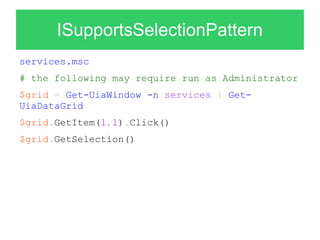


The document introduces new UIAutomation PowerShell extensions that allow accessing controls through an object model using supported patterns. This provides a fluent and intuitive way to interact with and test controls. The extensions expose methods, properties and patterns supported by each control. Examples are provided of selecting radio buttons, changing windows, scrolling grids, editing values and toggling checkboxes. IntelliSense is also supported to help write test code using the new object model.


