









Ufone is a Pakistani GSM cellular service provider. It was the third mobile
operator to enter Pakistani market. It started its operations, under the brand
name of Ufone, in Islamabad on January 29, 2001.
As a result of PTCL's privatization, Ufone became a part of the Emirates
Telecommunication Corporation Group (Etisalat) in 2006.
Introduction
•
UPaisa brings financial convenience to your doorstep! In collaboration with
U Microfinance Bank Ltd., UPaisa launched innovative branchless banking
solutions for the masses of Pakistan in October 2013. With one of the
largest agent networks in the country, UPaisa provides convenient access
to financial services to even the remotest locations. Anyone can now easily
conduct financial transactions through Mobile Accounts or the nearest
UPaisa Shop.
Introduction
 Utility Bill payment
 Sending or receiving money
 mobile account
 Debit Card
 Mobile bill payment
 Donation
The wide range of UPaisa services includes.
mobile account
 Transfer money to another mobile
account
 Transfer money to a person (CNIC)
 Transfer money to other banks (IBFT)
 Pay Utility Bills
 Make donations
 Make online purchases
It functions just like any other bank
account with the added convenience of
being accessible from any corner of
Pakistan, even while travelling.
It offers the following services:
provide efficient and seamless
financial assistance, Branchless
Banking Solutions and Mobile
Banking to U at reasonable and
affordable rates, providing the
best banking services for our
customers.
U BANK
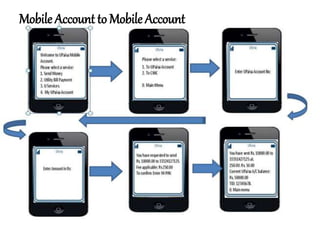
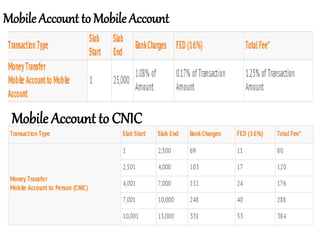
Mobile Account to Mobile Account
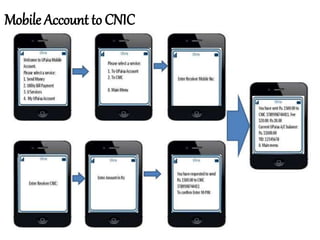
Mobile Account to CNIC
Mobile Account to Mobile Account
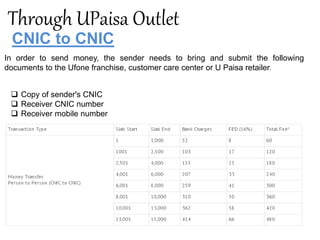
Through UPaisa Outlet
CNIC to CNIC
In order to send money, the sender needs to bring and submit the following
documents to the Ufone franchise, customer care center or U Paisa retailer.
 Copy of sender's CNIC
 Receiver CNIC number
 Receiver mobile number
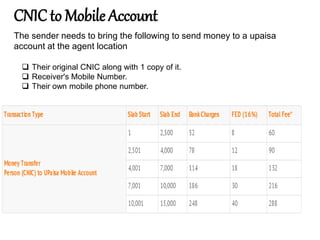
CNIC to Mobile Account
 Their original CNIC along with 1 copy of it.
 Receiver's Mobile Number.
 Their own mobile phone number.
The sender needs to bring the following to send money to a upaisa
account at the agent location
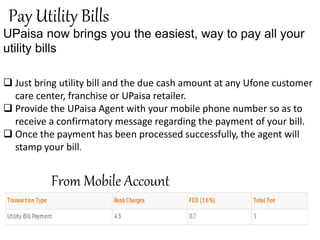
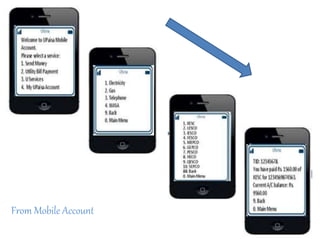
Pay Utility Bills
UPaisa now brings you the easiest, way to pay all your
utility bills
 Just bring utility bill and the due cash amount at any Ufone customer
care center, franchise or UPaisa retailer.
 Provide the UPaisa Agent with your mobile phone number so as to
receive a confirmatory message regarding the payment of your bill.
 Once the payment has been processed successfully, the agent will
stamp your bill.
From Mobile Account
From Mobile Account
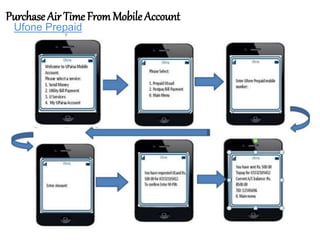
Purchase Air Time FromMobile Account
Ufone Prepaid
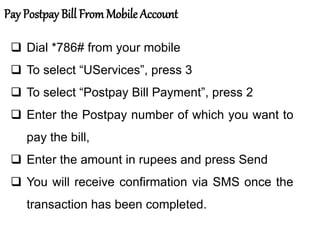
Pay Postpay Bill From Mobile Account
 Dial *786# from your mobile
 To select “UServices”, press 3
 To select “Postpay Bill Payment”, press 2
 Enter the Postpay number of which you want to
pay the bill,
 Enter the amount in rupees and press Send
 You will receive confirmation via SMS once the
transaction has been completed.
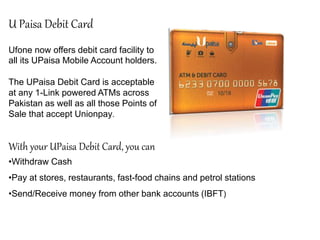
Ufone now offers debit card facility to
all its UPaisa Mobile Account holders.
The UPaisa Debit Card is acceptable
at any 1-Link powered ATMs across
Pakistan as well as all those Points of
Sale that accept Unionpay.
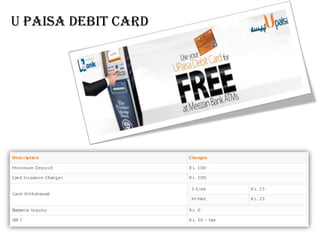
U Paisa Debit Card
With your UPaisa Debit Card, you can
•Withdraw Cash
•Pay at stores, restaurants, fast-food chains and petrol stations
•Send/Receive money from other bank accounts (IBFT)
DONATION
UPaisa gives you the facility to make
donations from the comfort of your
home. Now you can make donations
from anywhere in Pakistan. This
facility is available for UPaisa
customers 24/7.
 Upaisa Mobile Account
 UPaisa Outlet
 Ufone Customer Service Centre
 Ufone Franchise
 Ubank Branch
 Walk into any Ufone Service Center
 Tell agent the Date and Destination of travel
 Agent will tell you the available bus
 Make payment to CSR and receive your Daewoo Bus tickets
Ufone u paisa presentation

Ufone u paisa presentation

  • 1.
    Ufone is aPakistani GSM cellular service provider. It was the third mobile operator to enter Pakistani market. It started its operations, under the brand name of Ufone, in Islamabad on January 29, 2001. As a result of PTCL's privatization, Ufone became a part of the Emirates Telecommunication Corporation Group (Etisalat) in 2006. Introduction
  • 2.
    • UPaisa brings financialconvenience to your doorstep! In collaboration with U Microfinance Bank Ltd., UPaisa launched innovative branchless banking solutions for the masses of Pakistan in October 2013. With one of the largest agent networks in the country, UPaisa provides convenient access to financial services to even the remotest locations. Anyone can now easily conduct financial transactions through Mobile Accounts or the nearest UPaisa Shop. Introduction
  • 3.
     Utility Billpayment  Sending or receiving money  mobile account  Debit Card  Mobile bill payment  Donation The wide range of UPaisa services includes.
  • 4.
    mobile account  Transfermoney to another mobile account  Transfer money to a person (CNIC)  Transfer money to other banks (IBFT)  Pay Utility Bills  Make donations  Make online purchases It functions just like any other bank account with the added convenience of being accessible from any corner of Pakistan, even while travelling. It offers the following services:
  • 5.
    provide efficient andseamless financial assistance, Branchless Banking Solutions and Mobile Banking to U at reasonable and affordable rates, providing the best banking services for our customers. U BANK
  • 7.
    Mobile Account toMobile Account
  • 8.
  • 9.
    Mobile Account toCNIC Mobile Account to Mobile Account
  • 10.
    Through UPaisa Outlet CNICto CNIC In order to send money, the sender needs to bring and submit the following documents to the Ufone franchise, customer care center or U Paisa retailer.  Copy of sender's CNIC  Receiver CNIC number  Receiver mobile number
  • 11.
    CNIC to MobileAccount  Their original CNIC along with 1 copy of it.  Receiver's Mobile Number.  Their own mobile phone number. The sender needs to bring the following to send money to a upaisa account at the agent location
  • 13.
    Pay Utility Bills UPaisanow brings you the easiest, way to pay all your utility bills  Just bring utility bill and the due cash amount at any Ufone customer care center, franchise or UPaisa retailer.  Provide the UPaisa Agent with your mobile phone number so as to receive a confirmatory message regarding the payment of your bill.  Once the payment has been processed successfully, the agent will stamp your bill. From Mobile Account
  • 14.
  • 16.
    Purchase Air TimeFromMobile Account Ufone Prepaid
  • 17.
    Pay Postpay BillFrom Mobile Account  Dial *786# from your mobile  To select “UServices”, press 3  To select “Postpay Bill Payment”, press 2  Enter the Postpay number of which you want to pay the bill,  Enter the amount in rupees and press Send  You will receive confirmation via SMS once the transaction has been completed.
  • 19.
    Ufone now offersdebit card facility to all its UPaisa Mobile Account holders. The UPaisa Debit Card is acceptable at any 1-Link powered ATMs across Pakistan as well as all those Points of Sale that accept Unionpay. U Paisa Debit Card With your UPaisa Debit Card, you can •Withdraw Cash •Pay at stores, restaurants, fast-food chains and petrol stations •Send/Receive money from other bank accounts (IBFT)
  • 21.
    DONATION UPaisa gives youthe facility to make donations from the comfort of your home. Now you can make donations from anywhere in Pakistan. This facility is available for UPaisa customers 24/7.  Upaisa Mobile Account  UPaisa Outlet  Ufone Customer Service Centre  Ufone Franchise  Ubank Branch
  • 22.
     Walk intoany Ufone Service Center  Tell agent the Date and Destination of travel  Agent will tell you the available bus  Make payment to CSR and receive your Daewoo Bus tickets