UDS Enterprise
VMware vSphere
Quick Steps
@udsenterprise.com
More info about our software :
UDS Enterprise TeamContact:
www.udsenterprise.com
UDS Enterprise & vSphere integration
Step 1
Prepare your environment
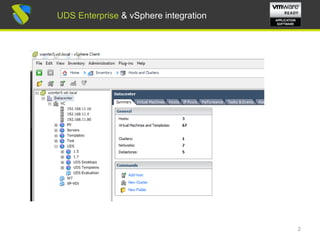
Install & configure VMware vSphere environment with at least:
- One ESXi node
- One vCenter server
For further info: VMware Compatibility Guide &
vCenter Server and vSphere Client Hardware Requirements
1
UDS Enterprise & vSphere integration
2
UDS Enterprise & vSphere integrationUDS Enterprise & vSphere integration
UDS Enterprise & vSphere integration
Step 2
Prepare Virtual Desktops to be deployed base image:
Optimize your base image/s
- Configure GPO
- Remove unnecessary components
Install in your base image/s
- Favourite apps
- VMware Tools
- UDS Actor
For further info: UDS Enterprise 2.0 Installation, Administration
and User Guide
3
UDS Enterprise & vSphere integration
Step 3
UDS Enterprise software installation
Install & configure UDS Enterprise components:
- MySQL Database
- UDS Server (broker)
- UDS Tunneler
- UDS Actor
4
UDS Enterprise & vSphere integration
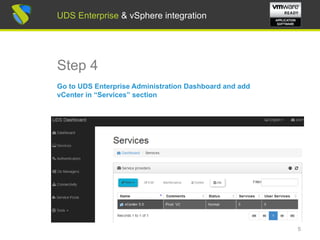
Step 4
Go to UDS Enterprise Administration Dashboard and add
vCenter in “Services” section
5
UDS Enterprise & vSphere integration
Step 5
Create your Authenticator/s, OS Manager/s & Transport/s
- Authenticator/s: Active Directory, eDirectory, OpenLDAP,
Internal database, IP authenticador, SAML
- OS Manager/s: Linux, Windows (Persistent / Non-
Persistent)
- Transport/s: RDP, XRDP, NX, RGS and RDP through
HTML5
6
UDS Enterprise & vSphere integration
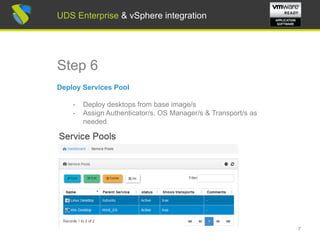
Step 6
Deploy Services Pool
- Deploy desktops from base image/s
- Assign Authenticator/s, OS Manager/s & Transport/s as
needed
7
UDS Enterprise & vSphere integration
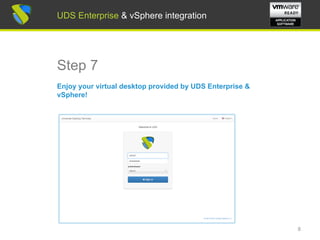
Step 7
Enjoy your virtual desktop provided by UDS Enterprise &
vSphere!
8
UDS Enterprise & vSphere integration
For further info visit:
www.udsenterprise.com
info@udsenterprise.com
www.udsenterprise.com
UDS Enterprise TeamContact:
UDS Enterprise & vSphere integration

UDS Enterprise & vSphere Quick Steps

  • 1.
    UDS Enterprise VMware vSphere QuickSteps @udsenterprise.com More info about our software : UDS Enterprise TeamContact: www.udsenterprise.com
  • 2.
    UDS Enterprise &vSphere integration Step 1 Prepare your environment Install & configure VMware vSphere environment with at least: - One ESXi node - One vCenter server For further info: VMware Compatibility Guide & vCenter Server and vSphere Client Hardware Requirements 1 UDS Enterprise & vSphere integration
  • 3.
    2 UDS Enterprise &vSphere integrationUDS Enterprise & vSphere integration
  • 4.
    UDS Enterprise &vSphere integration Step 2 Prepare Virtual Desktops to be deployed base image: Optimize your base image/s - Configure GPO - Remove unnecessary components Install in your base image/s - Favourite apps - VMware Tools - UDS Actor For further info: UDS Enterprise 2.0 Installation, Administration and User Guide 3 UDS Enterprise & vSphere integration
  • 5.
    UDS Enterprise &vSphere integration Step 3 UDS Enterprise software installation Install & configure UDS Enterprise components: - MySQL Database - UDS Server (broker) - UDS Tunneler - UDS Actor 4 UDS Enterprise & vSphere integration
  • 6.
    UDS Enterprise &vSphere integration Step 4 Go to UDS Enterprise Administration Dashboard and add vCenter in “Services” section 5 UDS Enterprise & vSphere integration
  • 7.
    UDS Enterprise &vSphere integration Step 5 Create your Authenticator/s, OS Manager/s & Transport/s - Authenticator/s: Active Directory, eDirectory, OpenLDAP, Internal database, IP authenticador, SAML - OS Manager/s: Linux, Windows (Persistent / Non- Persistent) - Transport/s: RDP, XRDP, NX, RGS and RDP through HTML5 6 UDS Enterprise & vSphere integration
  • 8.
    UDS Enterprise &vSphere integration Step 6 Deploy Services Pool - Deploy desktops from base image/s - Assign Authenticator/s, OS Manager/s & Transport/s as needed 7 UDS Enterprise & vSphere integration
  • 9.
    UDS Enterprise &vSphere integration Step 7 Enjoy your virtual desktop provided by UDS Enterprise & vSphere! 8 UDS Enterprise & vSphere integration
  • 10.
    UDS Enterprise &vSphere integration For further info visit: www.udsenterprise.com info@udsenterprise.com www.udsenterprise.com UDS Enterprise TeamContact: UDS Enterprise & vSphere integration