UDL Presentation
Pursue-IT Elementary
Janel Meriweather
SPED 6334
UDL design school
The purpose of the UDL design school,
Pursue-IT Elementary,
is to offer a multi-educational opportunity for the learner to identify their learning
style and pursue it through state-of-the-art facility and personalized instruction that
accommodates all learners
Pre-K-5th grades.
Building design
Structure
 Wheel-chair lifts (for the physically impaired)
 Elevators and Steps (for physically impaired)
 Sound-proof walls (for those sensitive to sound)
 Within a classroom [common pod with specific small group rooms]
 Theater
 Sensory room
Personnel
 Each grade level will be staffed with a teacher and 2 assistants per 20 students.
 Each student or group of students will have lessons that are designed and given to
them via Google Docs.
 Lessons will contain the majority designed according to their learning network:
Recognition, Strategic and Affective and will work with others within their
preferred network.
 **Note: students can have more than one network at a time. Lessons will be
flexible instruction.
 The school will have full-time Psychologist, behavior specialist, assistive
technology technician, Occupational and Physical therapist
Core Areas
Instructionial Classes will consist of grade level students but each class will have
subgroups. The teacher monitors the collaborations between partners
 Subgroups: core content will be grouped according to ability 3x per week and the
other 2 days each student will be matched with another student to teach the other
in a way that is easiest for them.
 (ex.) one student learns best through videos, so the student has to search videos that best
expresses content and will teach his partner through video. While the other student learns
best through manipulatives and he will teach to his partner through manipulatives
 Core content ability groups will receive their daily lesson through Google Docs and they
will choose their setting within the pod classroom area to work on their assignments
 Life Skills content groups will be small mixed grouping with meeting with each group.
While teacher is meeting with group the other students will be working on a creative
volunteer project within mixed grouping with group responsibilities decided beforehand.
Curriculum https://www.youtube.com/watch?v=pGLTJw0GSxk
 Schedule: Modified day (morning – core); 2-hour=lunch (afternoon – life skills
teaching)
 Core Curriculum: Communication/Language, Social Skills, Reading will be
developed using Science/Social Studies, Math
 Life skills
 -money management (bills, savings, planning)
 -goal setting
 Time management
 Behavior management
 Cooking/cleaning
Recognition Learning Networks
Helping students with learning process:
Use many examples
Use a spotlight on the areas of focus
Use different and many formats and media
Make sure that background knowledge is a part of the process
Strategic Learning Network
During student learning:
Show various models of great examples of what is expected
Make sure there several moments to practice using aids to help with
learning
Let the student know the strengths and weaknesses of their work
Give the student many opportunities to show what they know
Affective Learning Network
Allow the student to :
Choose what they would like to work on and how they would like to accomplish
their work
Create challenges that are leveled
Give the student and opportunity to work for and choose their award
Decide where they would like to learn
Technology
 Everyday Teaching will be through Google Docs for lessons and assignments.
Other Technology
 Smartboard technology
 Assistive Technology: Augmentative and Alternative Communication (AAC) for
the limited verbal and nonverbal student
 Assistive Technology for the Hearing Impaired
Assessment
 Assessment will be monitored weekly through observations and diagnostic skill
assessments on the computer through play-based software for Pre-K through
2nd grade.
 3rd -5th will continue to have assessments through observations, diagnostic
skills assessment weekly on the computer with play-based software.
Additionally, students will assessed core state standards 4 times a year for a
maximum of 1-hour each time of assessing.
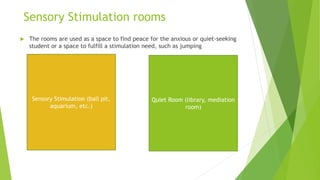
Sensory Stimulation rooms
 The rooms are used as a space to find peace for the anxious or quiet-seeking
student or a space to fulfill a stimulation need, such as jumping
Sensory Stimulation (ball pit,
aquarium, etc.)
Quiet Room (library, mediation
room)
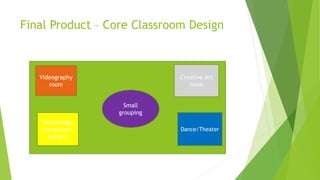
Final Product – Core Classroom Design
Videography
room
Small
grouping
Creative Art
room
Dance/Theater
Technology
(computers,
games)
References
 Rose, DH., & Meyer, A. (2002) Teaching Every Student in the Digital Age.
Universal Design for Learning. Association for Supervision and Curriculum
Development, Alexandria Virginia.
 “Royalty-Free Stock Images And Stock Photography By Dreamstime.”
Dreamstime, www.dreamstime.com/.
 National Center on Universal Design for Learning. “UDL: Principles and
Practice.” YouTube, YouTube, 17 Mar. 2010,
www.youtube.com/watch?v=pGLTJw0GSxk.

Udl presentation sped 6334 07.13.19 - final

  • 1.
  • 2.
    UDL design school Thepurpose of the UDL design school, Pursue-IT Elementary, is to offer a multi-educational opportunity for the learner to identify their learning style and pursue it through state-of-the-art facility and personalized instruction that accommodates all learners Pre-K-5th grades.
  • 3.
    Building design Structure  Wheel-chairlifts (for the physically impaired)  Elevators and Steps (for physically impaired)  Sound-proof walls (for those sensitive to sound)  Within a classroom [common pod with specific small group rooms]  Theater  Sensory room
  • 4.
    Personnel  Each gradelevel will be staffed with a teacher and 2 assistants per 20 students.  Each student or group of students will have lessons that are designed and given to them via Google Docs.  Lessons will contain the majority designed according to their learning network: Recognition, Strategic and Affective and will work with others within their preferred network.  **Note: students can have more than one network at a time. Lessons will be flexible instruction.  The school will have full-time Psychologist, behavior specialist, assistive technology technician, Occupational and Physical therapist
  • 5.
    Core Areas Instructionial Classeswill consist of grade level students but each class will have subgroups. The teacher monitors the collaborations between partners  Subgroups: core content will be grouped according to ability 3x per week and the other 2 days each student will be matched with another student to teach the other in a way that is easiest for them.  (ex.) one student learns best through videos, so the student has to search videos that best expresses content and will teach his partner through video. While the other student learns best through manipulatives and he will teach to his partner through manipulatives  Core content ability groups will receive their daily lesson through Google Docs and they will choose their setting within the pod classroom area to work on their assignments  Life Skills content groups will be small mixed grouping with meeting with each group. While teacher is meeting with group the other students will be working on a creative volunteer project within mixed grouping with group responsibilities decided beforehand.
  • 6.
    Curriculum https://www.youtube.com/watch?v=pGLTJw0GSxk  Schedule:Modified day (morning – core); 2-hour=lunch (afternoon – life skills teaching)  Core Curriculum: Communication/Language, Social Skills, Reading will be developed using Science/Social Studies, Math  Life skills  -money management (bills, savings, planning)  -goal setting  Time management  Behavior management  Cooking/cleaning
  • 7.
    Recognition Learning Networks Helpingstudents with learning process: Use many examples Use a spotlight on the areas of focus Use different and many formats and media Make sure that background knowledge is a part of the process
  • 8.
    Strategic Learning Network Duringstudent learning: Show various models of great examples of what is expected Make sure there several moments to practice using aids to help with learning Let the student know the strengths and weaknesses of their work Give the student many opportunities to show what they know
  • 9.
    Affective Learning Network Allowthe student to : Choose what they would like to work on and how they would like to accomplish their work Create challenges that are leveled Give the student and opportunity to work for and choose their award Decide where they would like to learn
  • 10.
    Technology  Everyday Teachingwill be through Google Docs for lessons and assignments. Other Technology  Smartboard technology  Assistive Technology: Augmentative and Alternative Communication (AAC) for the limited verbal and nonverbal student  Assistive Technology for the Hearing Impaired
  • 11.
    Assessment  Assessment willbe monitored weekly through observations and diagnostic skill assessments on the computer through play-based software for Pre-K through 2nd grade.  3rd -5th will continue to have assessments through observations, diagnostic skills assessment weekly on the computer with play-based software. Additionally, students will assessed core state standards 4 times a year for a maximum of 1-hour each time of assessing.
  • 12.
    Sensory Stimulation rooms The rooms are used as a space to find peace for the anxious or quiet-seeking student or a space to fulfill a stimulation need, such as jumping Sensory Stimulation (ball pit, aquarium, etc.) Quiet Room (library, mediation room)
  • 13.
    Final Product –Core Classroom Design Videography room Small grouping Creative Art room Dance/Theater Technology (computers, games)
  • 14.
    References  Rose, DH.,& Meyer, A. (2002) Teaching Every Student in the Digital Age. Universal Design for Learning. Association for Supervision and Curriculum Development, Alexandria Virginia.  “Royalty-Free Stock Images And Stock Photography By Dreamstime.” Dreamstime, www.dreamstime.com/.  National Center on Universal Design for Learning. “UDL: Principles and Practice.” YouTube, YouTube, 17 Mar. 2010, www.youtube.com/watch?v=pGLTJw0GSxk.