TYPES OF
OPERATING
SYSTEMS
Md sahil shahh
W H AT I S A N O P E R AT I N G
S Y S T E M ? ?
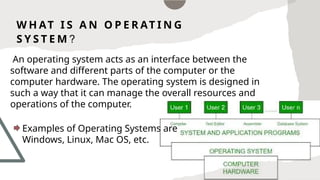
An operating system acts as an interface between the
software and different parts of the computer or the
computer hardware. The operating system is designed in
such a way that it can manage the overall resources and
operations of the computer.
Examples of Operating Systems are
Windows, Linux, Mac OS, etc.
T Y P E S O F
O P E R AT I N G
S Y S T E M
• Batch Operating System
• Multi-Programming System
• Multi-Processing System
• Multi-Tasking Operating System
• Time-Sharing Operating System
• Distributed Operating System
• Network Operating System
• Real-Time Operating System
B AT C H O P E R AT I N G
S Y S T E M S
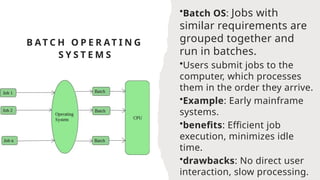
•Batch OS: Jobs with
similar requirements are
grouped together and
run in batches.
•Users submit jobs to the
computer, which processes
them in the order they arrive.
•Example: Early mainframe
systems.
•benefits: Efficient job
execution, minimizes idle
time.
•drawbacks: No direct user
interaction, slow processing.
M U L T I - P R O G R A M M I N G O P E R AT I N G
S Y S T E M
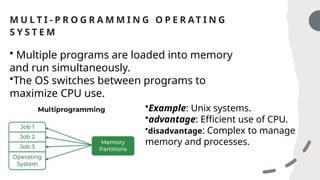
• Multiple programs are loaded into memory
and run simultaneously.
•The OS switches between programs to
maximize CPU use.
•Example: Unix systems.
•advantage: Efficient use of CPU.
•disadvantage: Complex to manage
memory and processes.
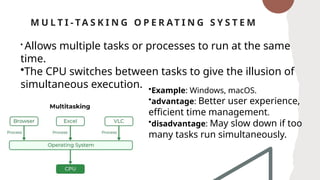
M U L T I - TA S K I N G O P E R AT I N G S Y S T E M
•Example: Windows, macOS.
•advantage: Better user experience,
efficient time management.
•disadvantage: May slow down if too
many tasks run simultaneously.
• Allows multiple tasks or processes to run at the same
time.
•The CPU switches between tasks to give the illusion of
simultaneous execution.
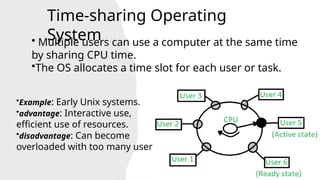
• Multiple users can use a computer at the same time
by sharing CPU time.
•The OS allocates a time slot for each user or task.
•Example: Early Unix systems.
•advantage: Interactive use,
efficient use of resources.
•disadvantage: Can become
overloaded with too many users
Time-sharing Operating
System
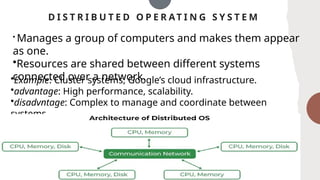
D I S T R I B U T E D O P E R AT I N G S Y S T E M
• Manages a group of computers and makes them appear
as one.
•Resources are shared between different systems
connected over a network.
•Example: Cluster systems, Google’s cloud infrastructure.
•advantage: High performance, scalability.
•disadvntage: Complex to manage and coordinate between
systems.
M U L T I - P R O C E S S I N G O P E R AT I N G S Y S T E M
•Multi-processing OS: Supports multiple CPUs to work
together on different tasks at the same time.
•Uses two or more processors to increase computing
power.
•Example: Linux, modern
Windows.
•advantage: Faster performance,
more efficient.
•disadvantage: More complex to
manage multiple processors.
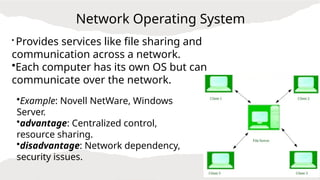
Network Operating System
• Provides services like file sharing and
communication across a network.
•Each computer has its own OS but can
communicate over the network.
•Example: Novell NetWare, Windows
Server.
•advantage: Centralized control,
resource sharing.
•disadvantage: Network dependency,
security issues.
R E A L - T I M E O P E R AT I N G S Y S T E M ( R T O S )
• Designed to process data as it comes in,
with minimal delay.
•Used in systems where timing is critical
(e.g., medical devices, flight control).
•Example: VxWorks, FreeRTOS.
•advantage: Precise and reliable timing.
•disadvantage: Limited resources,
expensive to develop.
THANK YOU

types of operating system.pptx..........

  • 1.
  • 2.
    W H ATI S A N O P E R AT I N G S Y S T E M ? ? An operating system acts as an interface between the software and different parts of the computer or the computer hardware. The operating system is designed in such a way that it can manage the overall resources and operations of the computer. Examples of Operating Systems are Windows, Linux, Mac OS, etc.
  • 3.
    T Y PE S O F O P E R AT I N G S Y S T E M • Batch Operating System • Multi-Programming System • Multi-Processing System • Multi-Tasking Operating System • Time-Sharing Operating System • Distributed Operating System • Network Operating System • Real-Time Operating System
  • 4.
    B AT CH O P E R AT I N G S Y S T E M S •Batch OS: Jobs with similar requirements are grouped together and run in batches. •Users submit jobs to the computer, which processes them in the order they arrive. •Example: Early mainframe systems. •benefits: Efficient job execution, minimizes idle time. •drawbacks: No direct user interaction, slow processing.
  • 5.
    M U LT I - P R O G R A M M I N G O P E R AT I N G S Y S T E M • Multiple programs are loaded into memory and run simultaneously. •The OS switches between programs to maximize CPU use. •Example: Unix systems. •advantage: Efficient use of CPU. •disadvantage: Complex to manage memory and processes.
  • 6.
    M U LT I - TA S K I N G O P E R AT I N G S Y S T E M •Example: Windows, macOS. •advantage: Better user experience, efficient time management. •disadvantage: May slow down if too many tasks run simultaneously. • Allows multiple tasks or processes to run at the same time. •The CPU switches between tasks to give the illusion of simultaneous execution.
  • 7.
    • Multiple userscan use a computer at the same time by sharing CPU time. •The OS allocates a time slot for each user or task. •Example: Early Unix systems. •advantage: Interactive use, efficient use of resources. •disadvantage: Can become overloaded with too many users Time-sharing Operating System
  • 8.
    D I ST R I B U T E D O P E R AT I N G S Y S T E M • Manages a group of computers and makes them appear as one. •Resources are shared between different systems connected over a network. •Example: Cluster systems, Google’s cloud infrastructure. •advantage: High performance, scalability. •disadvntage: Complex to manage and coordinate between systems.
  • 9.
    M U LT I - P R O C E S S I N G O P E R AT I N G S Y S T E M •Multi-processing OS: Supports multiple CPUs to work together on different tasks at the same time. •Uses two or more processors to increase computing power. •Example: Linux, modern Windows. •advantage: Faster performance, more efficient. •disadvantage: More complex to manage multiple processors.
  • 10.
    Network Operating System •Provides services like file sharing and communication across a network. •Each computer has its own OS but can communicate over the network. •Example: Novell NetWare, Windows Server. •advantage: Centralized control, resource sharing. •disadvantage: Network dependency, security issues.
  • 11.
    R E AL - T I M E O P E R AT I N G S Y S T E M ( R T O S ) • Designed to process data as it comes in, with minimal delay. •Used in systems where timing is critical (e.g., medical devices, flight control). •Example: VxWorks, FreeRTOS. •advantage: Precise and reliable timing. •disadvantage: Limited resources, expensive to develop.
  • 12.