TWILIO API 
Build Text Messaging in Web App. 
Presenter: Naincy Gupta 
Mindfire Solutions
Contents 
Introduction 
How it Works? 
Get start with it 
TWILIO API 
Features of Twilio 
Comparison with other API's
Introduction 
 Allow to build apps that can communicate. 
 TWILIO APIs are designed to make it easier to build 
telephony into your apps 
 TWILIO SMS supports 98 languages 
 You can use TWILIO API with PHP, PYTHON, RUBY, 
JAVA, .NET, PERL
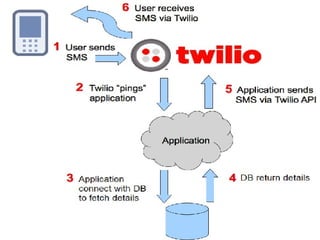
How It Works?
How to Start with 
 Create account in Twilio 
 Get verified your phone number. 
 Get a Twilio Phone number. 
 Write your script want to call 
 Set POST url for the number which will call your script 
 All set! To send SMS
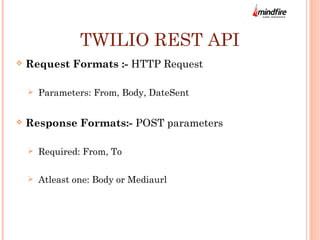
TWILIO REST API 
 Request Formats :- HTTP Request 
 Parameters: From, Body, DateSent 
 Response Formats:- POST parameters 
 Required: From, To 
 Atleast one: Body or Mediaurl
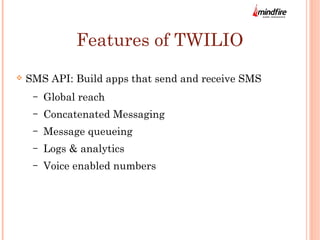
Features of TWILIO 
 SMS API: Build apps that send and receive SMS 
– Global reach 
– Concatenated Messaging 
– Message queueing 
– Logs & analytics 
– Voice enabled numbers
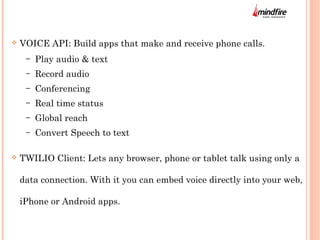
 VOICE API: Build apps that make and receive phone calls. 
– Play audio & text 
– Record audio 
– Conferencing 
– Real time status 
– Global reach 
– Convert Speech to text 
 TWILIO Client: Lets any browser, phone or tablet talk using only a 
data connection. With it you can embed voice directly into your web, 
iPhone or Android apps.
Benefits of TWILIO 
 Set Geographic permissions for SMS sending and receiving. 
 Monitor your API. 
 Maintain log details of SMS. 
 Can export CSV of your logs. 
 Can use TWILIO API with PHP, PYTHON, RUBY, JAVA, .NET, 
PERL
Comparison with 
Other API's
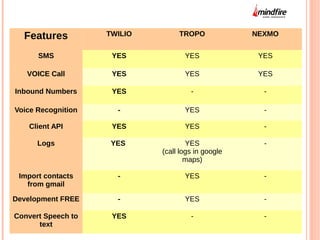
Features TWILIO TROPO NEXMO 
SMS YES YES YES 
VOICE Call YES YES YES 
Inbound Numbers YES - - 
Voice Recognition - YES - 
Client API YES YES - 
Logs YES YES 
(call logs in google 
maps) 
- 
Import contacts 
from gmail 
- YES - 
Development FREE - YES - 
Convert Speech to 
text 
YES - -
QUESTIONS..?? 
Mail me your questions at nansee1804@gmail.com
Thank You..!!

TWILIO SMS Introduction

  • 1.
    TWILIO API BuildText Messaging in Web App. Presenter: Naincy Gupta Mindfire Solutions
  • 2.
    Contents Introduction Howit Works? Get start with it TWILIO API Features of Twilio Comparison with other API's
  • 3.
    Introduction  Allowto build apps that can communicate.  TWILIO APIs are designed to make it easier to build telephony into your apps  TWILIO SMS supports 98 languages  You can use TWILIO API with PHP, PYTHON, RUBY, JAVA, .NET, PERL
  • 4.
  • 6.
    How to Startwith  Create account in Twilio  Get verified your phone number.  Get a Twilio Phone number.  Write your script want to call  Set POST url for the number which will call your script  All set! To send SMS
  • 7.
    TWILIO REST API  Request Formats :- HTTP Request  Parameters: From, Body, DateSent  Response Formats:- POST parameters  Required: From, To  Atleast one: Body or Mediaurl
  • 8.
    Features of TWILIO  SMS API: Build apps that send and receive SMS – Global reach – Concatenated Messaging – Message queueing – Logs & analytics – Voice enabled numbers
  • 9.
     VOICE API:Build apps that make and receive phone calls. – Play audio & text – Record audio – Conferencing – Real time status – Global reach – Convert Speech to text  TWILIO Client: Lets any browser, phone or tablet talk using only a data connection. With it you can embed voice directly into your web, iPhone or Android apps.
  • 10.
    Benefits of TWILIO  Set Geographic permissions for SMS sending and receiving.  Monitor your API.  Maintain log details of SMS.  Can export CSV of your logs.  Can use TWILIO API with PHP, PYTHON, RUBY, JAVA, .NET, PERL
  • 13.
  • 14.
    Features TWILIO TROPONEXMO SMS YES YES YES VOICE Call YES YES YES Inbound Numbers YES - - Voice Recognition - YES - Client API YES YES - Logs YES YES (call logs in google maps) - Import contacts from gmail - YES - Development FREE - YES - Convert Speech to text YES - -
  • 15.
    QUESTIONS..?? Mail meyour questions at nansee1804@gmail.com
  • 16.

Editor's Notes

  • #2 <number>
  • #4 <number>
  • #5 <number>
  • #7 <number>
  • #8 <number>
  • #9 <number>
  • #10 <number>
  • #11 <number>
  • #14 <number>