Garage Band Tutorial Link
http://www.youtube.com/watch?v=vv_VWD3rEMw
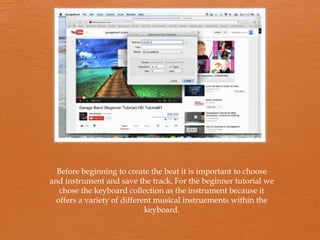
Before beginning to create the beat it is important to choose
and instrument and save the track. For the beginner tutorial we
chose the keyboard collection as the instrument because it
offers a variety of different musical instruements within the
keyboard.
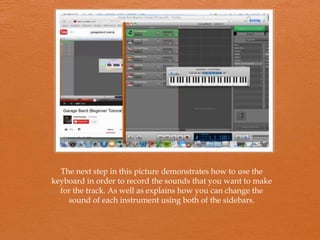
The next step in this picture demonstrates how to use the
keyboard in order to record the sounds that you want to make
for the track. As well as explains how you can change the
sound of each instrument using both of the sidebars.
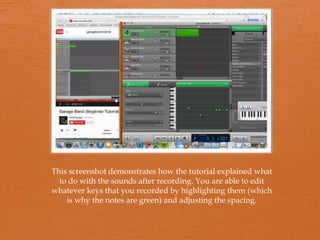
This screenshot demonstrates how the tutorial explained what
to do with the sounds after recording. You are able to edit
whatever keys that you recorded by highlighting them (which
is why the notes are green) and adjusting the spacing.
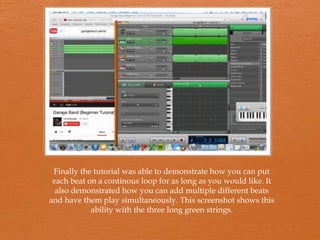
Finally the tutorial was able to demonstrate how you can put
each beat on a continous loop for as long as you would like. It
also demonstrated how you can add multiple different beats
and have them play simultaneously. This screenshot shows this
ability with the three long green strings.

Tutorial presentation

  • 2.
    Garage Band TutorialLink http://www.youtube.com/watch?v=vv_VWD3rEMw
  • 3.
    Before beginning tocreate the beat it is important to choose and instrument and save the track. For the beginner tutorial we chose the keyboard collection as the instrument because it offers a variety of different musical instruements within the keyboard.
  • 4.
    The next stepin this picture demonstrates how to use the keyboard in order to record the sounds that you want to make for the track. As well as explains how you can change the sound of each instrument using both of the sidebars.
  • 5.
    This screenshot demonstrateshow the tutorial explained what to do with the sounds after recording. You are able to edit whatever keys that you recorded by highlighting them (which is why the notes are green) and adjusting the spacing.
  • 6.
    Finally the tutorialwas able to demonstrate how you can put each beat on a continous loop for as long as you would like. It also demonstrated how you can add multiple different beats and have them play simultaneously. This screenshot shows this ability with the three long green strings.