TREE
Fariha Tasmin Jaigirdar
Assistant Professor
Daffodil International University
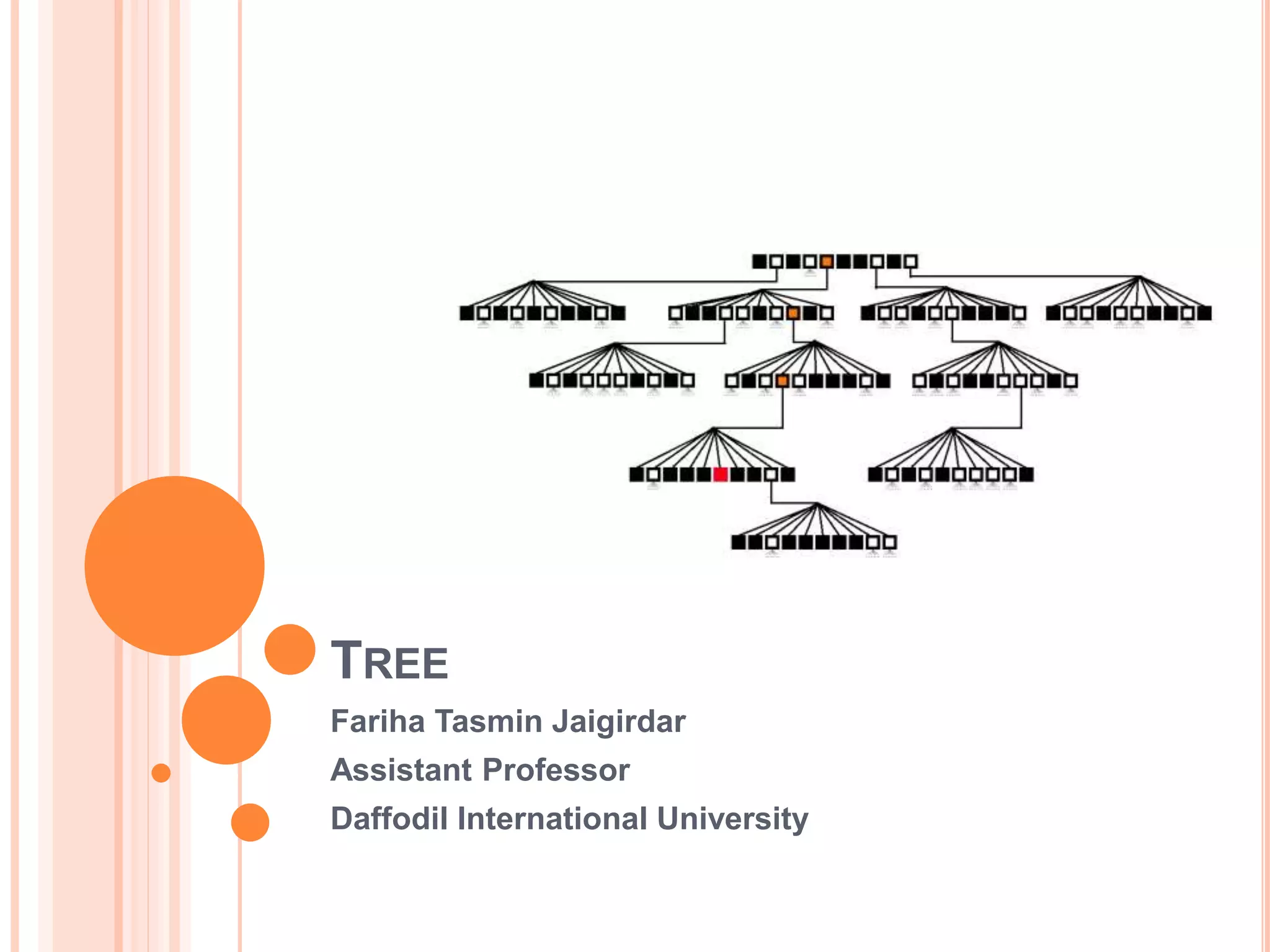
TREE
 Trees are very flexible and powerful non-liner data structure that
can be used to represent data items possessing hierarchical
relationship between the grand father and his children and grand
children as so on.
 A tree is an ideal data structure for representing hierarchical data.
 A tree can be theoretically defined as a finite set of one or more
data items (or nodes) such that :
1. There is a special node called the root of the tree.
2. Removing nodes (or data item) are partitioned into number of mutually
exclusive (i.e., disjoined) subsets each of which is itself a tree, are called
sub tree.
 Before we begin our study of tree data structures, let’s look at a
few common examples.
EXAMPLES OF TREES
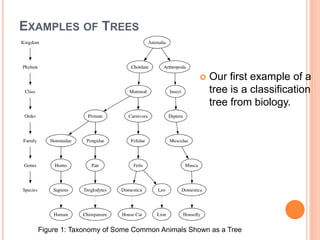
 Our first example of a
tree is a classification
tree from biology.
Figure 1: Taxonomy of Some Common Animals Shown as a Tree
EXAMPLES OF TREES
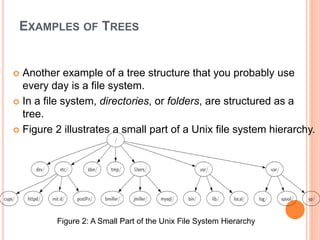
 Another example of a tree structure that you probably use
every day is a file system.
 In a file system, directories, or folders, are structured as a
tree.
 Figure 2 illustrates a small part of a Unix file system hierarchy.
Figure 2: A Small Part of the Unix File System Hierarchy
EXAMPLES OF TREES
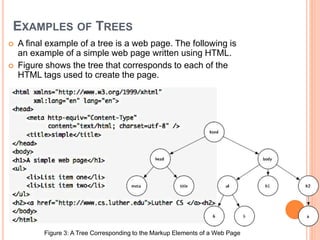
 A final example of a tree is a web page. The following is
an example of a simple web page written using HTML.
 Figure shows the tree that corresponds to each of the
HTML tags used to create the page.
Figure 3: A Tree Corresponding to the Markup Elements of a Web Page
BASIC TERMINOLOGIES
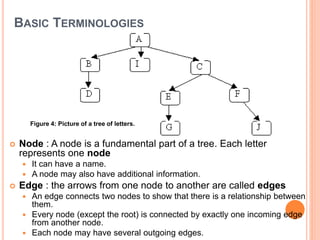
 Node : A node is a fundamental part of a tree. Each letter
represents one node
 It can have a name.
 A node may also have additional information.
 Edge : the arrows from one node to another are called edges
 An edge connects two nodes to show that there is a relationship between
them.
 Every node (except the root) is connected by exactly one incoming edge
from another node.
 Each node may have several outgoing edges.
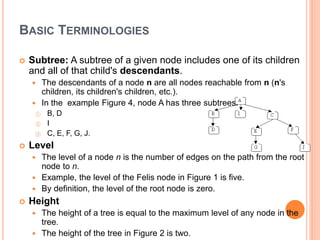
Figure 4: Picture of a tree of letters.
BASIC TERMINOLOGIES
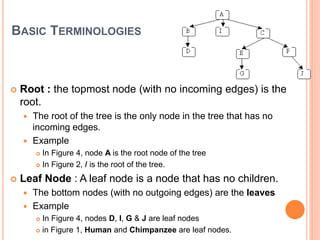
 Root : the topmost node (with no incoming edges) is the
root.
 The root of the tree is the only node in the tree that has no
incoming edges.
 Example
 In Figure 4, node A is the root node of the tree
 In Figure 2, / is the root of the tree.
 Leaf Node : A leaf node is a node that has no children.
 The bottom nodes (with no outgoing edges) are the leaves
 Example
 In Figure 4, nodes D, I, G & J are leaf nodes
 in Figure 1, Human and Chimpanzee are leaf nodes.
BASIC TERMINOLOGIES
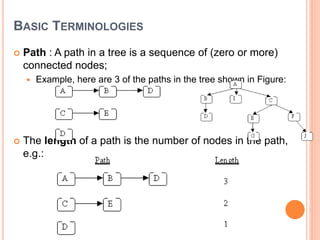
 Path : A path in a tree is a sequence of (zero or more)
connected nodes;
 Example, here are 3 of the paths in the tree shown in Figure:
 The length of a path is the number of nodes in the path,
e.g.:
BASIC TERMINOLOGIES
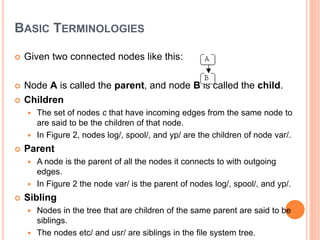
 Given two connected nodes like this:
 Node A is called the parent, and node B is called the child.
 Children
 The set of nodes c that have incoming edges from the same node to
are said to be the children of that node.
 In Figure 2, nodes log/, spool/, and yp/ are the children of node var/.
 Parent
 A node is the parent of all the nodes it connects to with outgoing
edges.
 In Figure 2 the node var/ is the parent of nodes log/, spool/, and yp/.
 Sibling
 Nodes in the tree that are children of the same parent are said to be
siblings.
 The nodes etc/ and usr/ are siblings in the file system tree.
BASIC TERMINOLOGIES
 Subtree: A subtree of a given node includes one of its children
and all of that child's descendants.
 The descendants of a node n are all nodes reachable from n (n's
children, its children's children, etc.).
 In the example Figure 4, node A has three subtrees:
① B, D
② I
③ C, E, F, G, J.
 Level
 The level of a node n is the number of edges on the path from the root
node to n.
 Example, the level of the Felis node in Figure 1 is five.
 By definition, the level of the root node is zero.
 Height
 The height of a tree is equal to the maximum level of any node in the
tree.
 The height of the tree in Figure 2 is two.
BASIC TERMINOLOGIES
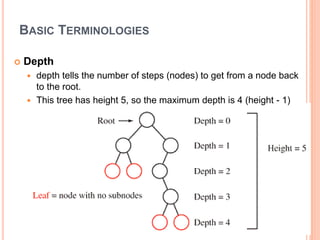
 Depth
 depth tells the number of steps (nodes) to get from a node back
to the root.
 This tree has height 5, so the maximum depth is 4 (height - 1)
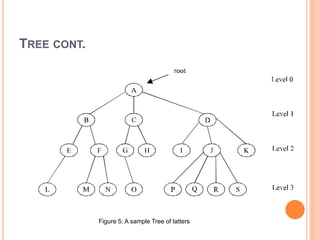
TREE CONT.
Figure 5: A sample Tree of latters
BASIC TERMINOLOGIES
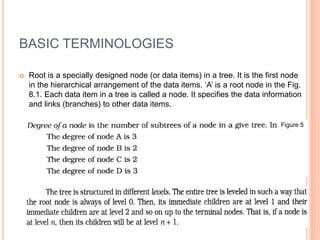
 Root is a specially designed node (or data items) in a tree. It is the first node
in the hierarchical arrangement of the data items. ‘A’ is a root node in the Fig.
8.1. Each data item in a tree is called a node. It specifies the data information
and links (branches) to other data items.
Figure 5
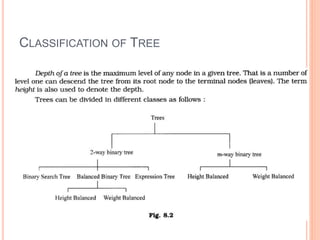
CLASSIFICATION OF TREE
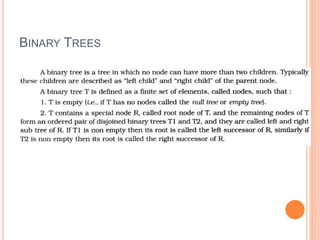
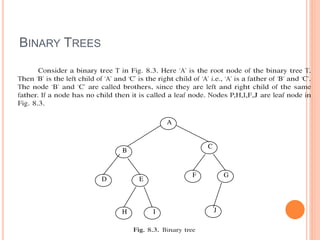
BINARY TREES
BINARY TREES
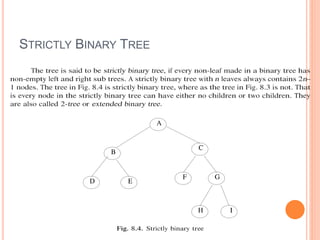
STRICTLY BINARY TREE
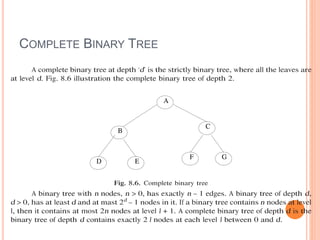
COMPLETE BINARY TREE
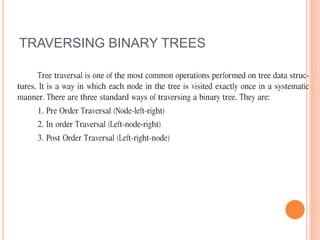
TRAVERSING BINARY TREES
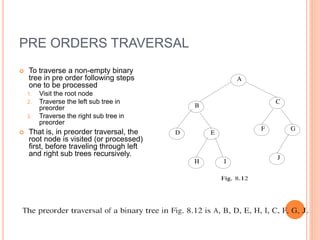
PRE ORDERS TRAVERSAL
 To traverse a non-empty binary
tree in pre order following steps
one to be processed
1. Visit the root node
2. Traverse the left sub tree in
preorder
3. Traverse the right sub tree in
preorder
 That is, in preorder traversal, the
root node is visited (or processed)
first, before traveling through left
and right sub trees recursively.
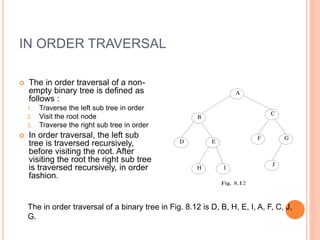
IN ORDER TRAVERSAL
 The in order traversal of a non-
empty binary tree is defined as
follows :
1. Traverse the left sub tree in order
2. Visit the root node
3. Traverse the right sub tree in order
 In order traversal, the left sub
tree is traversed recursively,
before visiting the root. After
visiting the root the right sub tree
is traversed recursively, in order
fashion.
The in order traversal of a binary tree in Fig. 8.12 is D, B, H, E, I, A, F, C, J,
G.
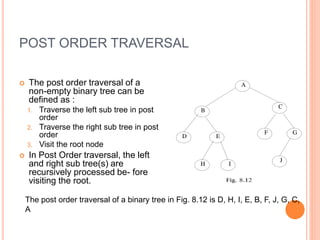
POST ORDER TRAVERSAL
 The post order traversal of a
non-empty binary tree can be
defined as :
1. Traverse the left sub tree in post
order
2. Traverse the right sub tree in post
order
3. Visit the root node
 In Post Order traversal, the left
and right sub tree(s) are
recursively processed be- fore
visiting the root.
The post order traversal of a binary tree in Fig. 8.12 is D, H, I, E, B, F, J, G, C,
A
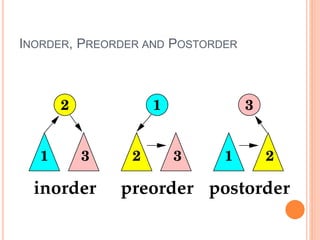
INORDER, PREORDER AND POSTORDER

Tree

  • 1.
    TREE Fariha Tasmin Jaigirdar AssistantProfessor Daffodil International University
  • 2.
    TREE  Trees arevery flexible and powerful non-liner data structure that can be used to represent data items possessing hierarchical relationship between the grand father and his children and grand children as so on.  A tree is an ideal data structure for representing hierarchical data.  A tree can be theoretically defined as a finite set of one or more data items (or nodes) such that : 1. There is a special node called the root of the tree. 2. Removing nodes (or data item) are partitioned into number of mutually exclusive (i.e., disjoined) subsets each of which is itself a tree, are called sub tree.  Before we begin our study of tree data structures, let’s look at a few common examples.
  • 3.
    EXAMPLES OF TREES Our first example of a tree is a classification tree from biology. Figure 1: Taxonomy of Some Common Animals Shown as a Tree
  • 4.
    EXAMPLES OF TREES Another example of a tree structure that you probably use every day is a file system.  In a file system, directories, or folders, are structured as a tree.  Figure 2 illustrates a small part of a Unix file system hierarchy. Figure 2: A Small Part of the Unix File System Hierarchy
  • 5.
    EXAMPLES OF TREES A final example of a tree is a web page. The following is an example of a simple web page written using HTML.  Figure shows the tree that corresponds to each of the HTML tags used to create the page. Figure 3: A Tree Corresponding to the Markup Elements of a Web Page
  • 6.
    BASIC TERMINOLOGIES  Node: A node is a fundamental part of a tree. Each letter represents one node  It can have a name.  A node may also have additional information.  Edge : the arrows from one node to another are called edges  An edge connects two nodes to show that there is a relationship between them.  Every node (except the root) is connected by exactly one incoming edge from another node.  Each node may have several outgoing edges. Figure 4: Picture of a tree of letters.
  • 7.
    BASIC TERMINOLOGIES  Root: the topmost node (with no incoming edges) is the root.  The root of the tree is the only node in the tree that has no incoming edges.  Example  In Figure 4, node A is the root node of the tree  In Figure 2, / is the root of the tree.  Leaf Node : A leaf node is a node that has no children.  The bottom nodes (with no outgoing edges) are the leaves  Example  In Figure 4, nodes D, I, G & J are leaf nodes  in Figure 1, Human and Chimpanzee are leaf nodes.
  • 8.
    BASIC TERMINOLOGIES  Path: A path in a tree is a sequence of (zero or more) connected nodes;  Example, here are 3 of the paths in the tree shown in Figure:  The length of a path is the number of nodes in the path, e.g.:
  • 9.
    BASIC TERMINOLOGIES  Giventwo connected nodes like this:  Node A is called the parent, and node B is called the child.  Children  The set of nodes c that have incoming edges from the same node to are said to be the children of that node.  In Figure 2, nodes log/, spool/, and yp/ are the children of node var/.  Parent  A node is the parent of all the nodes it connects to with outgoing edges.  In Figure 2 the node var/ is the parent of nodes log/, spool/, and yp/.  Sibling  Nodes in the tree that are children of the same parent are said to be siblings.  The nodes etc/ and usr/ are siblings in the file system tree.
  • 10.
    BASIC TERMINOLOGIES  Subtree:A subtree of a given node includes one of its children and all of that child's descendants.  The descendants of a node n are all nodes reachable from n (n's children, its children's children, etc.).  In the example Figure 4, node A has three subtrees: ① B, D ② I ③ C, E, F, G, J.  Level  The level of a node n is the number of edges on the path from the root node to n.  Example, the level of the Felis node in Figure 1 is five.  By definition, the level of the root node is zero.  Height  The height of a tree is equal to the maximum level of any node in the tree.  The height of the tree in Figure 2 is two.
  • 11.
    BASIC TERMINOLOGIES  Depth depth tells the number of steps (nodes) to get from a node back to the root.  This tree has height 5, so the maximum depth is 4 (height - 1)
  • 12.
    TREE CONT. Figure 5:A sample Tree of latters
  • 13.
    BASIC TERMINOLOGIES  Rootis a specially designed node (or data items) in a tree. It is the first node in the hierarchical arrangement of the data items. ‘A’ is a root node in the Fig. 8.1. Each data item in a tree is called a node. It specifies the data information and links (branches) to other data items. Figure 5
  • 14.
  • 15.
  • 16.
  • 17.
  • 18.
  • 19.
  • 20.
    PRE ORDERS TRAVERSAL To traverse a non-empty binary tree in pre order following steps one to be processed 1. Visit the root node 2. Traverse the left sub tree in preorder 3. Traverse the right sub tree in preorder  That is, in preorder traversal, the root node is visited (or processed) first, before traveling through left and right sub trees recursively.
  • 21.
    IN ORDER TRAVERSAL The in order traversal of a non- empty binary tree is defined as follows : 1. Traverse the left sub tree in order 2. Visit the root node 3. Traverse the right sub tree in order  In order traversal, the left sub tree is traversed recursively, before visiting the root. After visiting the root the right sub tree is traversed recursively, in order fashion. The in order traversal of a binary tree in Fig. 8.12 is D, B, H, E, I, A, F, C, J, G.
  • 22.
    POST ORDER TRAVERSAL The post order traversal of a non-empty binary tree can be defined as : 1. Traverse the left sub tree in post order 2. Traverse the right sub tree in post order 3. Visit the root node  In Post Order traversal, the left and right sub tree(s) are recursively processed be- fore visiting the root. The post order traversal of a binary tree in Fig. 8.12 is D, H, I, E, B, F, J, G, C, A
  • 23.