DATA STRUCTURES THROUGH C++ NOTES UNIT 3
- 1 -
UNIT - III
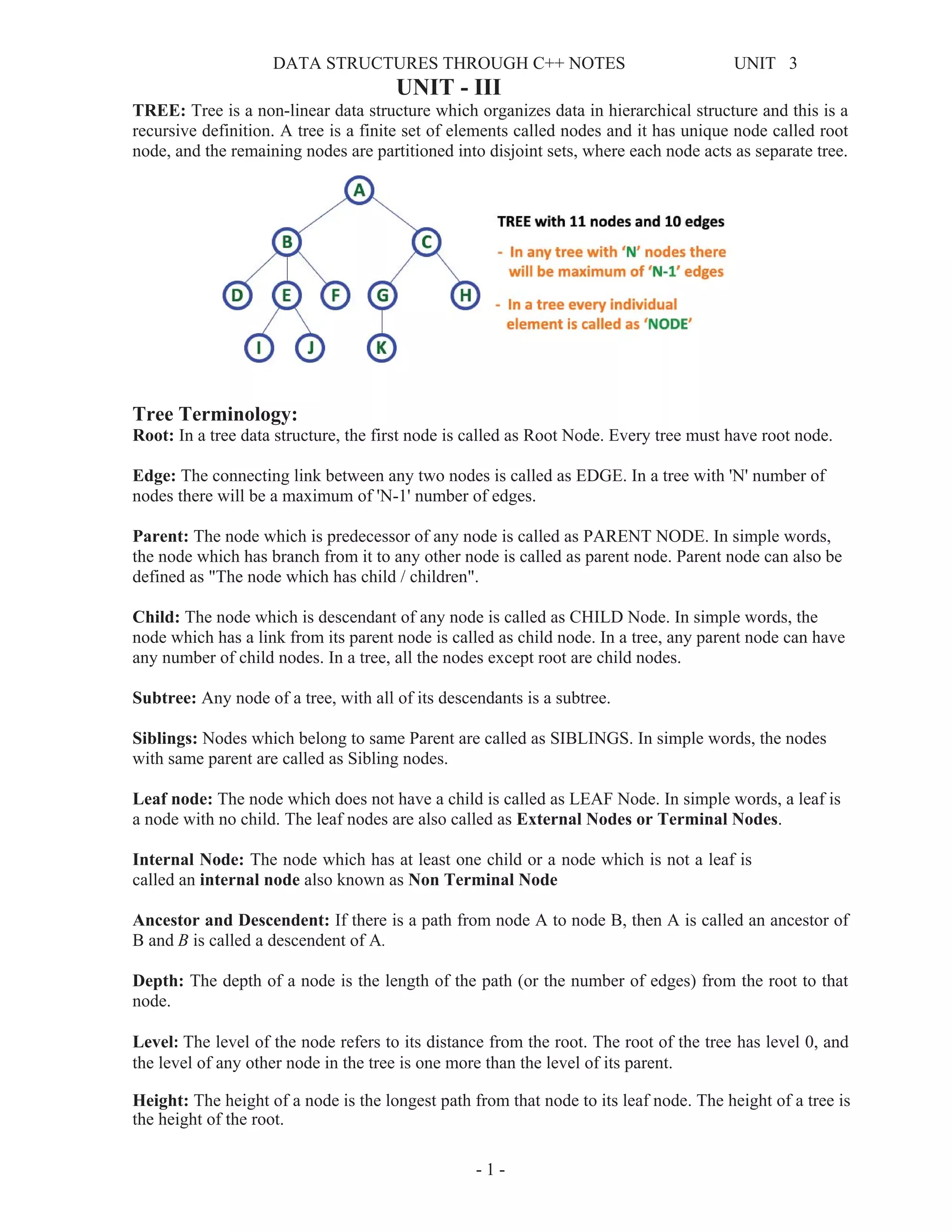
TREE: Tree is a non-linear data structure which organizes data in hierarchical structure and this is a
recursive definition. A tree is a finite set of elements called nodes and it has unique node called root
node, and the remaining nodes are partitioned into disjoint sets, where each node acts as separate tree.
Tree Terminology:
Root: In a tree data structure, the first node is called as Root Node. Every tree must have root node.
Edge: The connecting link between any two nodes is called as EDGE. In a tree with 'N' number of
nodes there will be a maximum of 'N-1' number of edges.
Parent: The node which is predecessor of any node is called as PARENT NODE. In simple words,
the node which has branch from it to any other node is called as parent node. Parent node can also be
defined as "The node which has child / children".
Child: The node which is descendant of any node is called as CHILD Node. In simple words, the
node which has a link from its parent node is called as child node. In a tree, any parent node can have
any number of child nodes. In a tree, all the nodes except root are child nodes.
Subtree: Any node of a tree, with all of its descendants is a subtree.
Siblings: Nodes which belong to same Parent are called as SIBLINGS. In simple words, the nodes
with same parent are called as Sibling nodes.
Leaf node: The node which does not have a child is called as LEAF Node. In simple words, a leaf is
a node with no child. The leaf nodes are also called as External Nodes or Terminal Nodes.
Internal Node: The node which has at least one child or a node which is not a leaf is
called an internal node also known as Non Terminal Node
Ancestor and Descendent: If there is a path from node A to node B, then A is called an ancestor of
B and B is called a descendent of A.
Depth: The depth of a node is the length of the path (or the number of edges) from the root to that
node.
Level: The level of the node refers to its distance from the root. The root of the tree has level 0, and
the level of any other node in the tree is one more than the level of its parent.
Height: The height of a node is the longest path from that node to its leaf node. The height of a tree is
the height of the root.
DATA STRUCTURES THROUGH C++ NOTES UNIT 3
- 2 -
Degree: The total number of children of a node is called as DEGREE of that Node. In simple words,
the Degree of a node is total number of children it has. The highest degree of a node among all the
nodes in a tree is called as 'Degree of Tree'
Binary Tree: A binary tree s a tree in which each node has at most two children, a left child and a
right child, a binary tree is either empty or consists of root node, left and right sub trees.
Properties of binary tree:
1. If h is height of binary tree then maximum number of leaves = 2h
2. If h is height of binary tree then maximum number of nodes = 2h+1
-1
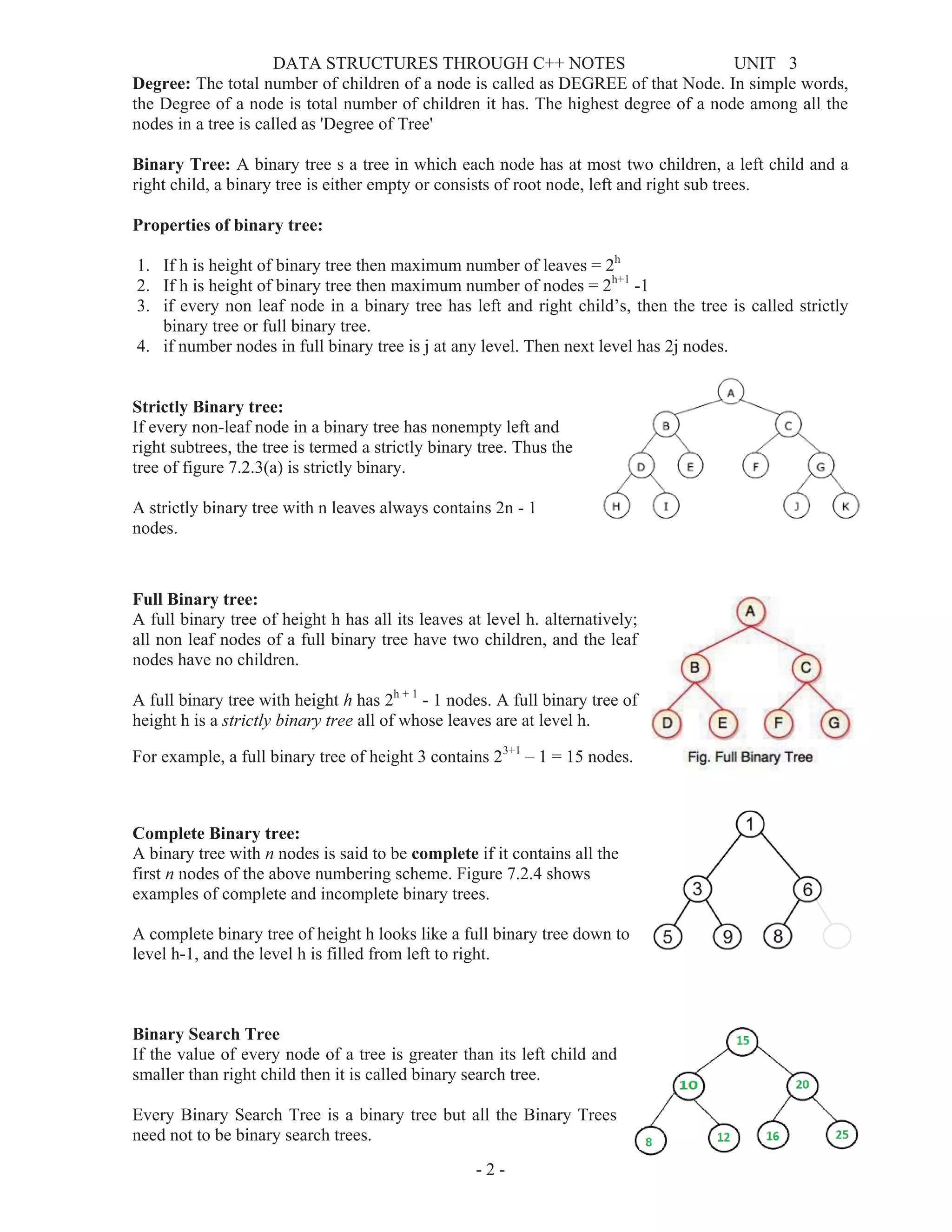
3. if every non leaf node in a binary tree has left and right child’s, then the tree is called strictly
binary tree or full binary tree.
4. if number nodes in full binary tree is j at any level. Then next level has 2j nodes.
Strictly Binary tree:
If every non-leaf node in a binary tree has nonempty left and
right subtrees, the tree is termed a strictly binary tree. Thus the
tree of figure 7.2.3(a) is strictly binary.
A strictly binary tree with n leaves always contains 2n - 1
nodes.
Full Binary tree:
A full binary tree of height h has all its leaves at level h. alternatively;
all non leaf nodes of a full binary tree have two children, and the leaf
nodes have no children.
A full binary tree with height h has 2h + 1
- 1 nodes. A full binary tree of
height h is a strictly binary tree all of whose leaves are at level h.
For example, a full binary tree of height 3 contains 23+1
– 1 = 15 nodes.
Complete Binary tree:
A binary tree with n nodes is said to be complete if it contains all the
first n nodes of the above numbering scheme. Figure 7.2.4 shows
examples of complete and incomplete binary trees.
A complete binary tree of height h looks like a full binary tree down to
level h-1, and the level h is filled from left to right.
Binary Search Tree
If the value of every node of a tree is greater than its left child and
smaller than right child then it is called binary search tree.
Every Binary Search Tree is a binary tree but all the Binary Trees
need not to be binary search trees.
DATA STRUCTURES THROUGH C++ NOTES UNIT 3
- 3 -
Binary Tree ADT (Operations):
1. Insertion into binary tree
2. Deleting a node from binary tree
3. Finding the number of nodes in a binary tree
4. Finding the height of a binary tree
5. Finding the number of leaves in a binary tree
6. Finding the width of a binary tree
Representation of binary tree: A binary tree data structure is represented using two methods.
Those methods are as follows...
1. Array Representation
2. Linked List Representation
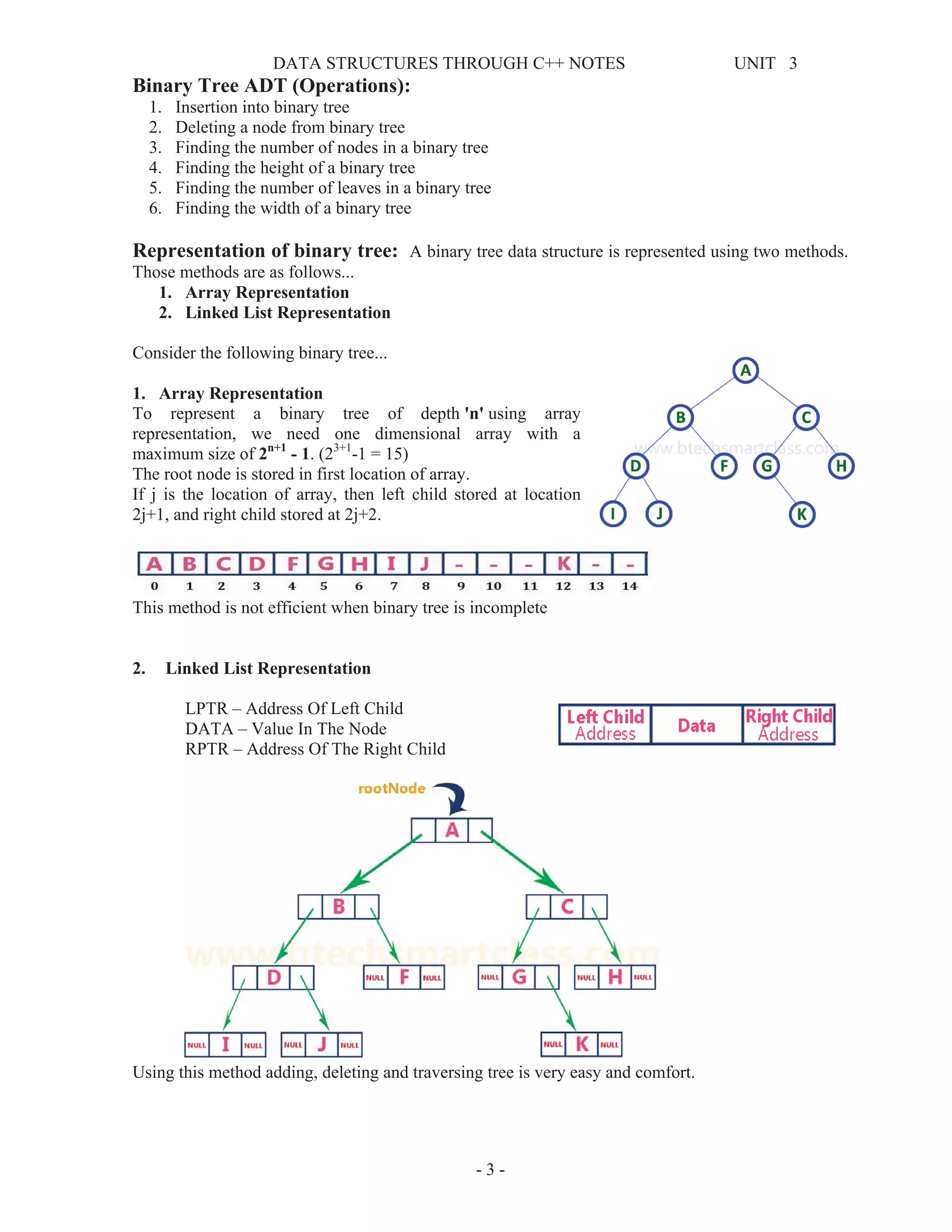
Consider the following binary tree...
1. Array Representation
To represent a binary tree of depth 'n' using array
representation, we need one dimensional array with a
maximum size of 2n+1
- 1. (23+1
-1 = 15)
The root node is stored in first location of array.
If j is the location of array, then left child stored at location
2j+1, and right child stored at 2j+2.
This method is not efficient when binary tree is incomplete
2. Linked List Representation
LPTR – Address Of Left Child
DATA – Value In The Node
RPTR – Address Of The Right Child
Using this method adding, deleting and traversing tree is very easy and comfort.
DATA STRUCTURES THROUGH C++ NOTES UNIT 3
- 4 -
A
B C
D E F G
Binary Tree Traversals:
Traversing means visiting each node exactly one time, the process of visiting each node in a tree is
called traversal of tree. It depends up on root node and left and child nodes.
1. Breadth First or Level Order Traversal
2. Depth First Traversals:
1. Breadth First or Level Order Traversal
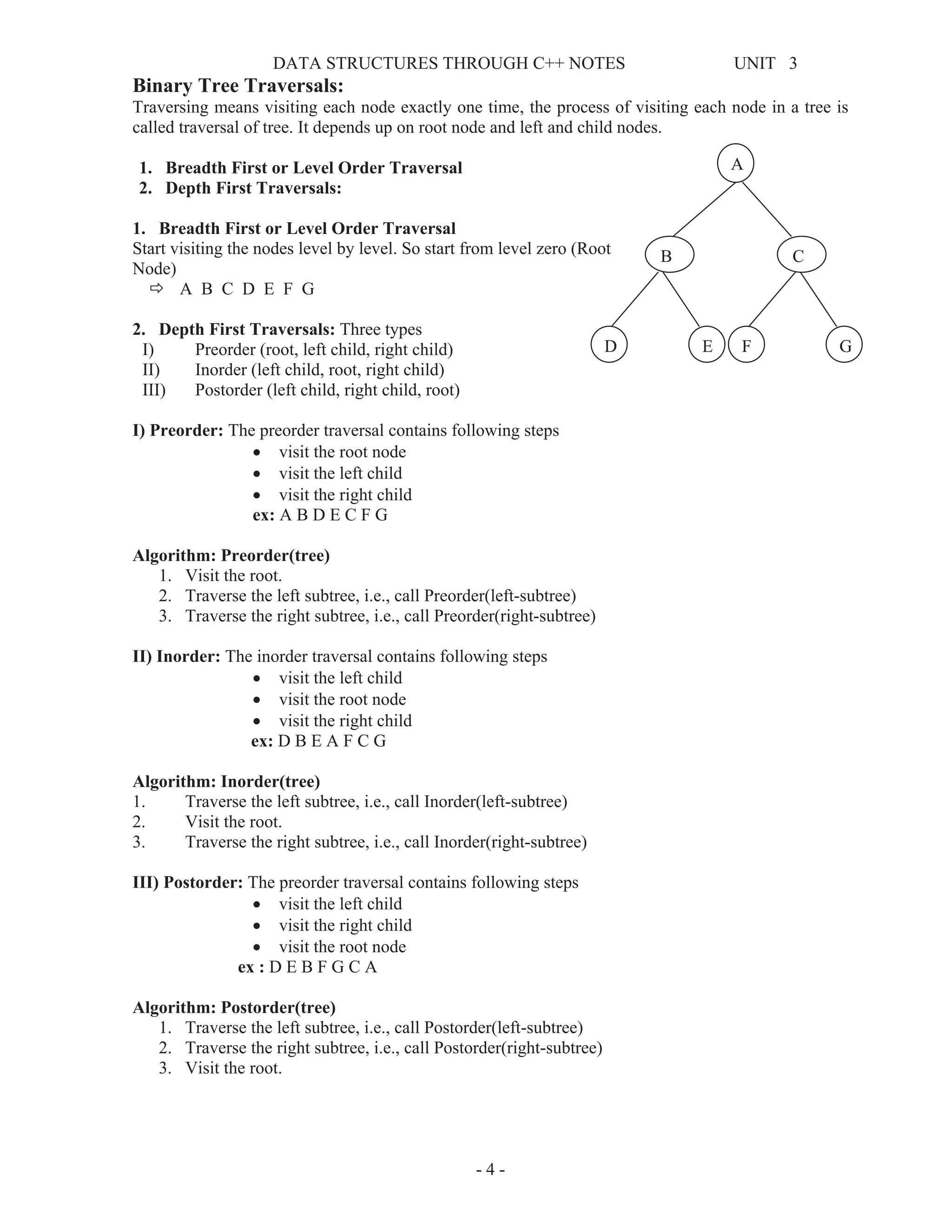
Start visiting the nodes level by level. So start from level zero (Root
Node)
Ö A B C D E F G
2. Depth First Traversals: Three types
I) Preorder (root, left child, right child)
II) Inorder (left child, root, right child)
III) Postorder (left child, right child, root)
I) Preorder: The preorder traversal contains following steps
x visit the root node
x visit the left child
x visit the right child
ex: A B D E C F G
Algorithm: Preorder(tree)
1. Visit the root.
2. Traverse the left subtree, i.e., call Preorder(left-subtree)
3. Traverse the right subtree, i.e., call Preorder(right-subtree)
II) Inorder: The inorder traversal contains following steps
x visit the left child
x visit the root node
x visit the right child
ex: D B E A F C G
Algorithm: Inorder(tree)
1. Traverse the left subtree, i.e., call Inorder(left-subtree)
2. Visit the root.
3. Traverse the right subtree, i.e., call Inorder(right-subtree)
III) Postorder: The preorder traversal contains following steps
x visit the left child
x visit the right child
x visit the root node
ex : D E B F G C A
Algorithm: Postorder(tree)
1. Traverse the left subtree, i.e., call Postorder(left-subtree)
2. Traverse the right subtree, i.e., call Postorder(right-subtree)
3. Visit the root.
DATA STRUCTURES THROUGH C++ NOTES UNIT 3
- 5 -
Threaded Binary Trees:
Threaded Binary Tree is also a binary tree in which all left child pointers that are NULL (in Linked
list representation) points to its in-order predecessor, and all right child pointers that are NULL (in
Linked list representation) points to its in-order successor.
There are two types of threaded binary trees.
1. Single Threaded: each node is threaded towards either the in-order predecessor or successor
(left or right).
2. Double threaded: each node is threaded towards both the in-order predecessor and successor
(left and right).
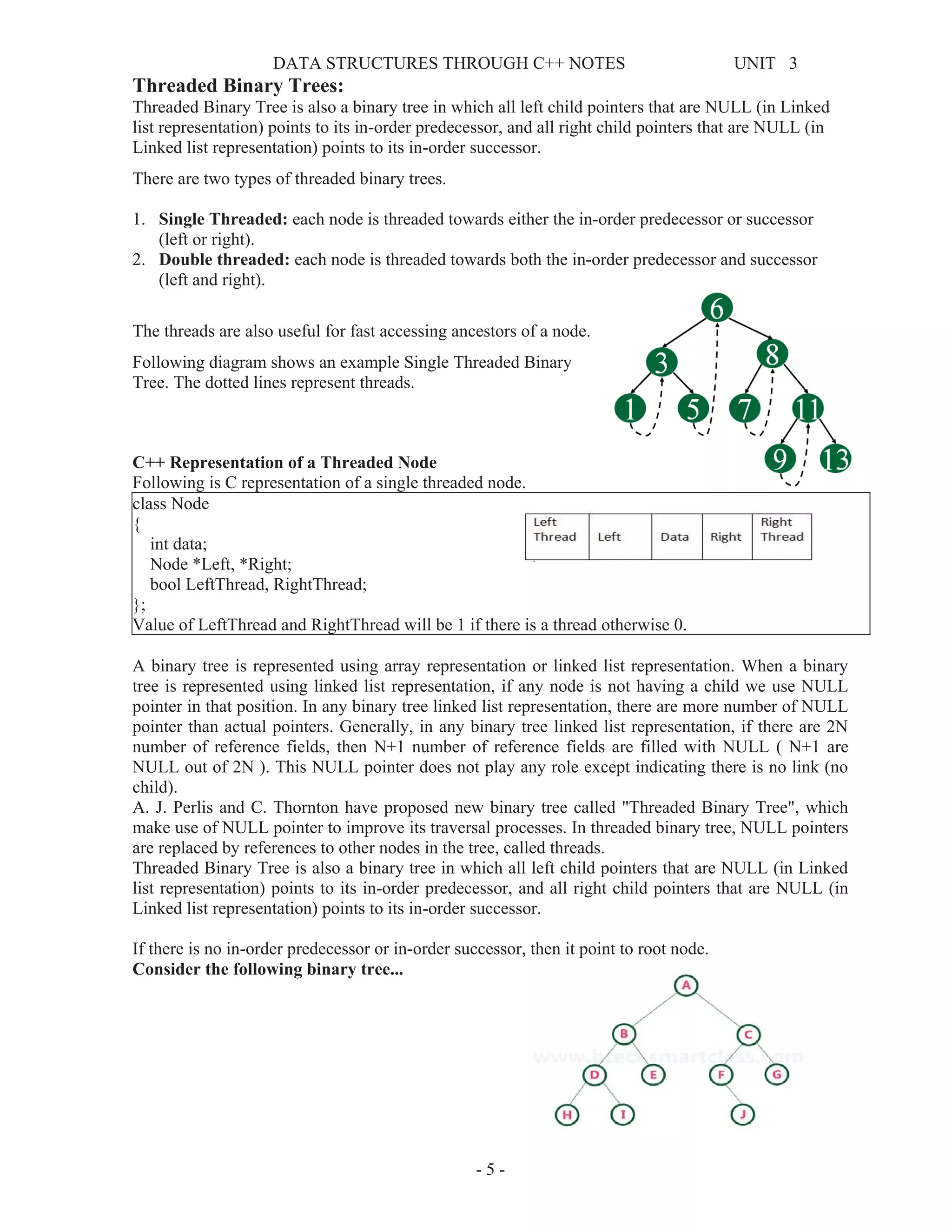
The threads are also useful for fast accessing ancestors of a node.
Following diagram shows an example Single Threaded Binary
Tree. The dotted lines represent threads.
C++ Representation of a Threaded Node
Following is C representation of a single threaded node.
class Node
{
int data;
Node *Left, *Right;
bool LeftThread, RightThread;
};
Value of LeftThread and RightThread will be 1 if there is a thread otherwise 0.
A binary tree is represented using array representation or linked list representation. When a binary
tree is represented using linked list representation, if any node is not having a child we use NULL
pointer in that position. In any binary tree linked list representation, there are more number of NULL
pointer than actual pointers. Generally, in any binary tree linked list representation, if there are 2N
number of reference fields, then N+1 number of reference fields are filled with NULL ( N+1 are
NULL out of 2N ). This NULL pointer does not play any role except indicating there is no link (no
child).
A. J. Perlis and C. Thornton have proposed new binary tree called "Threaded Binary Tree", which
make use of NULL pointer to improve its traversal processes. In threaded binary tree, NULL pointers
are replaced by references to other nodes in the tree, called threads.
Threaded Binary Tree is also a binary tree in which all left child pointers that are NULL (in Linked
list representation) points to its in-order predecessor, and all right child pointers that are NULL (in
Linked list representation) points to its in-order successor.
If there is no in-order predecessor or in-order successor, then it point to root node.
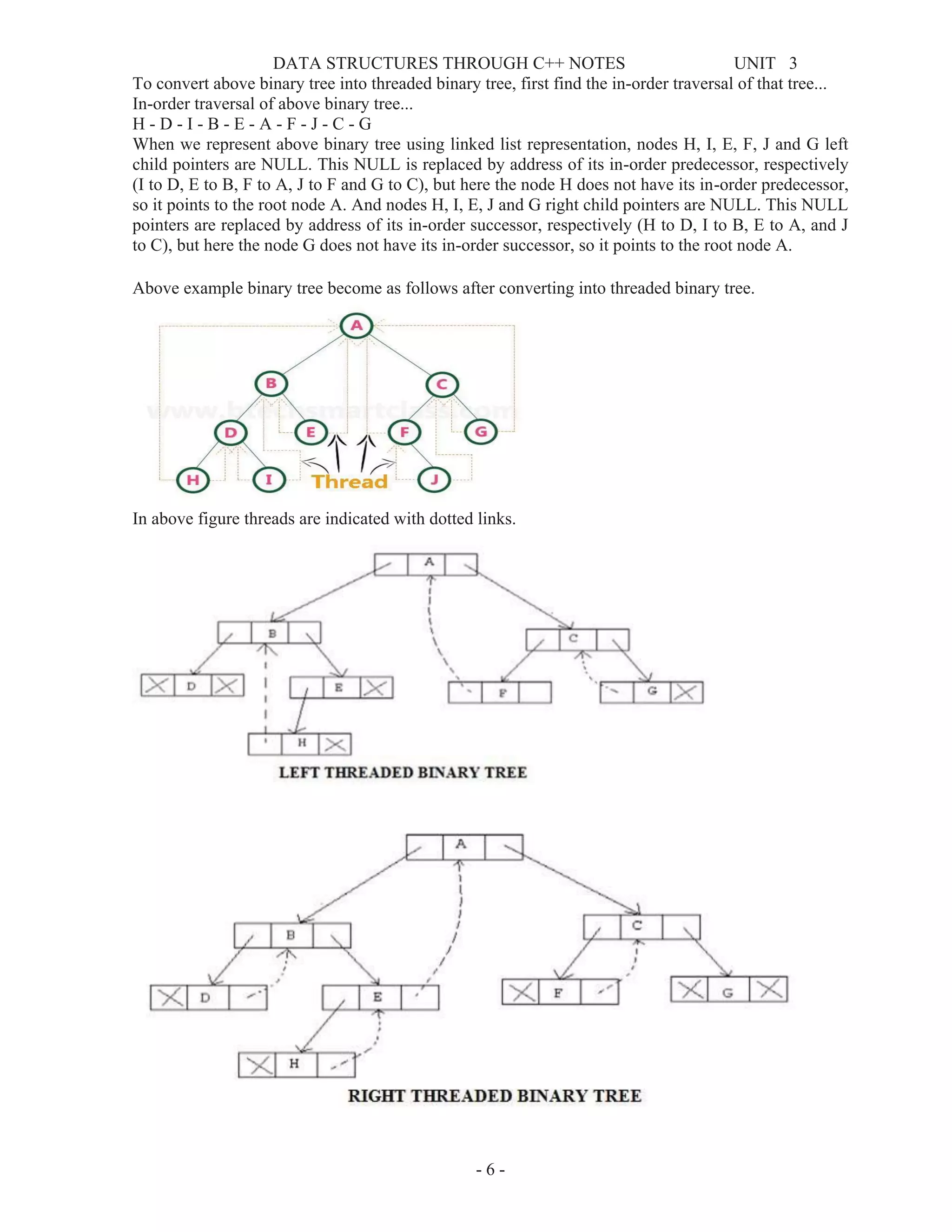
Consider the following binary tree...
DATA STRUCTURES THROUGH C++ NOTES UNIT 3
- 6 -
To convert above binary tree into threaded binary tree, first find the in-order traversal of that tree...
In-order traversal of above binary tree...
H - D - I - B - E - A - F - J - C - G
When we represent above binary tree using linked list representation, nodes H, I, E, F, J and G left
child pointers are NULL. This NULL is replaced by address of its in-order predecessor, respectively
(I to D, E to B, F to A, J to F and G to C), but here the node H does not have its in-order predecessor,
so it points to the root node A. And nodes H, I, E, J and G right child pointers are NULL. This NULL
pointers are replaced by address of its in-order successor, respectively (H to D, I to B, E to A, and J
to C), but here the node G does not have its in-order successor, so it points to the root node A.
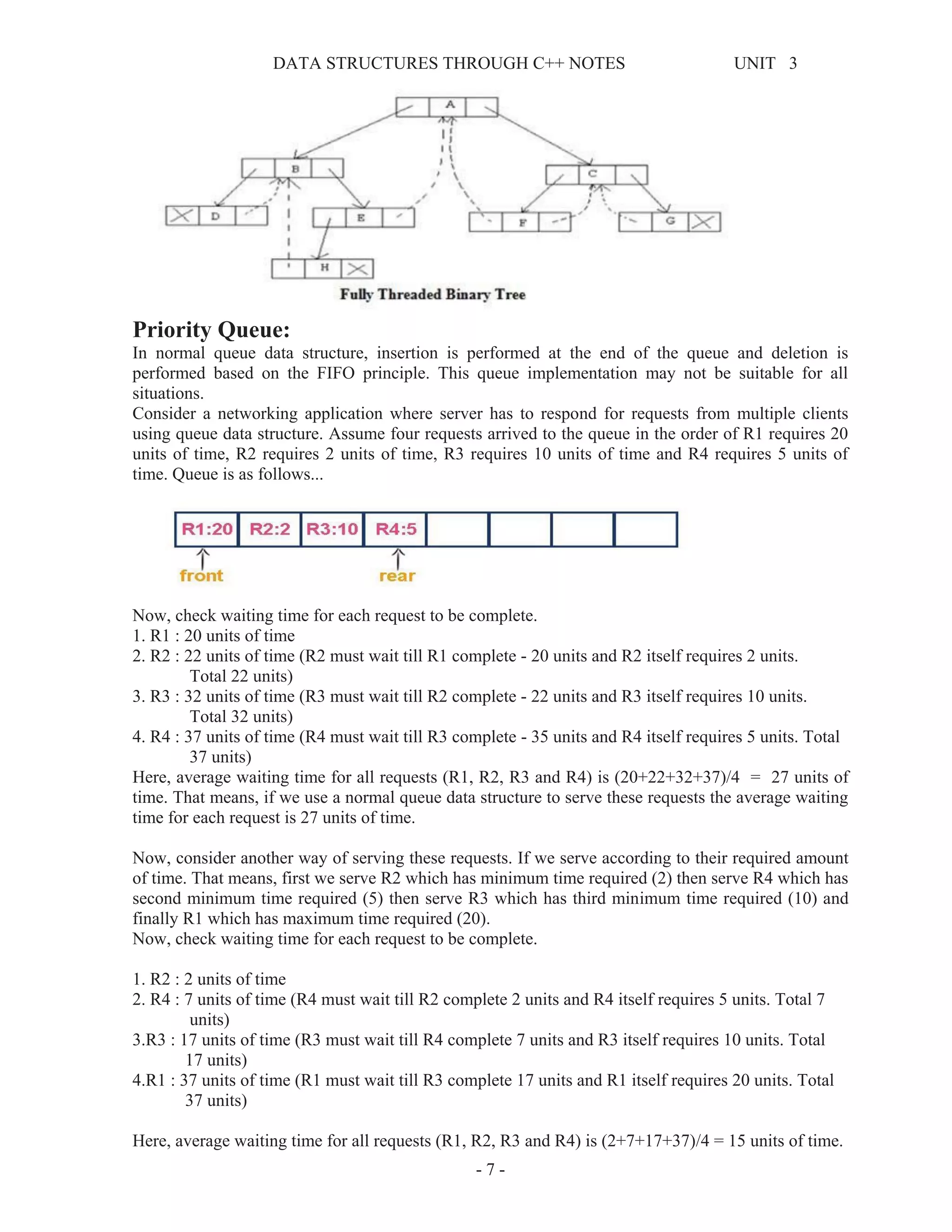
Above example binary tree become as follows after converting into threaded binary tree.
In above figure threads are indicated with dotted links.
DATA STRUCTURES THROUGH C++ NOTES UNIT 3
- 7 -
Priority Queue:
In normal queue data structure, insertion is performed at the end of the queue and deletion is
performed based on the FIFO principle. This queue implementation may not be suitable for all
situations.
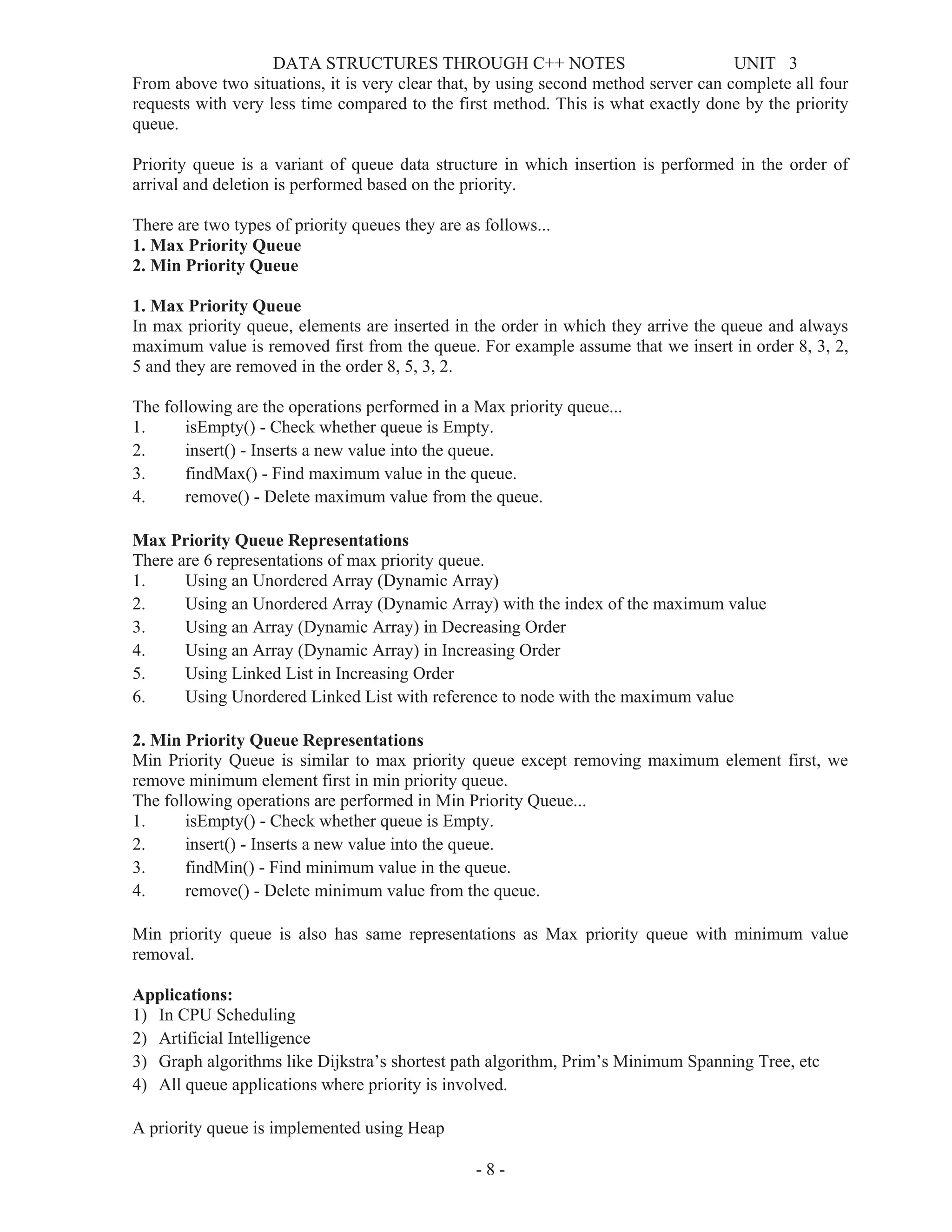
Consider a networking application where server has to respond for requests from multiple clients
using queue data structure. Assume four requests arrived to the queue in the order of R1 requires 20
units of time, R2 requires 2 units of time, R3 requires 10 units of time and R4 requires 5 units of
time. Queue is as follows...
Now, check waiting time for each request to be complete.
1. R1 : 20 units of time
2. R2 : 22 units of time (R2 must wait till R1 complete - 20 units and R2 itself requires 2 units.
Total 22 units)
3. R3 : 32 units of time (R3 must wait till R2 complete - 22 units and R3 itself requires 10 units.
Total 32 units)
4. R4 : 37 units of time (R4 must wait till R3 complete - 35 units and R4 itself requires 5 units. Total
37 units)
Here, average waiting time for all requests (R1, R2, R3 and R4) is (20+22+32+37)/4 = 27 units of
time. That means, if we use a normal queue data structure to serve these requests the average waiting
time for each request is 27 units of time.
Now, consider another way of serving these requests. If we serve according to their required amount
of time. That means, first we serve R2 which has minimum time required (2) then serve R4 which has
second minimum time required (5) then serve R3 which has third minimum time required (10) and
finally R1 which has maximum time required (20).
Now, check waiting time for each request to be complete.
1. R2 : 2 units of time
2. R4 : 7 units of time (R4 must wait till R2 complete 2 units and R4 itself requires 5 units. Total 7
units)
3.R3 : 17 units of time (R3 must wait till R4 complete 7 units and R3 itself requires 10 units. Total
17 units)
4.R1 : 37 units of time (R1 must wait till R3 complete 17 units and R1 itself requires 20 units. Total
37 units)
Here, average waiting time for all requests (R1, R2, R3 and R4) is (2+7+17+37)/4 = 15 units of time.
DATA STRUCTURES THROUGH C++ NOTES UNIT 3
- 8 -
From above two situations, it is very clear that, by using second method server can complete all four
requests with very less time compared to the first method. This is what exactly done by the priority
queue.
Priority queue is a variant of queue data structure in which insertion is performed in the order of
arrival and deletion is performed based on the priority.
There are two types of priority queues they are as follows...
1. Max Priority Queue
2. Min Priority Queue
1. Max Priority Queue
In max priority queue, elements are inserted in the order in which they arrive the queue and always
maximum value is removed first from the queue. For example assume that we insert in order 8, 3, 2,
5 and they are removed in the order 8, 5, 3, 2.
The following are the operations performed in a Max priority queue...
1. isEmpty() - Check whether queue is Empty.
2. insert() - Inserts a new value into the queue.
3. findMax() - Find maximum value in the queue.
4. remove() - Delete maximum value from the queue.
Max Priority Queue Representations
There are 6 representations of max priority queue.
1. Using an Unordered Array (Dynamic Array)
2. Using an Unordered Array (Dynamic Array) with the index of the maximum value
3. Using an Array (Dynamic Array) in Decreasing Order
4. Using an Array (Dynamic Array) in Increasing Order
5. Using Linked List in Increasing Order
6. Using Unordered Linked List with reference to node with the maximum value
2. Min Priority Queue Representations
Min Priority Queue is similar to max priority queue except removing maximum element first, we
remove minimum element first in min priority queue.
The following operations are performed in Min Priority Queue...
1. isEmpty() - Check whether queue is Empty.
2. insert() - Inserts a new value into the queue.
3. findMin() - Find minimum value in the queue.
4. remove() - Delete minimum value from the queue.
Min priority queue is also has same representations as Max priority queue with minimum value
removal.
Applications:
1) In CPU Scheduling
2) Artificial Intelligence
3) Graph algorithms like Dijkstra’s shortest path algorithm, Prim’s Minimum Spanning Tree, etc
4) All queue applications where priority is involved.
A priority queue is implemented using Heap
DATA STRUCTURES THROUGH C++ NOTES UNIT 3
- 9 -
Heap Data Structure:
Heap data structure is a specialized binary tree based data structure. Heap is a binary tree with special
characteristics. In a heap data structure, nodes are arranged based on their value. A heap data
structure, some time called as Binary Heap.
There are two types of heap data structures and they are as follows...
1. Max Heap
2. Min Heap
Every heap data structure has the following properties...
Property #1 (Ordering): Nodes must be arranged in a order according to values based on Max heap
or Min heap.
Property #2 (Structural): All levels in a heap must full, except last level and nodes must be filled
from left to right strictly.
Max Heap
Max heap data structure is a specialized full binary tree data structure except last leaf node can be
alone. In a max heap nodes are arranged based on node value.
Max heap is defined as follows...
Max heap is a specialized full binary tree in which every parent node contains greater or equal value
than its child nodes. And last leaf node can be alone.
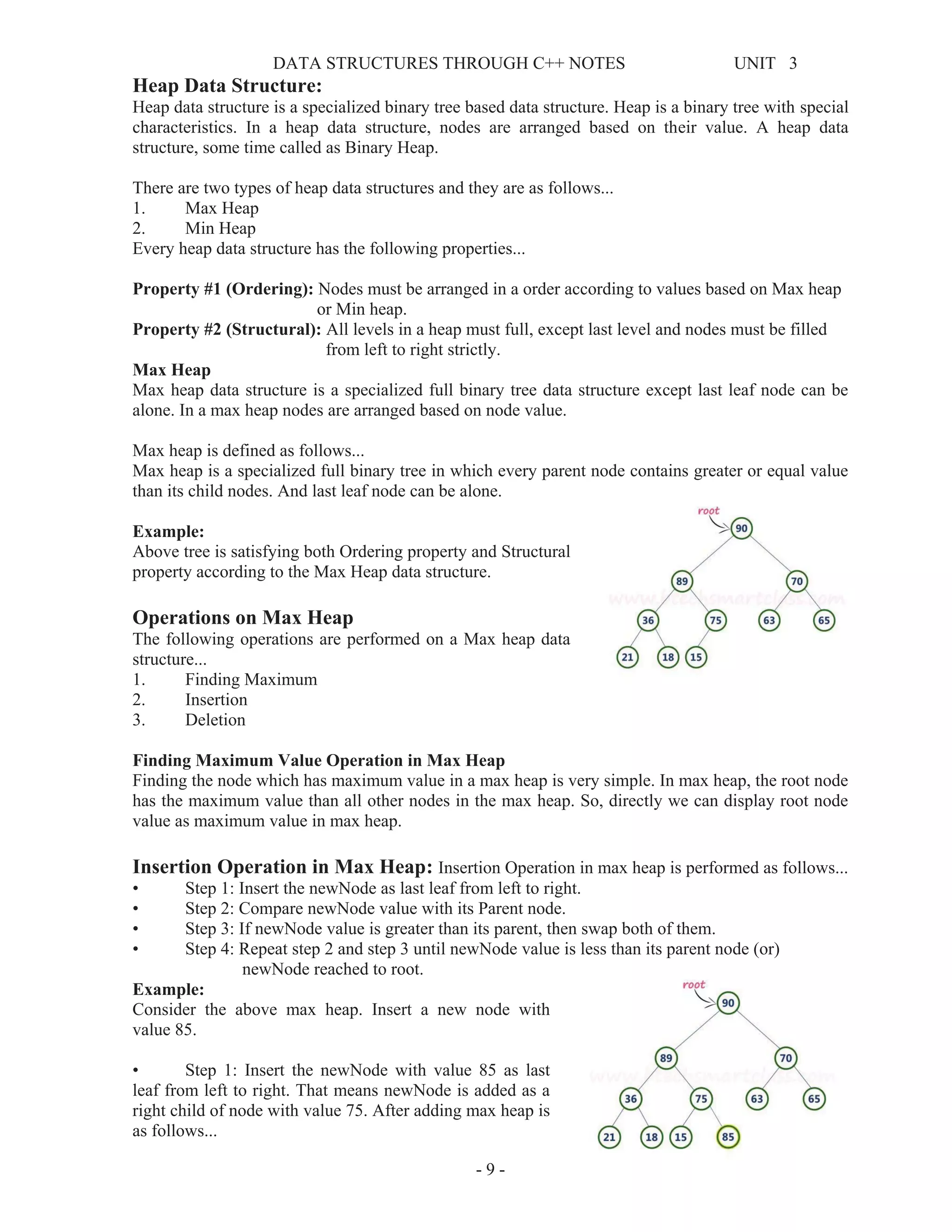
Example:
Above tree is satisfying both Ordering property and Structural
property according to the Max Heap data structure.
Operations on Max Heap
The following operations are performed on a Max heap data
structure...
1. Finding Maximum
2. Insertion
3. Deletion
Finding Maximum Value Operation in Max Heap
Finding the node which has maximum value in a max heap is very simple. In max heap, the root node
has the maximum value than all other nodes in the max heap. So, directly we can display root node
value as maximum value in max heap.
Insertion Operation in Max Heap: Insertion Operation in max heap is performed as follows...
• Step 1: Insert the newNode as last leaf from left to right.
• Step 2: Compare newNode value with its Parent node.
• Step 3: If newNode value is greater than its parent, then swap both of them.
• Step 4: Repeat step 2 and step 3 until newNode value is less than its parent node (or)
newNode reached to root.
Example:
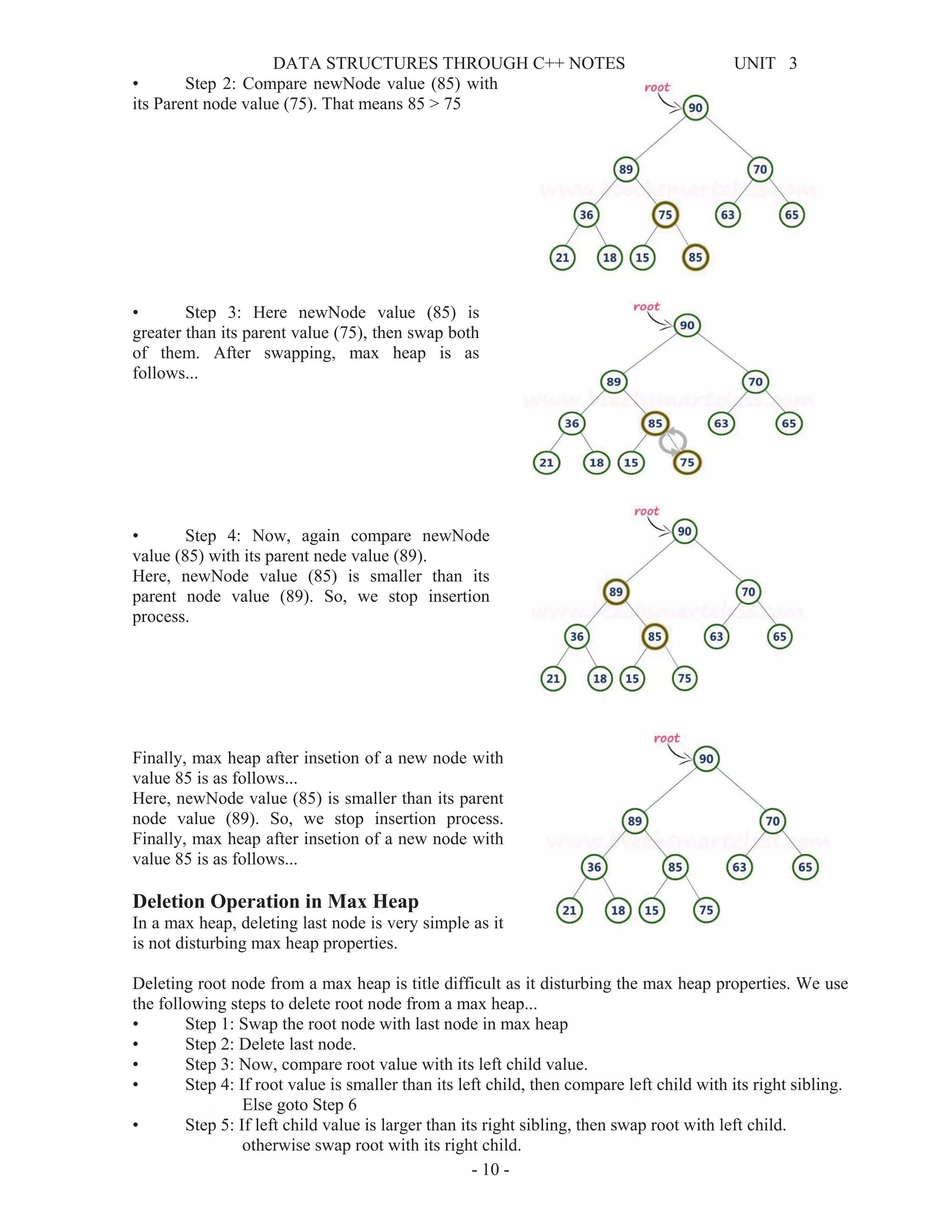
Consider the above max heap. Insert a new node with
value 85.
• Step 1: Insert the newNode with value 85 as last
leaf from left to right. That means newNode is added as a
right child of node with value 75. After adding max heap is
as follows...
DATA STRUCTURES THROUGH C++ NOTES UNIT 3
- 10 -
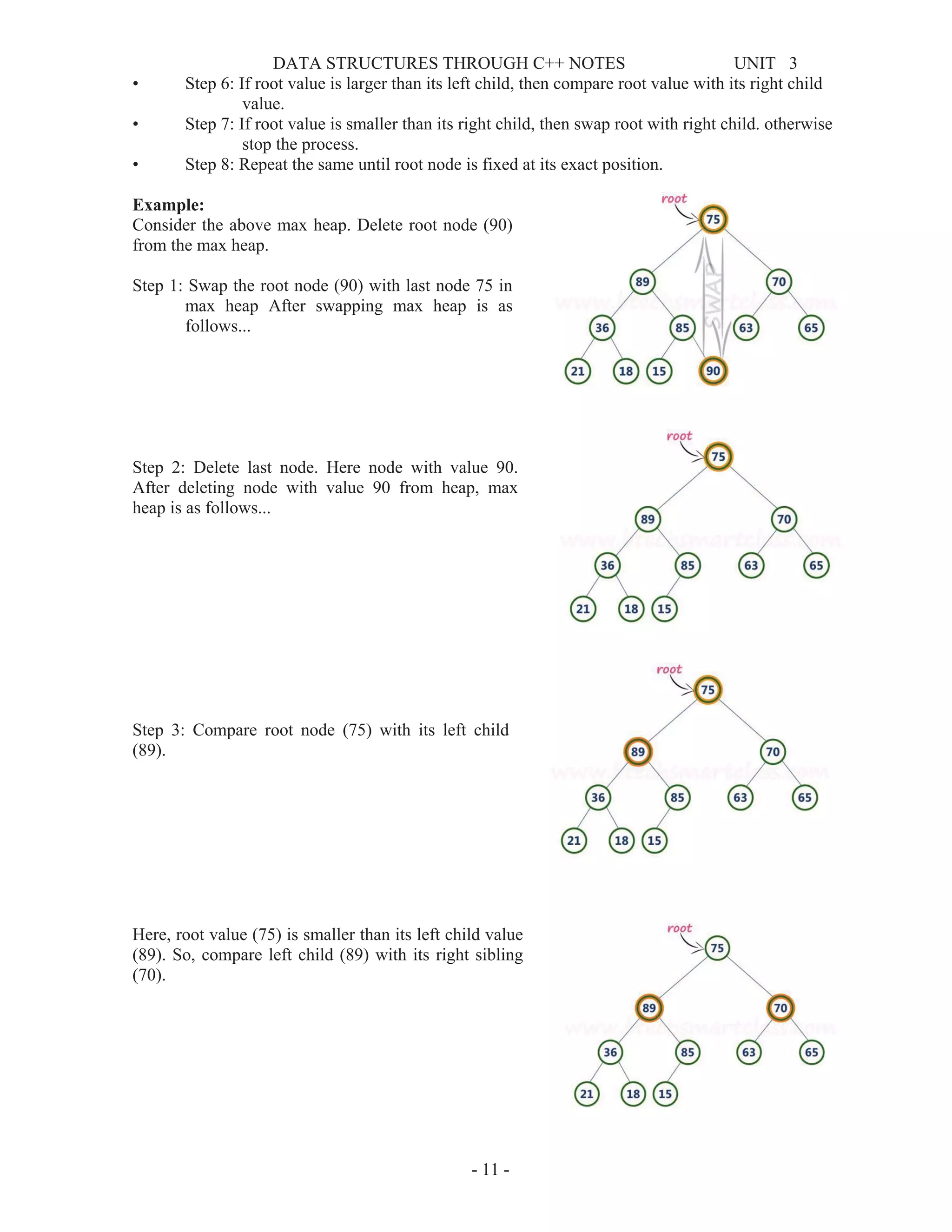
• Step 2: Compare newNode value (85) with
its Parent node value (75). That means 85 > 75
• Step 3: Here newNode value (85) is
greater than its parent value (75), then swap both
of them. After swapping, max heap is as
follows...
• Step 4: Now, again compare newNode
value (85) with its parent nede value (89).
Here, newNode value (85) is smaller than its
parent node value (89). So, we stop insertion
process.
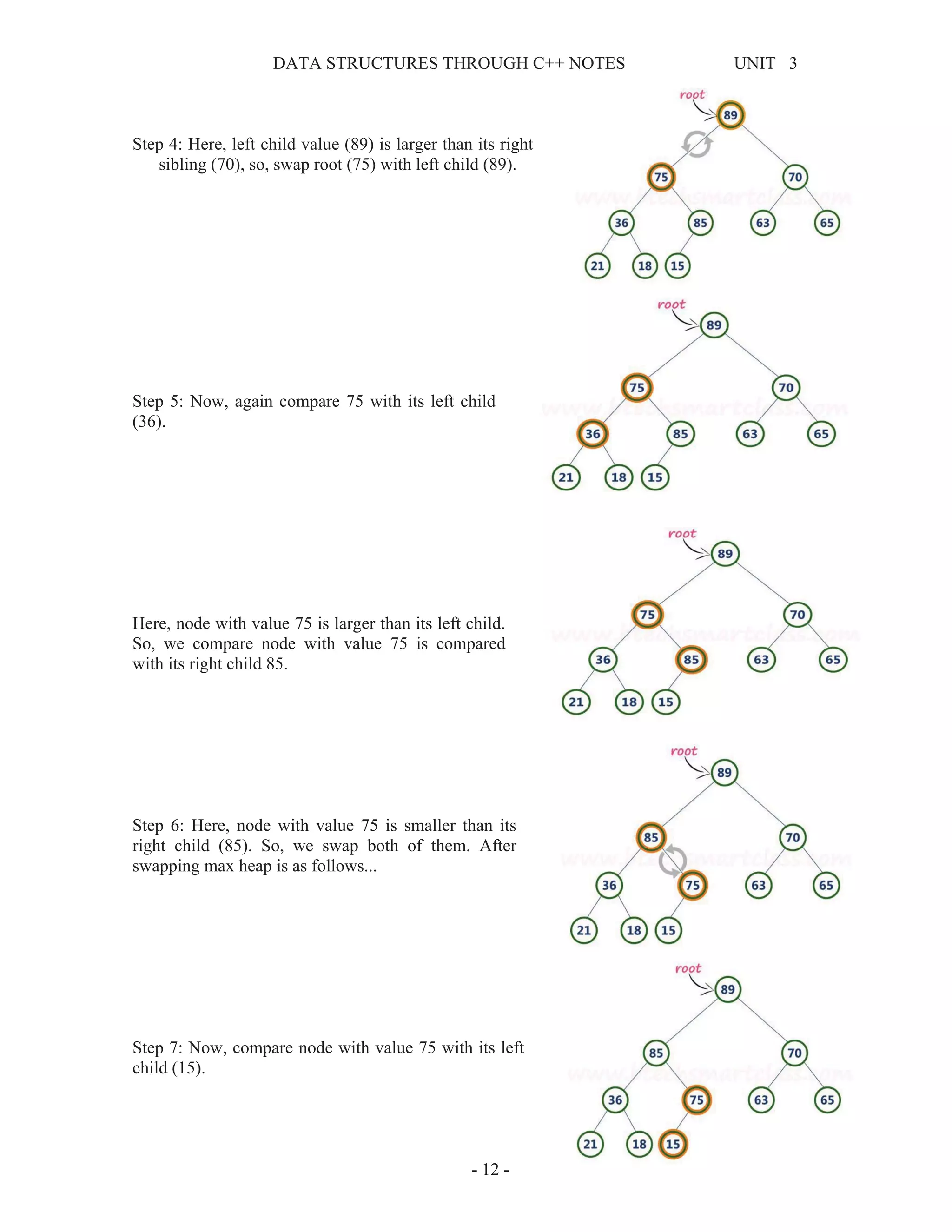
Finally, max heap after insetion of a new node with
value 85 is as follows...
Here, newNode value (85) is smaller than its parent
node value (89). So, we stop insertion process.
Finally, max heap after insetion of a new node with
value 85 is as follows...
Deletion Operation in Max Heap
In a max heap, deleting last node is very simple as it
is not disturbing max heap properties.
Deleting root node from a max heap is title difficult as it disturbing the max heap properties. We use
the following steps to delete root node from a max heap...
• Step 1: Swap the root node with last node in max heap
• Step 2: Delete last node.
• Step 3: Now, compare root value with its left child value.
• Step 4: If root value is smaller than its left child, then compare left child with its right sibling.
Else goto Step 6
• Step 5: If left child value is larger than its right sibling, then swap root with left child.
otherwise swap root with its right child.
DATA STRUCTURES THROUGH C++ NOTES UNIT 3
- 11 -
• Step 6: If root value is larger than its left child, then compare root value with its right child
value.
• Step 7: If root value is smaller than its right child, then swap root with right child. otherwise
stop the process.
• Step 8: Repeat the same until root node is fixed at its exact position.
Example:
Consider the above max heap. Delete root node (90)
from the max heap.
Step 1: Swap the root node (90) with last node 75 in
max heap After swapping max heap is as
follows...
Step 2: Delete last node. Here node with value 90.
After deleting node with value 90 from heap, max
heap is as follows...
Step 3: Compare root node (75) with its left child
(89).
Here, root value (75) is smaller than its left child value
(89). So, compare left child (89) with its right sibling
(70).
DATA STRUCTURES THROUGH C++ NOTES UNIT 3
- 12 -
Step 4: Here, left child value (89) is larger than its right
sibling (70), so, swap root (75) with left child (89).
Step 5: Now, again compare 75 with its left child
(36).
Here, node with value 75 is larger than its left child.
So, we compare node with value 75 is compared
with its right child 85.
Step 6: Here, node with value 75 is smaller than its
right child (85). So, we swap both of them. After
swapping max heap is as follows...
Step 7: Now, compare node with value 75 with its left
child (15).
DATA STRUCTURES THROUGH C++ NOTES UNIT 3
- 13 -
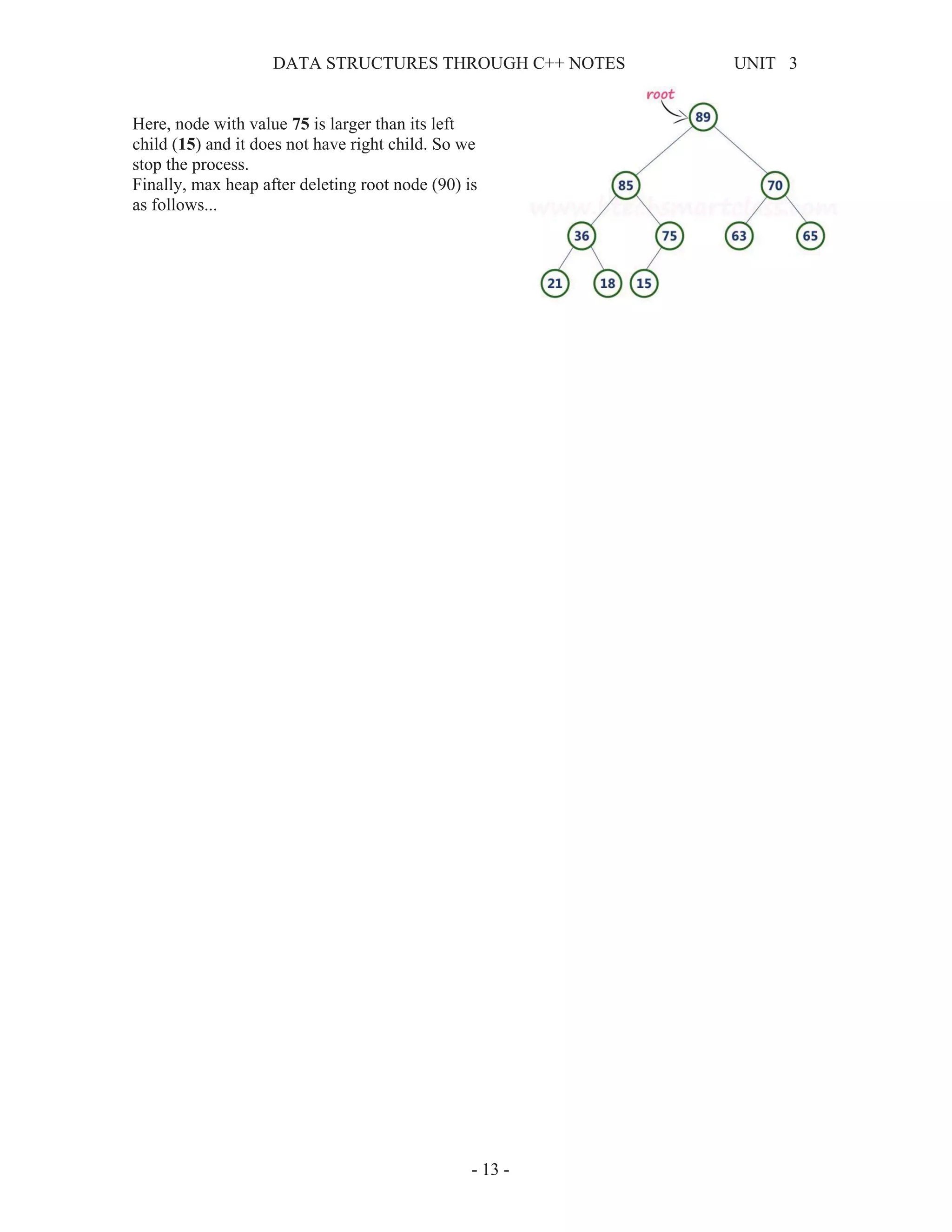
Here, node with value 75 is larger than its left
child (15) and it does not have right child. So we
stop the process.
Finally, max heap after deleting root node (90) is
as follows...
DATA STRUCTURES THROUGH C++ NOTES UNIT 3
- 14 -
UNIT – V Part II (Balanced Search Trees)
Binary Search Trees (BST):
A Binary Search Tree (BST) is a tree in which all the nodes follow the below-mentioned properties
¾ The left sub-tree of a node has a key less than or equal to its parent node's key.
¾ The right sub-tree of a node has a key greater than to its parent node's key.
Thus, BST divides all its sub-trees into two segments; the left sub-tree and the right sub-tree and can
be defined as −
left_subtree (keys) ≤ node (key) ≤ right_subtree (keys)
Following are the basic operations of a tree −
1. Search − Searches an element in a tree.
2. Insert − Inserts an element in a tree.
3. Pre-order Traversal − Traverses a tree in a pre-order manner.
4. In-order Traversal − Traverses a tree in an in-order manner.
5. Post-order Traversal − Traverses a tree in a post-order manner.
Node: Define a node having some data, references to its left and right child nodes.
struct node
{
int data;
struct node *leftChild;
struct node *rightChild;
};
Search for an element in the BST
• Use the search key to direct a recursive binary search for a matching node
1. Start at the root node as current node
2. If the search key’s value matches the current node’s key then found a match
3. If search key’s value is greater than current node’s
1. If the current node has a right child, search right
2. Else, no matching node in the tree
4. If search key is less than the current node’s
1. If the current node has a left child, search left
2. Else, no matching node in the tree
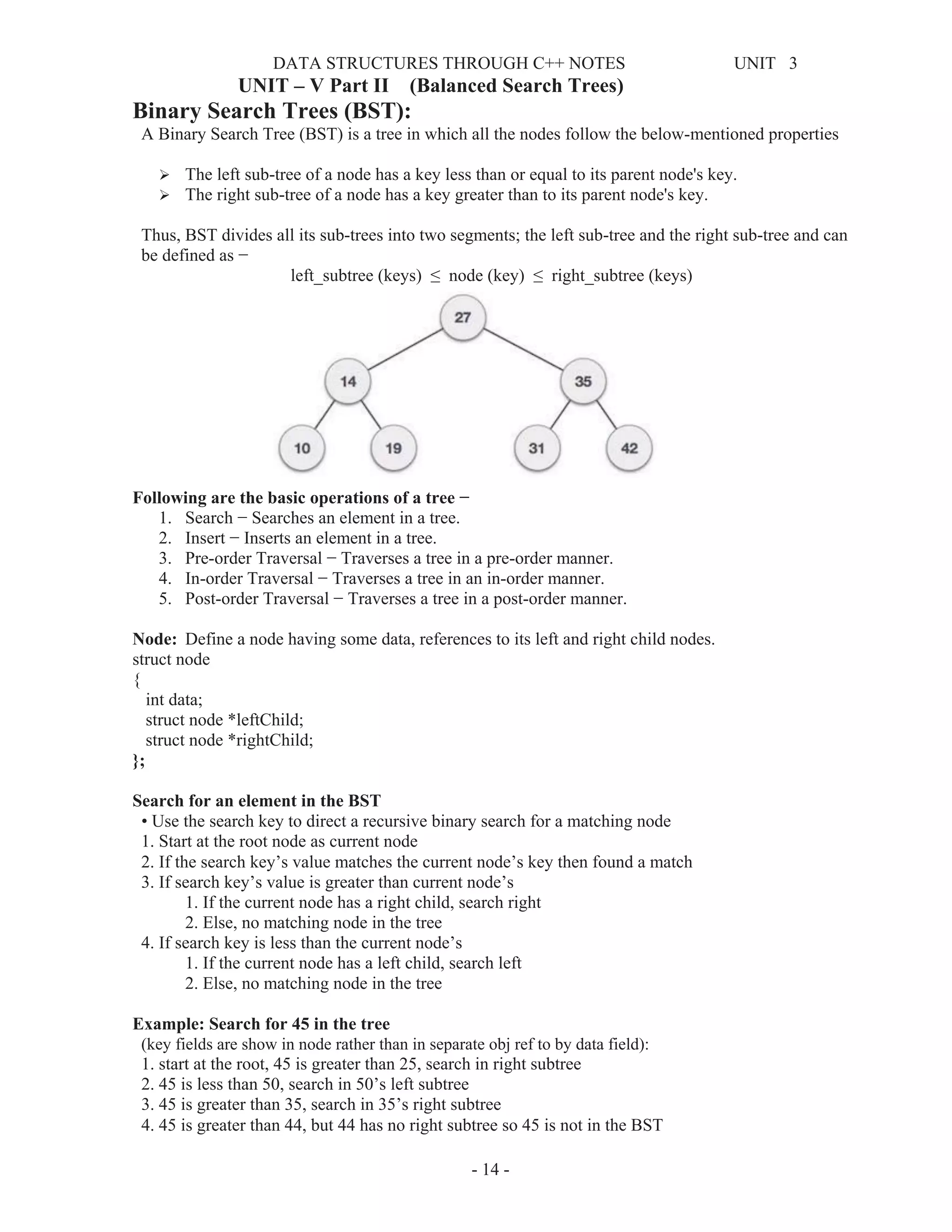
Example: Search for 45 in the tree
(key fields are show in node rather than in separate obj ref to by data field):
1. start at the root, 45 is greater than 25, search in right subtree
2. 45 is less than 50, search in 50’s left subtree
3. 45 is greater than 35, search in 35’s right subtree
4. 45 is greater than 44, but 44 has no right subtree so 45 is not in the BST
DATA STRUCTURES THROUGH C++ NOTES UNIT 3
- 15 -
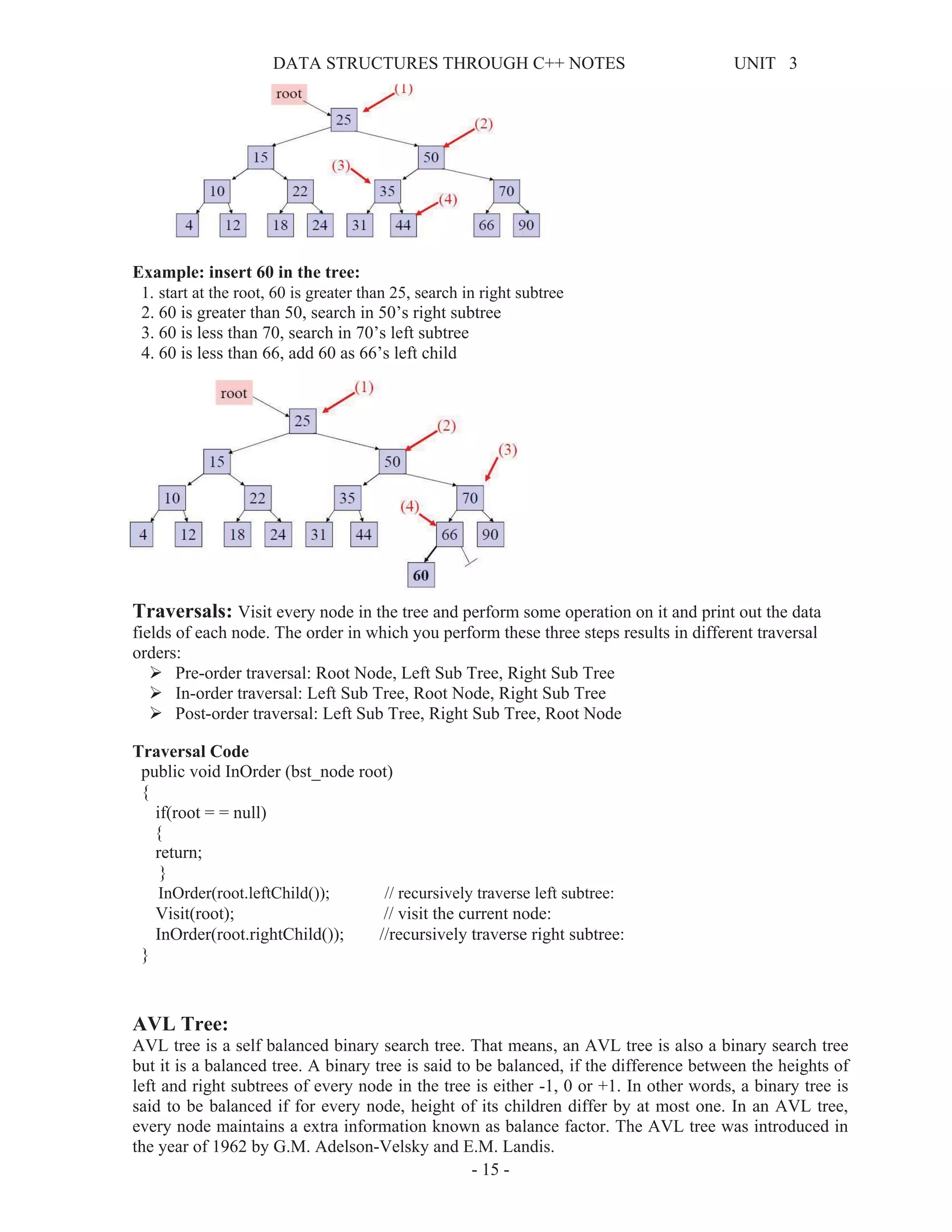
Example: insert 60 in the tree:
1. start at the root, 60 is greater than 25, search in right subtree
2. 60 is greater than 50, search in 50’s right subtree
3. 60 is less than 70, search in 70’s left subtree
4. 60 is less than 66, add 60 as 66’s left child
Traversals: Visit every node in the tree and perform some operation on it and print out the data
fields of each node. The order in which you perform these three steps results in different traversal
orders:
¾ Pre-order traversal: Root Node, Left Sub Tree, Right Sub Tree
¾ In-order traversal: Left Sub Tree, Root Node, Right Sub Tree
¾ Post-order traversal: Left Sub Tree, Right Sub Tree, Root Node
Traversal Code
public void InOrder (bst_node root)
{
if(root = = null)
{
return;
}
InOrder(root.leftChild()); // recursively traverse left subtree:
Visit(root); // visit the current node:
InOrder(root.rightChild()); //recursively traverse right subtree:
}
AVL Tree:
AVL tree is a self balanced binary search tree. That means, an AVL tree is also a binary search tree
but it is a balanced tree. A binary tree is said to be balanced, if the difference between the heights of
left and right subtrees of every node in the tree is either -1, 0 or +1. In other words, a binary tree is
said to be balanced if for every node, height of its children differ by at most one. In an AVL tree,
every node maintains a extra information known as balance factor. The AVL tree was introduced in
the year of 1962 by G.M. Adelson-Velsky and E.M. Landis.
DATA STRUCTURES THROUGH C++ NOTES UNIT 3
- 16 -
An AVL tree is defined as follows...
An AVL tree is a balanced binary search tree. In an AVL tree, balance factor of every node is either -
1, 0 or +1.
Balance factor of a node is the difference between the heights of left and right subtrees of that node.
The balance factor of a node is calculated either height of left subtree - height of right subtree (OR)
height of right subtree - height of left subtree.
In the following explanation, we are calculating as follows...
Balance factor = heightOfLeftSubtree - heightOfRightSubtree
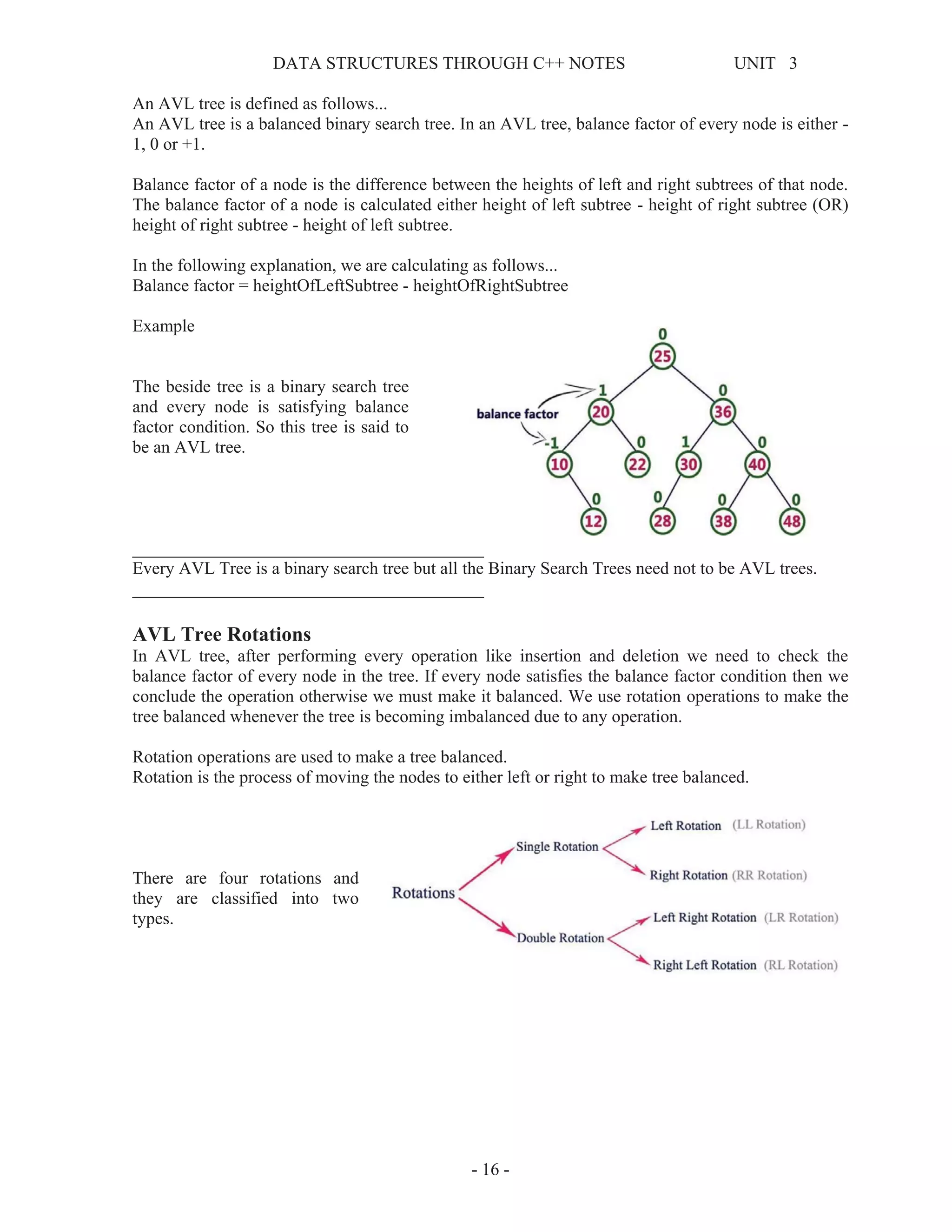
Example
The beside tree is a binary search tree
and every node is satisfying balance
factor condition. So this tree is said to
be an AVL tree.
________________________________________
Every AVL Tree is a binary search tree but all the Binary Search Trees need not to be AVL trees.
________________________________________
AVL Tree Rotations
In AVL tree, after performing every operation like insertion and deletion we need to check the
balance factor of every node in the tree. If every node satisfies the balance factor condition then we
conclude the operation otherwise we must make it balanced. We use rotation operations to make the
tree balanced whenever the tree is becoming imbalanced due to any operation.
Rotation operations are used to make a tree balanced.
Rotation is the process of moving the nodes to either left or right to make tree balanced.
There are four rotations and
they are classified into two
types.
DATA STRUCTURES THROUGH C++ NOTES UNIT 3
- 17 -
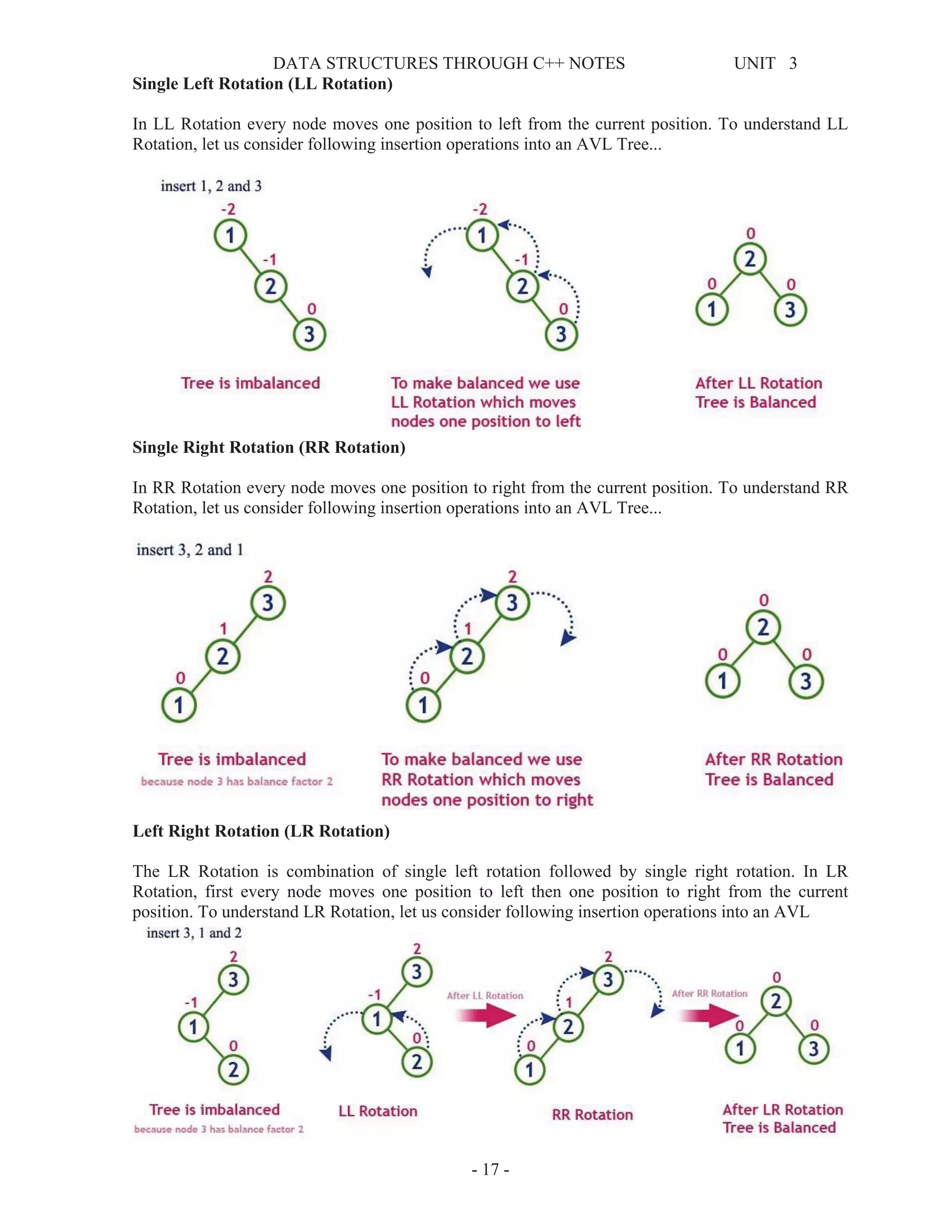
Single Left Rotation (LL Rotation)
In LL Rotation every node moves one position to left from the current position. To understand LL
Rotation, let us consider following insertion operations into an AVL Tree...
Single Right Rotation (RR Rotation)
In RR Rotation every node moves one position to right from the current position. To understand RR
Rotation, let us consider following insertion operations into an AVL Tree...
Left Right Rotation (LR Rotation)
The LR Rotation is combination of single left rotation followed by single right rotation. In LR
Rotation, first every node moves one position to left then one position to right from the current
position. To understand LR Rotation, let us consider following insertion operations into an AVL
DATA STRUCTURES THROUGH C++ NOTES UNIT 3
- 18 -
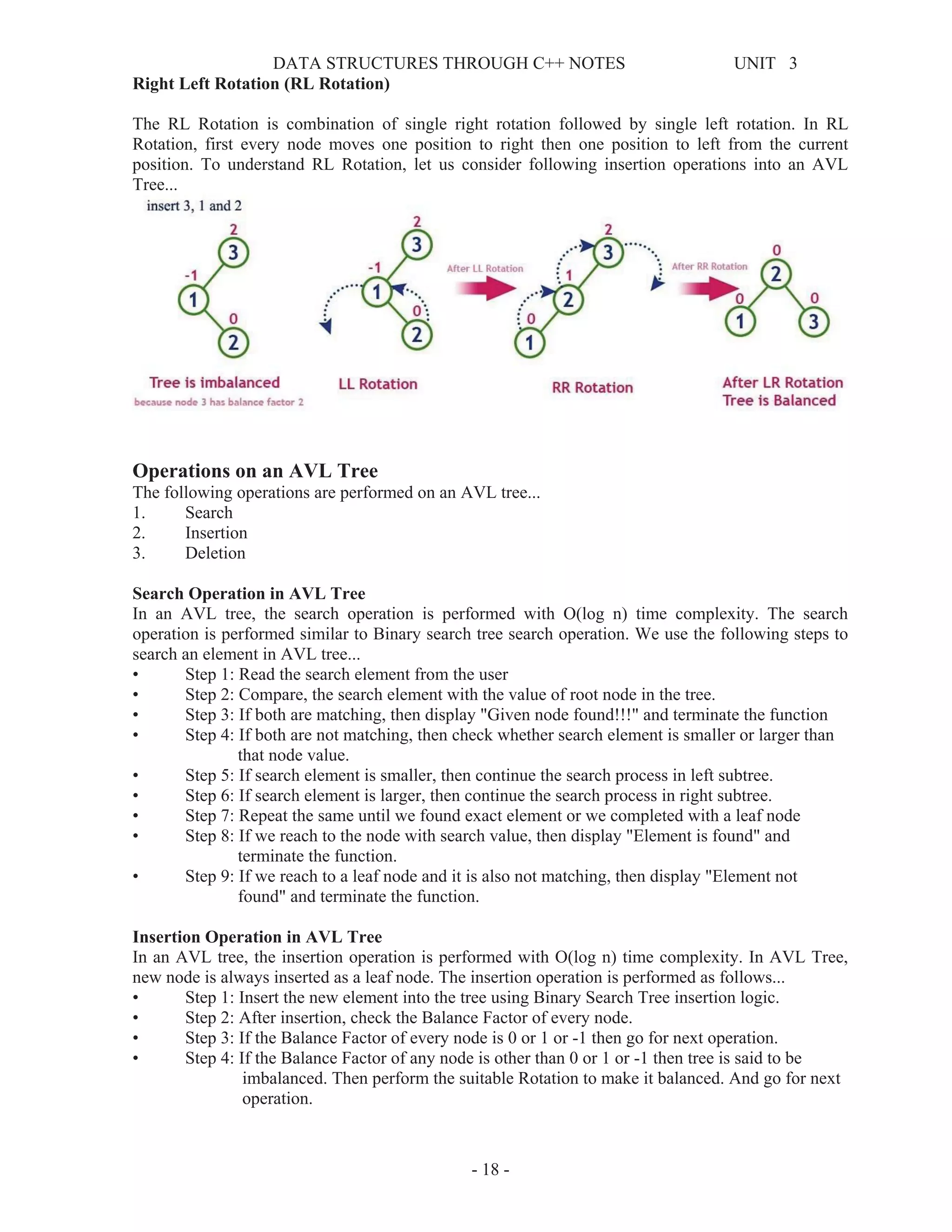
Right Left Rotation (RL Rotation)
The RL Rotation is combination of single right rotation followed by single left rotation. In RL
Rotation, first every node moves one position to right then one position to left from the current
position. To understand RL Rotation, let us consider following insertion operations into an AVL
Tree...
Operations on an AVL Tree
The following operations are performed on an AVL tree...
1. Search
2. Insertion
3. Deletion
Search Operation in AVL Tree
In an AVL tree, the search operation is performed with O(log n) time complexity. The search
operation is performed similar to Binary search tree search operation. We use the following steps to
search an element in AVL tree...
• Step 1: Read the search element from the user
• Step 2: Compare, the search element with the value of root node in the tree.
• Step 3: If both are matching, then display "Given node found!!!" and terminate the function
• Step 4: If both are not matching, then check whether search element is smaller or larger than
that node value.
• Step 5: If search element is smaller, then continue the search process in left subtree.
• Step 6: If search element is larger, then continue the search process in right subtree.
• Step 7: Repeat the same until we found exact element or we completed with a leaf node
• Step 8: If we reach to the node with search value, then display "Element is found" and
terminate the function.
• Step 9: If we reach to a leaf node and it is also not matching, then display "Element not
found" and terminate the function.
Insertion Operation in AVL Tree
In an AVL tree, the insertion operation is performed with O(log n) time complexity. In AVL Tree,
new node is always inserted as a leaf node. The insertion operation is performed as follows...
• Step 1: Insert the new element into the tree using Binary Search Tree insertion logic.
• Step 2: After insertion, check the Balance Factor of every node.
• Step 3: If the Balance Factor of every node is 0 or 1 or -1 then go for next operation.
• Step 4: If the Balance Factor of any node is other than 0 or 1 or -1 then tree is said to be
imbalanced. Then perform the suitable Rotation to make it balanced. And go for next
operation.
DATA STRUCTURES THROUGH C++ NOTES UNIT 3
- 19 -
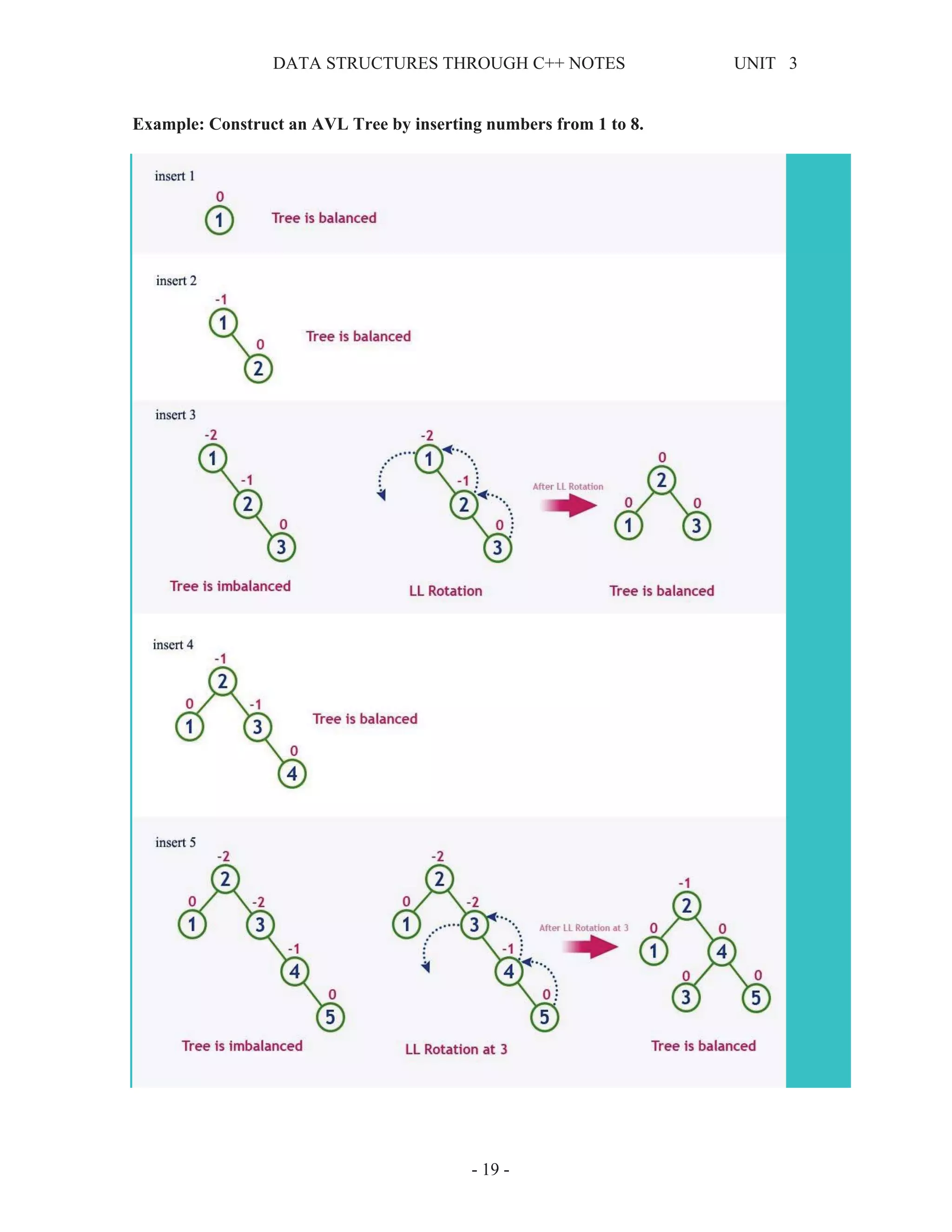
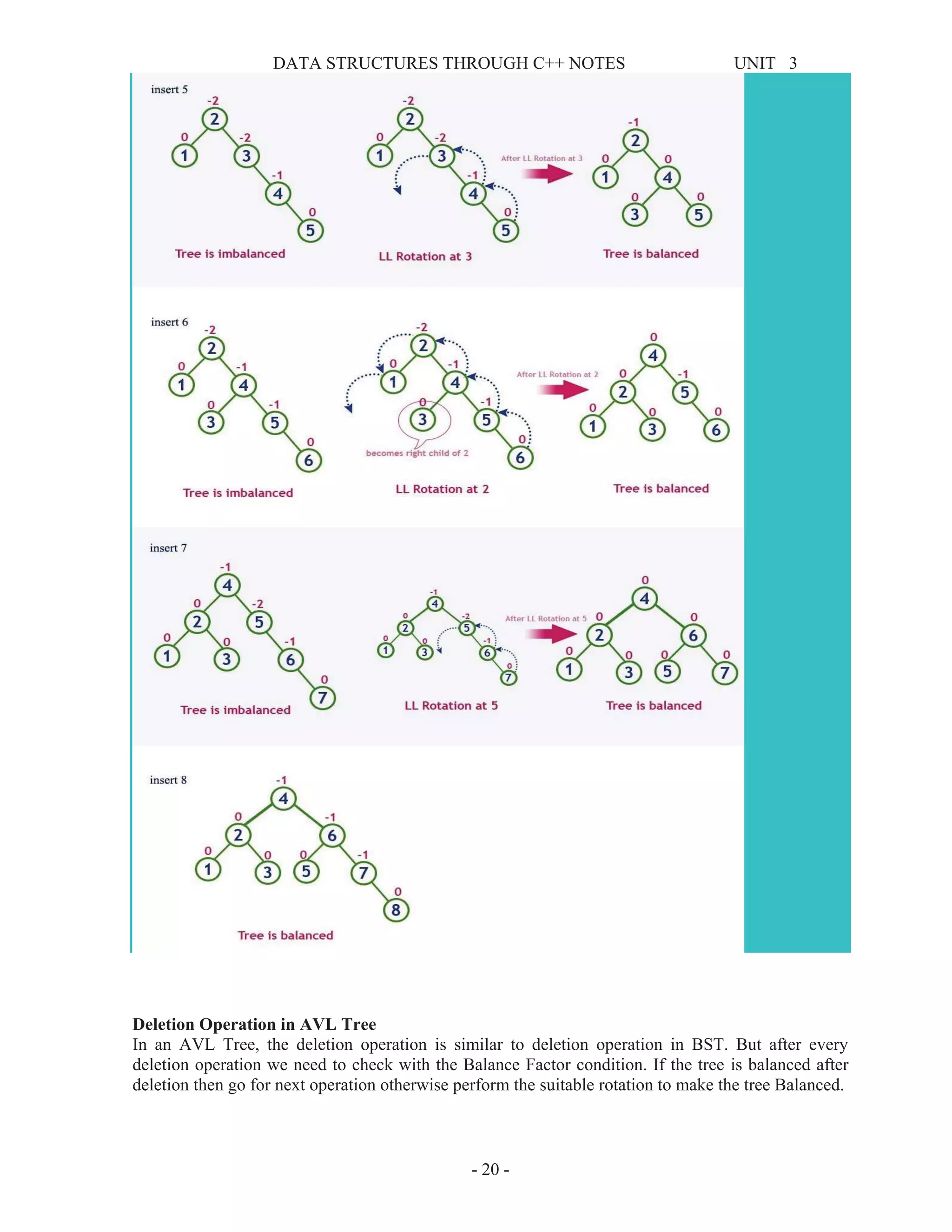
Example: Construct an AVL Tree by inserting numbers from 1 to 8.
DATA STRUCTURES THROUGH C++ NOTES UNIT 3
- 20 -
Deletion Operation in AVL Tree
In an AVL Tree, the deletion operation is similar to deletion operation in BST. But after every
deletion operation we need to check with the Balance Factor condition. If the tree is balanced after
deletion then go for next operation otherwise perform the suitable rotation to make the tree Balanced.
DATA STRUCTURES THROUGH C++ NOTES UNIT 3
- 21 -
B - Trees
In a binary search tree, AVL Tree, Red-Black tree etc., every node can have only one value (key) and
maximum of two children but there is another type of search tree called B-Tree in which a node can
store more than one value (key) and it can have more than two children. B-Tree was developed in the
year of 1972 by Bayer and McCreight with the name Height Balanced m-way Search Tree. Later it
was named as B-Tree.
B-Tree can be defined as follows...
B-Tree is a self-balanced search tree with multiple keys in every node and more than two children for
every node.
Here, number of keys in a node and number of children for a node is depend on the order of the B-
Tree. Every B-Tree has order.
B-Tree of Order m has the following properties...
• Property #1 - All the leaf nodes must be at same level.
• Property #2 - All nodes except root must have at least [m/2]-1 keys and maximum of m-1
keys.
• Property #3 - All non leaf nodes except root (i.e. all internal nodes) must have at least m/2
children.
• Property #4 - If the root node is a non leaf node, then it must have at least 2 children.
• Property #5 - A non leaf node with n-1 keys must have n number of children.
• Property #6 - All the key values within a node must be in Ascending Order.
For example, B-Tree of Order 4 contains maximum 3 key values in a node and maximum 4 children
for a node.
Example
Operations on a B-Tree
The following operations are performed on a B-Tree...
1. Search
2. Insertion
3. Deletion
DATA STRUCTURES THROUGH C++ NOTES UNIT 3
- 22 -
Search Operation in B-Tree
In a B-Tree, the search operation is similar to that of Binary Search Tree. In a Binary search tree, the
search process starts from the root node and every time we make a 2-way decision (we go to either
left subtree or right subtree). In B-Tree also search process starts from the root node but every time
we make n-way decision where n is the total number of children that node has. In a B-Ttree, the
search operation is performed with O(log n) time complexity. The search operation is performed as
follows...
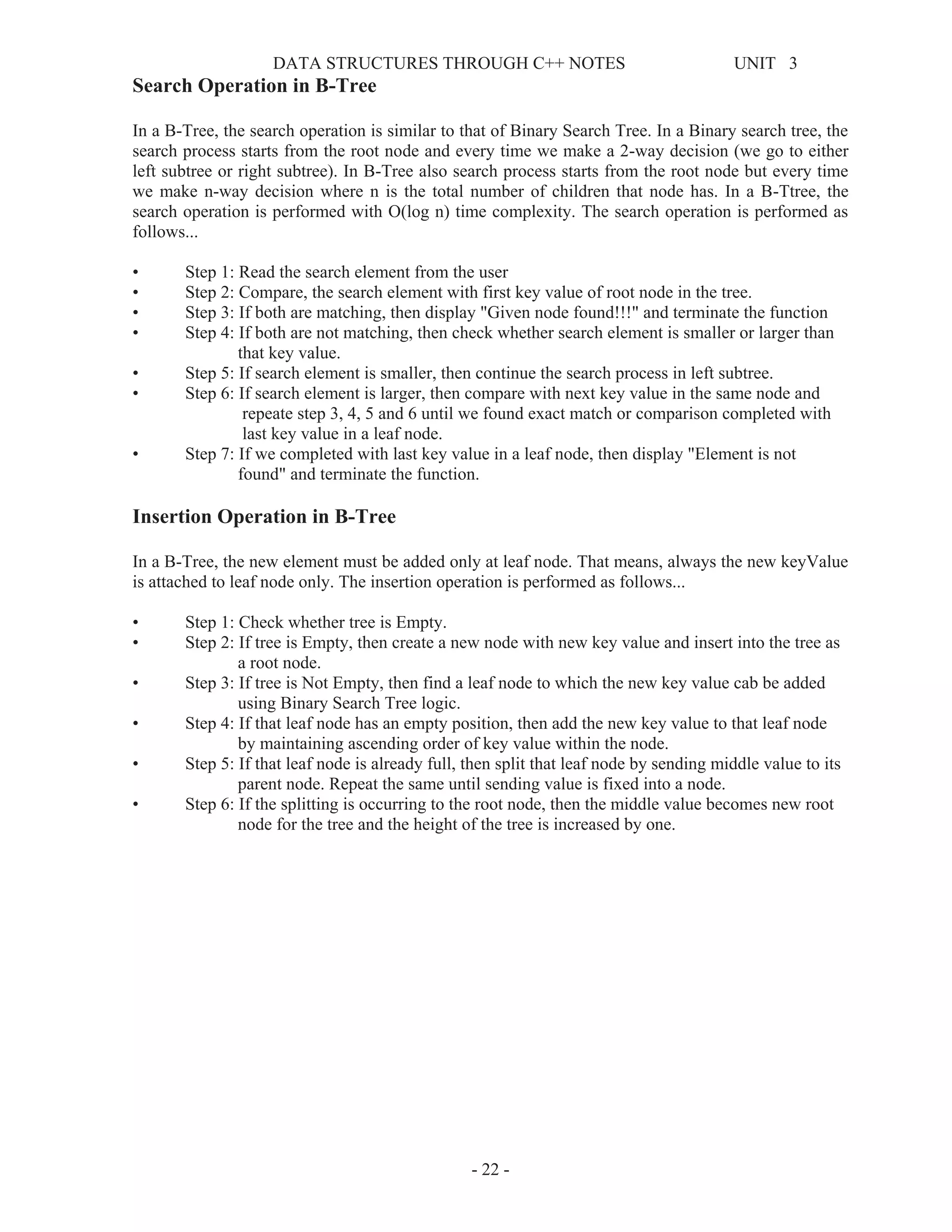
• Step 1: Read the search element from the user
• Step 2: Compare, the search element with first key value of root node in the tree.
• Step 3: If both are matching, then display "Given node found!!!" and terminate the function
• Step 4: If both are not matching, then check whether search element is smaller or larger than
that key value.
• Step 5: If search element is smaller, then continue the search process in left subtree.
• Step 6: If search element is larger, then compare with next key value in the same node and
repeate step 3, 4, 5 and 6 until we found exact match or comparison completed with
last key value in a leaf node.
• Step 7: If we completed with last key value in a leaf node, then display "Element is not
found" and terminate the function.
Insertion Operation in B-Tree
In a B-Tree, the new element must be added only at leaf node. That means, always the new keyValue
is attached to leaf node only. The insertion operation is performed as follows...
• Step 1: Check whether tree is Empty.
• Step 2: If tree is Empty, then create a new node with new key value and insert into the tree as
a root node.
• Step 3: If tree is Not Empty, then find a leaf node to which the new key value cab be added
using Binary Search Tree logic.
• Step 4: If that leaf node has an empty position, then add the new key value to that leaf node
by maintaining ascending order of key value within the node.
• Step 5: If that leaf node is already full, then split that leaf node by sending middle value to its
parent node. Repeat the same until sending value is fixed into a node.
• Step 6: If the splitting is occurring to the root node, then the middle value becomes new root
node for the tree and the height of the tree is increased by one.
DATA STRUCTURES THROUGH C++ NOTES UNIT 3
- 23 -
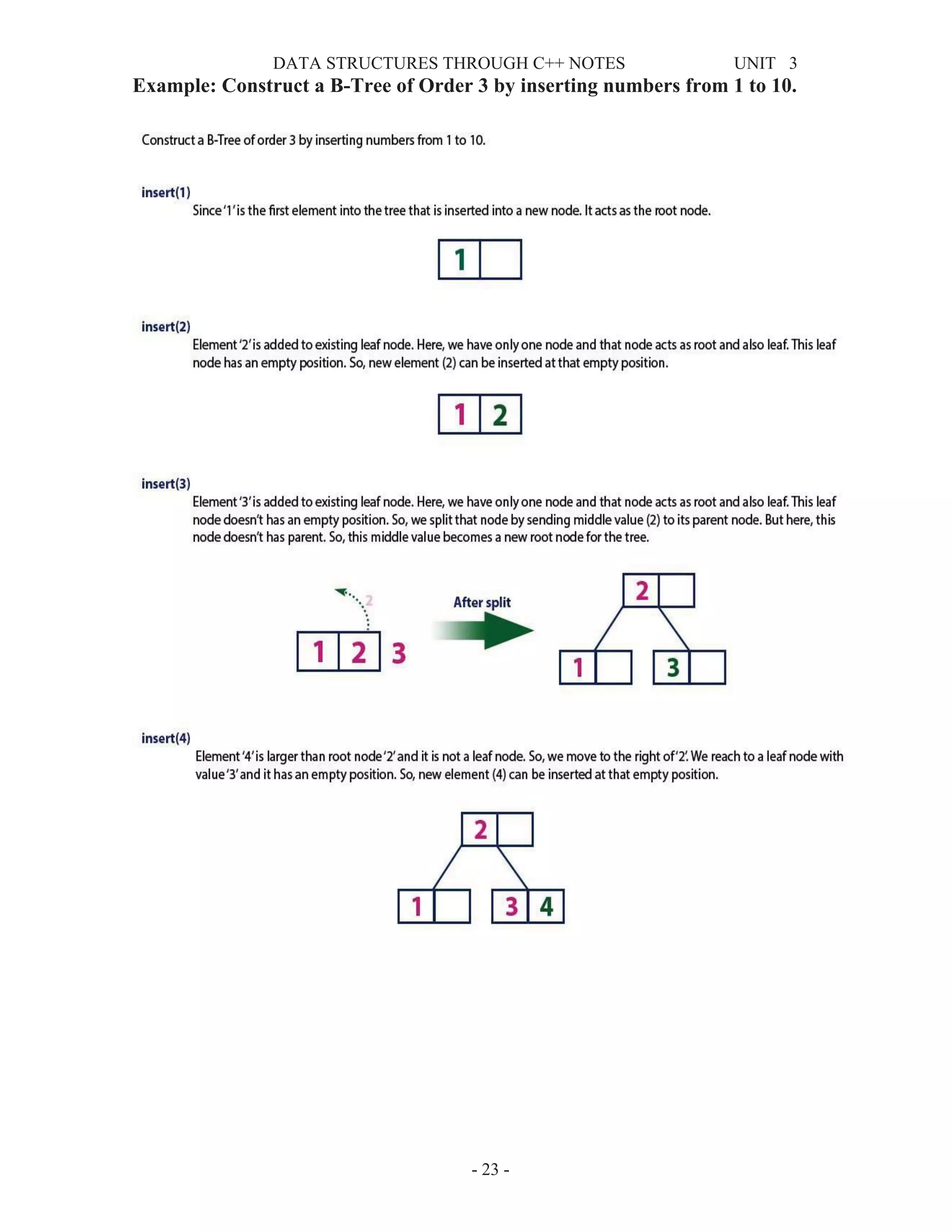
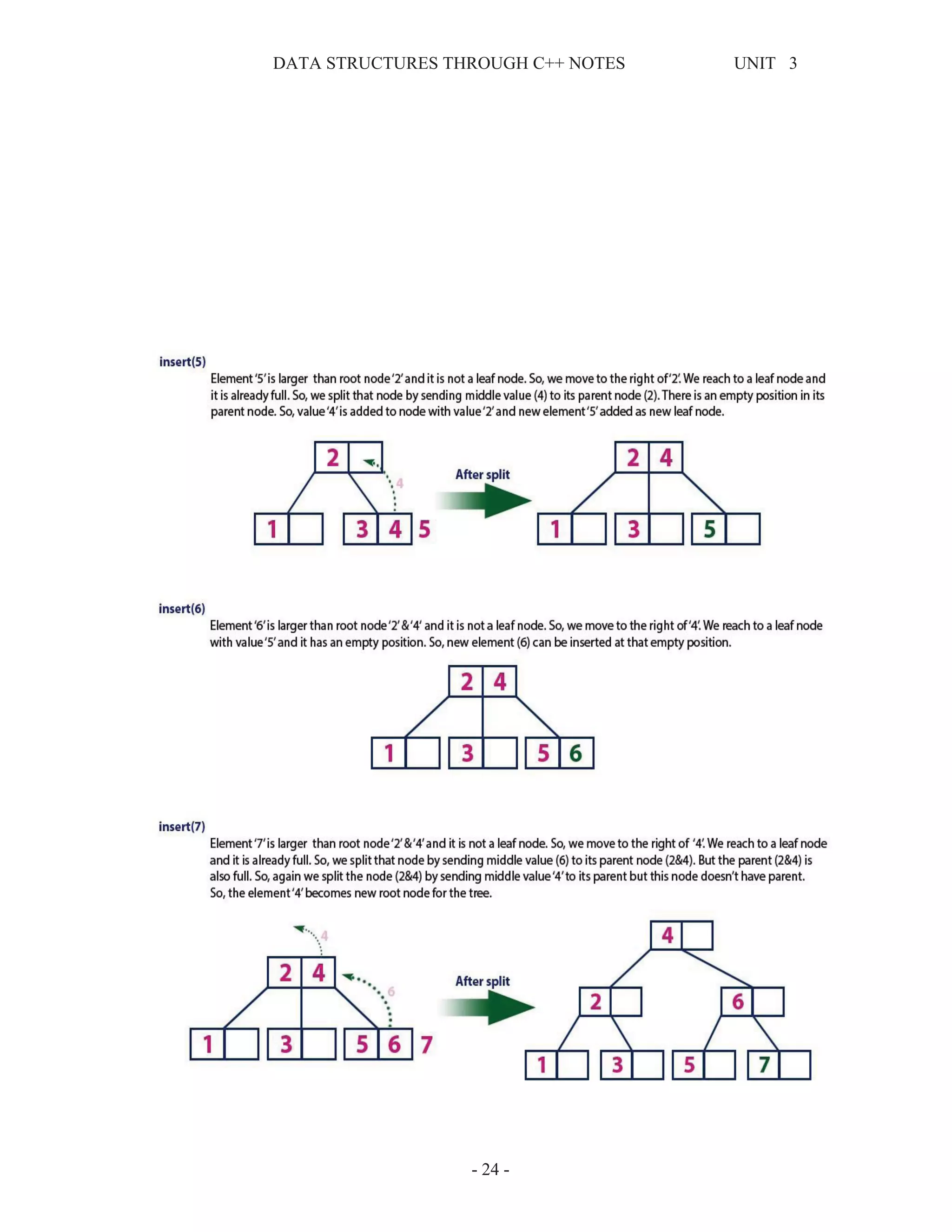
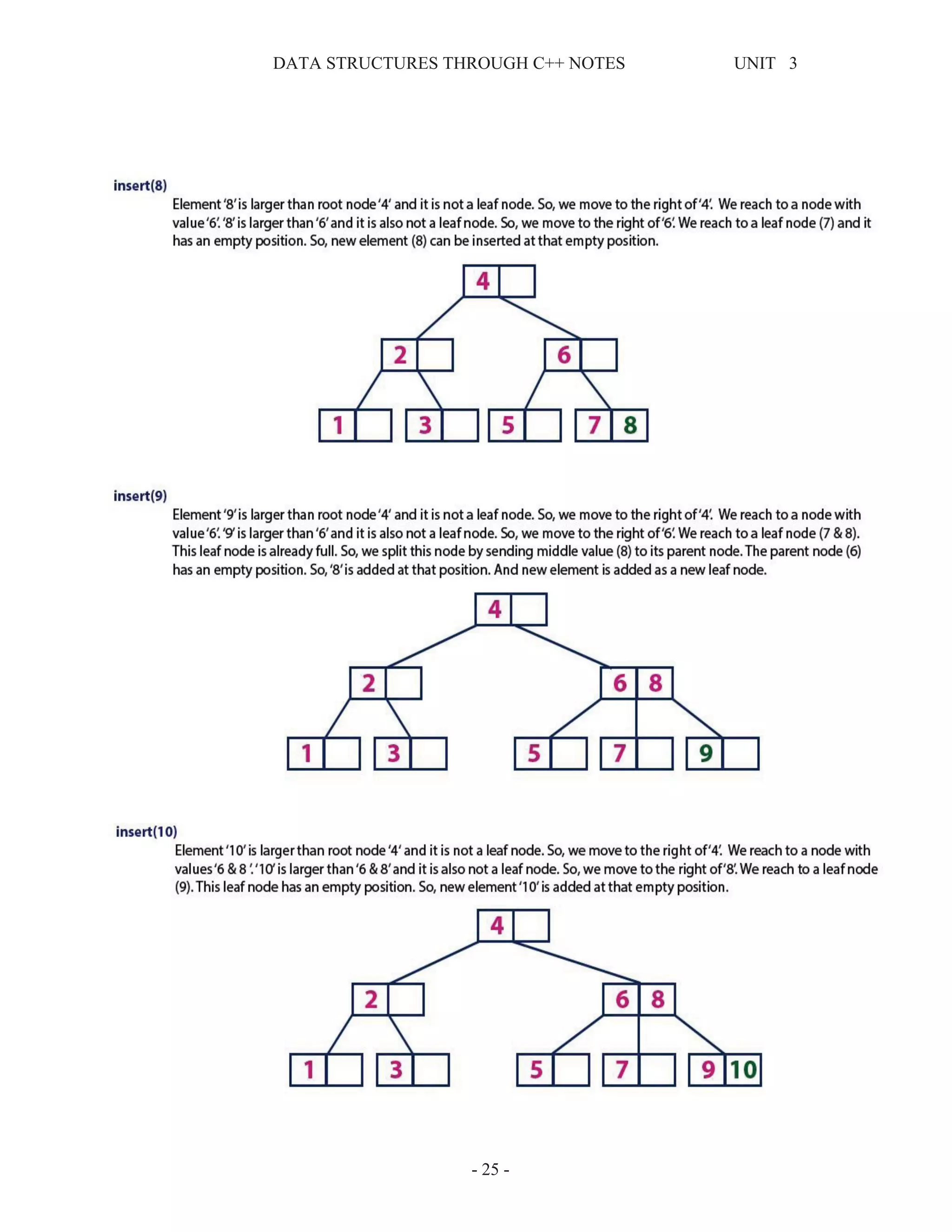
Example: Construct a B-Tree of Order 3 by inserting numbers from 1 to 10.
DATA STRUCTURES THROUGH C++ NOTES UNIT 3
- 24 -
DATA STRUCTURES THROUGH C++ NOTES UNIT 3
- 25 -
DATA STRUCTURES THROUGH C++ NOTES UNIT 3
- 26 -
B-Tree Visualization
https://www.cs.usfca.edu/~galles/visualization/BTree.html
Red Black Tree
Red - Black Tree is another variant of Binary Search Tree in which every node is coloured either
RED or BLACK. We can define a Red Black Tree as follows...
Red Black Tree is a Binary Search Tree in which every node is colored either RED or BLACK.
In a Red Black Tree the colour of a node is decided based on the Red Black Tree properties. Every
Red Black Tree has the following properties.
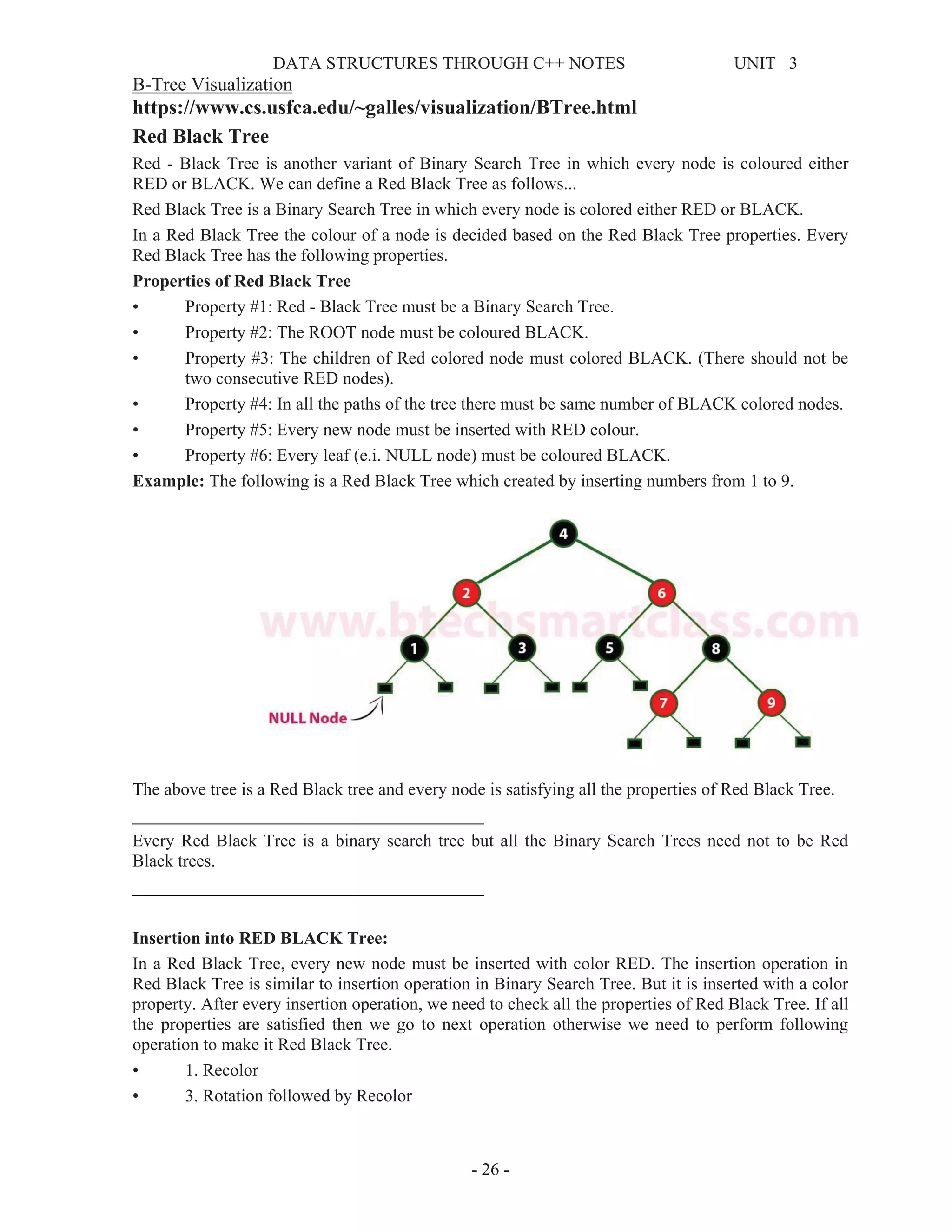
Properties of Red Black Tree
• Property #1: Red - Black Tree must be a Binary Search Tree.
• Property #2: The ROOT node must be coloured BLACK.
• Property #3: The children of Red colored node must colored BLACK. (There should not be
two consecutive RED nodes).
• Property #4: In all the paths of the tree there must be same number of BLACK colored nodes.
• Property #5: Every new node must be inserted with RED colour.
• Property #6: Every leaf (e.i. NULL node) must be coloured BLACK.
Example: The following is a Red Black Tree which created by inserting numbers from 1 to 9.
The above tree is a Red Black tree and every node is satisfying all the properties of Red Black Tree.
________________________________________
Every Red Black Tree is a binary search tree but all the Binary Search Trees need not to be Red
Black trees.
________________________________________
Insertion into RED BLACK Tree:
In a Red Black Tree, every new node must be inserted with color RED. The insertion operation in
Red Black Tree is similar to insertion operation in Binary Search Tree. But it is inserted with a color
property. After every insertion operation, we need to check all the properties of Red Black Tree. If all
the properties are satisfied then we go to next operation otherwise we need to perform following
operation to make it Red Black Tree.
• 1. Recolor
• 3. Rotation followed by Recolor
DATA STRUCTURES THROUGH C++ NOTES UNIT 3
- 27 -
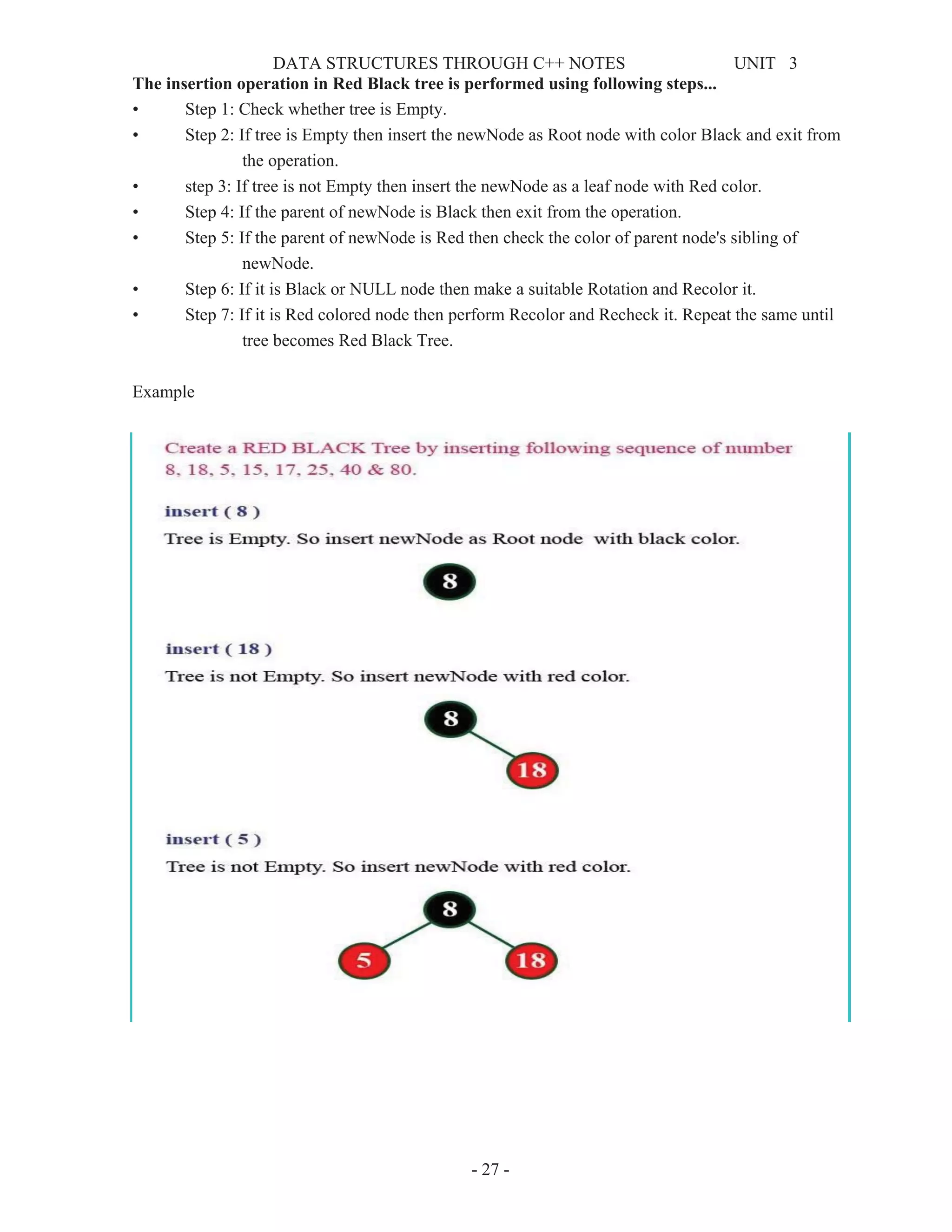
The insertion operation in Red Black tree is performed using following steps...
• Step 1: Check whether tree is Empty.
• Step 2: If tree is Empty then insert the newNode as Root node with color Black and exit from
the operation.
• step 3: If tree is not Empty then insert the newNode as a leaf node with Red color.
• Step 4: If the parent of newNode is Black then exit from the operation.
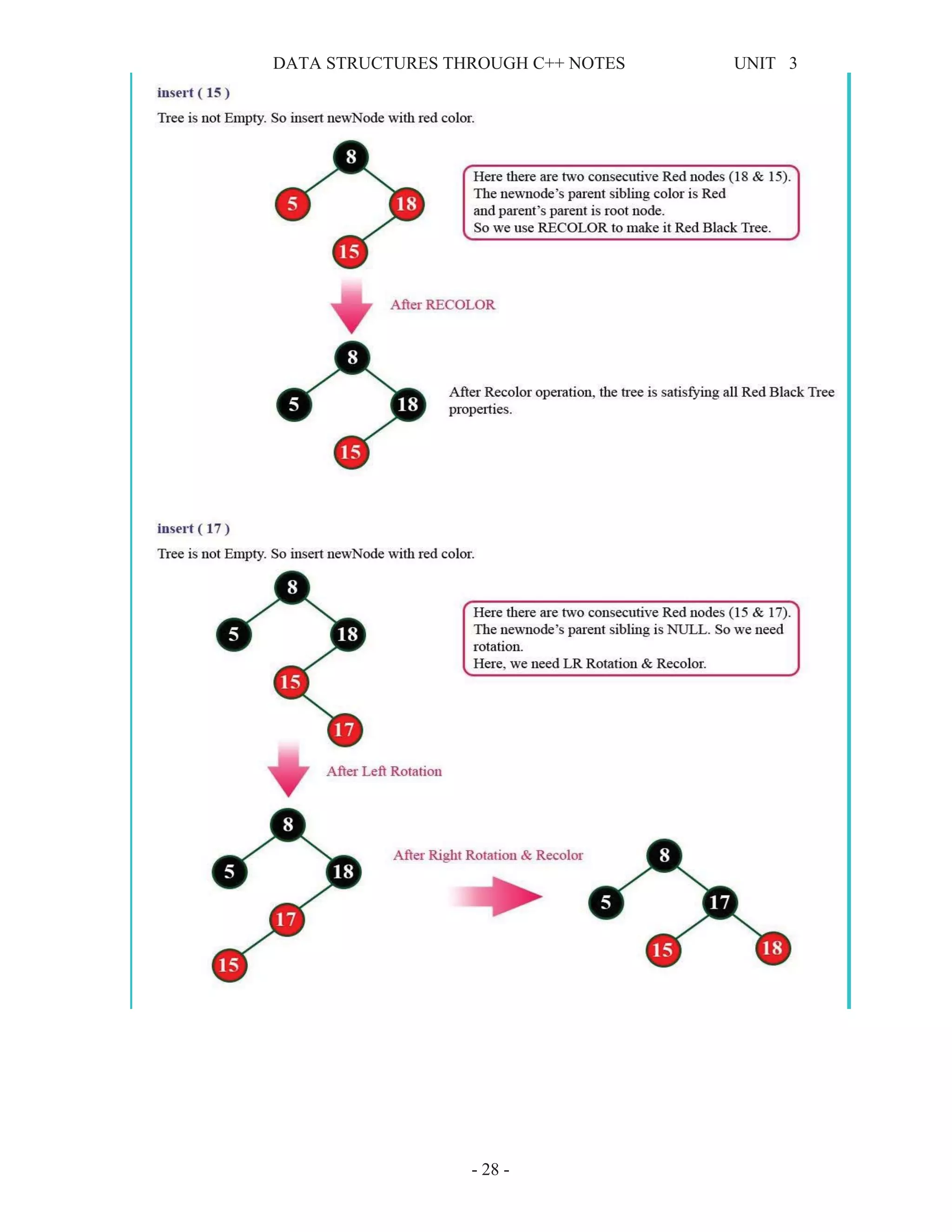
• Step 5: If the parent of newNode is Red then check the color of parent node's sibling of
newNode.
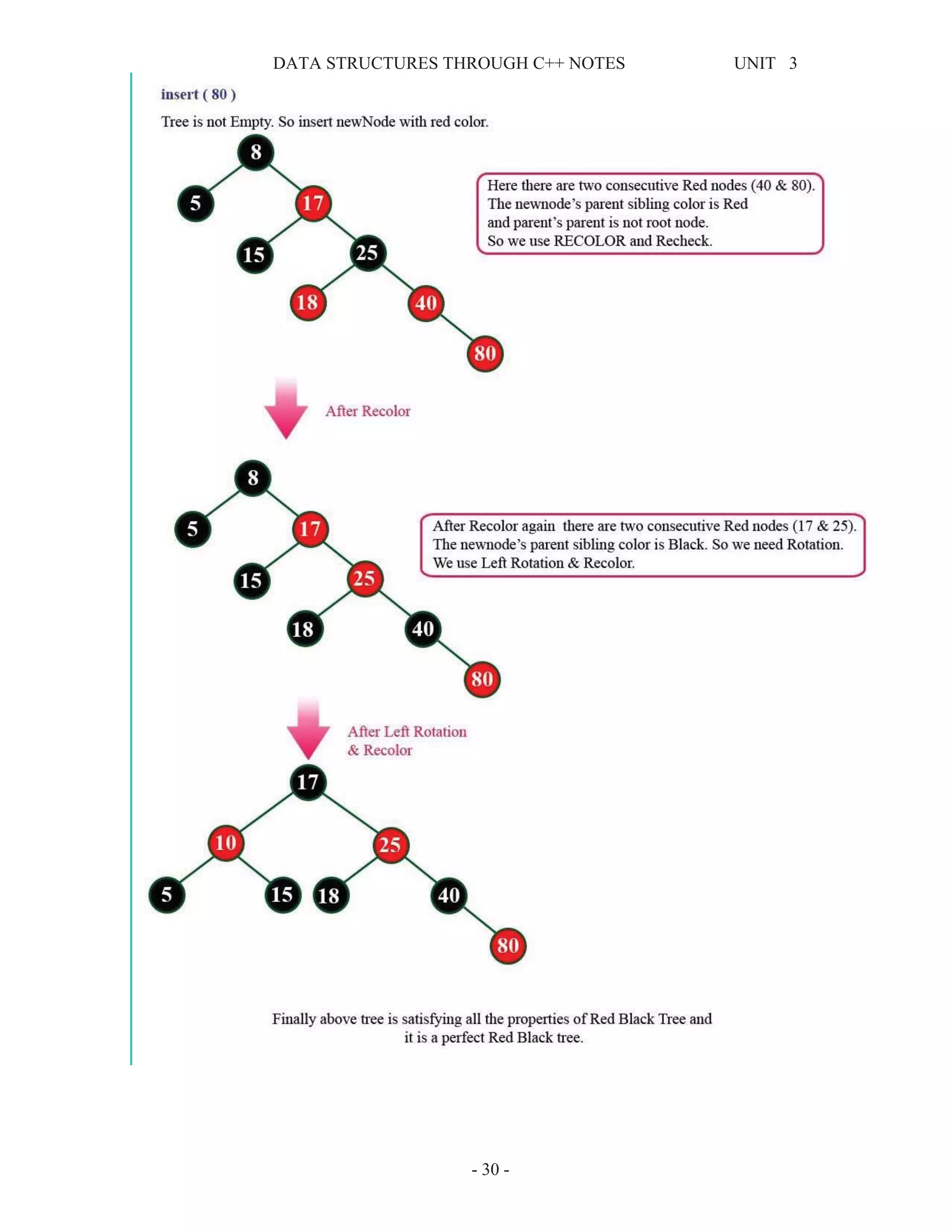
• Step 6: If it is Black or NULL node then make a suitable Rotation and Recolor it.
• Step 7: If it is Red colored node then perform Recolor and Recheck it. Repeat the same until
tree becomes Red Black Tree.
Example
DATA STRUCTURES THROUGH C++ NOTES UNIT 3
- 28 -
DATA STRUCTURES THROUGH C++ NOTES UNIT 3
- 29 -
DATA STRUCTURES THROUGH C++ NOTES UNIT 3
- 30 -
DATA STRUCTURES THROUGH C++ NOTES UNIT 3
- 31 -
Deletion Operation in Red Black Tree
In a Red Black Tree, the deletion operation is similar to deletion operation in BST. But after every
deletion operation we need to check with the Red Black Tree properties. If any of the property is
violated then make suitable operation like Recolor or Rotation & Recolor.
Why Red-Black Trees?
Most of the BST operations (e.g., search, max, min, insert, delete.. etc) take O(h) time where h is the
height of the BST. The cost of these operations may become O(n) for a skewed Binary tree. If we
make sure that height of the tree remains O(Log(n)) after every insertion and deletion, then we can
guarantee an upper bound of O(Log(n)) for all these operations. The height of a Red Black tree is
always O(Log(n)) where n is the number of nodes in the tree.
Comparison with AVL Tree
The AVL trees are more balanced compared to Red Black Trees, but they may cause more rotations
during insertion and deletion. So if your application involves many frequent insertions and deletions,
then Red Black trees should be preferred. And if the insertions and deletions are less frequent and
search is more frequent operation, then AVL tree should be preferred over Red Black Tree.

Dsc++ unit 3 notes

  • 1.
    DATA STRUCTURES THROUGHC++ NOTES UNIT 3 - 1 - UNIT - III TREE: Tree is a non-linear data structure which organizes data in hierarchical structure and this is a recursive definition. A tree is a finite set of elements called nodes and it has unique node called root node, and the remaining nodes are partitioned into disjoint sets, where each node acts as separate tree. Tree Terminology: Root: In a tree data structure, the first node is called as Root Node. Every tree must have root node. Edge: The connecting link between any two nodes is called as EDGE. In a tree with 'N' number of nodes there will be a maximum of 'N-1' number of edges. Parent: The node which is predecessor of any node is called as PARENT NODE. In simple words, the node which has branch from it to any other node is called as parent node. Parent node can also be defined as "The node which has child / children". Child: The node which is descendant of any node is called as CHILD Node. In simple words, the node which has a link from its parent node is called as child node. In a tree, any parent node can have any number of child nodes. In a tree, all the nodes except root are child nodes. Subtree: Any node of a tree, with all of its descendants is a subtree. Siblings: Nodes which belong to same Parent are called as SIBLINGS. In simple words, the nodes with same parent are called as Sibling nodes. Leaf node: The node which does not have a child is called as LEAF Node. In simple words, a leaf is a node with no child. The leaf nodes are also called as External Nodes or Terminal Nodes. Internal Node: The node which has at least one child or a node which is not a leaf is called an internal node also known as Non Terminal Node Ancestor and Descendent: If there is a path from node A to node B, then A is called an ancestor of B and B is called a descendent of A. Depth: The depth of a node is the length of the path (or the number of edges) from the root to that node. Level: The level of the node refers to its distance from the root. The root of the tree has level 0, and the level of any other node in the tree is one more than the level of its parent. Height: The height of a node is the longest path from that node to its leaf node. The height of a tree is the height of the root.
  • 2.
    DATA STRUCTURES THROUGHC++ NOTES UNIT 3 - 2 - Degree: The total number of children of a node is called as DEGREE of that Node. In simple words, the Degree of a node is total number of children it has. The highest degree of a node among all the nodes in a tree is called as 'Degree of Tree' Binary Tree: A binary tree s a tree in which each node has at most two children, a left child and a right child, a binary tree is either empty or consists of root node, left and right sub trees. Properties of binary tree: 1. If h is height of binary tree then maximum number of leaves = 2h 2. If h is height of binary tree then maximum number of nodes = 2h+1 -1 3. if every non leaf node in a binary tree has left and right child’s, then the tree is called strictly binary tree or full binary tree. 4. if number nodes in full binary tree is j at any level. Then next level has 2j nodes. Strictly Binary tree: If every non-leaf node in a binary tree has nonempty left and right subtrees, the tree is termed a strictly binary tree. Thus the tree of figure 7.2.3(a) is strictly binary. A strictly binary tree with n leaves always contains 2n - 1 nodes. Full Binary tree: A full binary tree of height h has all its leaves at level h. alternatively; all non leaf nodes of a full binary tree have two children, and the leaf nodes have no children. A full binary tree with height h has 2h + 1 - 1 nodes. A full binary tree of height h is a strictly binary tree all of whose leaves are at level h. For example, a full binary tree of height 3 contains 23+1 – 1 = 15 nodes. Complete Binary tree: A binary tree with n nodes is said to be complete if it contains all the first n nodes of the above numbering scheme. Figure 7.2.4 shows examples of complete and incomplete binary trees. A complete binary tree of height h looks like a full binary tree down to level h-1, and the level h is filled from left to right. Binary Search Tree If the value of every node of a tree is greater than its left child and smaller than right child then it is called binary search tree. Every Binary Search Tree is a binary tree but all the Binary Trees need not to be binary search trees.
  • 3.
    DATA STRUCTURES THROUGHC++ NOTES UNIT 3 - 3 - Binary Tree ADT (Operations): 1. Insertion into binary tree 2. Deleting a node from binary tree 3. Finding the number of nodes in a binary tree 4. Finding the height of a binary tree 5. Finding the number of leaves in a binary tree 6. Finding the width of a binary tree Representation of binary tree: A binary tree data structure is represented using two methods. Those methods are as follows... 1. Array Representation 2. Linked List Representation Consider the following binary tree... 1. Array Representation To represent a binary tree of depth 'n' using array representation, we need one dimensional array with a maximum size of 2n+1 - 1. (23+1 -1 = 15) The root node is stored in first location of array. If j is the location of array, then left child stored at location 2j+1, and right child stored at 2j+2. This method is not efficient when binary tree is incomplete 2. Linked List Representation LPTR – Address Of Left Child DATA – Value In The Node RPTR – Address Of The Right Child Using this method adding, deleting and traversing tree is very easy and comfort.
  • 4.
    DATA STRUCTURES THROUGHC++ NOTES UNIT 3 - 4 - A B C D E F G Binary Tree Traversals: Traversing means visiting each node exactly one time, the process of visiting each node in a tree is called traversal of tree. It depends up on root node and left and child nodes. 1. Breadth First or Level Order Traversal 2. Depth First Traversals: 1. Breadth First or Level Order Traversal Start visiting the nodes level by level. So start from level zero (Root Node) Ö A B C D E F G 2. Depth First Traversals: Three types I) Preorder (root, left child, right child) II) Inorder (left child, root, right child) III) Postorder (left child, right child, root) I) Preorder: The preorder traversal contains following steps x visit the root node x visit the left child x visit the right child ex: A B D E C F G Algorithm: Preorder(tree) 1. Visit the root. 2. Traverse the left subtree, i.e., call Preorder(left-subtree) 3. Traverse the right subtree, i.e., call Preorder(right-subtree) II) Inorder: The inorder traversal contains following steps x visit the left child x visit the root node x visit the right child ex: D B E A F C G Algorithm: Inorder(tree) 1. Traverse the left subtree, i.e., call Inorder(left-subtree) 2. Visit the root. 3. Traverse the right subtree, i.e., call Inorder(right-subtree) III) Postorder: The preorder traversal contains following steps x visit the left child x visit the right child x visit the root node ex : D E B F G C A Algorithm: Postorder(tree) 1. Traverse the left subtree, i.e., call Postorder(left-subtree) 2. Traverse the right subtree, i.e., call Postorder(right-subtree) 3. Visit the root.
  • 5.
    DATA STRUCTURES THROUGHC++ NOTES UNIT 3 - 5 - Threaded Binary Trees: Threaded Binary Tree is also a binary tree in which all left child pointers that are NULL (in Linked list representation) points to its in-order predecessor, and all right child pointers that are NULL (in Linked list representation) points to its in-order successor. There are two types of threaded binary trees. 1. Single Threaded: each node is threaded towards either the in-order predecessor or successor (left or right). 2. Double threaded: each node is threaded towards both the in-order predecessor and successor (left and right). The threads are also useful for fast accessing ancestors of a node. Following diagram shows an example Single Threaded Binary Tree. The dotted lines represent threads. C++ Representation of a Threaded Node Following is C representation of a single threaded node. class Node { int data; Node *Left, *Right; bool LeftThread, RightThread; }; Value of LeftThread and RightThread will be 1 if there is a thread otherwise 0. A binary tree is represented using array representation or linked list representation. When a binary tree is represented using linked list representation, if any node is not having a child we use NULL pointer in that position. In any binary tree linked list representation, there are more number of NULL pointer than actual pointers. Generally, in any binary tree linked list representation, if there are 2N number of reference fields, then N+1 number of reference fields are filled with NULL ( N+1 are NULL out of 2N ). This NULL pointer does not play any role except indicating there is no link (no child). A. J. Perlis and C. Thornton have proposed new binary tree called "Threaded Binary Tree", which make use of NULL pointer to improve its traversal processes. In threaded binary tree, NULL pointers are replaced by references to other nodes in the tree, called threads. Threaded Binary Tree is also a binary tree in which all left child pointers that are NULL (in Linked list representation) points to its in-order predecessor, and all right child pointers that are NULL (in Linked list representation) points to its in-order successor. If there is no in-order predecessor or in-order successor, then it point to root node. Consider the following binary tree...
  • 6.
    DATA STRUCTURES THROUGHC++ NOTES UNIT 3 - 6 - To convert above binary tree into threaded binary tree, first find the in-order traversal of that tree... In-order traversal of above binary tree... H - D - I - B - E - A - F - J - C - G When we represent above binary tree using linked list representation, nodes H, I, E, F, J and G left child pointers are NULL. This NULL is replaced by address of its in-order predecessor, respectively (I to D, E to B, F to A, J to F and G to C), but here the node H does not have its in-order predecessor, so it points to the root node A. And nodes H, I, E, J and G right child pointers are NULL. This NULL pointers are replaced by address of its in-order successor, respectively (H to D, I to B, E to A, and J to C), but here the node G does not have its in-order successor, so it points to the root node A. Above example binary tree become as follows after converting into threaded binary tree. In above figure threads are indicated with dotted links.
  • 7.
    DATA STRUCTURES THROUGHC++ NOTES UNIT 3 - 7 - Priority Queue: In normal queue data structure, insertion is performed at the end of the queue and deletion is performed based on the FIFO principle. This queue implementation may not be suitable for all situations. Consider a networking application where server has to respond for requests from multiple clients using queue data structure. Assume four requests arrived to the queue in the order of R1 requires 20 units of time, R2 requires 2 units of time, R3 requires 10 units of time and R4 requires 5 units of time. Queue is as follows... Now, check waiting time for each request to be complete. 1. R1 : 20 units of time 2. R2 : 22 units of time (R2 must wait till R1 complete - 20 units and R2 itself requires 2 units. Total 22 units) 3. R3 : 32 units of time (R3 must wait till R2 complete - 22 units and R3 itself requires 10 units. Total 32 units) 4. R4 : 37 units of time (R4 must wait till R3 complete - 35 units and R4 itself requires 5 units. Total 37 units) Here, average waiting time for all requests (R1, R2, R3 and R4) is (20+22+32+37)/4 = 27 units of time. That means, if we use a normal queue data structure to serve these requests the average waiting time for each request is 27 units of time. Now, consider another way of serving these requests. If we serve according to their required amount of time. That means, first we serve R2 which has minimum time required (2) then serve R4 which has second minimum time required (5) then serve R3 which has third minimum time required (10) and finally R1 which has maximum time required (20). Now, check waiting time for each request to be complete. 1. R2 : 2 units of time 2. R4 : 7 units of time (R4 must wait till R2 complete 2 units and R4 itself requires 5 units. Total 7 units) 3.R3 : 17 units of time (R3 must wait till R4 complete 7 units and R3 itself requires 10 units. Total 17 units) 4.R1 : 37 units of time (R1 must wait till R3 complete 17 units and R1 itself requires 20 units. Total 37 units) Here, average waiting time for all requests (R1, R2, R3 and R4) is (2+7+17+37)/4 = 15 units of time.
  • 8.
    DATA STRUCTURES THROUGHC++ NOTES UNIT 3 - 8 - From above two situations, it is very clear that, by using second method server can complete all four requests with very less time compared to the first method. This is what exactly done by the priority queue. Priority queue is a variant of queue data structure in which insertion is performed in the order of arrival and deletion is performed based on the priority. There are two types of priority queues they are as follows... 1. Max Priority Queue 2. Min Priority Queue 1. Max Priority Queue In max priority queue, elements are inserted in the order in which they arrive the queue and always maximum value is removed first from the queue. For example assume that we insert in order 8, 3, 2, 5 and they are removed in the order 8, 5, 3, 2. The following are the operations performed in a Max priority queue... 1. isEmpty() - Check whether queue is Empty. 2. insert() - Inserts a new value into the queue. 3. findMax() - Find maximum value in the queue. 4. remove() - Delete maximum value from the queue. Max Priority Queue Representations There are 6 representations of max priority queue. 1. Using an Unordered Array (Dynamic Array) 2. Using an Unordered Array (Dynamic Array) with the index of the maximum value 3. Using an Array (Dynamic Array) in Decreasing Order 4. Using an Array (Dynamic Array) in Increasing Order 5. Using Linked List in Increasing Order 6. Using Unordered Linked List with reference to node with the maximum value 2. Min Priority Queue Representations Min Priority Queue is similar to max priority queue except removing maximum element first, we remove minimum element first in min priority queue. The following operations are performed in Min Priority Queue... 1. isEmpty() - Check whether queue is Empty. 2. insert() - Inserts a new value into the queue. 3. findMin() - Find minimum value in the queue. 4. remove() - Delete minimum value from the queue. Min priority queue is also has same representations as Max priority queue with minimum value removal. Applications: 1) In CPU Scheduling 2) Artificial Intelligence 3) Graph algorithms like Dijkstra’s shortest path algorithm, Prim’s Minimum Spanning Tree, etc 4) All queue applications where priority is involved. A priority queue is implemented using Heap
  • 9.
    DATA STRUCTURES THROUGHC++ NOTES UNIT 3 - 9 - Heap Data Structure: Heap data structure is a specialized binary tree based data structure. Heap is a binary tree with special characteristics. In a heap data structure, nodes are arranged based on their value. A heap data structure, some time called as Binary Heap. There are two types of heap data structures and they are as follows... 1. Max Heap 2. Min Heap Every heap data structure has the following properties... Property #1 (Ordering): Nodes must be arranged in a order according to values based on Max heap or Min heap. Property #2 (Structural): All levels in a heap must full, except last level and nodes must be filled from left to right strictly. Max Heap Max heap data structure is a specialized full binary tree data structure except last leaf node can be alone. In a max heap nodes are arranged based on node value. Max heap is defined as follows... Max heap is a specialized full binary tree in which every parent node contains greater or equal value than its child nodes. And last leaf node can be alone. Example: Above tree is satisfying both Ordering property and Structural property according to the Max Heap data structure. Operations on Max Heap The following operations are performed on a Max heap data structure... 1. Finding Maximum 2. Insertion 3. Deletion Finding Maximum Value Operation in Max Heap Finding the node which has maximum value in a max heap is very simple. In max heap, the root node has the maximum value than all other nodes in the max heap. So, directly we can display root node value as maximum value in max heap. Insertion Operation in Max Heap: Insertion Operation in max heap is performed as follows... • Step 1: Insert the newNode as last leaf from left to right. • Step 2: Compare newNode value with its Parent node. • Step 3: If newNode value is greater than its parent, then swap both of them. • Step 4: Repeat step 2 and step 3 until newNode value is less than its parent node (or) newNode reached to root. Example: Consider the above max heap. Insert a new node with value 85. • Step 1: Insert the newNode with value 85 as last leaf from left to right. That means newNode is added as a right child of node with value 75. After adding max heap is as follows...
  • 10.
    DATA STRUCTURES THROUGHC++ NOTES UNIT 3 - 10 - • Step 2: Compare newNode value (85) with its Parent node value (75). That means 85 > 75 • Step 3: Here newNode value (85) is greater than its parent value (75), then swap both of them. After swapping, max heap is as follows... • Step 4: Now, again compare newNode value (85) with its parent nede value (89). Here, newNode value (85) is smaller than its parent node value (89). So, we stop insertion process. Finally, max heap after insetion of a new node with value 85 is as follows... Here, newNode value (85) is smaller than its parent node value (89). So, we stop insertion process. Finally, max heap after insetion of a new node with value 85 is as follows... Deletion Operation in Max Heap In a max heap, deleting last node is very simple as it is not disturbing max heap properties. Deleting root node from a max heap is title difficult as it disturbing the max heap properties. We use the following steps to delete root node from a max heap... • Step 1: Swap the root node with last node in max heap • Step 2: Delete last node. • Step 3: Now, compare root value with its left child value. • Step 4: If root value is smaller than its left child, then compare left child with its right sibling. Else goto Step 6 • Step 5: If left child value is larger than its right sibling, then swap root with left child. otherwise swap root with its right child.
  • 11.
    DATA STRUCTURES THROUGHC++ NOTES UNIT 3 - 11 - • Step 6: If root value is larger than its left child, then compare root value with its right child value. • Step 7: If root value is smaller than its right child, then swap root with right child. otherwise stop the process. • Step 8: Repeat the same until root node is fixed at its exact position. Example: Consider the above max heap. Delete root node (90) from the max heap. Step 1: Swap the root node (90) with last node 75 in max heap After swapping max heap is as follows... Step 2: Delete last node. Here node with value 90. After deleting node with value 90 from heap, max heap is as follows... Step 3: Compare root node (75) with its left child (89). Here, root value (75) is smaller than its left child value (89). So, compare left child (89) with its right sibling (70).
  • 12.
    DATA STRUCTURES THROUGHC++ NOTES UNIT 3 - 12 - Step 4: Here, left child value (89) is larger than its right sibling (70), so, swap root (75) with left child (89). Step 5: Now, again compare 75 with its left child (36). Here, node with value 75 is larger than its left child. So, we compare node with value 75 is compared with its right child 85. Step 6: Here, node with value 75 is smaller than its right child (85). So, we swap both of them. After swapping max heap is as follows... Step 7: Now, compare node with value 75 with its left child (15).
  • 13.
    DATA STRUCTURES THROUGHC++ NOTES UNIT 3 - 13 - Here, node with value 75 is larger than its left child (15) and it does not have right child. So we stop the process. Finally, max heap after deleting root node (90) is as follows...
  • 14.
    DATA STRUCTURES THROUGHC++ NOTES UNIT 3 - 14 - UNIT – V Part II (Balanced Search Trees) Binary Search Trees (BST): A Binary Search Tree (BST) is a tree in which all the nodes follow the below-mentioned properties ¾ The left sub-tree of a node has a key less than or equal to its parent node's key. ¾ The right sub-tree of a node has a key greater than to its parent node's key. Thus, BST divides all its sub-trees into two segments; the left sub-tree and the right sub-tree and can be defined as − left_subtree (keys) ≤ node (key) ≤ right_subtree (keys) Following are the basic operations of a tree − 1. Search − Searches an element in a tree. 2. Insert − Inserts an element in a tree. 3. Pre-order Traversal − Traverses a tree in a pre-order manner. 4. In-order Traversal − Traverses a tree in an in-order manner. 5. Post-order Traversal − Traverses a tree in a post-order manner. Node: Define a node having some data, references to its left and right child nodes. struct node { int data; struct node *leftChild; struct node *rightChild; }; Search for an element in the BST • Use the search key to direct a recursive binary search for a matching node 1. Start at the root node as current node 2. If the search key’s value matches the current node’s key then found a match 3. If search key’s value is greater than current node’s 1. If the current node has a right child, search right 2. Else, no matching node in the tree 4. If search key is less than the current node’s 1. If the current node has a left child, search left 2. Else, no matching node in the tree Example: Search for 45 in the tree (key fields are show in node rather than in separate obj ref to by data field): 1. start at the root, 45 is greater than 25, search in right subtree 2. 45 is less than 50, search in 50’s left subtree 3. 45 is greater than 35, search in 35’s right subtree 4. 45 is greater than 44, but 44 has no right subtree so 45 is not in the BST
  • 15.
    DATA STRUCTURES THROUGHC++ NOTES UNIT 3 - 15 - Example: insert 60 in the tree: 1. start at the root, 60 is greater than 25, search in right subtree 2. 60 is greater than 50, search in 50’s right subtree 3. 60 is less than 70, search in 70’s left subtree 4. 60 is less than 66, add 60 as 66’s left child Traversals: Visit every node in the tree and perform some operation on it and print out the data fields of each node. The order in which you perform these three steps results in different traversal orders: ¾ Pre-order traversal: Root Node, Left Sub Tree, Right Sub Tree ¾ In-order traversal: Left Sub Tree, Root Node, Right Sub Tree ¾ Post-order traversal: Left Sub Tree, Right Sub Tree, Root Node Traversal Code public void InOrder (bst_node root) { if(root = = null) { return; } InOrder(root.leftChild()); // recursively traverse left subtree: Visit(root); // visit the current node: InOrder(root.rightChild()); //recursively traverse right subtree: } AVL Tree: AVL tree is a self balanced binary search tree. That means, an AVL tree is also a binary search tree but it is a balanced tree. A binary tree is said to be balanced, if the difference between the heights of left and right subtrees of every node in the tree is either -1, 0 or +1. In other words, a binary tree is said to be balanced if for every node, height of its children differ by at most one. In an AVL tree, every node maintains a extra information known as balance factor. The AVL tree was introduced in the year of 1962 by G.M. Adelson-Velsky and E.M. Landis.
  • 16.
    DATA STRUCTURES THROUGHC++ NOTES UNIT 3 - 16 - An AVL tree is defined as follows... An AVL tree is a balanced binary search tree. In an AVL tree, balance factor of every node is either - 1, 0 or +1. Balance factor of a node is the difference between the heights of left and right subtrees of that node. The balance factor of a node is calculated either height of left subtree - height of right subtree (OR) height of right subtree - height of left subtree. In the following explanation, we are calculating as follows... Balance factor = heightOfLeftSubtree - heightOfRightSubtree Example The beside tree is a binary search tree and every node is satisfying balance factor condition. So this tree is said to be an AVL tree. ________________________________________ Every AVL Tree is a binary search tree but all the Binary Search Trees need not to be AVL trees. ________________________________________ AVL Tree Rotations In AVL tree, after performing every operation like insertion and deletion we need to check the balance factor of every node in the tree. If every node satisfies the balance factor condition then we conclude the operation otherwise we must make it balanced. We use rotation operations to make the tree balanced whenever the tree is becoming imbalanced due to any operation. Rotation operations are used to make a tree balanced. Rotation is the process of moving the nodes to either left or right to make tree balanced. There are four rotations and they are classified into two types.
  • 17.
    DATA STRUCTURES THROUGHC++ NOTES UNIT 3 - 17 - Single Left Rotation (LL Rotation) In LL Rotation every node moves one position to left from the current position. To understand LL Rotation, let us consider following insertion operations into an AVL Tree... Single Right Rotation (RR Rotation) In RR Rotation every node moves one position to right from the current position. To understand RR Rotation, let us consider following insertion operations into an AVL Tree... Left Right Rotation (LR Rotation) The LR Rotation is combination of single left rotation followed by single right rotation. In LR Rotation, first every node moves one position to left then one position to right from the current position. To understand LR Rotation, let us consider following insertion operations into an AVL
  • 18.
    DATA STRUCTURES THROUGHC++ NOTES UNIT 3 - 18 - Right Left Rotation (RL Rotation) The RL Rotation is combination of single right rotation followed by single left rotation. In RL Rotation, first every node moves one position to right then one position to left from the current position. To understand RL Rotation, let us consider following insertion operations into an AVL Tree... Operations on an AVL Tree The following operations are performed on an AVL tree... 1. Search 2. Insertion 3. Deletion Search Operation in AVL Tree In an AVL tree, the search operation is performed with O(log n) time complexity. The search operation is performed similar to Binary search tree search operation. We use the following steps to search an element in AVL tree... • Step 1: Read the search element from the user • Step 2: Compare, the search element with the value of root node in the tree. • Step 3: If both are matching, then display "Given node found!!!" and terminate the function • Step 4: If both are not matching, then check whether search element is smaller or larger than that node value. • Step 5: If search element is smaller, then continue the search process in left subtree. • Step 6: If search element is larger, then continue the search process in right subtree. • Step 7: Repeat the same until we found exact element or we completed with a leaf node • Step 8: If we reach to the node with search value, then display "Element is found" and terminate the function. • Step 9: If we reach to a leaf node and it is also not matching, then display "Element not found" and terminate the function. Insertion Operation in AVL Tree In an AVL tree, the insertion operation is performed with O(log n) time complexity. In AVL Tree, new node is always inserted as a leaf node. The insertion operation is performed as follows... • Step 1: Insert the new element into the tree using Binary Search Tree insertion logic. • Step 2: After insertion, check the Balance Factor of every node. • Step 3: If the Balance Factor of every node is 0 or 1 or -1 then go for next operation. • Step 4: If the Balance Factor of any node is other than 0 or 1 or -1 then tree is said to be imbalanced. Then perform the suitable Rotation to make it balanced. And go for next operation.
  • 19.
    DATA STRUCTURES THROUGHC++ NOTES UNIT 3 - 19 - Example: Construct an AVL Tree by inserting numbers from 1 to 8.
  • 20.
    DATA STRUCTURES THROUGHC++ NOTES UNIT 3 - 20 - Deletion Operation in AVL Tree In an AVL Tree, the deletion operation is similar to deletion operation in BST. But after every deletion operation we need to check with the Balance Factor condition. If the tree is balanced after deletion then go for next operation otherwise perform the suitable rotation to make the tree Balanced.
  • 21.
    DATA STRUCTURES THROUGHC++ NOTES UNIT 3 - 21 - B - Trees In a binary search tree, AVL Tree, Red-Black tree etc., every node can have only one value (key) and maximum of two children but there is another type of search tree called B-Tree in which a node can store more than one value (key) and it can have more than two children. B-Tree was developed in the year of 1972 by Bayer and McCreight with the name Height Balanced m-way Search Tree. Later it was named as B-Tree. B-Tree can be defined as follows... B-Tree is a self-balanced search tree with multiple keys in every node and more than two children for every node. Here, number of keys in a node and number of children for a node is depend on the order of the B- Tree. Every B-Tree has order. B-Tree of Order m has the following properties... • Property #1 - All the leaf nodes must be at same level. • Property #2 - All nodes except root must have at least [m/2]-1 keys and maximum of m-1 keys. • Property #3 - All non leaf nodes except root (i.e. all internal nodes) must have at least m/2 children. • Property #4 - If the root node is a non leaf node, then it must have at least 2 children. • Property #5 - A non leaf node with n-1 keys must have n number of children. • Property #6 - All the key values within a node must be in Ascending Order. For example, B-Tree of Order 4 contains maximum 3 key values in a node and maximum 4 children for a node. Example Operations on a B-Tree The following operations are performed on a B-Tree... 1. Search 2. Insertion 3. Deletion
  • 22.
    DATA STRUCTURES THROUGHC++ NOTES UNIT 3 - 22 - Search Operation in B-Tree In a B-Tree, the search operation is similar to that of Binary Search Tree. In a Binary search tree, the search process starts from the root node and every time we make a 2-way decision (we go to either left subtree or right subtree). In B-Tree also search process starts from the root node but every time we make n-way decision where n is the total number of children that node has. In a B-Ttree, the search operation is performed with O(log n) time complexity. The search operation is performed as follows... • Step 1: Read the search element from the user • Step 2: Compare, the search element with first key value of root node in the tree. • Step 3: If both are matching, then display "Given node found!!!" and terminate the function • Step 4: If both are not matching, then check whether search element is smaller or larger than that key value. • Step 5: If search element is smaller, then continue the search process in left subtree. • Step 6: If search element is larger, then compare with next key value in the same node and repeate step 3, 4, 5 and 6 until we found exact match or comparison completed with last key value in a leaf node. • Step 7: If we completed with last key value in a leaf node, then display "Element is not found" and terminate the function. Insertion Operation in B-Tree In a B-Tree, the new element must be added only at leaf node. That means, always the new keyValue is attached to leaf node only. The insertion operation is performed as follows... • Step 1: Check whether tree is Empty. • Step 2: If tree is Empty, then create a new node with new key value and insert into the tree as a root node. • Step 3: If tree is Not Empty, then find a leaf node to which the new key value cab be added using Binary Search Tree logic. • Step 4: If that leaf node has an empty position, then add the new key value to that leaf node by maintaining ascending order of key value within the node. • Step 5: If that leaf node is already full, then split that leaf node by sending middle value to its parent node. Repeat the same until sending value is fixed into a node. • Step 6: If the splitting is occurring to the root node, then the middle value becomes new root node for the tree and the height of the tree is increased by one.
  • 23.
    DATA STRUCTURES THROUGHC++ NOTES UNIT 3 - 23 - Example: Construct a B-Tree of Order 3 by inserting numbers from 1 to 10.
  • 24.
    DATA STRUCTURES THROUGHC++ NOTES UNIT 3 - 24 -
  • 25.
    DATA STRUCTURES THROUGHC++ NOTES UNIT 3 - 25 -
  • 26.
    DATA STRUCTURES THROUGHC++ NOTES UNIT 3 - 26 - B-Tree Visualization https://www.cs.usfca.edu/~galles/visualization/BTree.html Red Black Tree Red - Black Tree is another variant of Binary Search Tree in which every node is coloured either RED or BLACK. We can define a Red Black Tree as follows... Red Black Tree is a Binary Search Tree in which every node is colored either RED or BLACK. In a Red Black Tree the colour of a node is decided based on the Red Black Tree properties. Every Red Black Tree has the following properties. Properties of Red Black Tree • Property #1: Red - Black Tree must be a Binary Search Tree. • Property #2: The ROOT node must be coloured BLACK. • Property #3: The children of Red colored node must colored BLACK. (There should not be two consecutive RED nodes). • Property #4: In all the paths of the tree there must be same number of BLACK colored nodes. • Property #5: Every new node must be inserted with RED colour. • Property #6: Every leaf (e.i. NULL node) must be coloured BLACK. Example: The following is a Red Black Tree which created by inserting numbers from 1 to 9. The above tree is a Red Black tree and every node is satisfying all the properties of Red Black Tree. ________________________________________ Every Red Black Tree is a binary search tree but all the Binary Search Trees need not to be Red Black trees. ________________________________________ Insertion into RED BLACK Tree: In a Red Black Tree, every new node must be inserted with color RED. The insertion operation in Red Black Tree is similar to insertion operation in Binary Search Tree. But it is inserted with a color property. After every insertion operation, we need to check all the properties of Red Black Tree. If all the properties are satisfied then we go to next operation otherwise we need to perform following operation to make it Red Black Tree. • 1. Recolor • 3. Rotation followed by Recolor
  • 27.
    DATA STRUCTURES THROUGHC++ NOTES UNIT 3 - 27 - The insertion operation in Red Black tree is performed using following steps... • Step 1: Check whether tree is Empty. • Step 2: If tree is Empty then insert the newNode as Root node with color Black and exit from the operation. • step 3: If tree is not Empty then insert the newNode as a leaf node with Red color. • Step 4: If the parent of newNode is Black then exit from the operation. • Step 5: If the parent of newNode is Red then check the color of parent node's sibling of newNode. • Step 6: If it is Black or NULL node then make a suitable Rotation and Recolor it. • Step 7: If it is Red colored node then perform Recolor and Recheck it. Repeat the same until tree becomes Red Black Tree. Example
  • 28.
    DATA STRUCTURES THROUGHC++ NOTES UNIT 3 - 28 -
  • 29.
    DATA STRUCTURES THROUGHC++ NOTES UNIT 3 - 29 -
  • 30.
    DATA STRUCTURES THROUGHC++ NOTES UNIT 3 - 30 -
  • 31.
    DATA STRUCTURES THROUGHC++ NOTES UNIT 3 - 31 - Deletion Operation in Red Black Tree In a Red Black Tree, the deletion operation is similar to deletion operation in BST. But after every deletion operation we need to check with the Red Black Tree properties. If any of the property is violated then make suitable operation like Recolor or Rotation & Recolor. Why Red-Black Trees? Most of the BST operations (e.g., search, max, min, insert, delete.. etc) take O(h) time where h is the height of the BST. The cost of these operations may become O(n) for a skewed Binary tree. If we make sure that height of the tree remains O(Log(n)) after every insertion and deletion, then we can guarantee an upper bound of O(Log(n)) for all these operations. The height of a Red Black tree is always O(Log(n)) where n is the number of nodes in the tree. Comparison with AVL Tree The AVL trees are more balanced compared to Red Black Trees, but they may cause more rotations during insertion and deletion. So if your application involves many frequent insertions and deletions, then Red Black trees should be preferred. And if the insertions and deletions are less frequent and search is more frequent operation, then AVL tree should be preferred over Red Black Tree.