EXTERNAL
NXP, THE NXP LOGO AND NXP SECURE CONNECTIONS FOR A SMARTER WORLD ARE TRADEMARKS OF NXP B.V.
ALL OTHER PRODUCT OR SERVICE NAMES ARE THE PROPERTY OF THEIR RESPECTIVE OWNERS. © 2020 NXP B.V.
3 1 S T J U LY 2 0 2 0
Sandra Fuchs
Principal Customer Application Engineer
TRANSACTION MAC
A MIFARE® DESFire® EV3 & MIFARE Plus® EV2 KEY FEATURE
VIDEO
1EXTERNAL
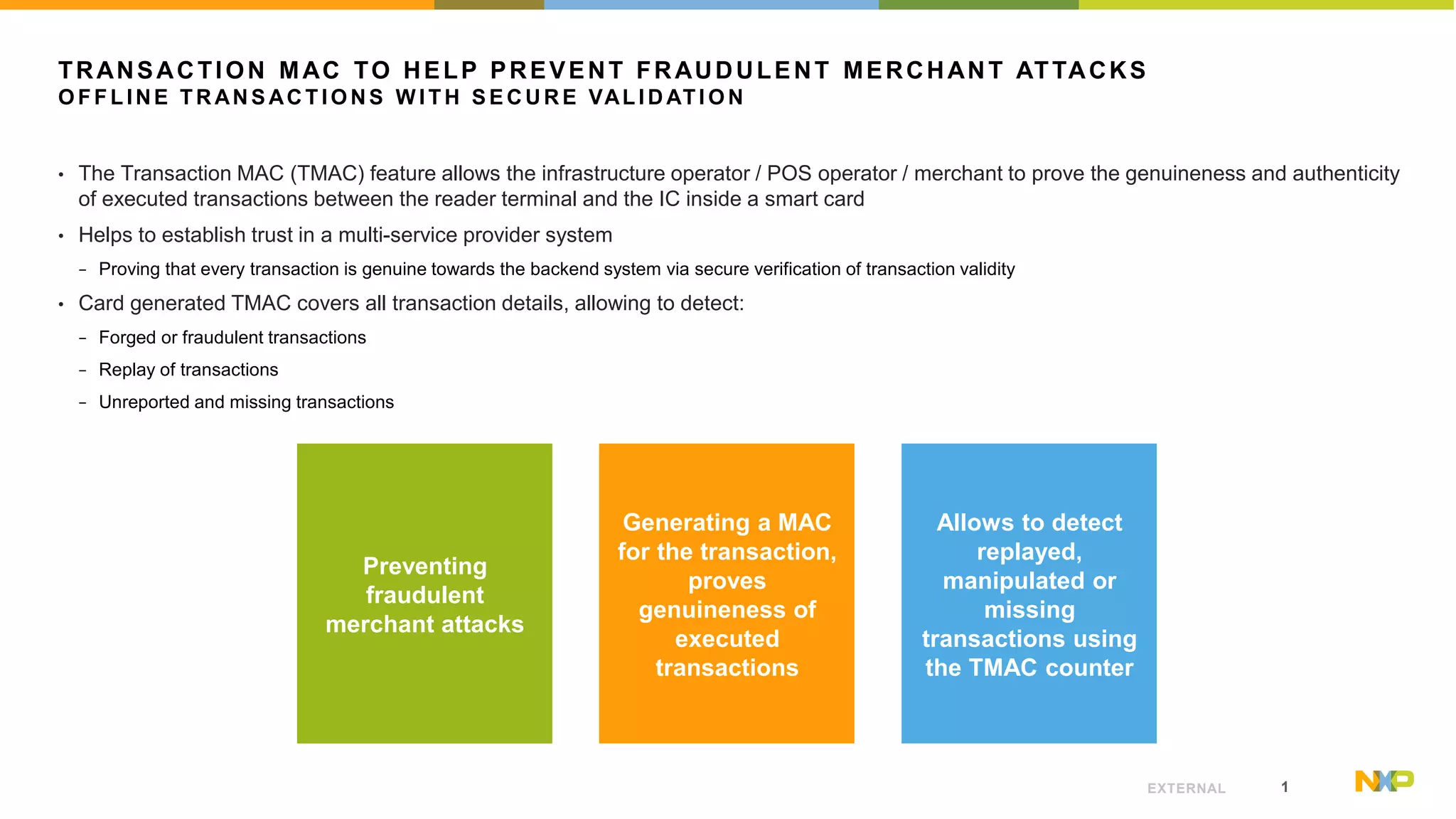
TRANSACTION MAC TO HELP PREVENT FRAUDULENT MERCHANT ATTACKS
O F F L I NE T R AN S AC T I O N S W I T H S E C U R E VAL I D AT I O N
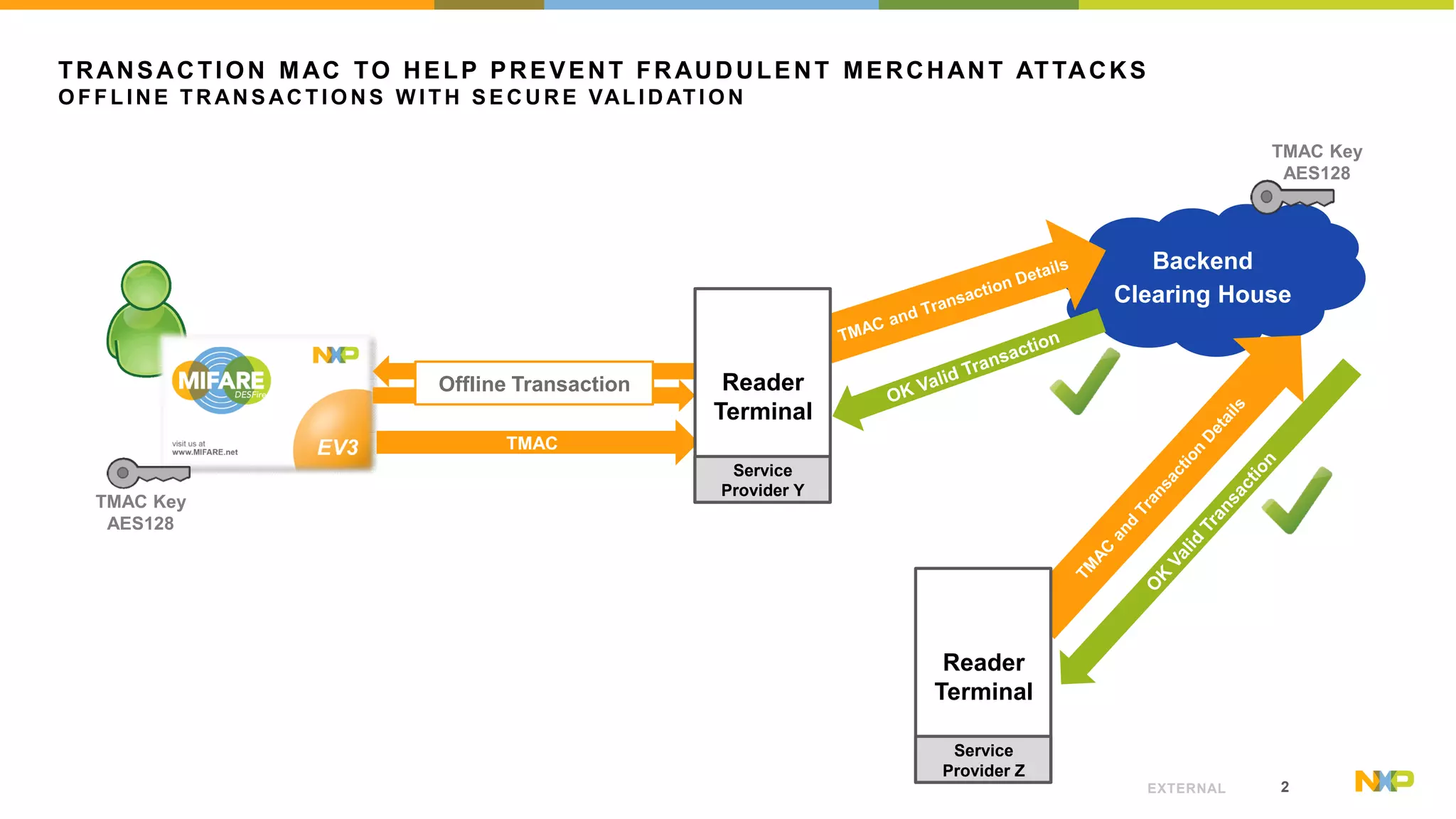
• The Transaction MAC (TMAC) feature allows the infrastructure operator / POS operator / merchant to prove the genuineness and authenticity
of executed transactions between the reader terminal and the IC inside a smart card
• Helps to establish trust in a multi-service provider system
− Proving that every transaction is genuine towards the backend system via secure verification of transaction validity
• Card generated TMAC covers all transaction details, allowing to detect:
− Forged or fraudulent transactions
− Replay of transactions
− Unreported and missing transactions
Preventing
fraudulent
merchant attacks
Generating a MAC
for the transaction,
proves
genuineness of
executed
transactions
Allows to detect
replayed,
manipulated or
missing
transactions using
the TMAC counter
2EXTERNAL
TRANSACTION MAC TO HELP PREVENT FRAUDULENT MERCHANT ATTACKS
O F F L I NE T R AN S AC T I O N S W I T H S E C U R E VAL I D AT I O N
Backend
Clearing House
Offline Transaction
TMAC Key
AES128
TMAC
TMAC Key
AES128
Reader
Terminal
Service
Provider Y
Reader
Terminal
Service
Provider Z
3EXTERNAL
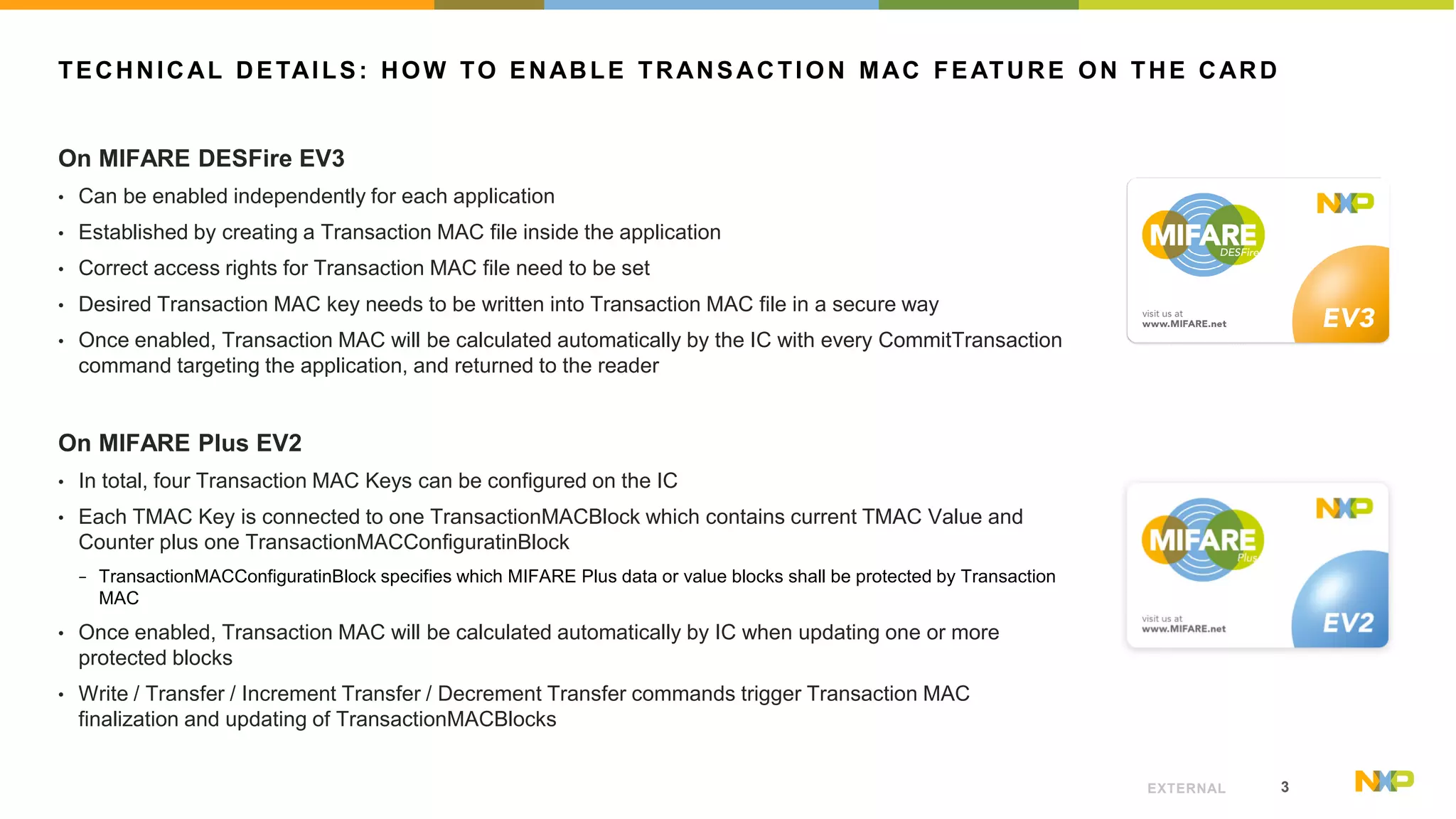
TECHNICAL DETAILS: HOW TO ENABLE TRANSACTION MAC FEATURE ON THE CARD
On MIFARE DESFire EV3
• Can be enabled independently for each application
• Established by creating a Transaction MAC file inside the application
• Correct access rights for Transaction MAC file need to be set
• Desired Transaction MAC key needs to be written into Transaction MAC file in a secure way
• Once enabled, Transaction MAC will be calculated automatically by the IC with every CommitTransaction
command targeting the application, and returned to the reader
On MIFARE Plus EV2
• In total, four Transaction MAC Keys can be configured on the IC
• Each TMAC Key is connected to one TransactionMACBlock which contains current TMAC Value and
Counter plus one TransactionMACConfiguratinBlock
− TransactionMACConfiguratinBlock specifies which MIFARE Plus data or value blocks shall be protected by Transaction
MAC
• Once enabled, Transaction MAC will be calculated automatically by IC when updating one or more
protected blocks
• Write / Transfer / Increment Transfer / Decrement Transfer commands trigger Transaction MAC
finalization and updating of TransactionMACBlocks
4EXTERNAL
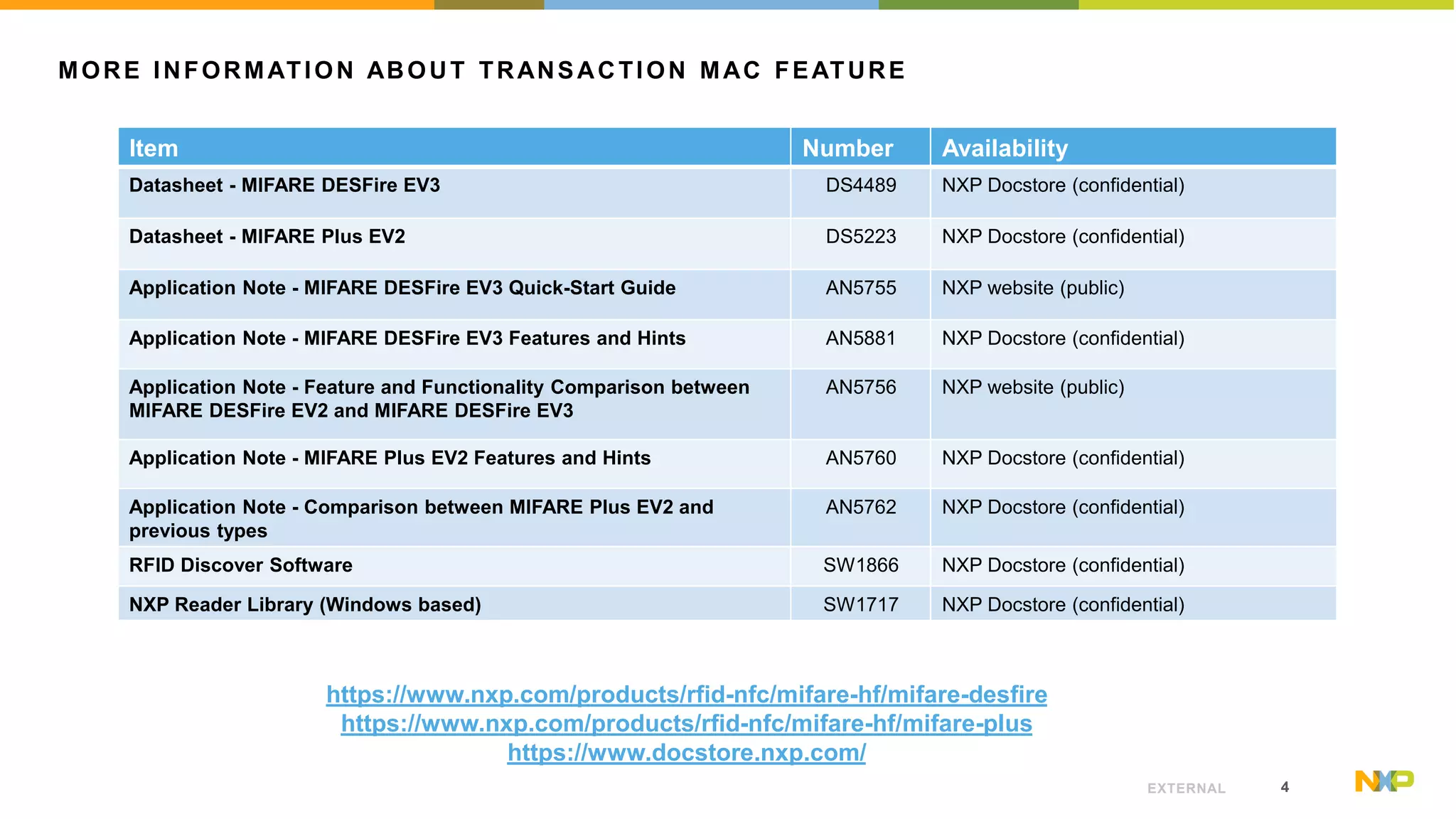
MORE INFORMATION ABOUT TRANSACTION MAC FEATURE
Item Number Availability
Datasheet - MIFARE DESFire EV3 DS4489 NXP Docstore (confidential)
Datasheet - MIFARE Plus EV2 DS5223 NXP Docstore (confidential)
Application Note - MIFARE DESFire EV3 Quick-Start Guide AN5755 NXP website (public)
Application Note - MIFARE DESFire EV3 Features and Hints AN5881 NXP Docstore (confidential)
Application Note - Feature and Functionality Comparison between
MIFARE DESFire EV2 and MIFARE DESFire EV3
AN5756 NXP website (public)
Application Note - MIFARE Plus EV2 Features and Hints AN5760 NXP Docstore (confidential)
Application Note - Comparison between MIFARE Plus EV2 and
previous types
AN5762 NXP Docstore (confidential)
RFID Discover Software SW1866 NXP Docstore (confidential)
NXP Reader Library (Windows based) SW1717 NXP Docstore (confidential)
https://www.nxp.com/products/rfid-nfc/mifare-hf/mifare-desfire
https://www.nxp.com/products/rfid-nfc/mifare-hf/mifare-plus
https://www.docstore.nxp.com/
NXP, THE NXP LOGO AND NXP SECURE CONNECTIONS FOR A SMARTER WORLD ARE TRADEMARKS OF NXP B.V. ALL OTHER PRODUCT OR SERVICE NAMES ARE THE PROPERTY OF THEIR RESPECTIVE OWNERS. © 2020 NXP B.V.

Transaction MAC Feature

  • 1.
    EXTERNAL NXP, THE NXPLOGO AND NXP SECURE CONNECTIONS FOR A SMARTER WORLD ARE TRADEMARKS OF NXP B.V. ALL OTHER PRODUCT OR SERVICE NAMES ARE THE PROPERTY OF THEIR RESPECTIVE OWNERS. © 2020 NXP B.V. 3 1 S T J U LY 2 0 2 0 Sandra Fuchs Principal Customer Application Engineer TRANSACTION MAC A MIFARE® DESFire® EV3 & MIFARE Plus® EV2 KEY FEATURE VIDEO
  • 2.
    1EXTERNAL TRANSACTION MAC TOHELP PREVENT FRAUDULENT MERCHANT ATTACKS O F F L I NE T R AN S AC T I O N S W I T H S E C U R E VAL I D AT I O N • The Transaction MAC (TMAC) feature allows the infrastructure operator / POS operator / merchant to prove the genuineness and authenticity of executed transactions between the reader terminal and the IC inside a smart card • Helps to establish trust in a multi-service provider system − Proving that every transaction is genuine towards the backend system via secure verification of transaction validity • Card generated TMAC covers all transaction details, allowing to detect: − Forged or fraudulent transactions − Replay of transactions − Unreported and missing transactions Preventing fraudulent merchant attacks Generating a MAC for the transaction, proves genuineness of executed transactions Allows to detect replayed, manipulated or missing transactions using the TMAC counter
  • 3.
    2EXTERNAL TRANSACTION MAC TOHELP PREVENT FRAUDULENT MERCHANT ATTACKS O F F L I NE T R AN S AC T I O N S W I T H S E C U R E VAL I D AT I O N Backend Clearing House Offline Transaction TMAC Key AES128 TMAC TMAC Key AES128 Reader Terminal Service Provider Y Reader Terminal Service Provider Z
  • 4.
    3EXTERNAL TECHNICAL DETAILS: HOWTO ENABLE TRANSACTION MAC FEATURE ON THE CARD On MIFARE DESFire EV3 • Can be enabled independently for each application • Established by creating a Transaction MAC file inside the application • Correct access rights for Transaction MAC file need to be set • Desired Transaction MAC key needs to be written into Transaction MAC file in a secure way • Once enabled, Transaction MAC will be calculated automatically by the IC with every CommitTransaction command targeting the application, and returned to the reader On MIFARE Plus EV2 • In total, four Transaction MAC Keys can be configured on the IC • Each TMAC Key is connected to one TransactionMACBlock which contains current TMAC Value and Counter plus one TransactionMACConfiguratinBlock − TransactionMACConfiguratinBlock specifies which MIFARE Plus data or value blocks shall be protected by Transaction MAC • Once enabled, Transaction MAC will be calculated automatically by IC when updating one or more protected blocks • Write / Transfer / Increment Transfer / Decrement Transfer commands trigger Transaction MAC finalization and updating of TransactionMACBlocks
  • 5.
    4EXTERNAL MORE INFORMATION ABOUTTRANSACTION MAC FEATURE Item Number Availability Datasheet - MIFARE DESFire EV3 DS4489 NXP Docstore (confidential) Datasheet - MIFARE Plus EV2 DS5223 NXP Docstore (confidential) Application Note - MIFARE DESFire EV3 Quick-Start Guide AN5755 NXP website (public) Application Note - MIFARE DESFire EV3 Features and Hints AN5881 NXP Docstore (confidential) Application Note - Feature and Functionality Comparison between MIFARE DESFire EV2 and MIFARE DESFire EV3 AN5756 NXP website (public) Application Note - MIFARE Plus EV2 Features and Hints AN5760 NXP Docstore (confidential) Application Note - Comparison between MIFARE Plus EV2 and previous types AN5762 NXP Docstore (confidential) RFID Discover Software SW1866 NXP Docstore (confidential) NXP Reader Library (Windows based) SW1717 NXP Docstore (confidential) https://www.nxp.com/products/rfid-nfc/mifare-hf/mifare-desfire https://www.nxp.com/products/rfid-nfc/mifare-hf/mifare-plus https://www.docstore.nxp.com/
  • 6.
    NXP, THE NXPLOGO AND NXP SECURE CONNECTIONS FOR A SMARTER WORLD ARE TRADEMARKS OF NXP B.V. ALL OTHER PRODUCT OR SERVICE NAMES ARE THE PROPERTY OF THEIR RESPECTIVE OWNERS. © 2020 NXP B.V.