Support for Realising New Member and Associated
States' Potentials in Transport Research
Monica Anghel
National Institute for Research and Development in
Informatics – ICI Bucharest
TransNEW database, FP7
Information Day on Research
PPPs', July 2011, Brussels
 The goal is to design, develop and populate
the TransNew database.
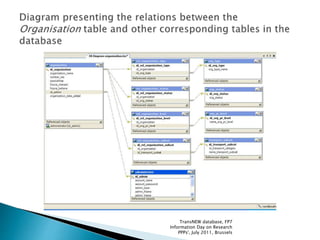
 The database is structured around 3 major
database entities:
 Organisation
 Project
 Researcher
TransNEW database, FP7
Information Day on Research
PPPs', July 2011, Brussels
 We set up a system to store and to use the
information gathered by the TransNEW
partners.
 We developed web forms for inserting the
data directly from these forms. The intention
was to avoid “unnecessary steps” – this
means that the information goes directly in
the database, it is verified and becomes
available instantly, without the need to read
and parse the data from external
spreadsheets.
TransNEW database, FP7
Information Day on Research
PPPs', July 2011, Brussels
 Our team developed a MySQL database, for
storing the information;
 The data gathered by the TransNEW partners
in the Excel Spreadsheets is transferred in the
MySQL database;
 This information can be modified or updated
by the TransNEW administrators solely by the
means of the web system, or by the owner of
the information that has an account in the
system (either organisation or researcher
account).
TransNEW database, FP7
Information Day on Research
PPPs', July 2011, Brussels
The construction of the database began after the analysis of the TransNEW
questionnaires. The questionnaire is formulated using the following criteria:
 determining the overall parameters of data collection, creating the questionnaire,
to be used to assess the current situation in transport research,
 in each country and for each transport mode, analyse data responses, including
SMEs in each country to assess their level of participation in transport projects.
From the point of view of the database planning, the questionnaires have
been analyzed as follows:
 the main categories that are stored within;
 identification of the fields that belong to each category;
 the types of fields that are being comprised in the Excel Spreadsheet;
 the dimension of each field in the Spreadsheet;
 the limitations (if any) that are set on some specific fields in the Spreadsheet.
 After all these were performed, we established the 3 main categories that must
represent the core of the database: Researcher, Organisation and Project.
 The SME module enabling users in New Member States to browse and contact
appropriate SMEs was part of the Database itself.
TransNEW database, FP7
Information Day on Research
PPPs', July 2011, Brussels
 We were looking to improve the database, to
have the option to store more valuable
information about the people involved in
TransNEW;
 So, in the Researcher form, we added Photo and
Personal description;
 The researcher uploads an image of
himself/herself, image that will be displayed on
his/her page on the TransNEW system;
 In addition, there is also the option to insert a
brief description about himself/herself, stating
the things that he/she believes to be valuable for
his/her activity and personality.
TransNEW database, FP7
Information Day on Research
PPPs', July 2011, Brussels
TransNEW database, FP7
Information Day on Research
PPPs', July 2011, Brussels
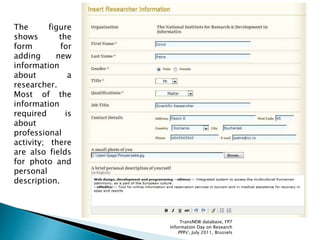
The figure
shows the
form for
adding new
information
about a
researcher.
Most of the
information
required is
about
professional
activity; there
are also fields
for photo and
personal
description.
TransNEW database, FP7
Information Day on Research
PPPs', July 2011, Brussels
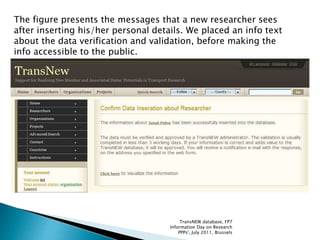
The figure presents the messages that a new researcher sees
after inserting his/her personal details. We placed an info text
about the data verification and validation, before making the
info accessible to the public.
TransNEW database, FP7
Information Day on Research
PPPs', July 2011, Brussels
 In the Organisation forms, we added Contact
fields, as follows:
- address;
- city;
- phone;
- e-mail;
- website address.
 Also, we created a field for uploading the
organisation’s logo; this will be displayed in
the organisation page on the TransNEW
system.
TransNEW database, FP7
Information Day on Research
PPPs', July 2011, Brussels
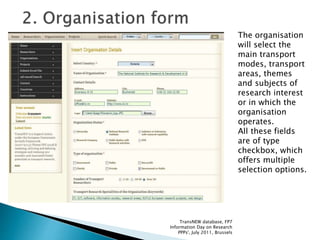
The organisation
will select the
main transport
modes, transport
areas, themes
and subjects of
research interest
or in which the
organisation
operates.
All these fields
are of type
checkbox, which
offers multiple
selection options.
TransNEW database, FP7
Information Day on Research
PPPs', July 2011, Brussels
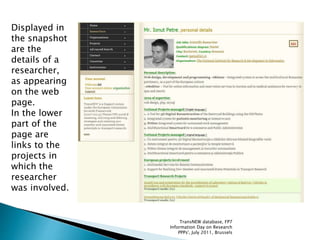
 The information inserted through the web forms
is reflected in the web pages that display the
details of the Researcher.
 The researcher’s photo is placed in the first part
of the page, for better visual impact.
 We displayed several fields from the database to
improve the page aspect.
 In the same page, we placed a list of the projects
in which the researcher has been involved. By
clicking on these links, the user can access the
project page and find more details about it.
TransNEW database, FP7
Information Day on Research
PPPs', July 2011, Brussels
Displayed in
the snapshot
are the
details of a
researcher,
as appearing
on the web
page.
In the lower
part of the
page are
links to the
projects in
which the
researcher
was involved.
TransNEW database, FP7
Information Day on Research
PPPs', July 2011, Brussels
 In the organisation page we displayed the
information contained in the Excel Spreadsheets,
as well as the information regarding the address
and contact details.
 In the lower part of the page, we displayed a list
with the researchers that belong to the respective
organisation.
 In the list we have only displayed a few details; if
any of them is pressed, it will lead to the
respective researcher webpage, to find more
details about him/her and about the researcher’s
activity and interests.
TransNEW database, FP7
Information Day on Research
PPPs', July 2011, Brussels
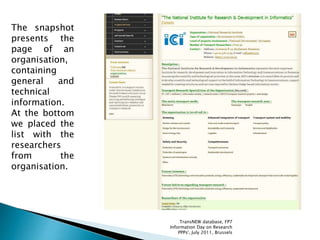
The snapshot
presents the
page of an
organisation,
containing
general and
technical
information.
At the bottom
we placed the
list with the
researchers
from the
organisation.
TransNEW database, FP7
Information Day on Research
PPPs', July 2011, Brussels
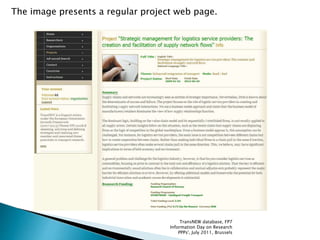
 In the project page, we displayed the
information contained in the spreadsheets for
the projects.
 In the lower part of the page there is a list
with the researchers that have been involved
in the project.
 Same as for the organisation page, any of the
researcher data can be accessed with a
simple click.
TransNEW database, FP7
Information Day on Research
PPPs', July 2011, Brussels
The image presents a regular project web page.
TransNEW database, FP7
Information Day on Research
PPPs', July 2011, Brussels
TransNEW database, FP7
Information Day on Research
PPPs', July 2011, Brussels
TransNEW database, FP7
Information Day on Research
PPPs', July 2011, Brussels
TransNEW database, FP7
Information Day on Research
PPPs', July 2011, Brussels
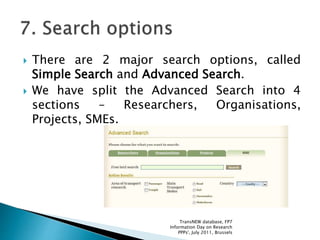
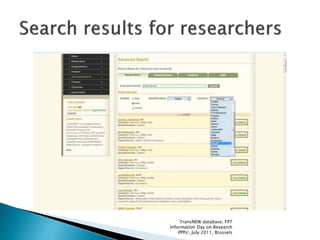
 There are 2 major search options, called
Simple Search and Advanced Search.
 We have split the Advanced Search into 4
sections – Researchers, Organisations,
Projects, SMEs.
TransNEW database, FP7
Information Day on Research
PPPs', July 2011, Brussels
TransNEW database, FP7
Information Day on Research
PPPs', July 2011, Brussels
We set 3 authentication levels: MASTER, ORGANISATION and RESEARCHER.
 MASTER : can modify anything in the database. Most probably, the
master accounts will be assigned to the TransNEW partners.
 ORGANISATION : this account can be set up by the representative of an
organisation. This administrator will have the privileges to:
- insert data about the organisation;
- insert the details about the researchers employeed at the organisation;
- insert data about the projects in which the organisation was involved.
 RESEARCHER: this account can be set up by any researcher involved in
transport research. This administrator will have rights to:
- insert data about himself/herself;
- insert data about projects in which he/she has been involved.
The information inserted by the Organisation and Researcher accounts will
be verified (eventually modified/corrected) by a TransNEW MASTER account
holder. This account takes the decision of validating, postponing the
decision or rejecting the data submitted by the Researcher or Organisation
account holders.
TransNEW database, FP7
Information Day on Research
PPPs', July 2011, Brussels
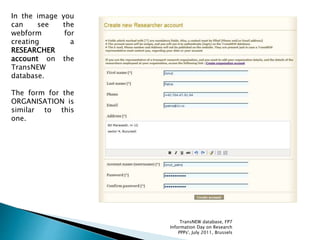
In the image you
can see the
webform for
creating a
RESEARCHER
account on the
TransNEW
database.
The form for the
ORGANISATION is
similar to this
one.
TransNEW database, FP7
Information Day on Research
PPPs', July 2011, Brussels
 No matter if the user is of Researcher or
Organisation account type, it will have a
section called My account.
 In this section the user can instantly see the
information owned, the status of the data, the
pages he can access and the data that can be
modified by him.
 From this section, the user can bring
modifications to his own account, to his own
personal details (as a Researcher) or to his
company details (as an Organisation).
TransNEW database, FP7
Information Day on Research
PPPs', July 2011, Brussels
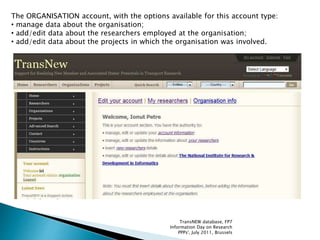
The ORGANISATION account, with the options available for this account type:
• manage data about the organisation;
• add/edit data about the researchers employed at the organisation;
• add/edit data about the projects in which the organisation was involved.
TransNEW database, FP7
Information Day on Research
PPPs', July 2011, Brussels
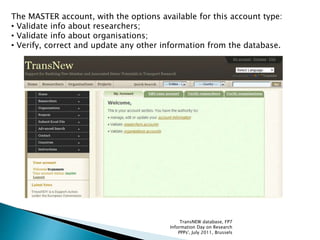
The MASTER account, with the options available for this account type:
• Validate info about researchers;
• Validate info about organisations;
• Verify, correct and update any other information from the database.
TransNEW database, FP7
Information Day on Research
PPPs', July 2011, Brussels
 A researcher who wants to be part of TransNEW
must access the page for creating an account.
After the account is created, the user can
authenticate with the username and the
password he chose.
 After this step, the user will be able to access his
personal data, from the Insert Researcher Details
form.
 Next, the user can insert data about the transport
research projects in which he was involved.
All the information inserted has a waiting status.
This means that the information will not appear on
the site until one of the TransNEW administrators
validates it.
TransNEW database, FP7
Information Day on Research
PPPs', July 2011, Brussels
 An organisation which desires to have its details in
the TransNEW database must access the page for
creating an account. Within this page the user will
follow the link for creating an organisation account.
After the account is created, the organisation
representative can authenticate with the username
and the password he chose.
 After this step, the user will be able to access his
personal data, from the Insert Organisation Details
form.
 Next, the user can insert data about the researchers
that are part of the company.
 In the next phase, the user can insert data about the
transport research projects in which the organisation
has been involved.
TransNEW database, FP7
Information Day on Research
PPPs', July 2011, Brussels
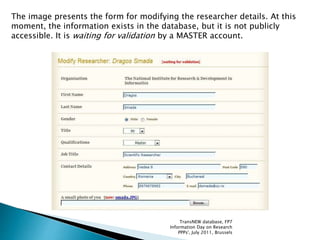
The image presents the form for modifying the researcher details. At this
moment, the information exists in the database, but it is not publicly
accessible. It is waiting for validation by a MASTER account.
TransNEW database, FP7
Information Day on Research
PPPs', July 2011, Brussels
 We implemented a translation facility, using
an API from Google, that accesses the Google
translation program for the entire content of
a webpage.
 The translation is not 100% accurate, but it is
continuously improved, so it is helpful for
people who do not know the English
language.
TransNEW database, FP7
Information Day on Research
PPPs', July 2011, Brussels
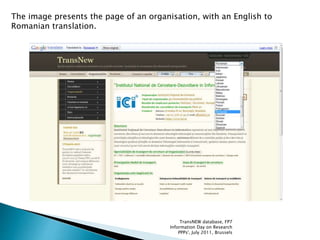
The image presents the page of an organisation, with an English to
Romanian translation.
TransNEW database, FP7
Information Day on Research
PPPs', July 2011, Brussels
For reporting issues with the database, or for
presenting idea of improvement, please contact
us at:
 ipetre@ici.ro
 dsmada@ici.ro
For more details concerning the TransNEW
project, please contact us at:
doina.banciu@ici.ro;
monica.anghel@ici.ro.
TransNEW database, FP7
Information Day on Research
PPPs', July 2011, Brussels

The database of the TransNEW project

  • 1.
    Support for RealisingNew Member and Associated States' Potentials in Transport Research Monica Anghel National Institute for Research and Development in Informatics – ICI Bucharest TransNEW database, FP7 Information Day on Research PPPs', July 2011, Brussels
  • 2.
     The goalis to design, develop and populate the TransNew database.  The database is structured around 3 major database entities:  Organisation  Project  Researcher TransNEW database, FP7 Information Day on Research PPPs', July 2011, Brussels
  • 3.
     We setup a system to store and to use the information gathered by the TransNEW partners.  We developed web forms for inserting the data directly from these forms. The intention was to avoid “unnecessary steps” – this means that the information goes directly in the database, it is verified and becomes available instantly, without the need to read and parse the data from external spreadsheets. TransNEW database, FP7 Information Day on Research PPPs', July 2011, Brussels
  • 4.
     Our teamdeveloped a MySQL database, for storing the information;  The data gathered by the TransNEW partners in the Excel Spreadsheets is transferred in the MySQL database;  This information can be modified or updated by the TransNEW administrators solely by the means of the web system, or by the owner of the information that has an account in the system (either organisation or researcher account). TransNEW database, FP7 Information Day on Research PPPs', July 2011, Brussels
  • 5.
    The construction ofthe database began after the analysis of the TransNEW questionnaires. The questionnaire is formulated using the following criteria:  determining the overall parameters of data collection, creating the questionnaire, to be used to assess the current situation in transport research,  in each country and for each transport mode, analyse data responses, including SMEs in each country to assess their level of participation in transport projects. From the point of view of the database planning, the questionnaires have been analyzed as follows:  the main categories that are stored within;  identification of the fields that belong to each category;  the types of fields that are being comprised in the Excel Spreadsheet;  the dimension of each field in the Spreadsheet;  the limitations (if any) that are set on some specific fields in the Spreadsheet.  After all these were performed, we established the 3 main categories that must represent the core of the database: Researcher, Organisation and Project.  The SME module enabling users in New Member States to browse and contact appropriate SMEs was part of the Database itself. TransNEW database, FP7 Information Day on Research PPPs', July 2011, Brussels
  • 6.
     We werelooking to improve the database, to have the option to store more valuable information about the people involved in TransNEW;  So, in the Researcher form, we added Photo and Personal description;  The researcher uploads an image of himself/herself, image that will be displayed on his/her page on the TransNEW system;  In addition, there is also the option to insert a brief description about himself/herself, stating the things that he/she believes to be valuable for his/her activity and personality. TransNEW database, FP7 Information Day on Research PPPs', July 2011, Brussels
  • 7.
    TransNEW database, FP7 InformationDay on Research PPPs', July 2011, Brussels
  • 8.
    The figure shows the formfor adding new information about a researcher. Most of the information required is about professional activity; there are also fields for photo and personal description. TransNEW database, FP7 Information Day on Research PPPs', July 2011, Brussels
  • 9.
    The figure presentsthe messages that a new researcher sees after inserting his/her personal details. We placed an info text about the data verification and validation, before making the info accessible to the public. TransNEW database, FP7 Information Day on Research PPPs', July 2011, Brussels
  • 10.
     In theOrganisation forms, we added Contact fields, as follows: - address; - city; - phone; - e-mail; - website address.  Also, we created a field for uploading the organisation’s logo; this will be displayed in the organisation page on the TransNEW system. TransNEW database, FP7 Information Day on Research PPPs', July 2011, Brussels
  • 11.
    The organisation will selectthe main transport modes, transport areas, themes and subjects of research interest or in which the organisation operates. All these fields are of type checkbox, which offers multiple selection options. TransNEW database, FP7 Information Day on Research PPPs', July 2011, Brussels
  • 12.
     The informationinserted through the web forms is reflected in the web pages that display the details of the Researcher.  The researcher’s photo is placed in the first part of the page, for better visual impact.  We displayed several fields from the database to improve the page aspect.  In the same page, we placed a list of the projects in which the researcher has been involved. By clicking on these links, the user can access the project page and find more details about it. TransNEW database, FP7 Information Day on Research PPPs', July 2011, Brussels
  • 13.
    Displayed in the snapshot arethe details of a researcher, as appearing on the web page. In the lower part of the page are links to the projects in which the researcher was involved. TransNEW database, FP7 Information Day on Research PPPs', July 2011, Brussels
  • 14.
     In theorganisation page we displayed the information contained in the Excel Spreadsheets, as well as the information regarding the address and contact details.  In the lower part of the page, we displayed a list with the researchers that belong to the respective organisation.  In the list we have only displayed a few details; if any of them is pressed, it will lead to the respective researcher webpage, to find more details about him/her and about the researcher’s activity and interests. TransNEW database, FP7 Information Day on Research PPPs', July 2011, Brussels
  • 15.
    The snapshot presents the pageof an organisation, containing general and technical information. At the bottom we placed the list with the researchers from the organisation. TransNEW database, FP7 Information Day on Research PPPs', July 2011, Brussels
  • 16.
     In theproject page, we displayed the information contained in the spreadsheets for the projects.  In the lower part of the page there is a list with the researchers that have been involved in the project.  Same as for the organisation page, any of the researcher data can be accessed with a simple click. TransNEW database, FP7 Information Day on Research PPPs', July 2011, Brussels
  • 17.
    The image presentsa regular project web page. TransNEW database, FP7 Information Day on Research PPPs', July 2011, Brussels
  • 18.
    TransNEW database, FP7 InformationDay on Research PPPs', July 2011, Brussels
  • 19.
    TransNEW database, FP7 InformationDay on Research PPPs', July 2011, Brussels
  • 20.
    TransNEW database, FP7 InformationDay on Research PPPs', July 2011, Brussels
  • 21.
     There are2 major search options, called Simple Search and Advanced Search.  We have split the Advanced Search into 4 sections – Researchers, Organisations, Projects, SMEs. TransNEW database, FP7 Information Day on Research PPPs', July 2011, Brussels
  • 22.
    TransNEW database, FP7 InformationDay on Research PPPs', July 2011, Brussels
  • 23.
    We set 3authentication levels: MASTER, ORGANISATION and RESEARCHER.  MASTER : can modify anything in the database. Most probably, the master accounts will be assigned to the TransNEW partners.  ORGANISATION : this account can be set up by the representative of an organisation. This administrator will have the privileges to: - insert data about the organisation; - insert the details about the researchers employeed at the organisation; - insert data about the projects in which the organisation was involved.  RESEARCHER: this account can be set up by any researcher involved in transport research. This administrator will have rights to: - insert data about himself/herself; - insert data about projects in which he/she has been involved. The information inserted by the Organisation and Researcher accounts will be verified (eventually modified/corrected) by a TransNEW MASTER account holder. This account takes the decision of validating, postponing the decision or rejecting the data submitted by the Researcher or Organisation account holders. TransNEW database, FP7 Information Day on Research PPPs', July 2011, Brussels
  • 24.
    In the imageyou can see the webform for creating a RESEARCHER account on the TransNEW database. The form for the ORGANISATION is similar to this one. TransNEW database, FP7 Information Day on Research PPPs', July 2011, Brussels
  • 25.
     No matterif the user is of Researcher or Organisation account type, it will have a section called My account.  In this section the user can instantly see the information owned, the status of the data, the pages he can access and the data that can be modified by him.  From this section, the user can bring modifications to his own account, to his own personal details (as a Researcher) or to his company details (as an Organisation). TransNEW database, FP7 Information Day on Research PPPs', July 2011, Brussels
  • 26.
    The ORGANISATION account,with the options available for this account type: • manage data about the organisation; • add/edit data about the researchers employed at the organisation; • add/edit data about the projects in which the organisation was involved. TransNEW database, FP7 Information Day on Research PPPs', July 2011, Brussels
  • 27.
    The MASTER account,with the options available for this account type: • Validate info about researchers; • Validate info about organisations; • Verify, correct and update any other information from the database. TransNEW database, FP7 Information Day on Research PPPs', July 2011, Brussels
  • 28.
     A researcherwho wants to be part of TransNEW must access the page for creating an account. After the account is created, the user can authenticate with the username and the password he chose.  After this step, the user will be able to access his personal data, from the Insert Researcher Details form.  Next, the user can insert data about the transport research projects in which he was involved. All the information inserted has a waiting status. This means that the information will not appear on the site until one of the TransNEW administrators validates it. TransNEW database, FP7 Information Day on Research PPPs', July 2011, Brussels
  • 29.
     An organisationwhich desires to have its details in the TransNEW database must access the page for creating an account. Within this page the user will follow the link for creating an organisation account. After the account is created, the organisation representative can authenticate with the username and the password he chose.  After this step, the user will be able to access his personal data, from the Insert Organisation Details form.  Next, the user can insert data about the researchers that are part of the company.  In the next phase, the user can insert data about the transport research projects in which the organisation has been involved. TransNEW database, FP7 Information Day on Research PPPs', July 2011, Brussels
  • 30.
    The image presentsthe form for modifying the researcher details. At this moment, the information exists in the database, but it is not publicly accessible. It is waiting for validation by a MASTER account. TransNEW database, FP7 Information Day on Research PPPs', July 2011, Brussels
  • 31.
     We implementeda translation facility, using an API from Google, that accesses the Google translation program for the entire content of a webpage.  The translation is not 100% accurate, but it is continuously improved, so it is helpful for people who do not know the English language. TransNEW database, FP7 Information Day on Research PPPs', July 2011, Brussels
  • 32.
    The image presentsthe page of an organisation, with an English to Romanian translation. TransNEW database, FP7 Information Day on Research PPPs', July 2011, Brussels
  • 33.
    For reporting issueswith the database, or for presenting idea of improvement, please contact us at:  ipetre@ici.ro  dsmada@ici.ro For more details concerning the TransNEW project, please contact us at: doina.banciu@ici.ro; monica.anghel@ici.ro. TransNEW database, FP7 Information Day on Research PPPs', July 2011, Brussels