Top Tips for Effective Email Designs
Stephen Hill, Senior Designer
BRAND BOOST
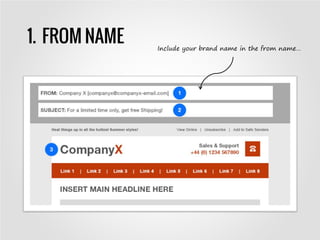
1. FROM NAME Include your brand name in the from name…
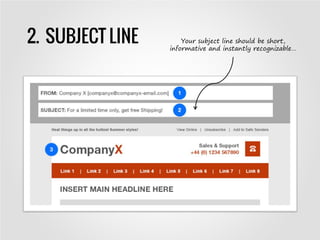
2. SUBJECT LINE Your subject line should be short,
informative and instantly recognizable…
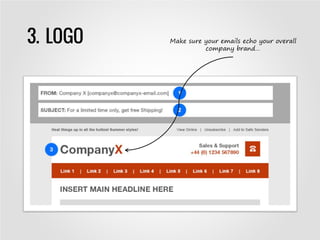
3. LOGO Make sure your emails echo your overall
company brand…
PRE-HEADER & HEADER
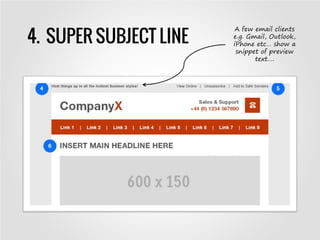
4. SUPER SUBJECT LINE
A few email clients
e.g. Gmail, Outlook,
iPhone etc… show a
snippet of preview
text….
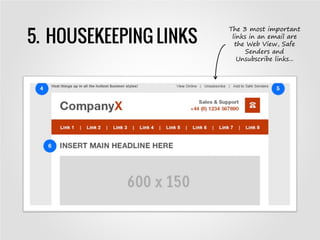
5. HOUSEKEEPING LINKS
The 3 most important
links in an email are
the Web View, Safe
Senders and
Unsubscribe links...
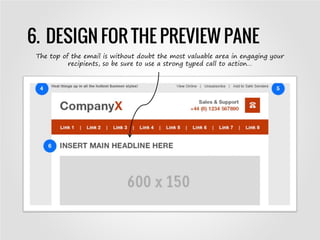
6. DESIGN FOR THE PREVIEW PANE
The top of the email is without doubt the most valuable area in engaging your
recipients, so be sure to use a strong typed call to action…
LAYOUT & IMPACT
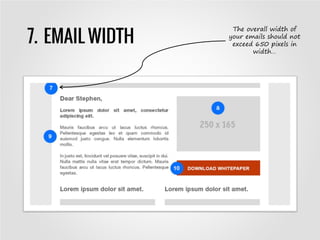
7. EMAIL WIDTH
The overall width of
your emails should not
exceed 650 pixels in
width…
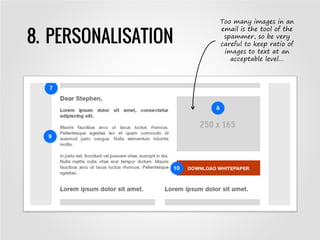
8. PERSONALISATION
Too many images in an
email is the tool of the
spammer, so be very
careful to keep ratio of
images to text at an
acceptable level…
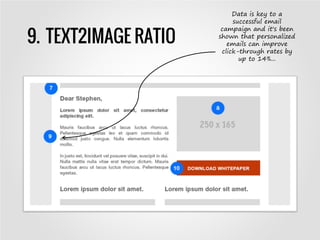
9. TEXT2IMAGE RATIO
Data is key to a
successful email
campaign and it's been
shown that personalized
emails can improve
click-through rates by
up to 14%...
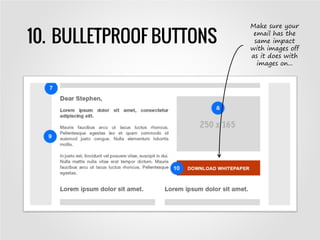
10. BULLETPROOF BUTTONS
Make sure your
email has the
same impact
with images off
as it does with
images on...
COPY & CONTENT
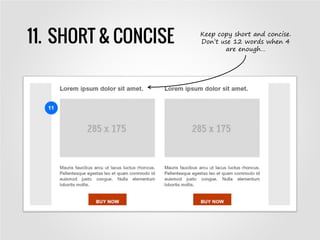
11. SHORT & CONCISE Keep copy short and concise.
Don’t use 12 words when 4
are enough…
FOOTER
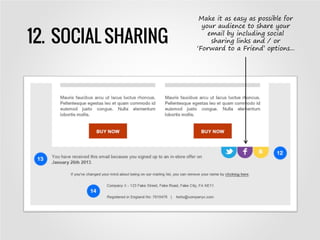
12. SOCIAL SHARING
Make it as easy as possible for
your audience to share your
email by including social
sharing links and / or
‘Forward to a Friend’ options...
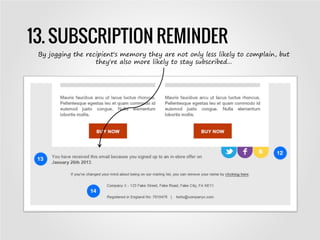
13. SUBSCRIPTION REMINDER
By jogging the recipient's memory they are not only less likely to complain, but
they're also more likely to stay subscribed...
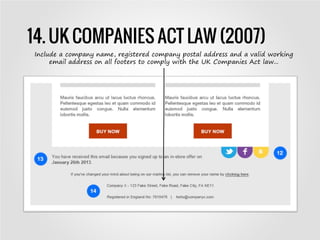
14. UK COMPANIES ACT LAW (2007)
Include a company name, registered company postal address and a valid working
email address on all footers to comply with the UK Companies Act law...
RESPONSIVE EMAIL
DESIGN
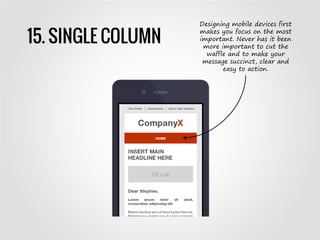
15. SINGLE COLUMN
Designing mobile devices first
makes you focus on the most
important. Never has it been
more important to cut the
waffle and to make your
message succinct, clear and
easy to action.
Any questions, please contact:
Stephen Hill, Senior Designer,
stephen.hill@communicatorcorp.com

Top Tips for Effective Email Design

  • 1.
    Top Tips forEffective Email Designs Stephen Hill, Senior Designer
  • 2.
  • 3.
    1. FROM NAMEInclude your brand name in the from name…
  • 4.
    2. SUBJECT LINEYour subject line should be short, informative and instantly recognizable…
  • 5.
    3. LOGO Makesure your emails echo your overall company brand…
  • 6.
  • 7.
    4. SUPER SUBJECTLINE A few email clients e.g. Gmail, Outlook, iPhone etc… show a snippet of preview text….
  • 8.
    5. HOUSEKEEPING LINKS The3 most important links in an email are the Web View, Safe Senders and Unsubscribe links...
  • 9.
    6. DESIGN FORTHE PREVIEW PANE The top of the email is without doubt the most valuable area in engaging your recipients, so be sure to use a strong typed call to action…
  • 10.
  • 11.
    7. EMAIL WIDTH Theoverall width of your emails should not exceed 650 pixels in width…
  • 12.
    8. PERSONALISATION Too manyimages in an email is the tool of the spammer, so be very careful to keep ratio of images to text at an acceptable level…
  • 13.
    9. TEXT2IMAGE RATIO Datais key to a successful email campaign and it's been shown that personalized emails can improve click-through rates by up to 14%...
  • 14.
    10. BULLETPROOF BUTTONS Makesure your email has the same impact with images off as it does with images on...
  • 15.
  • 16.
    11. SHORT &CONCISE Keep copy short and concise. Don’t use 12 words when 4 are enough…
  • 17.
  • 18.
    12. SOCIAL SHARING Makeit as easy as possible for your audience to share your email by including social sharing links and / or ‘Forward to a Friend’ options...
  • 19.
    13. SUBSCRIPTION REMINDER Byjogging the recipient's memory they are not only less likely to complain, but they're also more likely to stay subscribed...
  • 20.
    14. UK COMPANIESACT LAW (2007) Include a company name, registered company postal address and a valid working email address on all footers to comply with the UK Companies Act law...
  • 21.
  • 22.
    15. SINGLE COLUMN Designingmobile devices first makes you focus on the most important. Never has it been more important to cut the waffle and to make your message succinct, clear and easy to action.
  • 23.
    Any questions, pleasecontact: Stephen Hill, Senior Designer, stephen.hill@communicatorcorp.com