Top 20 Best Project Management Software
Admit it. Project Management (PM) is hard and those traditional methods we’re all too familiar with
just aren’t cutting it anymore. Think about it: repeatedly updating spreadsheets, drowning in post-its
and participating in weekly status update meetings doesn’t necessarily scream ‘efficiency’.
This way of working only presents more complications as there is no real overview of the work being
done. Thankfully, there is more than enough project management software out there that will help
you face your ‘deadline demons’ and get your projects back on track.
Here is an overview of the top 20 best Project Management Software:
opinion 2www.mopinion.com
1. Basecamp
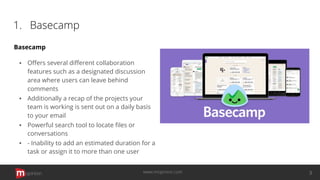
Basecamp
▪ Offers several different collaboration
features such as a designated discussion
area where users can leave behind
comments
▪ Additionally a recap of the projects your
team is working is sent out on a daily basis
to your email
▪ Powerful search tool to locate files or
conversations
▪ - Inability to add an estimated duration for a
task or assign it to more than one user
opinion 3www.mopinion.com
2. Teamwork Projects
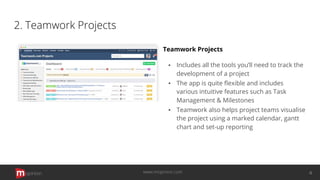
Teamwork Projects
▪ Includes all the tools you’ll need to track the
development of a project
▪ The app is quite flexible and includes
various intuitive features such as Task
Management & Milestones
▪ Teamwork also helps project teams visualise
the project using a marked calendar, gantt
chart and set-up reporting
opinion 4www.mopinion.com
3. ActiveCollab
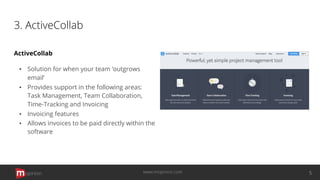
ActiveCollab
▪ Solution for when your team ‘outgrows
email’
▪ Provides support in the following areas:
Task Management, Team Collaboration,
Time-Tracking and Invoicing
▪ Invoicing features
▪ Allows invoices to be paid directly within the
software
opinion 5www.mopinion.com
4. Zoho Projects
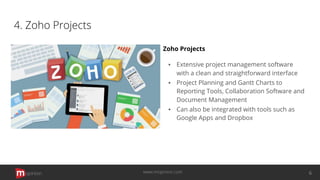
Zoho Projects
▪ Extensive project management software
with a clean and straightforward interface
▪ Project Planning and Gantt Charts to
Reporting Tools, Collaboration Software and
Document Management
▪ Can also be integrated with tools such as
Google Apps and Dropbox
opinion 6www.mopinion.com
5. Trello
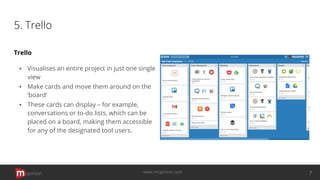
Trello
▪ Visualises an entire project in just one single
view
▪ Make cards and move them around on the
‘board’
▪ These cards can display – for example,
conversations or to-do lists, which can be
placed on a board, making them accessible
for any of the designated tool users.
opinion 7www.mopinion.com
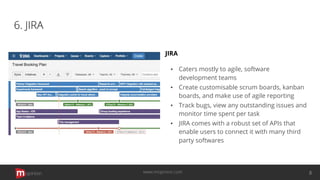
6. JIRA
JIRA
▪ Caters mostly to agile, software
development teams
▪ Create customisable scrum boards, kanban
boards, and make use of agile reporting
▪ Track bugs, view any outstanding issues and
monitor time spent per task
▪ JIRA comes with a robust set of APIs that
enable users to connect it with many third
party softwares
opinion 8www.mopinion.com
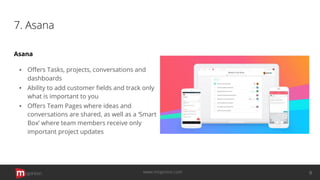
7. Asana
Asana
▪ Offers Tasks, projects, conversations and
dashboards
▪ Ability to add customer fields and track only
what is important to you
▪ Offers Team Pages where ideas and
conversations are shared, as well as a ‘Smart
Box’ where team members receive only
important project updates
opinion 9www.mopinion.com
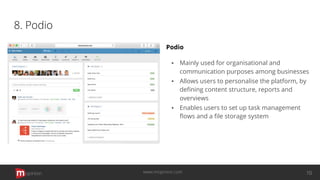
8. Podio
Podio
▪ Mainly used for organisational and
communication purposes among businesses
▪ Allows users to personalise the platform, by
defining content structure, reports and
overviews
▪ Enables users to set up task management
flows and a file storage system
opinion 10www.mopinion.com
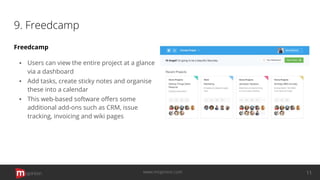
9. Freedcamp
Freedcamp
▪ Users can view the entire project at a glance
via a dashboard
▪ Add tasks, create sticky notes and organise
these into a calendar
▪ This web-based software offers some
additional add-ons such as CRM, issue
tracking, invoicing and wiki pages
opinion 11www.mopinion.com
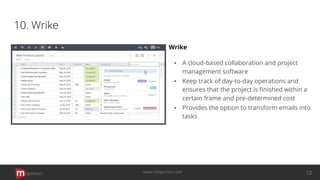
10. Wrike
Wrike
▪ A cloud-based collaboration and project
management software
▪ Keep track of day-to-day operations and
ensures that the project is finished within a
certain frame and pre-determined cost
▪ Provides the option to transform emails into
tasks
opinion 12www.mopinion.com
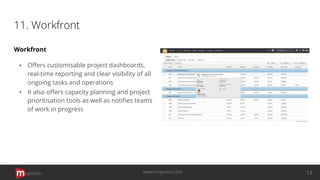
11. Workfront
Workfront
▪ Offers customisable project dashboards,
real-time reporting and clear visibility of all
ongoing tasks and operations
▪ It also offers capacity planning and project
prioritisation tools as well as notifies teams
of work in progress
opinion 13www.mopinion.com
12. Mavenlink
Mavenlink
▪ Offers cross-platform collaboration features
that make it easy to post, share and receive
updates on projects, all in real-time
▪ Create projects and tasks wherein users can
collaborate in a team form
▪ Known for ease of use and access and
advanced tools for real-time reporting and
resource management
opinion 14www.mopinion.com
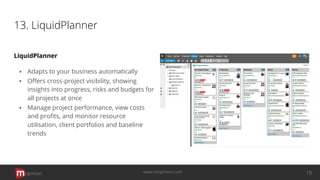
13. LiquidPlanner
LiquidPlanner
▪ Adapts to your business automatically
▪ Offers cross-project visibility, showing
insights into progress, risks and budgets for
all projects at once
▪ Manage project performance, view costs
and profits, and monitor resource
utilisation, client portfolios and baseline
trends
opinion 15www.mopinion.com
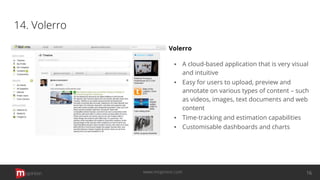
14. Volerro
Volerro
▪ A cloud-based application that is very visual
and intuitive
▪ Easy for users to upload, preview and
annotate on various types of content – such
as videos, images, text documents and web
content
▪ Time-tracking and estimation capabilities
▪ Customisable dashboards and charts
opinion 16www.mopinion.com
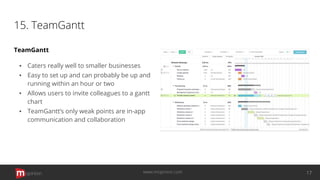
15. TeamGantt
TeamGantt
▪ Caters really well to smaller businesses
▪ Easy to set up and can probably be up and
running within an hour or two
▪ Allows users to invite colleagues to a gantt
chart
▪ TeamGantt’s only weak points are in-app
communication and collaboration
opinion 17www.mopinion.com
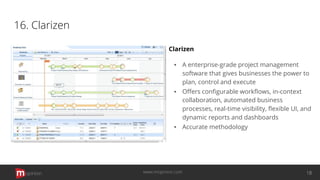
16. Clarizen
Clarizen
▪ A enterprise-grade project management
software that gives businesses the power to
plan, control and execute
▪ Offers configurable workflows, in-context
collaboration, automated business
processes, real-time visibility, flexible UI, and
dynamic reports and dashboards
▪ Accurate methodology
opinion 18www.mopinion.com
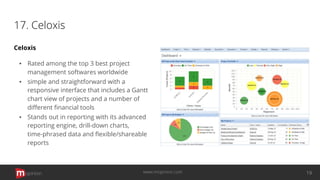
17. Celoxis
Celoxis
▪ Rated among the top 3 best project
management softwares worldwide
▪ simple and straightforward with a
responsive interface that includes a Gantt
chart view of projects and a number of
different financial tools
▪ Stands out in reporting with its advanced
reporting engine, drill-down charts,
time-phrased data and flexible/shareable
reports
opinion 19www.mopinion.com
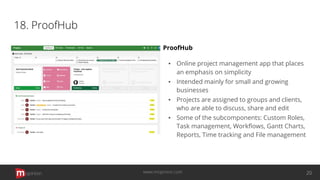
18. ProofHub
ProofHub
▪ Online project management app that places
an emphasis on simplicity
▪ Intended mainly for small and growing
businesses
▪ Projects are assigned to groups and clients,
who are able to discuss, share and edit
▪ Some of the subcomponents: Custom Roles,
Task management, Workflows, Gantt Charts,
Reports, Time tracking and File management
opinion 20www.mopinion.com
19. Notion
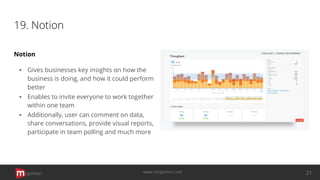
Notion
▪ Gives businesses key insights on how the
business is doing, and how it could perform
better
▪ Enables to invite everyone to work together
within one team
▪ Additionally, user can comment on data,
share conversations, provide visual reports,
participate in team polling and much more
opinion 21www.mopinion.com
20. ProjectManager.com
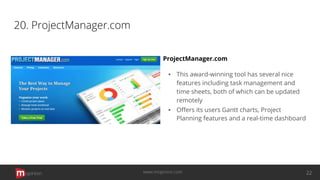
ProjectManager.com
▪ This award-winning tool has several nice
features including task management and
time sheets, both of which can be updated
remotely
▪ Offers its users Gantt charts, Project
Planning features and a real-time dashboard
opinion 22www.mopinion.com
Choosing your PM Software
In order to choose the right project management software, it’s important to consider factors such as
the size of your business and team, how many features you require and which of those features you
most value. Either way, I think you’ll quickly realise that having such a software in place will make
your day-to-day work much easier.
We hope this overview has given you some inspiration in choosing which project management
software might be right for your business. If you have any suggestions or know of other great project
management software, please feel free to put them in the comments below.
opinion 23www.mopinion.com
Start your Free Trial Today
Want to learn more about Mopinion’s feedback reporting and
analysis platform?
Take our software for a spin!
www.mopinion.com

Top 20 Best Project Management Software

  • 2.
    Top 20 BestProject Management Software Admit it. Project Management (PM) is hard and those traditional methods we’re all too familiar with just aren’t cutting it anymore. Think about it: repeatedly updating spreadsheets, drowning in post-its and participating in weekly status update meetings doesn’t necessarily scream ‘efficiency’. This way of working only presents more complications as there is no real overview of the work being done. Thankfully, there is more than enough project management software out there that will help you face your ‘deadline demons’ and get your projects back on track. Here is an overview of the top 20 best Project Management Software: opinion 2www.mopinion.com
  • 3.
    1. Basecamp Basecamp ▪ Offersseveral different collaboration features such as a designated discussion area where users can leave behind comments ▪ Additionally a recap of the projects your team is working is sent out on a daily basis to your email ▪ Powerful search tool to locate files or conversations ▪ - Inability to add an estimated duration for a task or assign it to more than one user opinion 3www.mopinion.com
  • 4.
    2. Teamwork Projects TeamworkProjects ▪ Includes all the tools you’ll need to track the development of a project ▪ The app is quite flexible and includes various intuitive features such as Task Management & Milestones ▪ Teamwork also helps project teams visualise the project using a marked calendar, gantt chart and set-up reporting opinion 4www.mopinion.com
  • 5.
    3. ActiveCollab ActiveCollab ▪ Solutionfor when your team ‘outgrows email’ ▪ Provides support in the following areas: Task Management, Team Collaboration, Time-Tracking and Invoicing ▪ Invoicing features ▪ Allows invoices to be paid directly within the software opinion 5www.mopinion.com
  • 6.
    4. Zoho Projects ZohoProjects ▪ Extensive project management software with a clean and straightforward interface ▪ Project Planning and Gantt Charts to Reporting Tools, Collaboration Software and Document Management ▪ Can also be integrated with tools such as Google Apps and Dropbox opinion 6www.mopinion.com
  • 7.
    5. Trello Trello ▪ Visualisesan entire project in just one single view ▪ Make cards and move them around on the ‘board’ ▪ These cards can display – for example, conversations or to-do lists, which can be placed on a board, making them accessible for any of the designated tool users. opinion 7www.mopinion.com
  • 8.
    6. JIRA JIRA ▪ Catersmostly to agile, software development teams ▪ Create customisable scrum boards, kanban boards, and make use of agile reporting ▪ Track bugs, view any outstanding issues and monitor time spent per task ▪ JIRA comes with a robust set of APIs that enable users to connect it with many third party softwares opinion 8www.mopinion.com
  • 9.
    7. Asana Asana ▪ OffersTasks, projects, conversations and dashboards ▪ Ability to add customer fields and track only what is important to you ▪ Offers Team Pages where ideas and conversations are shared, as well as a ‘Smart Box’ where team members receive only important project updates opinion 9www.mopinion.com
  • 10.
    8. Podio Podio ▪ Mainlyused for organisational and communication purposes among businesses ▪ Allows users to personalise the platform, by defining content structure, reports and overviews ▪ Enables users to set up task management flows and a file storage system opinion 10www.mopinion.com
  • 11.
    9. Freedcamp Freedcamp ▪ Userscan view the entire project at a glance via a dashboard ▪ Add tasks, create sticky notes and organise these into a calendar ▪ This web-based software offers some additional add-ons such as CRM, issue tracking, invoicing and wiki pages opinion 11www.mopinion.com
  • 12.
    10. Wrike Wrike ▪ Acloud-based collaboration and project management software ▪ Keep track of day-to-day operations and ensures that the project is finished within a certain frame and pre-determined cost ▪ Provides the option to transform emails into tasks opinion 12www.mopinion.com
  • 13.
    11. Workfront Workfront ▪ Offerscustomisable project dashboards, real-time reporting and clear visibility of all ongoing tasks and operations ▪ It also offers capacity planning and project prioritisation tools as well as notifies teams of work in progress opinion 13www.mopinion.com
  • 14.
    12. Mavenlink Mavenlink ▪ Offerscross-platform collaboration features that make it easy to post, share and receive updates on projects, all in real-time ▪ Create projects and tasks wherein users can collaborate in a team form ▪ Known for ease of use and access and advanced tools for real-time reporting and resource management opinion 14www.mopinion.com
  • 15.
    13. LiquidPlanner LiquidPlanner ▪ Adaptsto your business automatically ▪ Offers cross-project visibility, showing insights into progress, risks and budgets for all projects at once ▪ Manage project performance, view costs and profits, and monitor resource utilisation, client portfolios and baseline trends opinion 15www.mopinion.com
  • 16.
    14. Volerro Volerro ▪ Acloud-based application that is very visual and intuitive ▪ Easy for users to upload, preview and annotate on various types of content – such as videos, images, text documents and web content ▪ Time-tracking and estimation capabilities ▪ Customisable dashboards and charts opinion 16www.mopinion.com
  • 17.
    15. TeamGantt TeamGantt ▪ Catersreally well to smaller businesses ▪ Easy to set up and can probably be up and running within an hour or two ▪ Allows users to invite colleagues to a gantt chart ▪ TeamGantt’s only weak points are in-app communication and collaboration opinion 17www.mopinion.com
  • 18.
    16. Clarizen Clarizen ▪ Aenterprise-grade project management software that gives businesses the power to plan, control and execute ▪ Offers configurable workflows, in-context collaboration, automated business processes, real-time visibility, flexible UI, and dynamic reports and dashboards ▪ Accurate methodology opinion 18www.mopinion.com
  • 19.
    17. Celoxis Celoxis ▪ Ratedamong the top 3 best project management softwares worldwide ▪ simple and straightforward with a responsive interface that includes a Gantt chart view of projects and a number of different financial tools ▪ Stands out in reporting with its advanced reporting engine, drill-down charts, time-phrased data and flexible/shareable reports opinion 19www.mopinion.com
  • 20.
    18. ProofHub ProofHub ▪ Onlineproject management app that places an emphasis on simplicity ▪ Intended mainly for small and growing businesses ▪ Projects are assigned to groups and clients, who are able to discuss, share and edit ▪ Some of the subcomponents: Custom Roles, Task management, Workflows, Gantt Charts, Reports, Time tracking and File management opinion 20www.mopinion.com
  • 21.
    19. Notion Notion ▪ Givesbusinesses key insights on how the business is doing, and how it could perform better ▪ Enables to invite everyone to work together within one team ▪ Additionally, user can comment on data, share conversations, provide visual reports, participate in team polling and much more opinion 21www.mopinion.com
  • 22.
    20. ProjectManager.com ProjectManager.com ▪ Thisaward-winning tool has several nice features including task management and time sheets, both of which can be updated remotely ▪ Offers its users Gantt charts, Project Planning features and a real-time dashboard opinion 22www.mopinion.com
  • 23.
    Choosing your PMSoftware In order to choose the right project management software, it’s important to consider factors such as the size of your business and team, how many features you require and which of those features you most value. Either way, I think you’ll quickly realise that having such a software in place will make your day-to-day work much easier. We hope this overview has given you some inspiration in choosing which project management software might be right for your business. If you have any suggestions or know of other great project management software, please feel free to put them in the comments below. opinion 23www.mopinion.com
  • 24.
    Start your FreeTrial Today Want to learn more about Mopinion’s feedback reporting and analysis platform? Take our software for a spin! www.mopinion.com