Top 10 Proven Ways
for Optimizing a
WordPress Website
for SEO
e-Definers Technology Pvt.
Ltd.
INTRODUCTION
Designing a WordPress website for SEO involves a combination of
technical optimization, content strategy, and user experience
considerations.
Some of the leading WordPress developers of the best web design
company in Delhi are here with some useful ways –
Overview
Optimize Site Structure
Optimize Page Speed
Optimize for Mobile
Use SEO Plugins
Meta Tags
Optimisation
Create High-Quality
Content
Optimize Images
Enable SSL/HTTPS
Make Quality
Backlinks
Choose a SEO-Friendly Theme 01
02
03
04
05
06
07
08
09
10
• Select a WordPress theme that is lightweight, fast-loading, and
mobile-responsive.
• Avoid themes with excessive code or poor performance, as they can
negatively impact SEO.
• Choosing an SEO-friendly theme for your WordPress website means
picking a design that helps your site rank better on search engines
like Google.
• This theme should be fast, work well on mobile phones, and not have
too much-complicated code.
• Choosing a good theme helps your website load quickly and look good on
all devices.
• This is important because search engines like Google prefer websites
that load fast and work well on phones.
• Picking the right theme is like laying a strong foundation for your
Choose a SEO-Friendly Theme
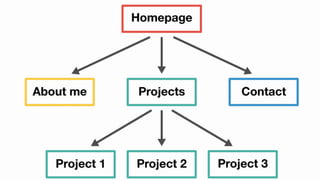
• Ensure your site has a clear and logical structure with well-defined
categories, subcategories, and navigation menus.
• Use descriptive, keyword-rich URLs and optimize internal linking to help
search engines understand the hierarchy of your content.
• Organize your WordPress website in a clear and easy-to-follow way.
• Imagine your website is like a big library. You want visitors (and search
engines) to find things easily.
• Think of categories like sections in the library, and pages like books on
shelves.
• Make sure everything has a proper place and is easy to find.
• This helps search engines understand what your website is about and how
different pages relate to each other.
• It also makes it easier for visitors to navigate your site, which can
improve their experience and keep them coming back for more.
Optimize Site Structure
• Page speed is a crucial ranking factor for search engines and also affects
user experience.
• Identify and fix performance issues such as large image files, unnecessary
plugins, or inefficient code.
• Make sure your WordPress website load quickly.
• When a website takes too long to load, it can frustrate visitors and make
them leave.
• To ensure your site loads fast, you need to optimize it by reducing
unnecessary elements that slow it down.
• This includes things like large image files and excessive plugins.
• By improving your site’s speed, you not only provide a better experience
for your visitors but also increase the likelihood of ranking at the top
in search engine results.
Optimize Page Speed
• With the increasing use of mobile devices, it’s essential to have a
responsive design that adapts to different screen sizes.
• Google prioritizes mobile-friendly websites in its search results, so
ensure your WordPress theme is mobile-responsive.
• It is important to check your WordPress website looks good and works well
on mobile phones and tablets, not just on computers.
• This is because many people use their phones to search the internet
nowadays.
• When your site is “responsive,” it means it can adjust and look good on
screens of all sizes.
• Search engines like Google prefer mobile-friendly sites, so having one can
help your site rank at the top in search results.
• To achieve this, choose a WordPress theme that’s designed to be responsive
• It ensure visitors have a good experience no matter what device they’re
using.
Optimize for Mobile
• Install and configure SEO plugins like Yoast SEO or Rank Math to help
optimize your content for search engines.
• These plugins provide functionalities like XML sitemap creation,
optimization of Meta tags, and content analysis, all aimed at enhancing
the visibility of your website.
• You can use special tools called plugins to make your WordPress website
better for search engines.
• Think of plugins like extra tools you add to your website to help it
perform better.
• These plugins help you do things like tell search engines what your
website is about.
• It creates a map of your site so search engines can understand it better,
and even suggest improvements to your content so it shows up at the top in
search results.
• By using these plugins suggested by the best digital marketing institute
Use SEO Plugins
• Write engaging and relevant title tags and Meta descriptions for each page
using target keywords.
• Meta tags provide search engines with valuable information about your
content and can influence click-through rates from search results.
• It’s like a sneak peek that helps people decide whether to click on your
site when they see it in search results.
• Think of the title tag as the headline and the Meta description as a
summary of what your page offers.
• By making these tags catchy and including relevant keywords, you increase
the chances of your site showing up in results and getting clicked on by
users.
• It is essential for boosting your website’s visibility.
Meta Tags Optimisation
• Prepare original, valuable, and informative content tailored to meet the
specific needs and interests of your intended audience.
• Use keyword research to identify relevant topics and incorporate keywords
naturally into your content.
• It creates valuable content for your WordPress website.
• This means making posts, articles, or pages that are helpful and
interesting for your visitors.
• When you write, try to understand what your audience wants to know and
address those topics.
• Use tools to find out which words people are searching for online, and
include those words naturally in your writing.
• Good content not only helps your readers but also tells search engines
like Google what your site is about, helping it to show up when people
search for related topics.
Create High-Quality Content
• Compress images to reduce file size without sacrificing quality, and use
descriptive filenames and alt attributes to help search engines understand
the content of your images.
• Image optimization can improve page load times and enhance the
accessibility of your site.
• This means making them smaller in size without losing quality, which helps
your site load faster.
• It involves giving images descriptive names and adding alternative text
(alt text) that describes what the image is about.
• These steps help search engines understand your images better, which can
improve your site’s visibility in search results.
• Image optimization ensures that your website is not only visually
appealing but also performs well and is accessible to everyone.
• It includes those using screen readers or with slow internet connections.
Optimize Images
• Secure your website with an SSL certificate to encrypt data transmitted
between your server and visitors’ browsers.
• HTTPS is a ranking factor for Google and can improve trust and security
for your users.
• It’s like putting a lock on your website’s door to keep information safe.
• When visitors browse your site, SSL encrypts their data, making it harder
for hackers to access.
• This encryption helps protect sensitive information like passwords or
payment details.
• Google prefers secure sites, so having HTTPS can boost your site’s
credibility and search engine ranking.
• It’s a simple yet effective way to show visitors that you care about their
privacy and security while browsing your WordPress website.
Enable SSL/HTTPS
• Focus on acquiring premium backlinks from trustworthy websites within your
industry or niche.
• Quality backlinks are a crucial ranking factor for search engines and can
significantly impact your website’s visibility in search results.
• Concentrate your efforts on obtaining top-tier backlinks from reputable
websites within your industry or niche.
• Regularly monitor your backlink profile to identify new linking
opportunities and address any toxic backlinks that may harm your SEO
efforts.
• Building quality backlinks means getting other reputable websites to link
back to your WordPress site.
• These links act like votes of confidence, telling search engines that your
content is valuable and trustworthy.
Make Quality Backlinks
THANK YOU!
e-Definers Technology Pvt.
Ltd.
https://www.edtech.i
n/
132, 2nd floor, Mall Road, Kingsway
camp, GTB nagar, Delhi 110009, India
9999051533

Top 10 Proven Ways for Optimizing a WordPress Website for SEO.pptx

  • 1.
    Top 10 ProvenWays for Optimizing a WordPress Website for SEO e-Definers Technology Pvt. Ltd.
  • 2.
    INTRODUCTION Designing a WordPresswebsite for SEO involves a combination of technical optimization, content strategy, and user experience considerations. Some of the leading WordPress developers of the best web design company in Delhi are here with some useful ways –
  • 3.
    Overview Optimize Site Structure OptimizePage Speed Optimize for Mobile Use SEO Plugins Meta Tags Optimisation Create High-Quality Content Optimize Images Enable SSL/HTTPS Make Quality Backlinks Choose a SEO-Friendly Theme 01 02 03 04 05 06 07 08 09 10
  • 4.
    • Select aWordPress theme that is lightweight, fast-loading, and mobile-responsive. • Avoid themes with excessive code or poor performance, as they can negatively impact SEO. • Choosing an SEO-friendly theme for your WordPress website means picking a design that helps your site rank better on search engines like Google. • This theme should be fast, work well on mobile phones, and not have too much-complicated code. • Choosing a good theme helps your website load quickly and look good on all devices. • This is important because search engines like Google prefer websites that load fast and work well on phones. • Picking the right theme is like laying a strong foundation for your Choose a SEO-Friendly Theme
  • 6.
    • Ensure yoursite has a clear and logical structure with well-defined categories, subcategories, and navigation menus. • Use descriptive, keyword-rich URLs and optimize internal linking to help search engines understand the hierarchy of your content. • Organize your WordPress website in a clear and easy-to-follow way. • Imagine your website is like a big library. You want visitors (and search engines) to find things easily. • Think of categories like sections in the library, and pages like books on shelves. • Make sure everything has a proper place and is easy to find. • This helps search engines understand what your website is about and how different pages relate to each other. • It also makes it easier for visitors to navigate your site, which can improve their experience and keep them coming back for more. Optimize Site Structure
  • 8.
    • Page speedis a crucial ranking factor for search engines and also affects user experience. • Identify and fix performance issues such as large image files, unnecessary plugins, or inefficient code. • Make sure your WordPress website load quickly. • When a website takes too long to load, it can frustrate visitors and make them leave. • To ensure your site loads fast, you need to optimize it by reducing unnecessary elements that slow it down. • This includes things like large image files and excessive plugins. • By improving your site’s speed, you not only provide a better experience for your visitors but also increase the likelihood of ranking at the top in search engine results. Optimize Page Speed
  • 10.
    • With theincreasing use of mobile devices, it’s essential to have a responsive design that adapts to different screen sizes. • Google prioritizes mobile-friendly websites in its search results, so ensure your WordPress theme is mobile-responsive. • It is important to check your WordPress website looks good and works well on mobile phones and tablets, not just on computers. • This is because many people use their phones to search the internet nowadays. • When your site is “responsive,” it means it can adjust and look good on screens of all sizes. • Search engines like Google prefer mobile-friendly sites, so having one can help your site rank at the top in search results. • To achieve this, choose a WordPress theme that’s designed to be responsive • It ensure visitors have a good experience no matter what device they’re using. Optimize for Mobile
  • 12.
    • Install andconfigure SEO plugins like Yoast SEO or Rank Math to help optimize your content for search engines. • These plugins provide functionalities like XML sitemap creation, optimization of Meta tags, and content analysis, all aimed at enhancing the visibility of your website. • You can use special tools called plugins to make your WordPress website better for search engines. • Think of plugins like extra tools you add to your website to help it perform better. • These plugins help you do things like tell search engines what your website is about. • It creates a map of your site so search engines can understand it better, and even suggest improvements to your content so it shows up at the top in search results. • By using these plugins suggested by the best digital marketing institute Use SEO Plugins
  • 14.
    • Write engagingand relevant title tags and Meta descriptions for each page using target keywords. • Meta tags provide search engines with valuable information about your content and can influence click-through rates from search results. • It’s like a sneak peek that helps people decide whether to click on your site when they see it in search results. • Think of the title tag as the headline and the Meta description as a summary of what your page offers. • By making these tags catchy and including relevant keywords, you increase the chances of your site showing up in results and getting clicked on by users. • It is essential for boosting your website’s visibility. Meta Tags Optimisation
  • 16.
    • Prepare original,valuable, and informative content tailored to meet the specific needs and interests of your intended audience. • Use keyword research to identify relevant topics and incorporate keywords naturally into your content. • It creates valuable content for your WordPress website. • This means making posts, articles, or pages that are helpful and interesting for your visitors. • When you write, try to understand what your audience wants to know and address those topics. • Use tools to find out which words people are searching for online, and include those words naturally in your writing. • Good content not only helps your readers but also tells search engines like Google what your site is about, helping it to show up when people search for related topics. Create High-Quality Content
  • 18.
    • Compress imagesto reduce file size without sacrificing quality, and use descriptive filenames and alt attributes to help search engines understand the content of your images. • Image optimization can improve page load times and enhance the accessibility of your site. • This means making them smaller in size without losing quality, which helps your site load faster. • It involves giving images descriptive names and adding alternative text (alt text) that describes what the image is about. • These steps help search engines understand your images better, which can improve your site’s visibility in search results. • Image optimization ensures that your website is not only visually appealing but also performs well and is accessible to everyone. • It includes those using screen readers or with slow internet connections. Optimize Images
  • 20.
    • Secure yourwebsite with an SSL certificate to encrypt data transmitted between your server and visitors’ browsers. • HTTPS is a ranking factor for Google and can improve trust and security for your users. • It’s like putting a lock on your website’s door to keep information safe. • When visitors browse your site, SSL encrypts their data, making it harder for hackers to access. • This encryption helps protect sensitive information like passwords or payment details. • Google prefers secure sites, so having HTTPS can boost your site’s credibility and search engine ranking. • It’s a simple yet effective way to show visitors that you care about their privacy and security while browsing your WordPress website. Enable SSL/HTTPS
  • 22.
    • Focus onacquiring premium backlinks from trustworthy websites within your industry or niche. • Quality backlinks are a crucial ranking factor for search engines and can significantly impact your website’s visibility in search results. • Concentrate your efforts on obtaining top-tier backlinks from reputable websites within your industry or niche. • Regularly monitor your backlink profile to identify new linking opportunities and address any toxic backlinks that may harm your SEO efforts. • Building quality backlinks means getting other reputable websites to link back to your WordPress site. • These links act like votes of confidence, telling search engines that your content is valuable and trustworthy. Make Quality Backlinks
  • 24.
    THANK YOU! e-Definers TechnologyPvt. Ltd. https://www.edtech.i n/ 132, 2nd floor, Mall Road, Kingsway camp, GTB nagar, Delhi 110009, India 9999051533