Blog
James
By August11,2023 6minread
How to install Tivimate : The
Ultimate IPTV Player (6 Easy
Steps)(Firestick & Android)
TivimateisapopularIPTVplayerthatallowsuserstostreamlivetelevision
channelsfromaroundtheworld.ItisdesignedforusewithAndroidTVboxes,
FireTVdevices,andotherAndroiddevices.thisappisknownforitssleek
interface,user-friendlydesign,andadvancedfeaturesthatmakeitoneofthe
bestIPTVplayersonthemarket.(OrderyourIPTVaccountLINK)
TableofContents
WhatisTiviMate:
HowtoInstallTiviMate:
HowToInstallTivimatefromGooglePlayStore:
HowToInstallTiviMateonFirestick:
SettingUpTiviMate:
FeaturesofTiviMate:
User-FriendlyInterfaceforSeamlessNavigation:
Conclusion
WhatisTiviMate:
TiviMateisapopularIPTVplayerapplicationusedonAndroidTVandmobile
devices.Itisdesignedtoprovideuserswithaseamlessexperiencefor
streamingliveTVchannelsandon-demandcontentfromIPTVservice
providers.TiviMateo몭ersauser-friendlyinterfaceandisknownforitssmooth
performance.Itsupportsfeaturessuchasplaylistmanagement,electronic
programguide(EPG)integration,catch-upTV,multi-screenlayout,andthe
abilitytorecordliveTVcontent.IthasgainedpopularityamongIPTVusersfor
itscompatibilitywithvariousIPTVservicesanditsintuitivedesign.
HowtoInstallTiviMate:
InstallingTivimateisastraightforwardprocess.Simplydownloadtheappfrom
theGooglePlayStoreorsideloadtheAPK몭leontoyourdevice.Once
installed,youwillneedtosetuptheappandaddyourIPTVplaylists.
HowToInstallTivimatefromGooglePlay
Store:
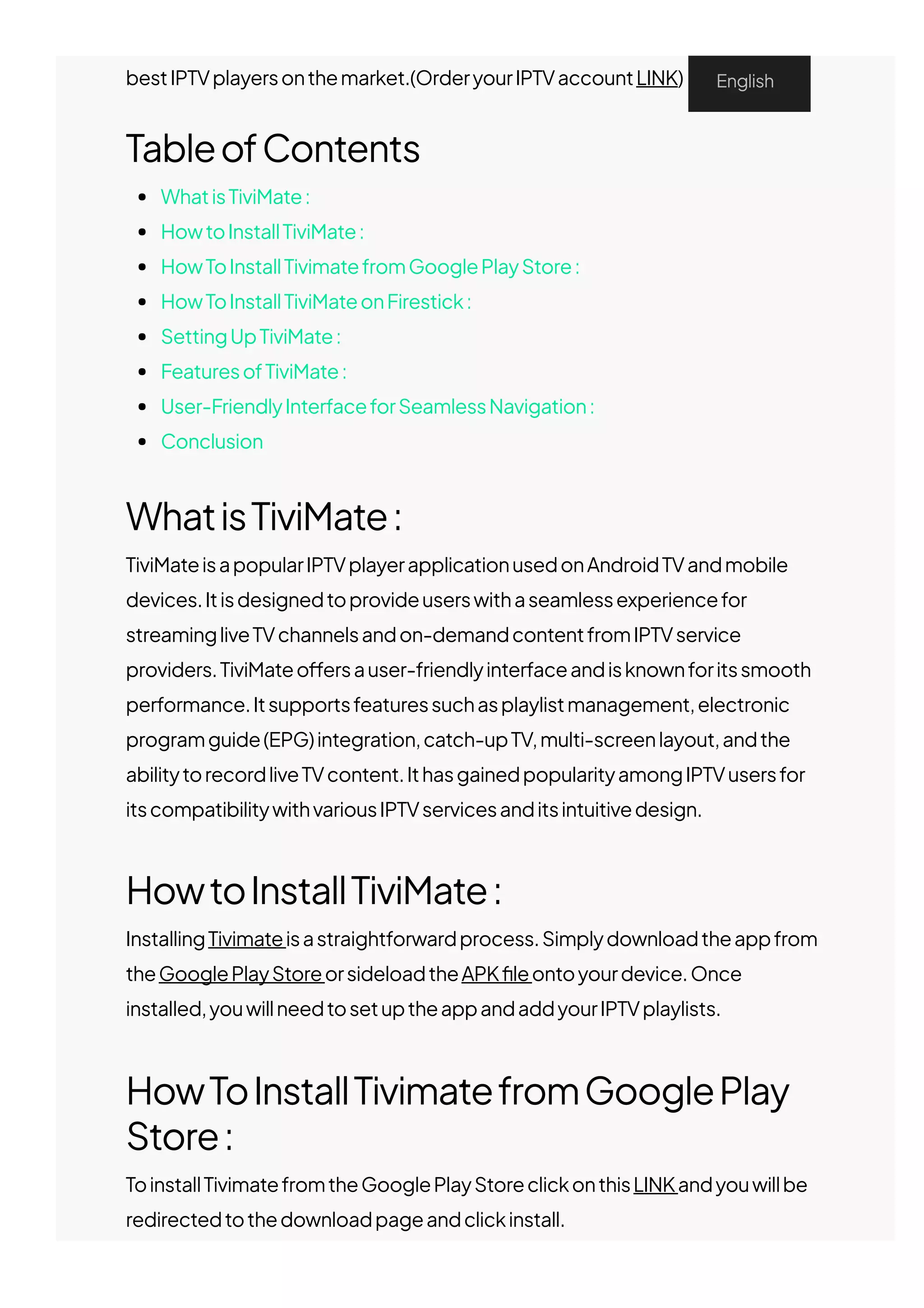
ToinstallTivimatefromtheGooglePlayStoreclickonthisLINKandyouwillbe
redirectedtothedownloadpageandclickinstall.
English
HowToInstallTiviMateonFirestick:
TiviMateisnotavailableontheAmazonAppStore.Usersmustrelyon
sideloadingappstoinstallapplicationsontheirdevices.
TosideloadappsonyourFireStick,몭rstyouwillneedtogettheDownloader
appandsetupyourFiresticktosideloadappsonit,gotothisLINKandfollow
thestepstoinstalltheDownloaderapponyourFirestick.
AfterinstallingtheDowloaderappandsettingupyourFiresticktosideload
appsonit:
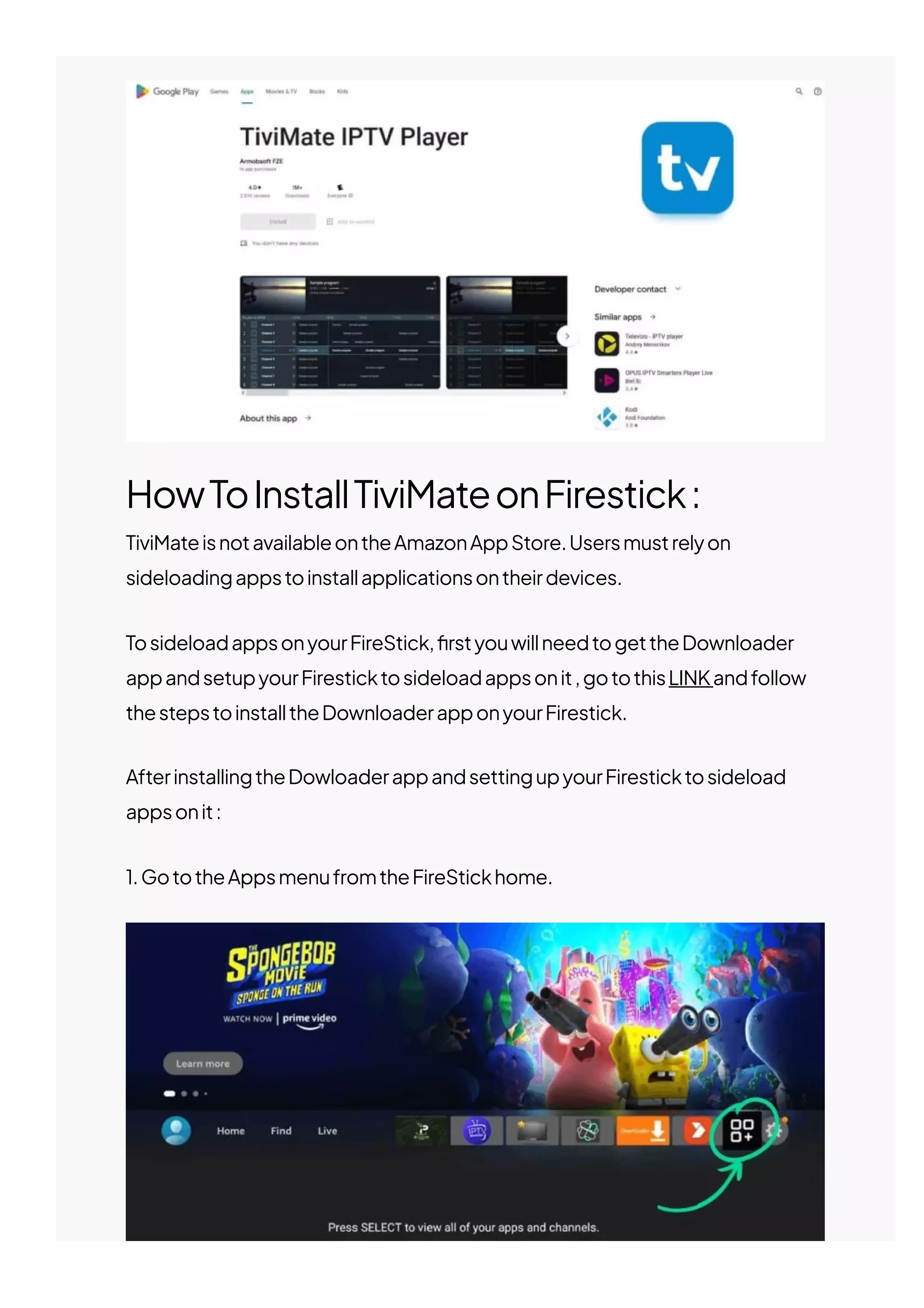
1.GototheAppsmenufromtheFireStickhome.
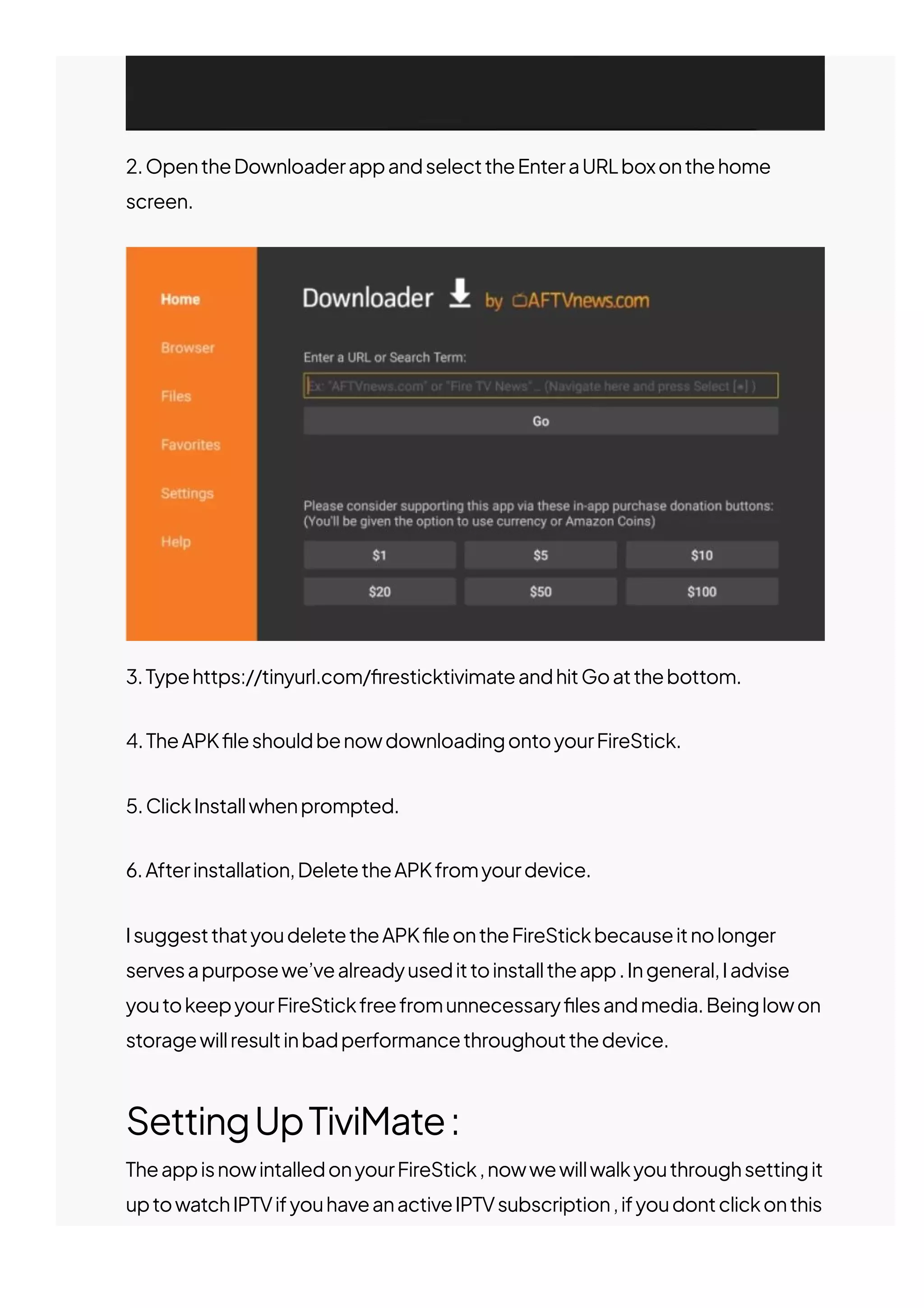
2.OpentheDownloaderappandselecttheEnteraURLboxonthehome
screen.
3.Typehttps://tinyurl.com/몭resticktivimateandhitGoatthebottom.
4.TheAPK몭leshouldbenowdownloadingontoyourFireStick.
5.ClickInstallwhenprompted.
6.Afterinstallation,DeletetheAPKfromyourdevice.
IsuggestthatyoudeletetheAPK몭leontheFireStickbecauseitnolonger
servesapurposewe’vealreadyusedittoinstalltheapp.Ingeneral,Iadvise
youtokeepyourFireStickfreefromunnecessary몭lesandmedia.Beinglowon
storagewillresultinbadperformancethroughoutthedevice.
SettingUpTiviMate:
TheappisnowintalledonyourFireStick,nowwewillwalkyouthroughsettingit
uptowatchIPTVifyouhaveanactiveIPTVsubscription,ifyoudontclickonthis
LINKtoorderyourIPTVsubscription
(Note:SometimesIPTVwon’tworkwhenconnectedtoaVPN.IfyouuseaVPN
onFireStick,you’llneedtodisconnectfromitandthenaddyouIPTVlogin
details.AndafteraddingtheIPTVservicetotheIPTVPlayer,youcanreenable
theVPNonyourFireStick.)
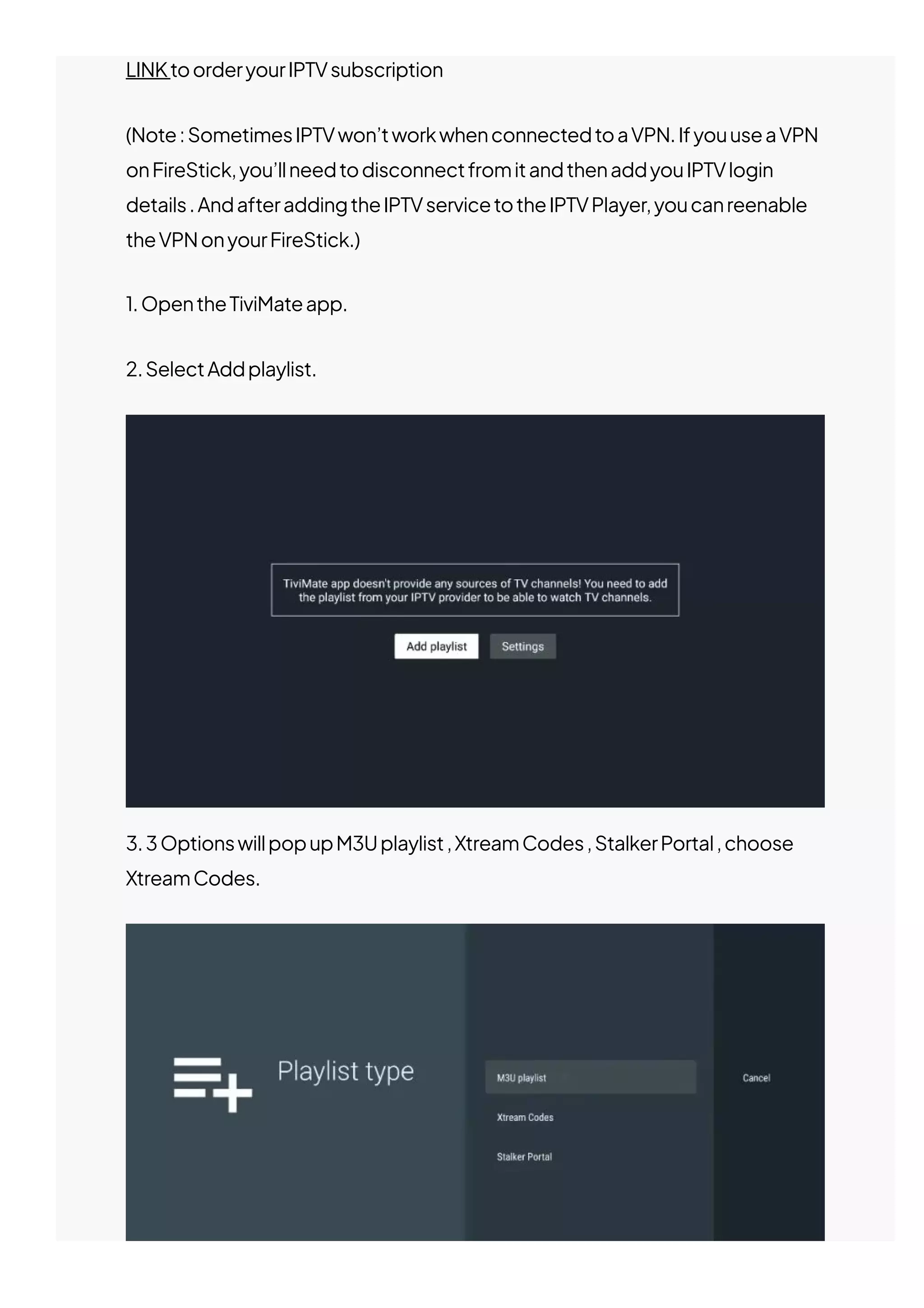
1.OpentheTiviMateapp.
2.SelectAddplaylist.
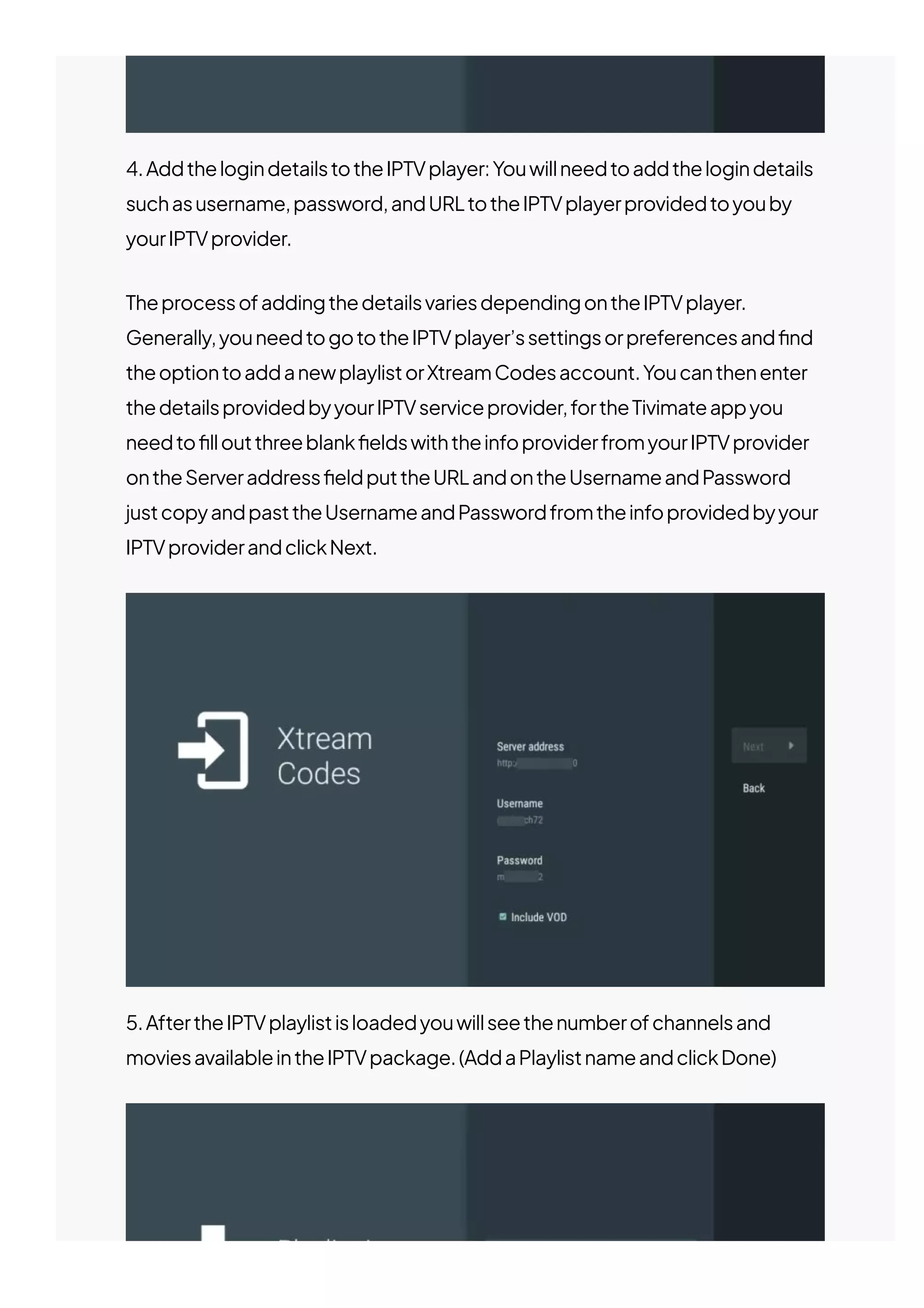
3.3OptionswillpopupM3Uplaylist,XtreamCodes,StalkerPortal,choose
XtreamCodes.
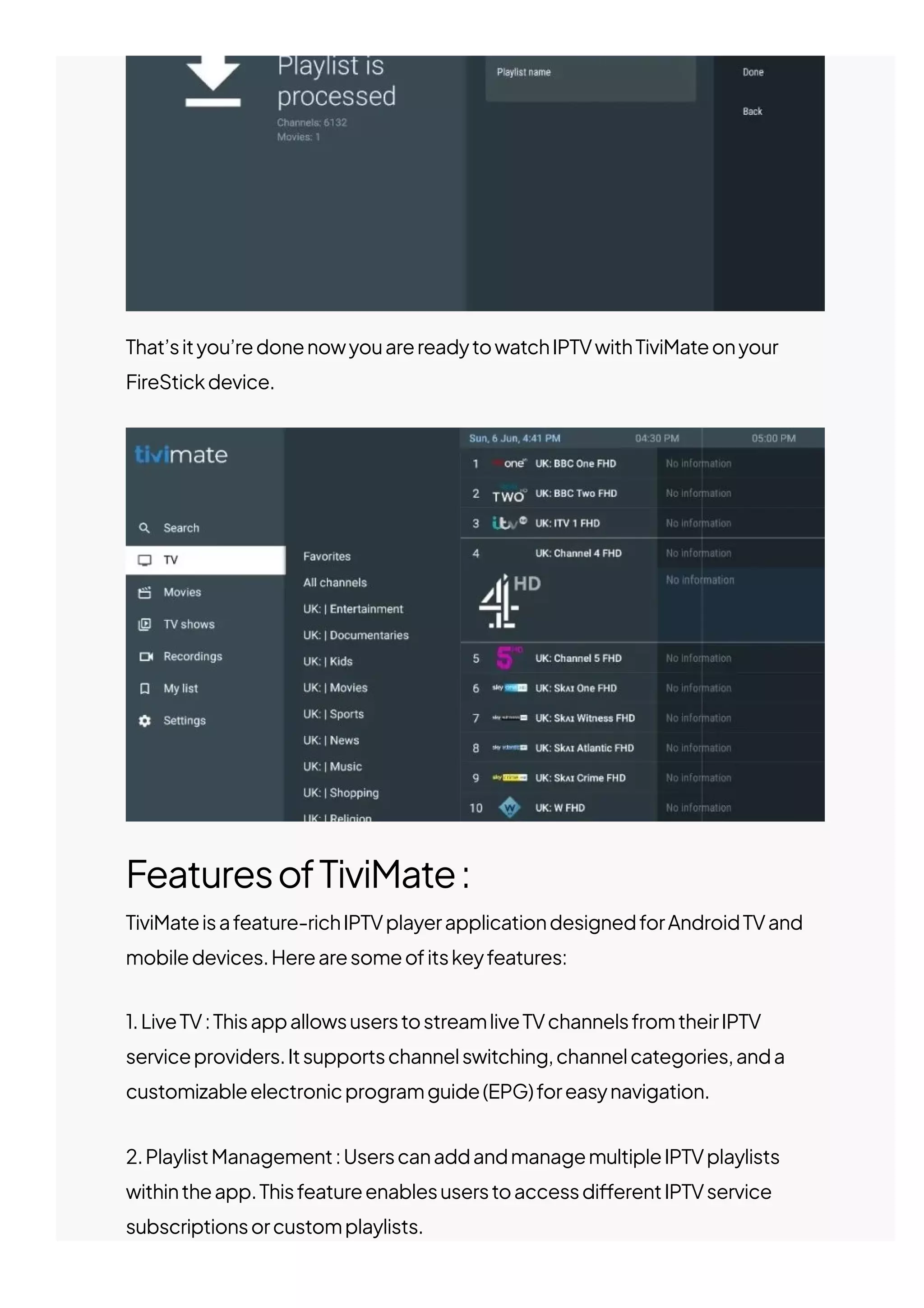
4.AddthelogindetailstotheIPTVplayer:Youwillneedtoaddthelogindetails
suchasusername,password,andURLtotheIPTVplayerprovidedtoyouby
yourIPTVprovider.
TheprocessofaddingthedetailsvariesdependingontheIPTVplayer.
Generally,youneedtogototheIPTVplayer’ssettingsorpreferencesand몭nd
theoptiontoaddanewplaylistorXtreamCodesaccount.Youcanthenenter
thedetailsprovidedbyyourIPTVserviceprovider,fortheTivimateappyou
needto몭lloutthreeblank몭eldswiththeinfoproviderfromyourIPTVprovider
ontheServeraddress몭eldputtheURLandontheUsernameandPassword
justcopyandpasttheUsernameandPasswordfromtheinfoprovidedbyyour
IPTVproviderandclickNext.
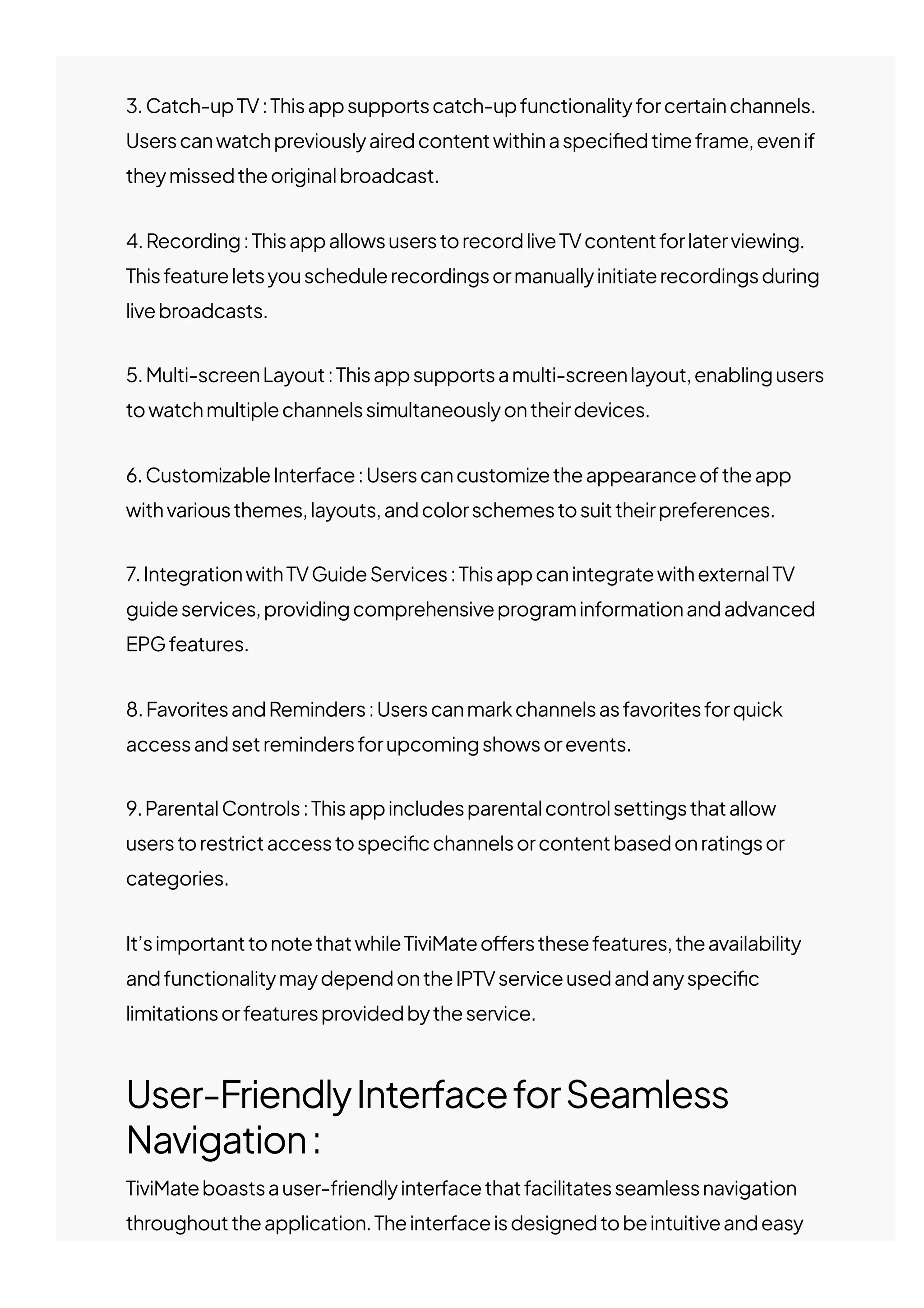
5.AftertheIPTVplaylistisloadedyouwillseethenumberofchannelsand
moviesavailableintheIPTVpackage.(AddaPlaylistnameandclickDone)
That’sityou’redonenowyouarereadytowatchIPTVwithTiviMateonyour
FireStickdevice.
FeaturesofTiviMate:
TiviMateisafeature-richIPTVplayerapplicationdesignedforAndroidTVand
mobiledevices.Herearesomeofitskeyfeatures:
1.LiveTV:ThisappallowsuserstostreamliveTVchannelsfromtheirIPTV
serviceproviders.Itsupportschannelswitching,channelcategories,anda
customizableelectronicprogramguide(EPG)foreasynavigation.
2.PlaylistManagement:UserscanaddandmanagemultipleIPTVplaylists
withintheapp.Thisfeatureenablesuserstoaccessdi몭erentIPTVservice
subscriptionsorcustomplaylists.
3.Catch-upTV:Thisappsupportscatch-upfunctionalityforcertainchannels.
Userscanwatchpreviouslyairedcontentwithinaspeci몭edtimeframe,evenif
theymissedtheoriginalbroadcast.
4.Recording:ThisappallowsuserstorecordliveTVcontentforlaterviewing.
Thisfeatureletsyouschedulerecordingsormanuallyinitiaterecordingsduring
livebroadcasts.
5.Multi-screenLayout:Thisappsupportsamulti-screenlayout,enablingusers
towatchmultiplechannelssimultaneouslyontheirdevices.
6.CustomizableInterface:Userscancustomizetheappearanceoftheapp
withvariousthemes,layouts,andcolorschemestosuittheirpreferences.
7.IntegrationwithTVGuideServices:ThisappcanintegratewithexternalTV
guideservices,providingcomprehensiveprograminformationandadvanced
EPGfeatures.
8.FavoritesandReminders:Userscanmarkchannelsasfavoritesforquick
accessandsetremindersforupcomingshowsorevents.
9.ParentalControls:Thisappincludesparentalcontrolsettingsthatallow
userstorestrictaccesstospeci몭cchannelsorcontentbasedonratingsor
categories.
It’simportanttonotethatwhileTiviMateo몭ersthesefeatures,theavailability
andfunctionalitymaydependontheIPTVserviceusedandanyspeci몭c
limitationsorfeaturesprovidedbytheservice.
User-FriendlyInterfaceforSeamless
Navigation:
TiviMateboastsauser-friendlyinterfacethatfacilitatesseamlessnavigation
throughouttheapplication.Theinterfaceisdesignedtobeintuitiveandeasy
tonavigate,ensuringthatuserscanquicklyaccessthedesiredfeaturesand
content.Themenustructureandlayoutareorganizedinalogicalmanner,
allowinguserstonavigatethroughdi몭erentsections,suchasliveTVchannels,
playlists,EPG,recordings,andsettings,withease.
Theuser-friendlyinterfaceofTiviMateensuresthatevenuserswhoarenot
technologicallysavvycancomfortablynavigateandusetheapplication.It
providesclearandintuitiveicons,labels,andmenus,minimizingconfusionand
makingitstraightforwardforusersto몭ndandaccessthedesiredcontentor
functionality.
Theinterfacealsoallowsforcustomizationoptions,suchastheabilityto
choosedi몭erentthemes,layouts,andcolorschemes.Thislevelof
customizationempowersuserstopersonalizetheirviewingexperienceand
adapttheinterfacetotheirpreferences.
Overall,TiviMate’suser-friendlyinterfaceenablesseamlessnavigation,
ensuringthatuserscane몭ortlesslybrowsethroughchannels,accessplaylists,
schedulerecordings,exploreprogramguides,andenjoytheirIPTVcontent
withoutanyhassle.
Conclusion
Inconclusion,TiviMateisapopularIPTVplayerapplicationknownforits
feature-richcapabilities.Itprovidesuserswithaseamlessexperiencefor
streamingliveTVchannelsandon-demandcontentfromvariousIPTVservice
providers.SomeofitskeyfeaturesincludeliveTVstreaming,playlist
management,catch-upTV,recording,multi-screenlayout,customizable
interface,integrationwithTVguideservices,favoritesandreminders,and
parentalcontrols.
AswithanyIPTVapplication,usersshouldensurethattheyuseTiviMateandthe
associatedIPTVservicesincompliancewithapplicablecopyrightlawsand
regulationstoavoidanylegalissues.It’simportanttobemindfulofthecontent
accessedthroughtheappandtorespecttherightsofcontentcreatorsand
providers.
RelatedPosts
PreviousPost
HowtoinstallMXLTVAppon
FireStick&Android(8EasySteps)
NextPost
HowtoinstallDownloaderApp
andSideloadAppsonFireStick(5
EasySteps)
RelatedPosts
HowToInstall&SetupGSESmartIPTV(7EasySteps)
AttheforefrontofIPTVtechnologicalrevolutionstandsGSESmart
IPTV,adynamicapplicationdesigned…
Ethan
August27,2023
Blog
HowToInstall&SetupRoomIPTV(5EasySteps)
Intherapidlyevolvinglandscapeoftelevisionandmediaconsumption,
oneapplicationstandsoutas…
Ethan
August14,2023
HowToInstall&SetupSmartOneIPTVApp(5Easy
Steps)
Theworldoftelevisionentertainmenthasundergoneasigni몭cant
transformationwiththepresenceofSmartOne…
Blog
Blog
©2023JESKOIPTV.
James
August1,2023

Tivimate