Blog
Ethan
By August11,2023 10minread
How To Install & Setup STBEmu
Pro (6 Easy Steps)
Streaminghasbecomeapopularwaytoaccessandenjoyawiderangeof
multimediacontent.(STBEmuPro)Set-TopBoxemulatorshaveemergedasa
convenientandversatilesolutionforstreamingcontentonvariousdevices.
OnesuchemulatorthathasgainedrecognitionandpopularityisSTBemuPro.
Thepurposeofthiscomprehensiveguideistodelveintothevariousaspectsof
STBemuProandprovideuserswithadetailedunderstandingofits
capabilities.Frominstallationandsetuptoitsadvancedfeaturesandmore,
thisguideaimstoequipuserswiththeknowledgeandskillsnecessarytomake
themostofthispowerfulemulator.
TableofContents
UnderstandingSTBemuPro:
HowtoinstallSTBEmuProonAndroid:
HowtoinstallSTBEmuProonFirestick:
HowtoSetupSTBEmuPro:
AdvancedFeaturesandAdd-ons:
STBemuProvs.Alternatives:
Conclusion:
UnderstandingSTBemuPro:
STBemuProisapowerfulSet-TopBoxemulatordesignedtoprovideusers
withaseamlessstreamingexperienceonvariousplatformsanddevices.By
emulatingthefunctionalityofaphysicalSet-TopBox,thisapplicationallows
userstoaccessandenjoymultimediacontent,includingIPTVchannels,on
theirpreferredscreens(IfyoudonthaveanIPTVservicegotothisLINKtoorder
yours).
De몭nitionandFeatures:
ThisappreplicatesthefeaturesandfunctionalitiesofatraditionalSet-TopBox,
enablinguserstostreamcontentovertheinternet.Ito몭ersarangeoffeatures
thatenhancetheviewingexperience,suchas:
IPTVSupport:ThisappintegrateswithIPTVservices,allowinguserstostream
liveTVchannels,on-demandcontent,andcatch-upTV.Thisopensupaworld
ofentertainmentoptionsand몭exibilityinaccessingtelevisionprogramming.
English
User-FriendlyInterface:Theapplicationprovidesauser-friendlyinterfacethat
iseasytonavigate,evenforthosewhoarenewtoSet-TopBoxemulators.The
interfacetypicallyresemblesthelayoutofatraditionalTVmenu,ensuring
familiarityandeaseofuse.
CustomizationOptions:Thisappo몭ersvariouscustomizationoptions,
allowinguserstopersonalizetheirstreamingexperience.Userscancustomize
theappearanceoftheinterface,con몭guretheirpreferredsettings,andadjust
thelayouttosuittheirpreferences.
ElectronicProgramGuide(EPG):ThisappincorporatesanEPGfunctionality,
providinguserswithacomprehensiveTVguidethatdisplaysprogram
schedulesanddetailedinformationaboutupcomingshows.Thismakesit
easiertoplananddiscovercontent.
RemoteControlFunctionality:Toenhancetheuserexperience,Thisapp
supportsremotecontrolfunctionality.Userscancontroltheapplicationusing
avirtualremotecontrol,whichsimulatesthefunctionsofaphysicalremote,
providingaseamlessandintuitivenavigationexperience.
Bene몭tsandAdvantages:
Thisappo몭ersseveralbene몭tsandadvantagesthatmakeitapreferred
choiceforstreamingenthusiasts:
Compatibility:STBemuProiscompatiblewithawiderangeofplatformsand
devices,includingAndroid,iOS,Windows,macOS,andmore.Thiscross-
platformcompatibilityensuresuserscanaccesstheirfavoritecontentontheir
preferredscreens.
Versatility:WithsupportforIPTVservices,STBemuProallowsuserstoenjoya
vastlibraryofchannelsandcontentfromaroundtheworld.Thisversatility
ensuresusershaveaccesstoadiverserangeofentertainmentoptions.
Cost-E몭ectiveSolution:UsingSTBemuProeliminatestheneedforpurchasing
andmaintainingphysicalSet-TopBoxes,whichcanbecostly.Theemulator
providesacost-e몭ectivealternative,allowinguserstoenjoythebene몭tsof
streamingwithouttheadditionalexpenses.
Portability:Asanapplication-basedemulator,STBemuProo몭ersthe
advantageofportability.Userscaninstalltheapplicationonmultipledevices,
allowingthemtoaccesstheircontentfromanywherewithaninternet
connection.
Personalization:STBemuPro’scustomizationoptionsenableuserstotailor
theirstreamingexperienceaccordingtotheirpreferences.Frominterface
themestochannelorganizationandlayout,usershavethefreedomto
personalizetheirviewingenvironment.
STBemuProopensupaworldofpossibilitiesforstreamingenthusiasts,
providingaconvenientandfeature-richsolutionforaccessingandenjoying
multimediacontent.Itscompatibility,versatility,andcustomizationoptionsset
itapartasapowerfulSet-TopBoxemulatorinthestreaminglandscape.
HowtoinstallSTBEmuProonAndroid:
InstallingSTBemuProonandroiddevicesisastraightforwardprocess.Follow
thestepsbelowtogetstarted:
1.OnyourAndroiddevice,opentheGooglePlayStore.
2.Taponthesearchbaratthetopofthescreenandtype“STBemu”tosearch
fortheapp.
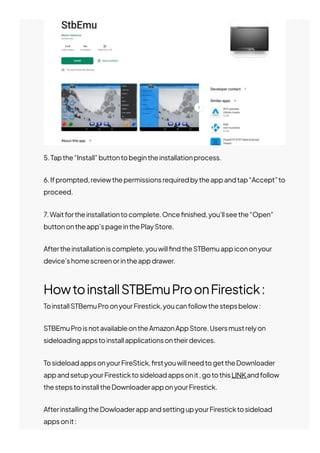
3.Fromthesearchresults,locatetheo몭cialSTBemuappandtaponit.
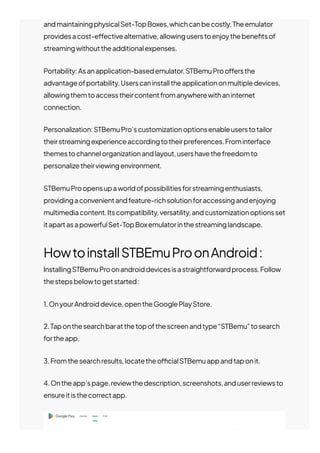
4.Ontheapp’spage,reviewthedescription,screenshots,anduserreviewsto
ensureitisthecorrectapp.
5.Tapthe“Install”buttontobegintheinstallationprocess.
6.Ifprompted,reviewthepermissionsrequiredbytheappandtap“Accept”to
proceed.
7.Waitfortheinstallationtocomplete.Once몭nished,you’llseethe“Open”
buttonontheapp’spageinthePlayStore.
Aftertheinstallationiscomplete,youwill몭ndtheSTBemuappicononyour
device’shomescreenorintheappdrawer.
HowtoinstallSTBEmuProonFirestick:
ToinstallSTBemuProonyourFirestick,youcanfollowthestepsbelow:
STBEmuProisnotavailableontheAmazonAppStore.Usersmustrelyon
sideloadingappstoinstallapplicationsontheirdevices.
TosideloadappsonyourFireStick,몭rstyouwillneedtogettheDownloader
appandsetupyourFiresticktosideloadappsonit,gotothisLINKandfollow
thestepstoinstalltheDownloaderapponyourFirestick.
AfterinstallingtheDowloaderappandsettingupyourFiresticktosideload
appsonit:
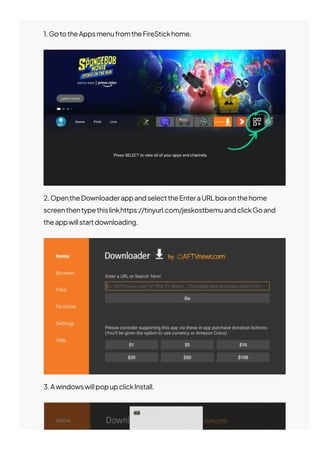
1.GototheAppsmenufromtheFireStickhome.
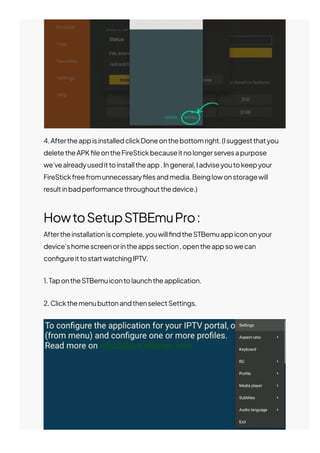
2.OpentheDownloaderappandselecttheEnteraURLboxonthehome
screenthentypethislinkhttps://tinyurl.com/jeskostbemuandclickGoand
theappwillstartdownloading.
3.AwindowswillpopupclickInstall.
4.AftertheappisinstalledclickDoneonthebottomright.(Isuggestthatyou
deletetheAPK몭leontheFireStickbecauseitnolongerservesapurpose
we’vealreadyusedittoinstalltheapp.Ingeneral,Iadviseyoutokeepyour
FireStickfreefromunnecessary몭lesandmedia.Beinglowonstoragewill
resultinbadperformancethroughoutthedevice.)
HowtoSetupSTBEmuPro:
Aftertheinstallationiscomplete,youwill몭ndtheSTBemuappicononyour
device’shomescreenorintheappssection,opentheappsowecan
con몭gureittostartwatchingIPTV.
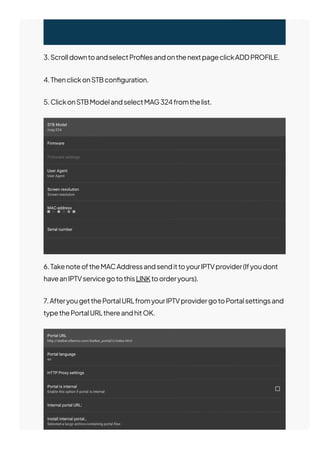
1.TapontheSTBemuicontolaunchtheapplication.
2.ClickthemenubuttonandthenselectSettings.
3.ScrolldowntoandselectPro몭lesandonthenextpageclickADDPROFILE.
4.ThenclickonSTBcon몭guration.
5.ClickonSTBModelandselectMAG324fromthelist.
6.TakenoteoftheMACAddressandsendittoyourIPTVprovider(Ifyoudont
haveanIPTVservicegotothisLINKtoorderyours).
7.AfteryougetthePortalURLfromyourIPTVprovidergotoPortalsettingsand
typethePortalURLthereandhitOK.
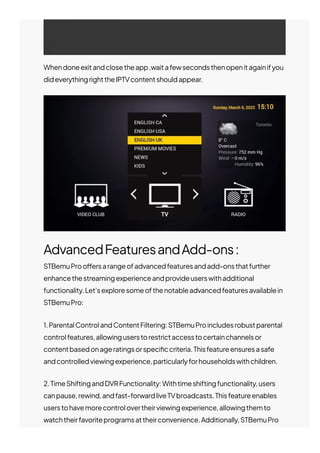
Whendoneexitandclosetheapp,waitafewsecondsthenopenitagainifyou
dideverythingrighttheIPTVcontentshouldappear.
AdvancedFeaturesandAdd-ons:
STBemuProo몭ersarangeofadvancedfeaturesandadd-onsthatfurther
enhancethestreamingexperienceandprovideuserswithadditional
functionality.Let’sexploresomeofthenotableadvancedfeaturesavailablein
STBemuPro:
1.ParentalControlandContentFiltering:STBemuProincludesrobustparental
controlfeatures,allowinguserstorestrictaccesstocertainchannelsor
contentbasedonageratingsorspeci몭ccriteria.Thisfeatureensuresasafe
andcontrolledviewingexperience,particularlyforhouseholdswithchildren.
2.TimeShiftingandDVRFunctionality:Withtimeshiftingfunctionality,users
canpause,rewind,andfast-forwardliveTVbroadcasts.Thisfeatureenables
userstohavemorecontrolovertheirviewingexperience,allowingthemto
watchtheirfavoriteprogramsattheirconvenience.Additionally,STBemuPro
supportsDVR(DigitalVideoRecorder)functionality,allowinguserstorecord
theirfavoriteshowsormoviesforlaterviewing.
3.ExternalStorageSupport:STBemuProsupportsexternalstoragedevices
suchasUSBdrivesornetwork-attachedstorage(NAS)devices,allowingusers
toexpandtheirstoragecapacity.Thisisparticularlyusefulforthosewhowant
tostorealargernumberofrecordedshowsoraccessmedia몭lesstoredon
externaldevices.
4.AdvancedAudioandVideoSettings:STBemuProprovidesuserswith
advancedaudioandvideosettingstooptimizethestreamingexperience.
Userscanadjustaudiooutputsettings,videoresolution,aspectratio,and
othervisualsettingstosuittheirpreferencesandenhancethequalityofthe
contentbeingstreamed.
5.Multi-ScreenandMulti-RoomSupport:STBemuProo몭ersmulti-screenand
multi-roomsupport,enablinguserstostreamcontentsimultaneouslyon
multipledeviceswithinthesamenetwork.Thisfeatureallowsforaseamless
streamingexperienceacrossdi몭erentscreens,ensuring몭exibilityand
convenience.
6.ThemesandSkins:Tofurthercustomizethevisualappearanceofthe
application,STBemuProprovidesthemesandskins.Userscanchoosefroma
varietyofthemesorapplycustomskinstopersonalizetheinterfaceaccording
totheirpreferences.
7.IntegrationwithExternalPlayers:STBemuProallowsuserstointegratewith
externalmediaplayersoftheirchoice.This몭exibilityenablesuserstoutilize
theirpreferredmediaplayer’sfeatures,suchasadvancedplaybackcontrols,
subtitlesupport,andcodeccompatibility.
Theseadvancedfeaturesandadd-onso몭eredbySTBemuProcontributeto
anenhancedstreamingexperience,providinguserswithmorecontrol,
customizationoptions,and몭exibilityinaccessingandenjoyingtheirfavorite
content.
It’sworthnotingthatwhileSTBemuProo몭ersarangeofbuilt-infeatures,the
availabilityofcertainadvancedfeaturesmaydependonthespeci몭cversion
andcustomizationoptionsprovidedbythedevelopers.It’srecommendedto
checktheo몭cialdocumentationorreleasenotesforthemostup-to-date
informationontheadvancedfeaturesandadd-onssupportedbySTBemu
Pro.
STBemuProvs.Alternatives:
WhenitcomestoSet-TopBoxemulators,STBemuProstandsasapopular
choiceamongstreamingenthusiasts.However,it’sessentialtoconsider
alternativeoptionstomakeaninformeddecision.Let’scompareSTBemuPro
withsomeofitsalternativestounderstandtheirstrengthsandweaknesses:
1.STBemuProvs.STBemuFree:STBemuFreeisafreeversionofSTBemuPro,
o몭eringbasicfunctionality.Whilebothversionssharesimilaritiesintermsof
userinterfaceandcorefeatures,STBemuProprovidesadditionaladvanced
featuresandcustomizationoptions.STBemuPro’sadvancedfeatures,suchas
parentalcontrols,timeshifting,andexternalstoragesupport,makeitamore
versatilechoiceforusersseekingacomprehensivestreamingexperience.
2.STBemuProvs.PerfectPlayer:PerfectPlayerisanotherpopularSet-Top
BoxemulatorthatfocusesprimarilyonIPTVstreaming.WhilebothSTBemuPro
andPerfectPlayero몭erIPTVsupportandEPGfunctionality,theydi몭erinterms
ofuserinterfaceandadditionalfeatures.STBemuProprovidesamoreintuitive
anduser-friendlyinterface,alongwithadvancedfeatureslikeparentalcontrol
andexternalstoragesupport.PerfectPlayer,ontheotherhand,o몭ers
extensivecustomizationoptionsforadvanceduserswhopreferahighly
tailoredstreamingexperience.
3.STBemuProvs.Kodi:Kodiisaversatilemediacenterthatsupportsawide
rangeofcontent,includingIPTV.UnlikeSTBemuPro,Kodiisnotspeci몭cally
designedasaSet-TopBoxemulatorbuto몭erssimilarfunctionalitythrough
variousIPTVadd-ons.WhileKodiprovidesextensivecustomizationoptions,a
widerangeofcompatibledevices,andastrongcommunitysupport,STBemu
Proo몭ersamorestreamlinedanduser-friendlyinterfaceforIPTVstreaming,
makingitasimplerandmorestraightforwardchoiceforthosefocusedonIPTV
content.
4.STBemuProvs.IPTVSmarters:IPTVSmartersisapopularIPTVplayer
applicationthato몭ersauser-friendlyinterfaceandcomprehensiveIPTV
features.STBemuProandIPTVSmarterssharesimilaritiesintermsofIPTV
channelmanagementandEPGfunctionality.However,STBemuProprovides
additionaladvancedfeaturessuchastimeshifting,externalstoragesupport,
andadvancedaudio/videosettings.IPTVSmarters,ontheotherhand,o몭ers
itsownuniquesetoffeatures,includingcatch-upTVandVOD(Videoon
Demand)support.
StrengthsandWeaknesses:STBemuPro’sstrengthslieinitscompatibility
acrossmultipleplatforms,user-friendlyinterface,andadvancedfeaturessuch
asparentalcontrolandexternalstoragesupport.Itprovidesawell-rounded
andversatilestreamingexperienceforIPTVenthusiasts.However,itmaynot
o몭erthesamelevelofcustomizationassomeotheralternatives,andthe
availabilityofcertainadvancedfeaturesmayvarybasedonthespeci몭c
versionandcustomizationoptions.
Ultimately,thechoicebetweenSTBemuProanditsalternativesdependson
personalpreferences,speci몭crequirements,andthedesiredlevelof
customization.Usersshouldconsidertheirstreamingneeds,desiredfeatures,
andthecompatibilityofeachemulatorwiththeirpreferreddevicesbefore
makingadecision.
It’srecommendedtoexplorethefeatures,functionalities,anduserreviewsof
eachemulatortodeterminewhichonealignsbestwithindividualpreferences
andrequirements.
Conclusion:
Insummary,STBemuProisareliableandfeature-packedoptionforIPTV
streaming.Itsadvancedfeatures,customizationoptions,andcompatibility
makeitaversatilechoiceforusersseekingacomprehensiveandpersonalized
streamingexperience.Whetheryou’reacasualvieweroradedicatedIPTV
enthusiast,STBemuProo몭ersthetoolsandfunctionalitytoenhanceyourIPTV
streamingjourney.
RelatedPosts
HowToInstall&SetupGSESmartIPTV(7EasySteps)
AttheforefrontofIPTVtechnologicalrevolutionstandsGSESmart
IPTV,adynamicapplicationdesigned…
Ethan
August27,2023
PreviousPost
HowToInstallXCIPTVPlayeron
Firestick/Android&SmartTVs(5
EasySteps)
NextPost
DiscovertheBestIPTVBoxesof
2023
Blog
HowToInstall&SetupRoomIPTV(5EasySteps)
Intherapidlyevolvinglandscapeoftelevisionandmediaconsumption,
oneapplicationstandsoutas…
Ethan
August14,2023
Blog
©2023JESKOIPTV.
HowToInstall&SetupSmartOneIPTVApp(5Easy
Steps)
Theworldoftelevisionentertainmenthasundergoneasigni몭cant
transformationwiththepresenceofSmartOne…
James
August1,2023
Blog

STBEMU Pro