Blog
Ethan
By August11,2023 3minread
Xtream Codes IPTV : How to
watch IPTV using Xtream
Codes (7 Easy Steps)
XtreamCodesisapopularIPTV(InternetProtocolTelevision)management
platformthatenablesIPTVproviderstomanagetheirstreamsandcustomers.
ThisAPIisakeycomponentoftheplatformthatallowsdeveloperstocreate
customapplicationsthatinteractwiththeplatform.Inthisarticle,wewill
explorehowtousetheXtreamCodesinIPTVapplications.
TableofContents
WhatistheXtreamCodesAPI?
HowtowatchIPTVusingXtreamCodes:
Conclusion
WhatistheXtreamCodesAPI?
TheXtreamCodesAPIisaRESTfulAPIthatallowsdeveloperstointeractwith
theIPTVplatform.Itprovidesastandardizedinterfacethatdeveloperscanuse
tocreatecustomIPTVapplicationsthatinteractwiththeplatform.TheAPI
supportsHTTPandHTTPSprotocolsandusesJSONfordataexchange.
HowtowatchIPTVusingXtreamCodes:
1.ObtainanIPTVsubscription:YouneedtosubscribetoanIPTVservicethat
usesXtreamCodeslikeourserviceclickonthisLINKtoorderyourIPTVaccount
.(Youcan몭ndvariousIPTVprovidersonlinethato몭erIPTVsubscriptionswith
XtreamCodesifyoudon’twanttouseourIPTVservice).
2.Getthenecessarycredentials:OnceyouhavesubscribedtoanIPTV
service,youwillreceiveausername,password,andURLthatyouneedtouse
toaccesstheservice.
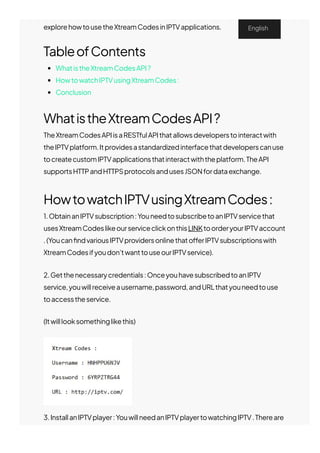
(Itwilllooksomethinglikethis)
3.InstallanIPTVplayer:YouwillneedanIPTVplayertowatchingIPTV.Thereare
manyIPTVplayersavailableonvariousplatformssuchasAndroid,iOS,
English
manyIPTVplayersavailableonvariousplatformssuchasAndroid,iOS,
Windows,macOS,Linux,etc.SomepopularIPTVplayersincludeIPTV
Smarters,Tivimate…youchoosewhicheveroneyoulike.Onthistutorialwewill
beusingtheTivimateapp(ClickonthisLINKforatutorialonhowtoinstallthe
TivimateapponFirestickorAndroid)
4.AfterfollowingthetutorialthatweprovidedandinstallingtheTivimateapp,
opentheTivimateappandyouwillbegreetedwiththefollowingscreenclick
onAddplaylist.
5.3OptionswillpopupM3Uplaylist,XtreamCodes,StalkerPortal,choose
XtreamCodes.
6.AddthelogindetailstotheIPTVplayer:Youwillneedtoaddthelogindetails
suchasusername,password,andURLtotheIPTVplayerprovidedtoyouby
yourIPTVprovider.
TheprocessofaddingthedetailsvariesdependingontheIPTVplayer.
Generally,youneedtogototheIPTVplayer’ssettingsorpreferencesand몭nd
theoptiontoaddanewplaylistorXtreamCodesaccount.Youcanthenenter
thedetailsprovidedbyyourIPTVserviceprovider,fortheTivimateappyou
needto몭lloutthreeblank몭eldswiththeinfoproviderfromyourIPTVprovider
ontheServeraddress몭eldputtheURLandontheUsernameandPassword
justcopyandpasttheUsernameandPasswordfromtheinfoprovidedbyyour
IPTVproviderandclickNext.
7.AfterthattheIPTVplaylistwillstartuploading.
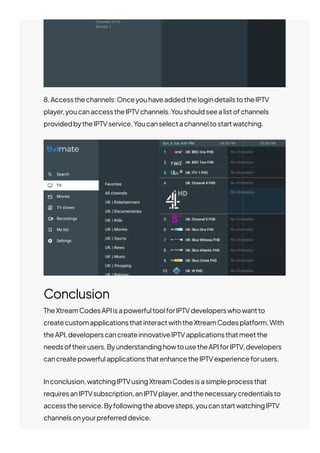
8.Accessthechannels:OnceyouhaveaddedthelogindetailstotheIPTV
player,youcanaccesstheIPTVchannels.Youshouldseealistofchannels
providedbytheIPTVservice.Youcanselectachanneltostartwatching.
Conclusion
TheXtreamCodesAPIisapowerfultoolforIPTVdeveloperswhowantto
createcustomapplicationsthatinteractwiththeXtreamCodesplatform.With
theAPI,developerscancreateinnovativeIPTVapplicationsthatmeetthe
needsoftheirusers.ByunderstandinghowtousetheAPIforIPTV,developers
cancreatepowerfulapplicationsthatenhancetheIPTVexperienceforusers.
Inconclusion,watchingIPTVusingXtreamCodesisasimpleprocessthat
requiresanIPTVsubscription,anIPTVplayer,andthenecessarycredentialsto
accesstheservice.Byfollowingtheabovesteps,youcanstartwatchingIPTV
channelsonyourpreferreddevice.
RelatedPosts
PreviousPost
KodiIPTV-HowToWatchIPTVOn
Kodi(8EasySteps)
NextPost
HowtoinstallMXLTVAppon
FireStick&Android(8EasySteps)
HowToInstall&SetupGSESmartIPTV(7EasySteps)
AttheforefrontofIPTVtechnologicalrevolutionstandsGSESmart
IPTV,adynamicapplicationdesigned…
Ethan
August27,2023
Blog
HowToInstall&SetupRoomIPTV(5EasySteps)
Intherapidlyevolvinglandscapeoftelevisionandmediaconsumption,
oneapplicationstandsoutas…
Ethan
August14,2023
HowToInstall&SetupSmartOneIPTVApp(5Easy
Steps)
Theworldoftelevisionentertainmenthasundergoneasigni몭cant
transformationwiththepresenceofSmartOne…
James
August1,2023
Blog
Blog
©2023JESKOIPTV.

Xtream Codes