Notes From The Field: Tips, Tricks and Best Practices for Managing Microsoft Office SharePoint Server 2007Name: Lenny Ankireddi, Consultant 	Ravichandran A, Sr.ConsultantCompany: MicrosoftSession Code:
Session Objectives And TakeawaysSession Objective(s):  Make It WorkMake It FastMake It ScaleMake It Back
AgendaCapacity PlanningSystem Center Capacity Planner for SharePointUsing the Capacity PlannerCapacity Planner DemoEnsuring Performance Content database managementIIS ManagementTune Web server performance
Capacity Planning
Capacity PlanningPlan around software boundariesPlan for performanceThroughputFarm topologyStorage
System Center Capacity PlannerBuilt-in best practicesVisual Model EditorAbility to perform “what-if” analysisEfficient deployment planning
Using the SCCP for SharePointDetermine and input organization specific dataInputs analyzed and topology recommendedRun simulations – “what-if” analysisOptimize topology modelFinalize topology and generate reports
Tool does not handleExtranet topologiesAuthentication methods other than NTLM and AnonymousForms, Excel Services, BDC, and other system dependencies outside the core infrastructureHigh-end scenarios such as multi-terabyte Web applications or multiple Web applications
Capacity PlanningUsing the System Center Capacity Planner 2007Demo
Techniques for tuning and trackingMaking sites faster through caching and testing for throughputPerformance
Ensuring PerformanceList LimitsUnderstand Alternative List Access MechanismsSQL Server Health MonitoringSeparate tempdb, content databases and log databases into separate disksSplit the database to move the growing site collections to another database or even another server (i.e. move large site collections using stsadm -o mergecontentdbs)Combine several site collections into one database to help with load balancingAlign databases to contain data that is accessed in similar waysUse multiple data files for content databases & SSP databasesNumber of data files should be less than or equal to the number of core CPUsMicrosoft Confidential
Ensuring PerformanceUnderstand Custom IFilter ImpactsMonitor performance regularly SCOM Mgt Packs for MOSS & WSSSCOM Mgt Pack Web Sites & ServicesMicrosoft Confidential
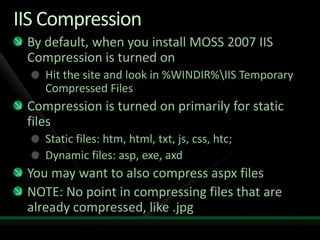
IIS CompressionBy default, when you install MOSS 2007 IIS Compression is turned onHit the site and look in %WINDIR%\IIS Temporary Compressed FilesCompression is turned on primarily for static filesStatic files: htm, html, txt, js, css, htc;Dynamic files: asp, exe, axdYou may want to also compress aspx filesNOTE: No point in compressing files that are already compressed, like .jpg
CacheOutput cacheBlob cacheObject cacheExcept for object cache, others turned off by default
Tune Web Server PerformanceCarefully configure 32-bit serversDo not use Web gardensUse dedicated Web servers for services that are not exposed to end-usersUse Kerberos authentication for farms with heavy usage Configure application pool recycling settings for better availabilityMonitor and manage large files and libraries
Ensure RecoveryDPM for SharePoint + SP1Database Mirroring + Log ShippingUse SQL Client AliasesMicrosoft Confidential
Tracking and measuring performanceTools
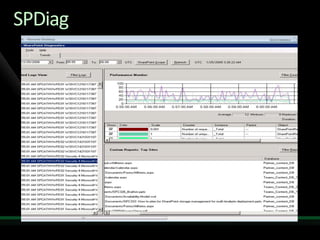
ToolsFiddlerVisual Studio Team TestSPDiag
ToolsTracking changes to site performance and throughputVisual Studio Team Test: lets you measure the throughput available in your site.  Fiddler: lets you examine individual requests to see what is being downloaded on each request and how large each item is.Tweak settings based on what you see in FiddlerTest again with VS.NET to check for improvement
SPDiag
Cache settings & FiddlerDemo
The EndIn SummaryHigh Volume != Low PerformanceKeep Sizing Recommendations In MindRobust SQL Server Infrastructure Is KeySpread Solution Design Where PossibleEducate Customers on ConceptsMake Your Customers Successful !Microsoft Confidential
આભારধন্যবাদநன்றிधन्यवादಧನ್ಯವಾದಗಳುధన్యవాదాలుଧନ୍ୟବାଦਧੰਨਵਾਦനിങ്ങള്‍‌ക്ക് നന്ദി
question & answer
SharePoint Readiness Resources
Related ContentBreakout Sessions (session codes and titles)Interactive Theater Sessions (session codes and titles)Hands-on Labs (session codes and titles)Hands-on Labs (session codes and titles)Required SlideSpeakers, please list the Breakout Sessions, TLC Interactive Theaters and Labs that are related to your session.
Track ResourcesResource 1Resource 2Resource 3Resource 4Required SlideTrack PMs will supply the content for this slide, which will be inserted during the final scrub.
Required Slide© 2009 Microsoft Corporation. All rights reserved. Microsoft, Windows, Windows Vista and other product names are or may be registered trademarks and/or trademarks in the U.S. and/or other countries.The information herein is for informational purposes only and represents the current view of Microsoft Corporation as of the date of this presentation.  Because Microsoft must respond to changing market conditions, it should not be interpreted to be a commitment on the part of Microsoft, and Microsoft cannot guarantee the accuracy of any information provided after the date of this presentation.  MICROSOFT MAKES NO WARRANTIES, EXPRESS, IMPLIED OR STATUTORY, AS TO THE INFORMATION IN THIS PRESENTATION.

Tipstricksandbestpracticesformanagingmicrosoftofficesharepointserver2007 090522032453 Phpapp02

  • 2.
    Notes From TheField: Tips, Tricks and Best Practices for Managing Microsoft Office SharePoint Server 2007Name: Lenny Ankireddi, Consultant Ravichandran A, Sr.ConsultantCompany: MicrosoftSession Code:
  • 3.
    Session Objectives AndTakeawaysSession Objective(s): Make It WorkMake It FastMake It ScaleMake It Back
  • 4.
    AgendaCapacity PlanningSystem CenterCapacity Planner for SharePointUsing the Capacity PlannerCapacity Planner DemoEnsuring Performance Content database managementIIS ManagementTune Web server performance
  • 5.
  • 6.
    Capacity PlanningPlan aroundsoftware boundariesPlan for performanceThroughputFarm topologyStorage
  • 7.
    System Center CapacityPlannerBuilt-in best practicesVisual Model EditorAbility to perform “what-if” analysisEfficient deployment planning
  • 8.
    Using the SCCPfor SharePointDetermine and input organization specific dataInputs analyzed and topology recommendedRun simulations – “what-if” analysisOptimize topology modelFinalize topology and generate reports
  • 9.
    Tool does nothandleExtranet topologiesAuthentication methods other than NTLM and AnonymousForms, Excel Services, BDC, and other system dependencies outside the core infrastructureHigh-end scenarios such as multi-terabyte Web applications or multiple Web applications
  • 10.
    Capacity PlanningUsing theSystem Center Capacity Planner 2007Demo
  • 11.
    Techniques for tuningand trackingMaking sites faster through caching and testing for throughputPerformance
  • 12.
    Ensuring PerformanceList LimitsUnderstandAlternative List Access MechanismsSQL Server Health MonitoringSeparate tempdb, content databases and log databases into separate disksSplit the database to move the growing site collections to another database or even another server (i.e. move large site collections using stsadm -o mergecontentdbs)Combine several site collections into one database to help with load balancingAlign databases to contain data that is accessed in similar waysUse multiple data files for content databases & SSP databasesNumber of data files should be less than or equal to the number of core CPUsMicrosoft Confidential
  • 13.
    Ensuring PerformanceUnderstand CustomIFilter ImpactsMonitor performance regularly SCOM Mgt Packs for MOSS & WSSSCOM Mgt Pack Web Sites & ServicesMicrosoft Confidential
  • 14.
    IIS CompressionBy default,when you install MOSS 2007 IIS Compression is turned onHit the site and look in %WINDIR%\IIS Temporary Compressed FilesCompression is turned on primarily for static filesStatic files: htm, html, txt, js, css, htc;Dynamic files: asp, exe, axdYou may want to also compress aspx filesNOTE: No point in compressing files that are already compressed, like .jpg
  • 15.
    CacheOutput cacheBlob cacheObjectcacheExcept for object cache, others turned off by default
  • 16.
    Tune Web ServerPerformanceCarefully configure 32-bit serversDo not use Web gardensUse dedicated Web servers for services that are not exposed to end-usersUse Kerberos authentication for farms with heavy usage Configure application pool recycling settings for better availabilityMonitor and manage large files and libraries
  • 17.
    Ensure RecoveryDPM forSharePoint + SP1Database Mirroring + Log ShippingUse SQL Client AliasesMicrosoft Confidential
  • 18.
    Tracking and measuringperformanceTools
  • 19.
  • 20.
    ToolsTracking changes tosite performance and throughputVisual Studio Team Test: lets you measure the throughput available in your site. Fiddler: lets you examine individual requests to see what is being downloaded on each request and how large each item is.Tweak settings based on what you see in FiddlerTest again with VS.NET to check for improvement
  • 21.
  • 22.
    Cache settings &FiddlerDemo
  • 23.
    The EndIn SummaryHighVolume != Low PerformanceKeep Sizing Recommendations In MindRobust SQL Server Infrastructure Is KeySpread Solution Design Where PossibleEducate Customers on ConceptsMake Your Customers Successful !Microsoft Confidential
  • 24.
  • 25.
  • 26.
  • 27.
    Related ContentBreakout Sessions(session codes and titles)Interactive Theater Sessions (session codes and titles)Hands-on Labs (session codes and titles)Hands-on Labs (session codes and titles)Required SlideSpeakers, please list the Breakout Sessions, TLC Interactive Theaters and Labs that are related to your session.
  • 28.
    Track ResourcesResource 1Resource2Resource 3Resource 4Required SlideTrack PMs will supply the content for this slide, which will be inserted during the final scrub.
  • 29.
    Required Slide© 2009Microsoft Corporation. All rights reserved. Microsoft, Windows, Windows Vista and other product names are or may be registered trademarks and/or trademarks in the U.S. and/or other countries.The information herein is for informational purposes only and represents the current view of Microsoft Corporation as of the date of this presentation. Because Microsoft must respond to changing market conditions, it should not be interpreted to be a commitment on the part of Microsoft, and Microsoft cannot guarantee the accuracy of any information provided after the date of this presentation. MICROSOFT MAKES NO WARRANTIES, EXPRESS, IMPLIED OR STATUTORY, AS TO THE INFORMATION IN THIS PRESENTATION.

Editor's Notes

  • #19 If you would like to host your demo on the Virtual Server, please use the myVPC demo slide, not this slide.