
The system architecture of an
   interactive e-Learning
  platform integrated with
   Web 2.0 technologies

                 Vincent Tam
                 & team members
                 in the Dept. of
                 EEE, HKU
* Acknowledgements

This work is in collaboration with Sr.
 Margaret Wong and her team in St.
 Paul Convent School (SPCS).
Some of the features covered in the
 subsequent presentation is suggested
 by the SPCS team.
An Overview…

Our inLearn System for Interactive
  Learning
     Introduction
     System Features
     System Architecture & Web 2.0
     Future Work
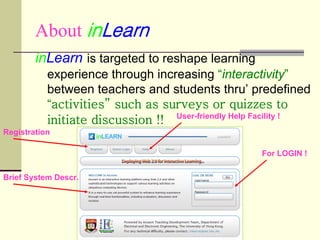
About inLearn
        inLearn is targeted to reshape learning
           experience through increasing “interactivity”
           between teachers and students thru’ predefined
           “activities” such as surveys or quizzes to
           initiate discussion !! User-friendly Help Facility !
Registration

                                                     For LOGIN !


Brief System Descr.
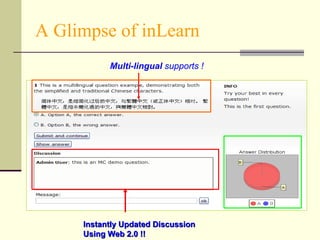
A Glimpse of inLearn
           Multi-lingual supports !


     Instantly Updated Discussion
     Using Web 2.0 !!
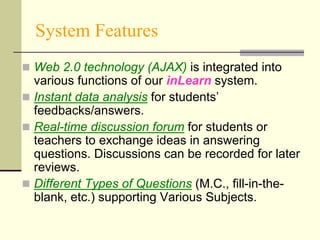
System Features
 Web 2.0 technology (AJAX) is integrated into
  various functions of our inLearn system.
 Instant data analysis for students’
  feedbacks/answers.
 Real-time discussion forum for students or
  teachers to exchange ideas in answering
  questions. Discussions can be recorded for later
  reviews.
 Different Types of Questions (M.C., fill-in-the-
  blank, etc.) supporting Various Subjects.
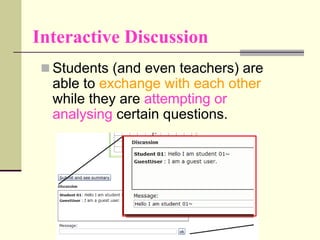
Interactive Discussion
  Students (and even teachers) are
  able to exchange with each other
  while they are attempting or
  analysing certain questions.
Different Question Types
 3 different question types : multiple-choices,
  fill-in-the-blanks, and scatter-plot-based
  questions are available at the moment.
 They can be mixed in each set of questions.
 Each question can be defined with or without a
  model answer. For an open-ended question
  (without a model answer), it will be automatically
  treated as a survey question in our inLearn
  system.
Other Functions in inLearn
 Backend database stores all the users’ answers
  for further analysis and generation of real-time
  result distribution charts.
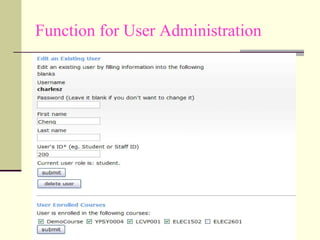
 [User-Admin Function] : A well-defined user
  hierarchy system to manage guest, student and
  teacher accounts.
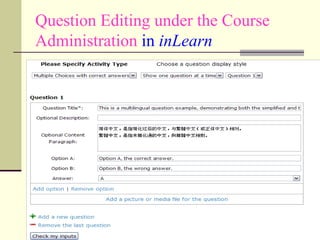
 [Course-Admin Function]: Easy-to-use facility for
  uploading users’ info, questions, and simple
  user interfaces to edit questions.
 Full supports on any O.S. platform including the
  Microsoft™, Linux or MacOS (iPod or iPhone).
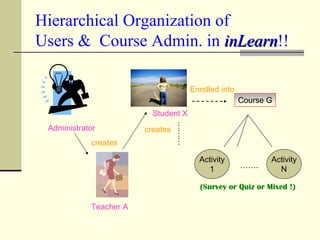
Hierarchical Organization of
Users & Course Admin. in inLearn!!
                           inLearn

                                        Enrolled into
                                                        Course G
                          Student X


                                  ………
 Administrator          creates
            creates

                                          Activity             Activity
                                            1           …….      N

                                          (Survey or Quiz or Mixed !)

            Teacher A
Function for User Administration
Question Editing under the Course
Administration in inLearn
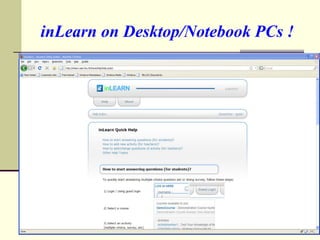
inLearn on Desktop/Notebook PCs !
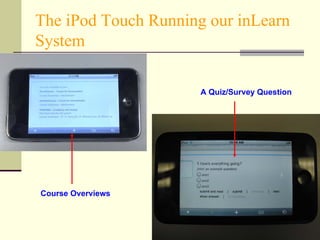
The iPod Touch Running our inLearn
System

                      A Quiz/Survey Question


Course Overviews
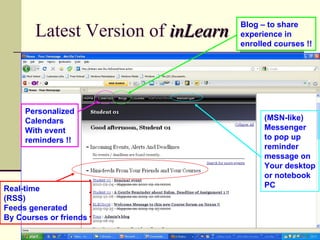
Blog – to share
       Latest Version of inLearn   experience in
                                   enrolled courses !!


     Personalized
     Calendars                           (MSN-like)
     With event                          Messenger
     reminders !!                        to pop up
                                         reminder
                                         message on
                                         Your desktop
                                         or notebook
Real-time                                PC
(RSS)
Feeds generated
By Courses or friends
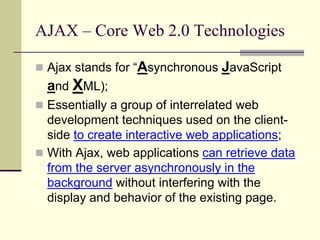
AJAX – Core Web 2.0 Technologies

 Ajax stands for “Asynchronous   JavaScript
  and XML);
 Essentially a group of interrelated web
  development techniques used on the client-
  side to create interactive web applications;
 With Ajax, web applications can retrieve data
  from the server asynchronously in the
  background without interfering with the
  display and behavior of the existing page.
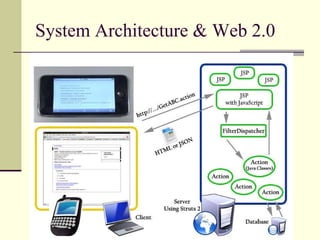
System Architecture & Web 2.0
Future Work
 Numerous aspects of inLearn for
 future development:
   Enhancing the user interface;
   Implementing more sophisticated
    visualization techniques;
   Forum-based student essay
    system;
   Many others….
Thank YOU !


 Q & A….

The system architecture of an interactive e-Learning platform integrated with Web 2.0 technologies

  • 1.
    The system architectureof an interactive e-Learning platform integrated with Web 2.0 technologies Vincent Tam & team members in the Dept. of EEE, HKU
  • 2.
    * Acknowledgements This workis in collaboration with Sr. Margaret Wong and her team in St. Paul Convent School (SPCS). Some of the features covered in the subsequent presentation is suggested by the SPCS team.
  • 3.
    An Overview… Our inLearnSystem for Interactive Learning  Introduction  System Features  System Architecture & Web 2.0  Future Work
  • 4.
    About inLearn inLearn is targeted to reshape learning experience through increasing “interactivity” between teachers and students thru’ predefined “activities” such as surveys or quizzes to initiate discussion !! User-friendly Help Facility ! Registration For LOGIN ! Brief System Descr.
  • 5.
    A Glimpse ofinLearn Multi-lingual supports ! Instantly Updated Discussion Using Web 2.0 !!
  • 6.
    System Features  Web2.0 technology (AJAX) is integrated into various functions of our inLearn system.  Instant data analysis for students’ feedbacks/answers.  Real-time discussion forum for students or teachers to exchange ideas in answering questions. Discussions can be recorded for later reviews.  Different Types of Questions (M.C., fill-in-the- blank, etc.) supporting Various Subjects.
  • 7.
    Interactive Discussion Students (and even teachers) are able to exchange with each other while they are attempting or analysing certain questions.
  • 8.
    Different Question Types 3 different question types : multiple-choices, fill-in-the-blanks, and scatter-plot-based questions are available at the moment.  They can be mixed in each set of questions.  Each question can be defined with or without a model answer. For an open-ended question (without a model answer), it will be automatically treated as a survey question in our inLearn system.
  • 9.
    Other Functions ininLearn  Backend database stores all the users’ answers for further analysis and generation of real-time result distribution charts.  [User-Admin Function] : A well-defined user hierarchy system to manage guest, student and teacher accounts.  [Course-Admin Function]: Easy-to-use facility for uploading users’ info, questions, and simple user interfaces to edit questions.  Full supports on any O.S. platform including the Microsoft™, Linux or MacOS (iPod or iPhone).
  • 10.
    Hierarchical Organization of Users& Course Admin. in inLearn!! inLearn Enrolled into Course G Student X ……… Administrator creates creates Activity Activity 1 ……. N (Survey or Quiz or Mixed !) Teacher A
  • 11.
    Function for UserAdministration
  • 12.
    Question Editing underthe Course Administration in inLearn
  • 13.
  • 14.
    The iPod TouchRunning our inLearn System A Quiz/Survey Question Course Overviews
  • 15.
    Blog – toshare Latest Version of inLearn experience in enrolled courses !! Personalized Calendars (MSN-like) With event Messenger reminders !! to pop up reminder message on Your desktop or notebook Real-time PC (RSS) Feeds generated By Courses or friends
  • 16.
    AJAX – CoreWeb 2.0 Technologies  Ajax stands for “Asynchronous JavaScript and XML);  Essentially a group of interrelated web development techniques used on the client- side to create interactive web applications;  With Ajax, web applications can retrieve data from the server asynchronously in the background without interfering with the display and behavior of the existing page.
  • 17.
  • 18.
    Future Work  Numerousaspects of inLearn for future development:  Enhancing the user interface;  Implementing more sophisticated visualization techniques;  Forum-based student essay system;  Many others….
  • 19.
    Thank YOU ! Q & A….