THE POWER OF
SEMANTIC HTML
Tatiane Aguirres Nogueira
I’m Tatiane 😊
š @tatianeaguirres
š tatianeaguirres.com
Why Semantic HTML is so important?
What should we avoid
to write a good structure?
…but before that, we need a context
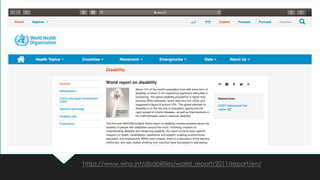
https://www.who.int/disabilities/world_report/2011/report/en/
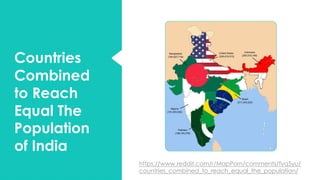
Countries
Combined
to Reach
Equal The
Population
of India
https://www.reddit.com/r/MapPorn/comments/fyq5yu/
countries_combined_to_reach_equal_the_population/
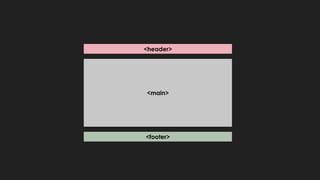
<header>
<footer>
<main>
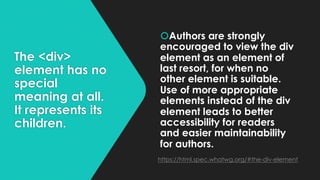
The <div>
element has no
special
meaning at all.
It represents its
children.
šAuthors are strongly
encouraged to view the div
element as an element of
last resort, for when no
other element is suitable.
Use of more appropriate
elements instead of the div
element leads to better
accessibility for readers
and easier maintainability
for authors.
https://html.spec.whatwg.org/#the-div-element
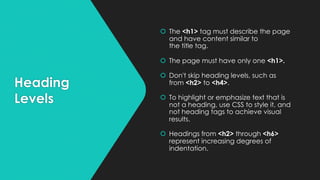
Heading
Levels
š The <h1> tag must describe the page
and have content similar to
the title tag.
š The page must have only one <h1>.
š Don't skip heading levels, such as
from <h2> to <h4>.
š To highlight or emphasize text that is
not a heading, use CSS to style it, and
not heading tags to achieve visual
results.
š Headings from <h2> through <h6>
represent increasing degrees of
indentation.
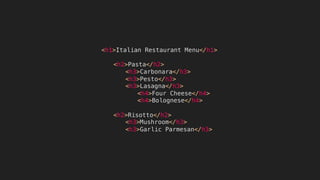
<h1>Italian Restaurant Menu</h1>
<h2>Pasta</h2>
<h3>Carbonara</h3>
<h3>Pesto</h3>
<h3>Lasagna</h3>
<h4>Four Cheese</h4>
<h4>Bolognese</h4>
<h2>Risotto</h2>
<h3>Mushroom</h3>
<h3>Garlic Parmesan</h3>
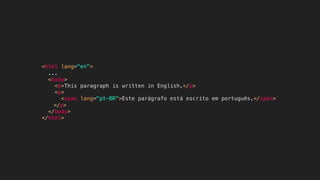
<html lang="en">
...
<body>
<p>This paragraph is written in English.</p>
<p>
<span lang="pt-BR">Este parágrafo está escrito em português.</span>
</p>
</body>
</html>
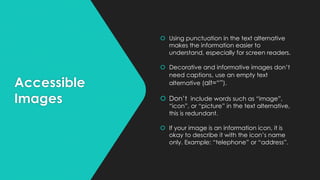
Accessible
Images
š Using punctuation in the text alternative
makes the information easier to
understand, especially for screen readers.
š Decorative and informative images don’t
need captions, use an empty text
alternative (alt=“”).
š Don’t include words such as “image”,
“icon”, or “picture” in the text alternative,
this is redundant.
š If your image is an information icon, it is
okay to describe it with the icon’s name
only. Example: “telephone” or “address”.
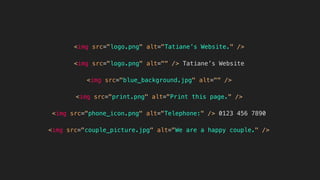
<img src="logo.png" alt="Tatiane’s Website." />
<img src="logo.png" alt="" /> Tatiane’s Website
<img src="blue_background.jpg" alt="" />
<img src="print.png" alt="Print this page." />
<img src="couple_picture.jpg" alt="We are a happy couple." />
<img src="phone_icon.png" alt="Telephone:" /> 0123 456 7890
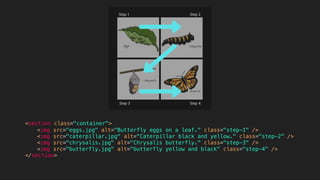
<section class="container">
<img src="eggs.jpg" alt="Butterfly eggs on a leaf." class="step-1" />
<img src="caterpillar.jpg" alt="Caterpillar black and yellow." class="step-2" />
<img src="chrysalis.jpg" alt="Chrysalis butterfly." class="step-3" />
<img src="butterfly.jpg" alt="butterfly yellow and black" class="step-4" />
</section>
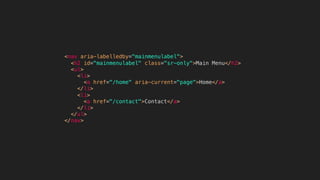
<nav aria-labelledby="mainmenulabel">
<h2 id="mainmenulabel" class="sr-only">Main Menu</h2>
<ul>
<li>
<a href="/home" aria-current="page">Home</a>
</li>
<li>
<a href="/contact">Contact</a>
</li>
</ul>
</nav>
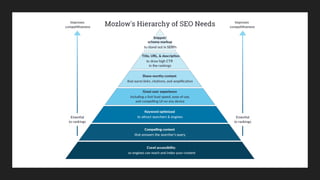
What is SEO?
Search Engine Optimization
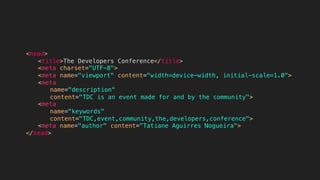
<head>
<title>The Developers Conference</title>
<meta charset="UTF-8">
<meta name="viewport" content="width=device-width, initial-scale=1.0">
<meta
name="description"
content="TDC is an event made for and by the community">
<meta
name="keywords"
content="TDC,event,community,the,developers,conference">
<meta name="author" content="Tatiane Aguirres Nogueira">
</head>
@tatianeaguirres

The Power of Semantic HTML

  • 1.
    THE POWER OF SEMANTICHTML Tatiane Aguirres Nogueira
  • 2.
    I’m Tatiane 😊 š@tatianeaguirres š tatianeaguirres.com
  • 3.
    Why Semantic HTMLis so important?
  • 5.
    What should weavoid to write a good structure? …but before that, we need a context
  • 6.
  • 7.
    Countries Combined to Reach Equal The Population ofIndia https://www.reddit.com/r/MapPorn/comments/fyq5yu/ countries_combined_to_reach_equal_the_population/
  • 8.
  • 10.
    The <div> element hasno special meaning at all. It represents its children. šAuthors are strongly encouraged to view the div element as an element of last resort, for when no other element is suitable. Use of more appropriate elements instead of the div element leads to better accessibility for readers and easier maintainability for authors. https://html.spec.whatwg.org/#the-div-element
  • 11.
    Heading Levels š The <h1>tag must describe the page and have content similar to the title tag. š The page must have only one <h1>. š Don't skip heading levels, such as from <h2> to <h4>. š To highlight or emphasize text that is not a heading, use CSS to style it, and not heading tags to achieve visual results. š Headings from <h2> through <h6> represent increasing degrees of indentation.
  • 12.
    <h1>Italian Restaurant Menu</h1> <h2>Pasta</h2> <h3>Carbonara</h3> <h3>Pesto</h3> <h3>Lasagna</h3> <h4>FourCheese</h4> <h4>Bolognese</h4> <h2>Risotto</h2> <h3>Mushroom</h3> <h3>Garlic Parmesan</h3>
  • 14.
    <html lang="en"> ... <body> <p>This paragraphis written in English.</p> <p> <span lang="pt-BR">Este parágrafo está escrito em português.</span> </p> </body> </html>
  • 15.
    Accessible Images š Using punctuationin the text alternative makes the information easier to understand, especially for screen readers. š Decorative and informative images don’t need captions, use an empty text alternative (alt=“”). š Don’t include words such as “image”, “icon”, or “picture” in the text alternative, this is redundant. š If your image is an information icon, it is okay to describe it with the icon’s name only. Example: “telephone” or “address”.
  • 16.
    <img src="logo.png" alt="Tatiane’sWebsite." /> <img src="logo.png" alt="" /> Tatiane’s Website <img src="blue_background.jpg" alt="" /> <img src="print.png" alt="Print this page." /> <img src="couple_picture.jpg" alt="We are a happy couple." /> <img src="phone_icon.png" alt="Telephone:" /> 0123 456 7890
  • 18.
    <section class="container"> <img src="eggs.jpg"alt="Butterfly eggs on a leaf." class="step-1" /> <img src="caterpillar.jpg" alt="Caterpillar black and yellow." class="step-2" /> <img src="chrysalis.jpg" alt="Chrysalis butterfly." class="step-3" /> <img src="butterfly.jpg" alt="butterfly yellow and black" class="step-4" /> </section>
  • 19.
    <nav aria-labelledby="mainmenulabel"> <h2 id="mainmenulabel"class="sr-only">Main Menu</h2> <ul> <li> <a href="/home" aria-current="page">Home</a> </li> <li> <a href="/contact">Contact</a> </li> </ul> </nav>
  • 20.
    What is SEO? SearchEngine Optimization
  • 22.
    <head> <title>The Developers Conference</title> <metacharset="UTF-8"> <meta name="viewport" content="width=device-width, initial-scale=1.0"> <meta name="description" content="TDC is an event made for and by the community"> <meta name="keywords" content="TDC,event,community,the,developers,conference"> <meta name="author" content="Tatiane Aguirres Nogueira"> </head>
  • 24.