Alloy


Powerful MVC from Appc
Ajenda
●   What is Alloy
●   Why Alloy
●   How to work with Alloy
●   Examples
●   Questions
What Is Alloy?
● Alloy is built on Node.js, available on npm,
  and integrated with Titanium Studio

● Alloy is an open source MVC framework with
  the goal of making Titanium development
  easier, faster, and more scalable
Why Alloy?
● Scaffolding generation and advanced tooling

● Best Practices

● With Alloy, developers can build apps not
  only faster, but of higher quality, effortlessly
  leveraging features like compile time
  validation, advanced code generation, and
  reusable components.
Alloy Key Features
● UI and app logic separation through MVC
  framework
● Develop your apps using XML and JSON
● Reusable widgets and templates
● Built-in Backbone.js and Underscore.js
  support
● Command Line interface
How to Start?
● Alloy Quickstart Guide
  http://projects.appcelerator.com/alloy/docs/Alloy-bootstrap/index.html


● Alloy Google Group
  https://groups.google.com/forum/?fromgroups=#!forum/appc-ti-alloy

● Alloy on Github
  https://github.com/appcelerator/alloy
Getting Start
Requirements
●   Ti SDK and Studio 2.1 or greater
●   Node.js 0.6.3 or greater
●   Support only on OSX 10.6 or greater(Windows and Linux Support Later)


Platform Support
●   Android - 2.2 (API8) or greater
●   iPad - 4.2 or greater
●   iPhone - 4.2 or greater
●   Mobile Web
Install Alloy
Once Titanium and Node.js are installed then
run the below command from the OSX terminal
app to install Alloy

   $sudo npm install alloy -g
Sample Project
Objectives

● Create Tab based App
● Call XHR request
● Display Results
New Alloy Project
● Create a new Titanium Mobile Project

● Using Terminal change to the directory
  where the newly created project lives

● To set up the project to use Alloy run
  $alloy new
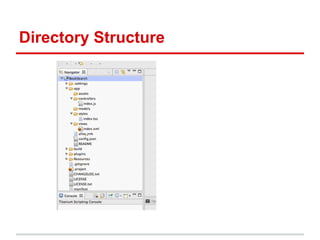
Directory Structure
views - index.xml
styles - index.tss
controllers - index.js
Create Controller
   $alloy generate controller row

Above command will create following files
  a. controllers/row.js
  b. views/row.xml
  c. styles/row.tss
Create Model
   $alloy generate model todo name:string
active:boolean

Above command will create following files
  a. models/todo.js
  b. models/todo.json
  c. migrations/201208061357439_todo.js
Code Walkthrough
Github Link:   https://github.com/railskarthi/sample-alloy-app

Appcelerator Titanium Alloy

  • 1.
  • 2.
    Ajenda ● What is Alloy ● Why Alloy ● How to work with Alloy ● Examples ● Questions
  • 3.
    What Is Alloy? ●Alloy is built on Node.js, available on npm, and integrated with Titanium Studio ● Alloy is an open source MVC framework with the goal of making Titanium development easier, faster, and more scalable
  • 4.
    Why Alloy? ● Scaffoldinggeneration and advanced tooling ● Best Practices ● With Alloy, developers can build apps not only faster, but of higher quality, effortlessly leveraging features like compile time validation, advanced code generation, and reusable components.
  • 5.
    Alloy Key Features ●UI and app logic separation through MVC framework ● Develop your apps using XML and JSON ● Reusable widgets and templates ● Built-in Backbone.js and Underscore.js support ● Command Line interface
  • 6.
    How to Start? ●Alloy Quickstart Guide http://projects.appcelerator.com/alloy/docs/Alloy-bootstrap/index.html ● Alloy Google Group https://groups.google.com/forum/?fromgroups=#!forum/appc-ti-alloy ● Alloy on Github https://github.com/appcelerator/alloy
  • 7.
    Getting Start Requirements ● Ti SDK and Studio 2.1 or greater ● Node.js 0.6.3 or greater ● Support only on OSX 10.6 or greater(Windows and Linux Support Later) Platform Support ● Android - 2.2 (API8) or greater ● iPad - 4.2 or greater ● iPhone - 4.2 or greater ● Mobile Web
  • 8.
    Install Alloy Once Titaniumand Node.js are installed then run the below command from the OSX terminal app to install Alloy $sudo npm install alloy -g
  • 9.
    Sample Project Objectives ● CreateTab based App ● Call XHR request ● Display Results
  • 10.
    New Alloy Project ●Create a new Titanium Mobile Project ● Using Terminal change to the directory where the newly created project lives ● To set up the project to use Alloy run $alloy new
  • 11.
  • 12.
  • 13.
  • 14.
  • 15.
    Create Controller $alloy generate controller row Above command will create following files a. controllers/row.js b. views/row.xml c. styles/row.tss
  • 16.
    Create Model $alloy generate model todo name:string active:boolean Above command will create following files a. models/todo.js b. models/todo.json c. migrations/201208061357439_todo.js
  • 17.
    Code Walkthrough Github Link: https://github.com/railskarthi/sample-alloy-app