Applets
Mrs.R.Chinthamani
Assistant Professsor,
Department of Computer Science
E.M.G.Yadava Women’s College
INTRODUCTION
Java programs are divided into two
main categories, appletsand
applications
An applicationis an ordinary Java
program
An applet is a kind of Java program
that can be run across the Internet
Programming Applets
The word appletis meant to suggest a small application
Applets were intended to be small programs run over
the Internet
–However, there are no size constraints on applets –
Applets can be viewed over the Internet, or without
any connection to the internet
An applet is similar to a Swing GUI
–In fact, almost all of the Swing techniques can be
used in applets
Defining an Applet
An applet class is normally defined as a
derived class of the class JApplet
–The class JAppletis in the package
javax.swing
There is also an older class, Applet, which
has been superseded by the Japplet class
Designing an Applet
An applet class can be designed as a derived
class of JApplet in much the same way that
regular Swing GUIs are defined as derived
classes of JFrame
However, an applet normally defines no
constructors
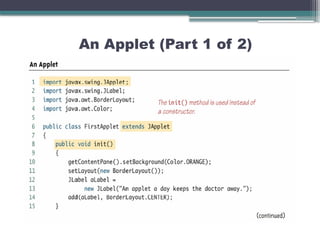
–The method init performs the initializations
that would be performed in a constructor for
a regular Swing GUI
Designing an Applet
Components can be added to an applet in the
same way that a component is added to a
JFrame
–The method add is used to add components
to an applet in the same way that
components are added to a JFrame
An Applet (Part 1 of 2)
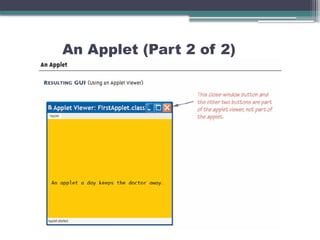
An Applet (Part 2 of 2)
How Applets Differ from Swing GUIs
Some of the items included in a Swing GUI are not
included in an applet
Applets do not contain a main or setVisible
method
–Applets are displayed automatically by a Web
page or an applet viewer
Applets do not have titles
–Therefore, they do not use the setTitle method
–They are normally embedded in an HTML
document, and the HTML document can add any
desired title
How Applets Differ from Swing GUIs
Applets do not use the setSize method
–The HTML document takes care of sizing the
applet
Applets do not have a close-window button
–Therefore, they do not have a
setDefaultCloseOperation method
–When the HTML document containing the
applet is closed, then the applet is automatically
closed
Running an Applet
An applet class is compiled in the same way
as any other Java class
– However, an applet is run differently from
other Java programs
The normal way to run an applet is to embed
it in an HTML document
–The applet is then run and viewed through a
Web browser
Running an Applet
An applet can also be viewed using an applet
viewer
–An applet viewer is a program designed to run
an applet as a stand-alone program
The Java appletviewer can be used to run an
applet:
appletviewer FirstApplet.html
It may be necessary, however, to create the
HTML document, and place the applet in it
Menus in a JApplet
Menus are constructed and added to a
Japplet as they are for a JFrame
–Japplet has a method named
setJMenuBar that behaves the same as the
setJMenuBar method of a JFrame
–Japplet can also have menu bars added to
a JApplet or to a panel that is part of the
Japplet using the add method
Tip: Converting a Swing Application to an Applet
The fastest and easiest way to explain how to define an applet,
is to explain how to modify a Swing GUI to transform it into an
applet
• 1.Derive the class from the class Japplet instead of from the
class JFrame
• 2.Remove the main method
• 3.Replace the constructor with a no-parameter method named
init
• –The body of the init method can be the same as the body of
the deleted constructor, but with some items removed
Tip: Converting a Swing Application to an Applet
• 4.Delete any invocation of super
• 5.Delete any method invocations that
program the close-window button of a
windowing GUI
• 6.Delete any invocation of setTitle
• 7.Delete any invocation of setSize
•The following applet was generated in this
way
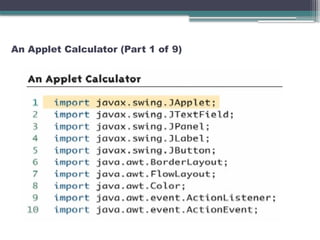
An Applet Calculator (Part 1 of 9)
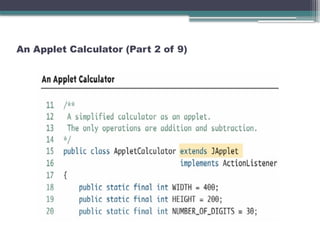
An Applet Calculator (Part 2 of 9)
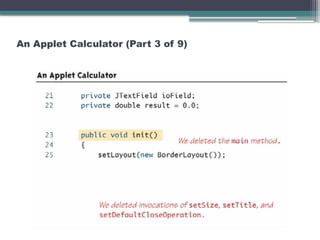
An Applet Calculator (Part 3 of 9)
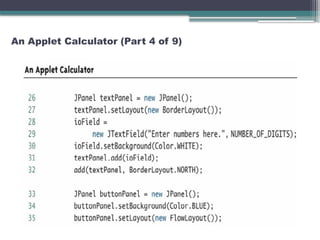
An Applet Calculator (Part 4 of 9)
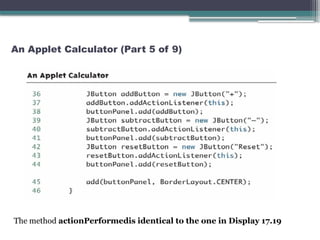
An Applet Calculator (Part 5 of 9)
The method actionPerformedis identical to the one in Display 17.19
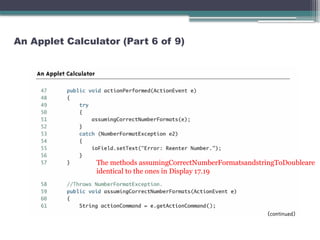
An Applet Calculator (Part 6 of 9)
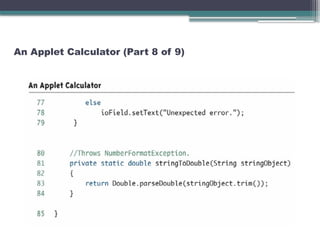
The methods assumingCorrectNumberFormatsandstringToDoubleare
identical to the ones in Display 17.19
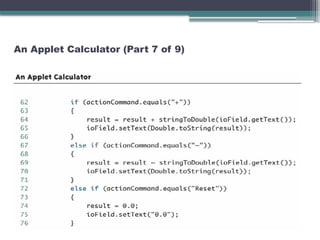
An Applet Calculator (Part 7 of 9)
An Applet Calculator (Part 8 of 9)
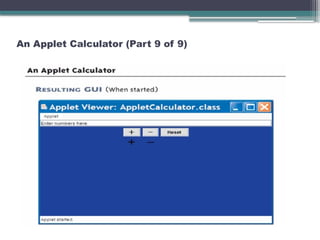
An Applet Calculator (Part 9 of 9)
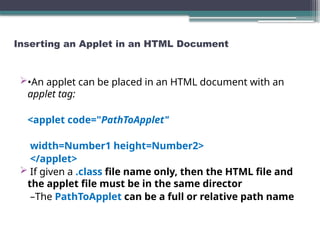
Inserting an Applet in an HTML Document
•An applet can be placed in an HTML document with an
applet tag:
<applet code="PathToApplet"
width=Number1 height=Number2>
</applet>
 If given a .class file name only, then the HTML file and
the applet file must be in the same director
–The PathToApplet can be a full or relative path name
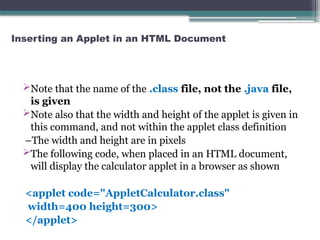
Inserting an Applet in an HTML Document
Note that the name of the .class file, not the .java file,
is given
Note also that the width and height of the applet is given in
this command, and not within the applet class definition
–The width and height are in pixels
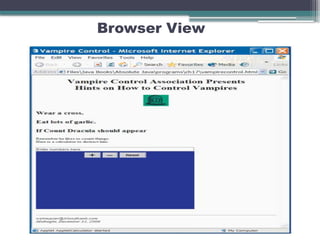
The following code, when placed in an HTML document,
will display the calculator applet in a browser as shown
<applet code="AppletCalculator.class"
width=400 height=300>
</applet>
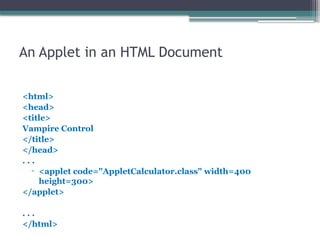
An Applet in an HTML Document
<html>
<head>
<title>
Vampire Control
</title>
</head>
. . .
▫ <applet code="AppletCalculator.class" width=400
height=300>
</applet>
. . .
</html>
Browser View

The Applet Concept in Java Programming.pptx

  • 1.
    Applets Mrs.R.Chinthamani Assistant Professsor, Department ofComputer Science E.M.G.Yadava Women’s College
  • 2.
    INTRODUCTION Java programs aredivided into two main categories, appletsand applications An applicationis an ordinary Java program An applet is a kind of Java program that can be run across the Internet
  • 3.
    Programming Applets The wordappletis meant to suggest a small application Applets were intended to be small programs run over the Internet –However, there are no size constraints on applets – Applets can be viewed over the Internet, or without any connection to the internet An applet is similar to a Swing GUI –In fact, almost all of the Swing techniques can be used in applets
  • 4.
    Defining an Applet Anapplet class is normally defined as a derived class of the class JApplet –The class JAppletis in the package javax.swing There is also an older class, Applet, which has been superseded by the Japplet class
  • 5.
    Designing an Applet Anapplet class can be designed as a derived class of JApplet in much the same way that regular Swing GUIs are defined as derived classes of JFrame However, an applet normally defines no constructors –The method init performs the initializations that would be performed in a constructor for a regular Swing GUI
  • 6.
    Designing an Applet Componentscan be added to an applet in the same way that a component is added to a JFrame –The method add is used to add components to an applet in the same way that components are added to a JFrame
  • 7.
  • 8.
  • 9.
    How Applets Differfrom Swing GUIs Some of the items included in a Swing GUI are not included in an applet Applets do not contain a main or setVisible method –Applets are displayed automatically by a Web page or an applet viewer Applets do not have titles –Therefore, they do not use the setTitle method –They are normally embedded in an HTML document, and the HTML document can add any desired title
  • 10.
    How Applets Differfrom Swing GUIs Applets do not use the setSize method –The HTML document takes care of sizing the applet Applets do not have a close-window button –Therefore, they do not have a setDefaultCloseOperation method –When the HTML document containing the applet is closed, then the applet is automatically closed
  • 11.
    Running an Applet Anapplet class is compiled in the same way as any other Java class – However, an applet is run differently from other Java programs The normal way to run an applet is to embed it in an HTML document –The applet is then run and viewed through a Web browser
  • 12.
    Running an Applet Anapplet can also be viewed using an applet viewer –An applet viewer is a program designed to run an applet as a stand-alone program The Java appletviewer can be used to run an applet: appletviewer FirstApplet.html It may be necessary, however, to create the HTML document, and place the applet in it
  • 13.
    Menus in aJApplet Menus are constructed and added to a Japplet as they are for a JFrame –Japplet has a method named setJMenuBar that behaves the same as the setJMenuBar method of a JFrame –Japplet can also have menu bars added to a JApplet or to a panel that is part of the Japplet using the add method
  • 14.
    Tip: Converting aSwing Application to an Applet The fastest and easiest way to explain how to define an applet, is to explain how to modify a Swing GUI to transform it into an applet • 1.Derive the class from the class Japplet instead of from the class JFrame • 2.Remove the main method • 3.Replace the constructor with a no-parameter method named init • –The body of the init method can be the same as the body of the deleted constructor, but with some items removed
  • 15.
    Tip: Converting aSwing Application to an Applet • 4.Delete any invocation of super • 5.Delete any method invocations that program the close-window button of a windowing GUI • 6.Delete any invocation of setTitle • 7.Delete any invocation of setSize •The following applet was generated in this way
  • 16.
    An Applet Calculator(Part 1 of 9)
  • 17.
    An Applet Calculator(Part 2 of 9)
  • 18.
    An Applet Calculator(Part 3 of 9)
  • 19.
    An Applet Calculator(Part 4 of 9)
  • 20.
    An Applet Calculator(Part 5 of 9) The method actionPerformedis identical to the one in Display 17.19
  • 21.
    An Applet Calculator(Part 6 of 9) The methods assumingCorrectNumberFormatsandstringToDoubleare identical to the ones in Display 17.19
  • 22.
    An Applet Calculator(Part 7 of 9)
  • 23.
    An Applet Calculator(Part 8 of 9)
  • 24.
    An Applet Calculator(Part 9 of 9)
  • 25.
    Inserting an Appletin an HTML Document •An applet can be placed in an HTML document with an applet tag: <applet code="PathToApplet" width=Number1 height=Number2> </applet>  If given a .class file name only, then the HTML file and the applet file must be in the same director –The PathToApplet can be a full or relative path name
  • 26.
    Inserting an Appletin an HTML Document Note that the name of the .class file, not the .java file, is given Note also that the width and height of the applet is given in this command, and not within the applet class definition –The width and height are in pixels The following code, when placed in an HTML document, will display the calculator applet in a browser as shown <applet code="AppletCalculator.class" width=400 height=300> </applet>
  • 27.
    An Applet inan HTML Document <html> <head> <title> Vampire Control </title> </head> . . . ▫ <applet code="AppletCalculator.class" width=400 height=300> </applet> . . . </html>
  • 28.