Susan Thares
03/13/2013
Social Media Policies &
Effective Strategies
Things To Consider Before You Begin
• What are you solving for?
• Who is the audience you want to reach?
• What does your customer want/need from you?
• Engagement or one-way communication?
• Where does your audience engage on social media?
• What constitutes success?
• What resources ($$ and people) are available?
• Identifying key stakeholders in your organization
• Leverage other government resources
Policy Components
• Purpose
• Scope
• Who does it apply to
• Background & Definition
• Defining social media/digital engagement & benefits of using it for your agency
• How is relates to and advances your agency mission
• Roles & Responsibilities
• Who is authorized to speak in an official capacity
• Approval processes
• Policy Specifics
• Access
• Account Management
• Acceptable Use
• Legal Requirements
• How it’ll be managed/Governance
Creating Policy
Internal Use Guidelines
• Follow all applicable government & agency policies
• Disclose only publicly available information
• Don’t use your status to discuss overly personal info
• Show respect & professionalism
• Respect other’s privacy
• Correct misinformation or mistakes
• Avoid political statements
Creating Policy
External Use Guidelines
• Comment Policy
• Linking Policy
• External link evaluation criteria
• Disclaimer of endorsement
• If you receive PII
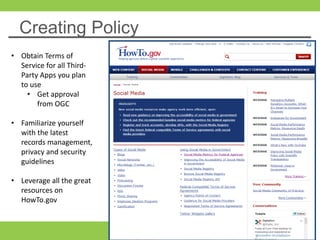
Creating Policy
• Obtain Terms of
Service for all Third-
Party Apps you plan
to use
• Get approval
from OGC
• Familiarize yourself
with the latest
records management,
privacy and security
guidelines
• Leverage all the great
resources on
HowTo.gov
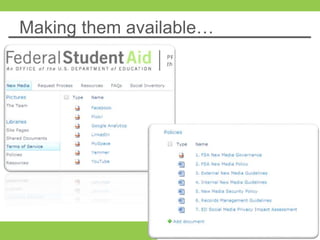
Making them available…
First Steps to an Effective
Strategy
Starting your Strategy
• Listen online for questions, comments, information gaps
around your products and services
• Wade through the noise, look for good nuggets and don’t take it
personally
• Creating content is key
• Write in plain language, inject some humor and go beyond text
based content
• Link back to resources on your websites
• Build an inventory of content before you start and determine how
often you are going post
• Metrics
• What to measure and how to report it
• Adjusting as you go
Online customer listening is
essential to a successful
social media strategy
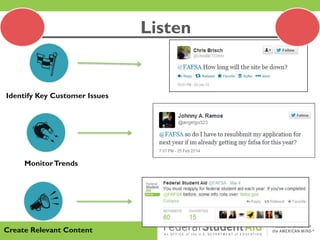
Create Relevant Content
MonitorTrends
Identify Key Customer Issues
Listen
• Include a variety of links to your websites,
resources and blogs
• Create visual collateral (video, photos,
infographics)
• Create a content calendar
• Repurpose content when you can
• Retweet relevant info from the White House, other
agencies and other parts of your agency
• Establish some basic metrics
• Review metrics regularly and adjust accordingly
(e.g. # posts/tweets, time of day, days of the
week, etc.)
• What content resonated most with your audience
• Test different ways to communicate a message
(e.g. use different tweet headlines that link to the
same blog)
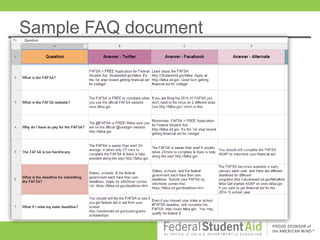
• Create FAQ spreadsheet with corresponding
answers in Facebook and Twitter formats
Sample FAQ document
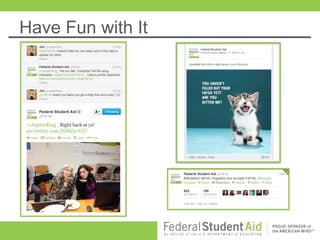
Have Fun with It
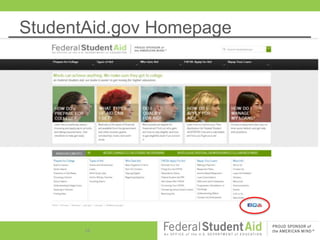
StudentAid.gov Homepage
16
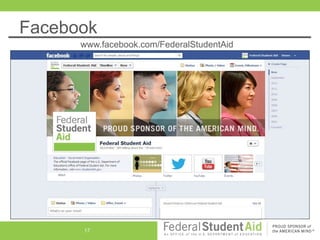
Facebook
www.facebook.com/FederalStudentAid
17
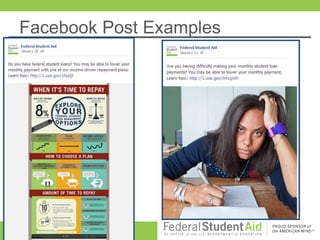
Facebook Post Examples
18
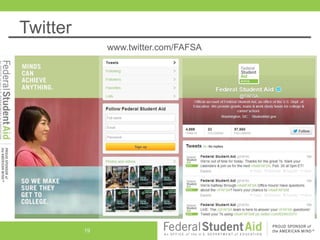
Twitter
www.twitter.com/FAFSA
19
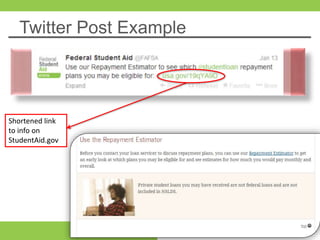
Twitter Post Example
20
Shortened link
to info on
StudentAid.gov
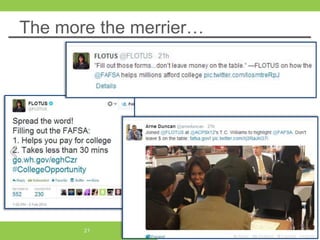
The more the merrier…
21
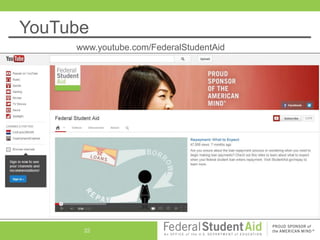
YouTube
22
www.youtube.com/FederalStudentAid
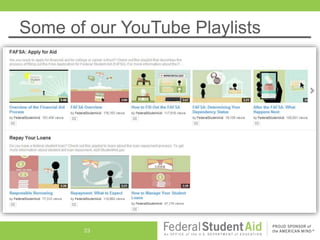
Some of our YouTube Playlists
23

Social Media Policies and Effective Strategies

  • 1.
    Susan Thares 03/13/2013 Social MediaPolicies & Effective Strategies
  • 2.
    Things To ConsiderBefore You Begin • What are you solving for? • Who is the audience you want to reach? • What does your customer want/need from you? • Engagement or one-way communication? • Where does your audience engage on social media? • What constitutes success? • What resources ($$ and people) are available? • Identifying key stakeholders in your organization • Leverage other government resources
  • 3.
    Policy Components • Purpose •Scope • Who does it apply to • Background & Definition • Defining social media/digital engagement & benefits of using it for your agency • How is relates to and advances your agency mission • Roles & Responsibilities • Who is authorized to speak in an official capacity • Approval processes • Policy Specifics • Access • Account Management • Acceptable Use • Legal Requirements • How it’ll be managed/Governance
  • 4.
    Creating Policy Internal UseGuidelines • Follow all applicable government & agency policies • Disclose only publicly available information • Don’t use your status to discuss overly personal info • Show respect & professionalism • Respect other’s privacy • Correct misinformation or mistakes • Avoid political statements
  • 5.
    Creating Policy External UseGuidelines • Comment Policy • Linking Policy • External link evaluation criteria • Disclaimer of endorsement • If you receive PII
  • 6.
    Creating Policy • ObtainTerms of Service for all Third- Party Apps you plan to use • Get approval from OGC • Familiarize yourself with the latest records management, privacy and security guidelines • Leverage all the great resources on HowTo.gov
  • 7.
  • 8.
    First Steps toan Effective Strategy
  • 9.
    Starting your Strategy •Listen online for questions, comments, information gaps around your products and services • Wade through the noise, look for good nuggets and don’t take it personally • Creating content is key • Write in plain language, inject some humor and go beyond text based content • Link back to resources on your websites • Build an inventory of content before you start and determine how often you are going post • Metrics • What to measure and how to report it • Adjusting as you go
  • 10.
    Online customer listeningis essential to a successful social media strategy
  • 11.
  • 12.
    • Include avariety of links to your websites, resources and blogs • Create visual collateral (video, photos, infographics) • Create a content calendar • Repurpose content when you can • Retweet relevant info from the White House, other agencies and other parts of your agency
  • 13.
    • Establish somebasic metrics • Review metrics regularly and adjust accordingly (e.g. # posts/tweets, time of day, days of the week, etc.) • What content resonated most with your audience • Test different ways to communicate a message (e.g. use different tweet headlines that link to the same blog) • Create FAQ spreadsheet with corresponding answers in Facebook and Twitter formats
  • 14.
  • 15.
  • 16.
  • 17.
  • 18.
  • 19.
  • 20.
    Twitter Post Example 20 Shortenedlink to info on StudentAid.gov
  • 21.
    The more themerrier… 21
  • 22.
  • 23.
    Some of ourYouTube Playlists 23