Webinar: Hybrid
IT with Azure’s
Cloud Services
William H. Salazar
Senior ALM Consultant
InCycle Software
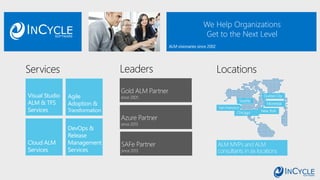
We Help Organizations
Get to the Next Level
ALM MVPs and ALM
consultants in six locations
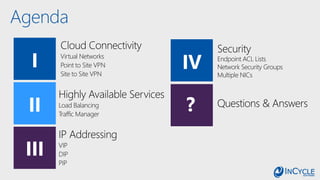
Agenda
III
I
II ?
IV
Questions & Answers
Virtual Networks
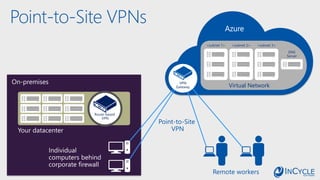
Point to Site VPN
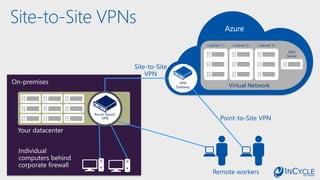
Site to Site VPN
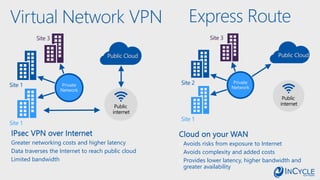
Express Route
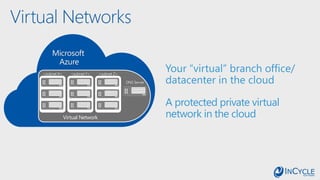
Virtual Networks
Virtual Network
<subnet X> <subnet Y> <subnet Z>
DNS Server
Microsoft
Azure
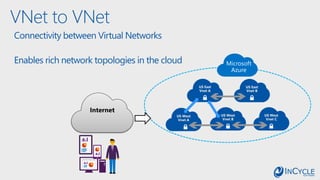
VNet to VNet
US West
Vnet C
US West
Vnet B
US East
Vnet B
Internet
Connectivity between Virtual Networks
Enables rich network topologies in the cloud
US East
Vnet A
US West
Vnet A
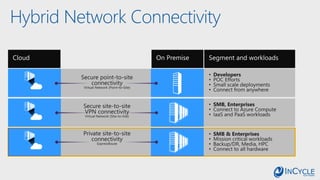
Hybrid Network Connectivity
On-premises
Your datacenter
Individual
computers behind
corporate firewall
Point-to-Site
VPN
Route-based
VPN
Azure
Virtual Network
<subnet 1> <subnet 2> <subnet 3>
DNS
Server
VPN
Gateway
Remote workers
Point-to-Site VPNs
On-premises
Your datacenter
Individual
computers behind
corporate firewall
Route-based
VPN
Azure
Virtual Network
<subnet 1> <subnet 2> <subnet 3>
DNS
Server
VPN
Gateway
Remote workers
Site-to-Site
VPN
Site-to-Site VPNs
Point-to-Site VPN
Avoids risks from exposure to Internet
Avoids complexity and added costs
Provides lower latency, higher bandwidth and
greater availability
Private
Network
Site 1
Site 2
Site 3
Virtual Network VPN
Greater networking costs and higher latency
Data traverses the Internet to reach public cloud
Limited bandwidth
Private
Network
Site 1
Site 1
Site 3
Express Route
Load Balancing
Traffic Manager
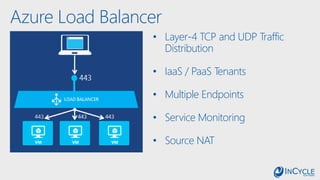
Azure Load Balancer
• Layer-4 TCP and UDP Traffic
Distribution
• IaaS / PaaS Tenants
• Multiple Endpoints
• Service Monitoring
• Source NAT
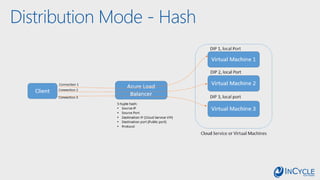
Distribution Mode - Hash
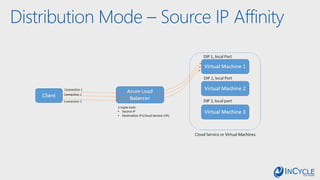
Distribution Mode – Source IP Affinity
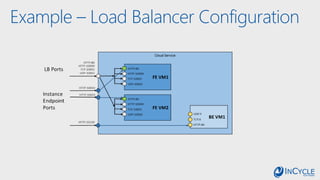
Example – Load Balancer Configuration
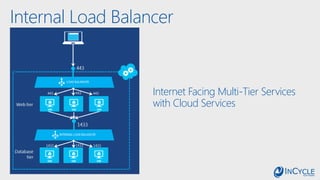
Internal Load Balancer
Internet Facing Multi-Tier Services
with Cloud Services
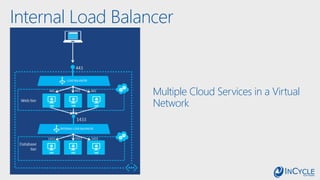
Internal Load Balancer
Multiple Cloud Services in a Virtual
Network
Traffic Manager
Reduce application downtime
Improved app performance, content
delivery
Distribute use traffic over multiple
locations
Works with your on-premises
datacenter
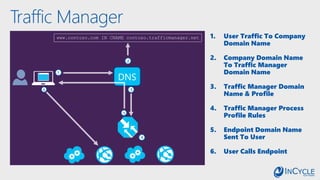
Traffic Manager
1
2
3
4
www.contoso.com IN CNAME contoso.trafficmanager.net
5
6
DNS
1. User Traffic To Company
Domain Name
2. Company Domain Name
To Traffic Manager
Domain Name
3. Traffic Manager Domain
Name & Profile
4. Traffic Manager Process
Profile Rules
5. Endpoint Domain Name
Sent To User
6. User Calls Endpoint
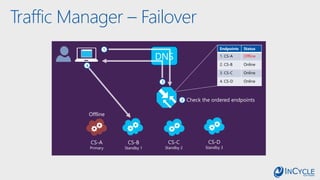
Traffic Manager – Failover
DNS
1
2
3
4
Check the ordered endpoints
CS-A
Primary
CS-B
Standby 1
CS-C
Standby 2
CS-D
Standby 3
Offline
Endpoints Status
1. CS-A Offline
2. CS-B Online
3. CS-C Online
4. CS-D Online
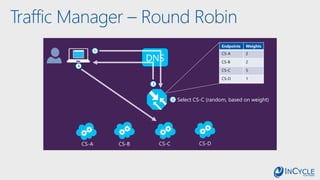
Traffic Manager – Round Robin
DNS
1
2
3
4
Select CS-C (random, based on weight)
CS-A CS-B CS-C CS-D
Endpoints Weights
CS-A 2
CS-B 2
CS-C 5
CS-D 1
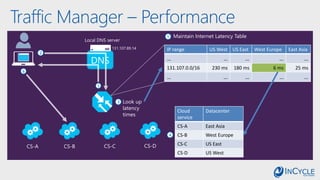
Traffic Manager – Performance
DNS
1
2
3
4
Look up
latency
times
CS-A CS-B CS-C CS-D
5
6
IP range US West US East West Europe East Asia
… … … … …
131.107.0.0/16 230 ms 180 ms 6 ms 25 ms
… … … … …
Cloud
service
Datacenter
CS-A East Asia
CS-B West Europe
CS-C US East
CS-D US West
Maintain Internet Latency Table
131.107.89.14
Local DNS server
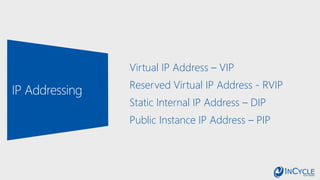
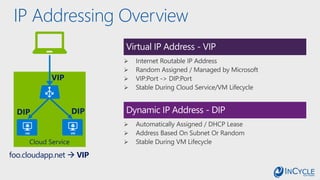
Virtual IP Address – VIP
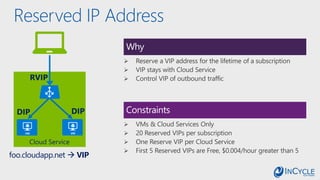
Reserved Virtual IP Address - RVIP
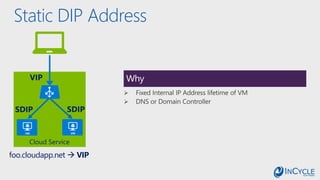
Static Internal IP Address – DIP
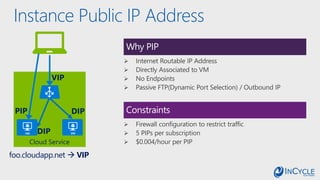
Public Instance IP Address – PIP
IP Addressing Overview
Virtual IP Address - VIP
Dynamic IP Address - DIP
foo.cloudapp.net  VIP
Reserved IP Address
Why
Constraints
foo.cloudapp.net  VIP
Static DIP Address
Why
foo.cloudapp.net  VIP
Instance Public IP Address
Why PIP
Constraints
foo.cloudapp.net  VIP
Network Endpoint ACLs
Network Security Groups
Multiple NICs
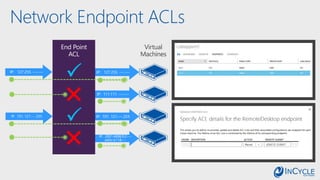
Network Endpoint ACLs
IP: 101. 121.---.255
IP: 127.255. ---.---
IP: 2001:4898:9:2:---
:e60c:b118:---
IP: 111.111. ---.---
29
IP: 101. 121.---.255
IP: 127.255. ---.---
End Point
ACL
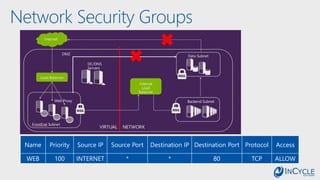
Network Security Groups
Name Priority Source IP Source Port Destination IP Destination Port Protocol Access
WEB 100 INTERNET * * 80 TCP ALLOW
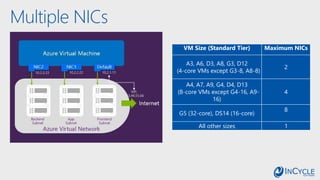
Multiple NICs
VM Size (Standard Tier) Maximum NICs
A3, A6, D3, A8, G3, D12
(4-core VMs except G3-8, A8-8)
2
A4, A7, A9, G4, D4, D13
(8-core VMs except G4-16, A9-
16)
4
G5 (32-core), DS14 (16-core)
8
All other sizes 1
Questions?
William H. Salazar
Senior ALM Consultant
InCycle Software
Los Angeles, CA
(714) 493-3210
william.salazar@incyclesoftware.com
www.incyclesoftware.com
Offers
Contact us at: info@incyclesoftware.com
/InCycleSoftware @InCycleSoftware /company/incycle-software incyclesoftware.com/blog/
Custom
Training or
Coaching
Dev & Test
with Azure
Jump Start
Assessment
& Roadmap
with AZDPS

Hybrid IT With Azure's Cloud Services