Text Features
A feature is used in many different
contexts, or situations.
A feature is an important part of
something. (It grabs your attention)
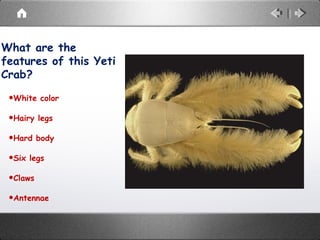
What are the
features of this Yeti
Crab?
•White color
•Hairy legs
•Hard body
•Six legs
•Claws
•Antennae
Textbooks & informational text
also have important features
that stand out from the other
parts of the text.
While reading informational text, you
have probably seen some or all of the
following:
• Boldface terms Photos and Illustrations
• Charts Preview
• Glossary Table of contents
• Headings andTitles Caption
• Index Timeline
• Maps
These are Text Features.
Their purpose is help us
understand the
information presented.
Boldface, Highlighted,
Underlined & italicized words
• These are signals to: Slow Down
and Pay Attention
• These words call attention to
important words or terms; also
shows which words can be found in
the glossary.
Charts, Tables or Graphs
• Gives information in a visual way
so that it is quicker and easier to
read information.
• Packs a lot of information in a
small space
• A great resource to help you
understand information in the
text
Headings and Titles
• Announces the topics that will be
covered.
• Allows us to be efficient in our
reading (skim the headings to focus on
the purpose of our reading)
• Increase your comprehension by
turning headings and titles into a
question -- as you continue to read,
can you answer your “question”?
Table of Contents
• Lists the major parts of the book
along with their page numbers.
• Outlines main topics or main points
• Readers can use the table of contents
to help locate information and see how
everything is organized.
Glossary
•Alphabetical list of key
people, places, events,
and terms.
•A tool to help you
understand the language
of the subject.
Index
• Found at the very back of a textbook
• Gives the location of every important
idea, term, definition, person, and
place.
• A search tool to help you find what
you need
Maps
When reading a map, pay attention to
the following:
• Lines
• Scale
• Symbols
• Colors
• Labels
• Legend or Key
• Compass Rose
• Lines of Longitude &
Latitude
• Maps are small
pictures of large areas
• Helps the reader to
understand where
places are in an area
Photos and Illustrations
• Photos and illustrations are used to emphasize or make
important points
Captions
• Read the captions
• Captions are words near or under the photo or illustration
that explain what the it is or what it is about.
• Captions say in a few lines, what the author takes paragraphs
to explain-- they help you understand the reason for putting
the picture or illustration in the text
Timelines
• Show important events in chronological
order OR time order (chron=time think
vocabulary)
• Helps the reader better understand the
order of events and how one event may have
lead to another.
Preview
Many textbooks include a preview
at the beginning of chapters.
• Acts like a summary
• Packs into one small space, all of the important
things to know about a chapter
• Key terms and important vocabulary will often be
listed in the preview
There are additional
text features such as-
color, use of font,
table of contents, insets
and many more!
Writers use text
features to bring
attention to important
details.
And now you are
saying, “So What?”.
Here’s the, “So What!”.
Putting text features into
use will help you
understand more of your
reading, and probably allow
you to do it in less time!!!!
You can use text
features to become
more successful and
efficient in your
reading of
informational text.

Textfeatures

  • 1.
    Text Features A featureis used in many different contexts, or situations. A feature is an important part of something. (It grabs your attention)
  • 2.
    What are the featuresof this Yeti Crab? •White color •Hairy legs •Hard body •Six legs •Claws •Antennae
  • 3.
    Textbooks & informationaltext also have important features that stand out from the other parts of the text.
  • 4.
    While reading informationaltext, you have probably seen some or all of the following: • Boldface terms Photos and Illustrations • Charts Preview • Glossary Table of contents • Headings andTitles Caption • Index Timeline • Maps
  • 5.
    These are TextFeatures. Their purpose is help us understand the information presented.
  • 6.
    Boldface, Highlighted, Underlined &italicized words • These are signals to: Slow Down and Pay Attention • These words call attention to important words or terms; also shows which words can be found in the glossary.
  • 7.
    Charts, Tables orGraphs • Gives information in a visual way so that it is quicker and easier to read information. • Packs a lot of information in a small space • A great resource to help you understand information in the text
  • 8.
    Headings and Titles •Announces the topics that will be covered. • Allows us to be efficient in our reading (skim the headings to focus on the purpose of our reading) • Increase your comprehension by turning headings and titles into a question -- as you continue to read, can you answer your “question”?
  • 9.
    Table of Contents •Lists the major parts of the book along with their page numbers. • Outlines main topics or main points • Readers can use the table of contents to help locate information and see how everything is organized.
  • 10.
    Glossary •Alphabetical list ofkey people, places, events, and terms. •A tool to help you understand the language of the subject.
  • 11.
    Index • Found atthe very back of a textbook • Gives the location of every important idea, term, definition, person, and place. • A search tool to help you find what you need
  • 12.
    Maps When reading amap, pay attention to the following: • Lines • Scale • Symbols • Colors • Labels • Legend or Key • Compass Rose • Lines of Longitude & Latitude • Maps are small pictures of large areas • Helps the reader to understand where places are in an area
  • 13.
    Photos and Illustrations •Photos and illustrations are used to emphasize or make important points Captions • Read the captions • Captions are words near or under the photo or illustration that explain what the it is or what it is about. • Captions say in a few lines, what the author takes paragraphs to explain-- they help you understand the reason for putting the picture or illustration in the text
  • 14.
    Timelines • Show importantevents in chronological order OR time order (chron=time think vocabulary) • Helps the reader better understand the order of events and how one event may have lead to another.
  • 15.
    Preview Many textbooks includea preview at the beginning of chapters. • Acts like a summary • Packs into one small space, all of the important things to know about a chapter • Key terms and important vocabulary will often be listed in the preview
  • 16.
    There are additional textfeatures such as- color, use of font, table of contents, insets and many more!
  • 17.
    Writers use text featuresto bring attention to important details.
  • 18.
    And now youare saying, “So What?”.
  • 19.
    Here’s the, “SoWhat!”. Putting text features into use will help you understand more of your reading, and probably allow you to do it in less time!!!!
  • 20.
    You can usetext features to become more successful and efficient in your reading of informational text.