“Text Features”
English 7 – Reading
and Writing
How does the understanding
of the text features help one
appreciate reading better?
vvv
Get Started!
We read not only the text of a material but also its features.
This means that, when we look at a reading material, our
understanding of its contents is not only based on what is
actually written on the page but also on how it looks, how the
lines are formatted, and sometimes, even what colors were used.
FEATURES
TEXT
Learning Objectives
the basics of text features in
sample books both fiction
and nonfiction materials
RECOGNIZE
DIFFERENTIATE
AND UTILIZE
reading techniques of
skimming and scanning.
Skim for major ideas using
headings as guide and scan
for specific information; and
FILL OUT
forms accurately and
efficiently
01 02 03
At the end of this lesson, you will be able:
Text Features
is used in an academic setting to describe all
of the components or features associated with an
article or nonfiction text that are not considered the
main text.
Common Features: table of contents, the index, headings, captions, bold words, illustrations,
photographs, the glossary, labels, graphs, charts, and diagrams
vvv
Why do we need to learn text features?
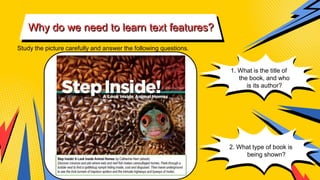
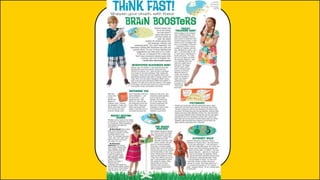
Study the picture carefully and answer the following questions.
1. What is the title of
the book, and who
is its author?
2. What type of book is
being shown?
vvv
Kindly answer the questions follow
in the Google Classroom.
3. What can a reader expect to know from the book? Which part in
what is shown above gives your that information? What do you call
that part?
4. Does the addition of that part give you a better idea of what the
book is about?
5. Did it excite you about the book?
are used to help navigate and locate specific
information provided in a nonfiction text in an easier
and more efficient manner.
TEXT FEATURES
USING TEXT FEATURES
TO LOCATE
INFORMATION
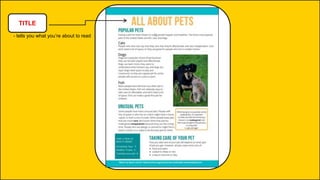
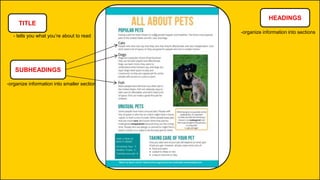
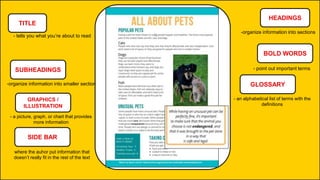
TITLE
- tells you what you’re about to read
TITLE
- tells you what you’re about to read
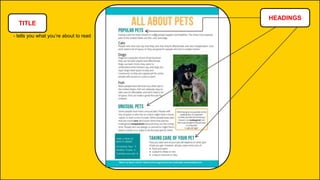
HEADINGS
TITLE
- tells you what you’re about to read
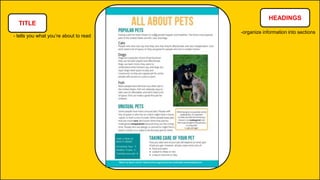
HEADINGS
-organize information into sections
TITLE
- tells you what you’re about to read
HEADINGS
-organize information into sections
SUBHEADINGS
-organize information into smaller section
TITLE
- tells you what you’re about to read
HEADINGS
-organize information into sections
SUBHEADINGS
-organize information into smaller section
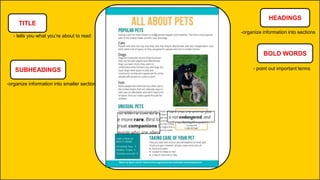
BOLD WORDS
- point out important terms
TITLE
- tells you what you’re about to read
HEADINGS
-organize information into sections
SUBHEADINGS
-organize information into smaller section
BOLD WORDS
- point out important terms
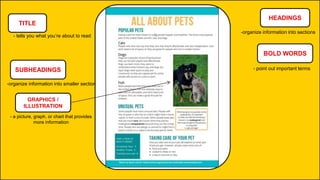
GRAPHICS /
ILLUSTRATION
- a picture, graph, or chart that provides
more information
TITLE
- tells you what you’re about to read
HEADINGS
-organize information into sections
SUBHEADINGS
-organize information into smaller section
BOLD WORDS
- point out important terms
GRAPHICS /
ILLUSTRATION
- a picture, graph, or chart that provides
more information
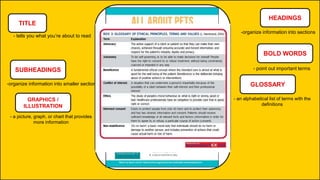
GLOSSARY
- an alphabetical list of terms with the
definitions
TITLE
- tells you what you’re about to read
HEADINGS
-organize information into sections
SUBHEADINGS
-organize information into smaller section
BOLD WORDS
- point out important terms
GRAPHICS /
ILLUSTRATION
- a picture, graph, or chart that provides
more information
GLOSSARY
SIDE BAR
- an alphabetical list of terms with the
definitions
where the auhor put information that
doesn’t really fit in the rest of the text
TITLE
- tells you what you’re about to read
HEADINGS
-organize information into sections
SUBHEADINGS
-organize information into smaller section
BOLD WORDS
- point out important terms
GRAPHICS /
ILLUSTRATION
- a picture, graph, or chart that provides
more information
GLOSSARY
SIDE BAR
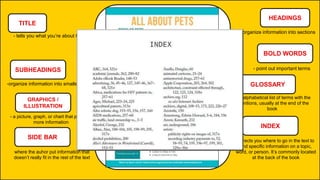
- an alphabetical list of terms with the
definitions, usually at the end of the
book
where the auhor put information that
doesn’t really fit in the rest of the text
INDEX
-directs you where to go in the text to
find specific information on a topic,
word, or person. It’s commonly located
at the back of the book
TITLE
- tells you what you’re about to read
HEADINGS
-organize information into sections
SUBHEADINGS
-organize information into smaller section
BOLD WORDS
- point out important terms
GRAPHICS /
ILLUSTRATION
- a picture, graph, or chart that provides
more information
GLOSSARY
SIDE BAR
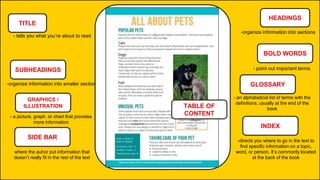
- an alphabetical list of terms with the
definitions, usually at the end of the
book
where the auhor put information that
doesn’t really fit in the rest of the text
INDEX
-directs you where to go in the text to
find specific information on a topic,
word, or person. It’s commonly located
at the back of the book
TABLE OF
CONTENT
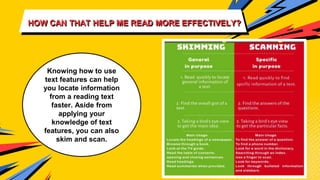
HOW CAN THAT HELP ME READ MORE EFFECTIVELY?
Knowing how to use
text features can help
you locate information
from a reading text
faster. Aside from
applying your
knowledge of text
features, you can also
skim and scan.
QUESTIONS:
#2
#1
How can knowing the different
text features help one become
amore effective reader?
Why do we need to learn about
the different text features?
ACTIVITY
FILLING OUT
FORMS
We fill out forms quite often as they are
used everywhere – at school, at work,
banks, hospitals, restaurants, and a lot
more. Thus, knowing how to accomplish
one is very essential nowadays.
Watch this video to learn more
information on how to fill out forms
correctly
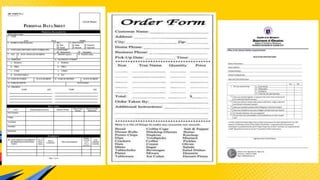
Look at each type of forms. Skim and scan each
to be able to identify the following:
1. What is the form for?
2. What information is required by the form?
Enumerate at least three for each.
Write your answers in the Google Classroom
A. Personal Data Sheet
B. Food Order Form
C. Health Declaration Form
FORMS
ASSIGNMENT: Review the
difference between common and
proper nouns and how they are
supposed to be written by reading
WIKI: Common and Proper Nouns

text_features.pptx

  • 1.
    “Text Features” English 7– Reading and Writing
  • 2.
    How does theunderstanding of the text features help one appreciate reading better?
  • 3.
    vvv Get Started! We readnot only the text of a material but also its features. This means that, when we look at a reading material, our understanding of its contents is not only based on what is actually written on the page but also on how it looks, how the lines are formatted, and sometimes, even what colors were used.
  • 5.
  • 6.
    Learning Objectives the basicsof text features in sample books both fiction and nonfiction materials RECOGNIZE DIFFERENTIATE AND UTILIZE reading techniques of skimming and scanning. Skim for major ideas using headings as guide and scan for specific information; and FILL OUT forms accurately and efficiently 01 02 03 At the end of this lesson, you will be able:
  • 7.
    Text Features is usedin an academic setting to describe all of the components or features associated with an article or nonfiction text that are not considered the main text. Common Features: table of contents, the index, headings, captions, bold words, illustrations, photographs, the glossary, labels, graphs, charts, and diagrams
  • 8.
    vvv Why do weneed to learn text features? Study the picture carefully and answer the following questions. 1. What is the title of the book, and who is its author? 2. What type of book is being shown?
  • 9.
    vvv Kindly answer thequestions follow in the Google Classroom. 3. What can a reader expect to know from the book? Which part in what is shown above gives your that information? What do you call that part? 4. Does the addition of that part give you a better idea of what the book is about? 5. Did it excite you about the book?
  • 10.
    are used tohelp navigate and locate specific information provided in a nonfiction text in an easier and more efficient manner. TEXT FEATURES
  • 11.
    USING TEXT FEATURES TOLOCATE INFORMATION
  • 12.
    TITLE - tells youwhat you’re about to read
  • 13.
    TITLE - tells youwhat you’re about to read HEADINGS
  • 14.
    TITLE - tells youwhat you’re about to read HEADINGS -organize information into sections
  • 15.
    TITLE - tells youwhat you’re about to read HEADINGS -organize information into sections SUBHEADINGS -organize information into smaller section
  • 16.
    TITLE - tells youwhat you’re about to read HEADINGS -organize information into sections SUBHEADINGS -organize information into smaller section BOLD WORDS - point out important terms
  • 17.
    TITLE - tells youwhat you’re about to read HEADINGS -organize information into sections SUBHEADINGS -organize information into smaller section BOLD WORDS - point out important terms GRAPHICS / ILLUSTRATION - a picture, graph, or chart that provides more information
  • 18.
    TITLE - tells youwhat you’re about to read HEADINGS -organize information into sections SUBHEADINGS -organize information into smaller section BOLD WORDS - point out important terms GRAPHICS / ILLUSTRATION - a picture, graph, or chart that provides more information GLOSSARY - an alphabetical list of terms with the definitions
  • 19.
    TITLE - tells youwhat you’re about to read HEADINGS -organize information into sections SUBHEADINGS -organize information into smaller section BOLD WORDS - point out important terms GRAPHICS / ILLUSTRATION - a picture, graph, or chart that provides more information GLOSSARY SIDE BAR - an alphabetical list of terms with the definitions where the auhor put information that doesn’t really fit in the rest of the text
  • 20.
    TITLE - tells youwhat you’re about to read HEADINGS -organize information into sections SUBHEADINGS -organize information into smaller section BOLD WORDS - point out important terms GRAPHICS / ILLUSTRATION - a picture, graph, or chart that provides more information GLOSSARY SIDE BAR - an alphabetical list of terms with the definitions, usually at the end of the book where the auhor put information that doesn’t really fit in the rest of the text INDEX -directs you where to go in the text to find specific information on a topic, word, or person. It’s commonly located at the back of the book
  • 21.
    TITLE - tells youwhat you’re about to read HEADINGS -organize information into sections SUBHEADINGS -organize information into smaller section BOLD WORDS - point out important terms GRAPHICS / ILLUSTRATION - a picture, graph, or chart that provides more information GLOSSARY SIDE BAR - an alphabetical list of terms with the definitions, usually at the end of the book where the auhor put information that doesn’t really fit in the rest of the text INDEX -directs you where to go in the text to find specific information on a topic, word, or person. It’s commonly located at the back of the book TABLE OF CONTENT
  • 22.
    HOW CAN THATHELP ME READ MORE EFFECTIVELY? Knowing how to use text features can help you locate information from a reading text faster. Aside from applying your knowledge of text features, you can also skim and scan.
  • 24.
    QUESTIONS: #2 #1 How can knowingthe different text features help one become amore effective reader? Why do we need to learn about the different text features?
  • 25.
  • 26.
  • 27.
    We fill outforms quite often as they are used everywhere – at school, at work, banks, hospitals, restaurants, and a lot more. Thus, knowing how to accomplish one is very essential nowadays.
  • 28.
    Watch this videoto learn more information on how to fill out forms correctly
  • 29.
    Look at eachtype of forms. Skim and scan each to be able to identify the following: 1. What is the form for? 2. What information is required by the form? Enumerate at least three for each. Write your answers in the Google Classroom
  • 30.
    A. Personal DataSheet B. Food Order Form C. Health Declaration Form FORMS
  • 32.
    ASSIGNMENT: Review the differencebetween common and proper nouns and how they are supposed to be written by reading WIKI: Common and Proper Nouns