TESTING OF WEB BASED
APPLICATIONS
Presented by
B. VENKATAKUMAR REDDY [60117204]
Under the guidance of
Proof Dr. G.ANJAN BABU SIR GARU
Contents
 What is web testing
 What is web application testing
 What are web based application
 How do you test a web application
Functional testing
Usability testing
Interface testing
Data base testing
Compatibility testing
Performance testing
Security testing
Crowd testing
Advantages & Disadvantages
What is web testing ?
web testing is define by
the simple terms is checking your web
application for potential bugs. Its
mode live or before code is moved into
the production environment.
What is web application testing?
web application testing
is performance tools. Its used to test
web application and interface .
its used to check load
and stress performance of the web site
and other web interfaces.
What are web based Applications?
A web based application
is any program that is accessed over a
network connection using HTTP,
rather than existing with in a device
memory.
web based applications
after run inside a web browser.web
based application is also known as
web Apps.
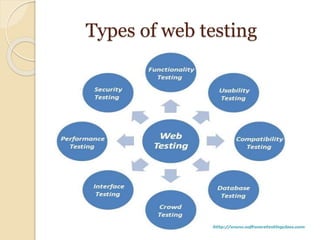
How do you test a web application?
A web application testing is
using of 8-steps of web application.
Functional testing
Usability testing
Interface testing
Data base testing
Compatibility testing
Performance testing
Security testing
Crowd testing
Types of web testing
Functional Testing
Functional testing we need check
the each components are functioning as
expected or not, so it is also called as
“Component Testing”. Functional testing is
to testing the functionality of the software
application under test.
‱ it is to check the basic functionality
mentioned in the functional specification
document.
Usability testing
 Usability testing is playing an important
role of any web application. This testing
is to be carried out by testers like you to
ensure that cover all possible test cases
which targeted audience of the web
application are doing regularly.
Interface testing
 Interface testing mainly three areas should be
covered :- Web Server
Application Serve
Database Server.
 Web Server: Check if all web requests are
accepting and not any requests are denied or
leakages.
 Application Server: Check if request is
sending correctly to the any server & displayed
correctly. Check if errors are catch properly &
displayed to admin user.
 Database Server: Check if database server is
returns correct result on query request.
Data base testing
Data reliability is key part in the
Database testing
Testing activities would include-
 Check if queries are executed without any errors.
 Creating, updating or deleting data in database
should maintain the data integrity.
 Collect data from database & represent on the web
pages correctly.
Compatibility testing
 Compatibility testing is the non-functional
part of testing.
 Customers are uses web application on
different Operating systems compatibility,
Browser compatibility,compatible to
various devices like notebook, mobile, etc.
Performance testing
 Performance testing is to check the web application
is working under the heavy load.
 Performance testing is categorized into two parts:
Web load Testing,
Web stress Testing
 Load testing - It is the simplest form of testing
conducted to understand the behaviour of the
system under a specific load.
 Stress testing - It is performed to find the upper
limit capacity of the system and also to determine
how the system performs if the current load goes
well above the expected maximum.
Security testing
 Security Testing is vital for e-commerce website
that store sensitive customer information like
credit cards.
Testing Activities will be :-
 Test unauthorized access to secure pages
should not be permitted
 Restricted files should not be downloadable
without appropriate access
 Check sessions are automatically killed after
prolonged user inactivity
Crowd testing
 Crowd testing is when a large group of
perfect strangers try your product then give
you phenomenally helpful feedback on
usability, bugs and features.
 Crowd testing is dependent on the quality
of the crowd. Also it depends on a crowd
that is composed out of a large group of
diver’s people.
Advantages & Disadvantages
 Advantages
ïƒș One tool for diagnostics and various testing
cases and tests that need to be completed
ïƒș Quicker and easier to use
ïƒș Simulates realistic scenarios for test cases
ïƒș Compatibility for major
languages/browsers/O.S.
 Disadvantage
ïƒș If language/browser/O.S. not supported, than
must rewrite script, thus tool becoming useless
ïƒș Tool is not open source
ïƒș Must have toolbar installed on machine to access
server and test reports
THANK YOU

Testing of web based Applicatons

  • 1.
    TESTING OF WEBBASED APPLICATIONS Presented by B. VENKATAKUMAR REDDY [60117204] Under the guidance of Proof Dr. G.ANJAN BABU SIR GARU
  • 2.
    Contents  What isweb testing  What is web application testing  What are web based application  How do you test a web application Functional testing Usability testing Interface testing Data base testing Compatibility testing Performance testing Security testing Crowd testing Advantages & Disadvantages
  • 3.
    What is webtesting ? web testing is define by the simple terms is checking your web application for potential bugs. Its mode live or before code is moved into the production environment.
  • 4.
    What is webapplication testing? web application testing is performance tools. Its used to test web application and interface . its used to check load and stress performance of the web site and other web interfaces.
  • 5.
    What are webbased Applications? A web based application is any program that is accessed over a network connection using HTTP, rather than existing with in a device memory. web based applications after run inside a web browser.web based application is also known as web Apps.
  • 6.
    How do youtest a web application? A web application testing is using of 8-steps of web application. Functional testing Usability testing Interface testing Data base testing Compatibility testing Performance testing Security testing Crowd testing
  • 7.
    Types of webtesting
  • 8.
    Functional Testing Functional testingwe need check the each components are functioning as expected or not, so it is also called as “Component Testing”. Functional testing is to testing the functionality of the software application under test. ‱ it is to check the basic functionality mentioned in the functional specification document.
  • 9.
    Usability testing  Usabilitytesting is playing an important role of any web application. This testing is to be carried out by testers like you to ensure that cover all possible test cases which targeted audience of the web application are doing regularly.
  • 10.
    Interface testing  Interfacetesting mainly three areas should be covered :- Web Server Application Serve Database Server.  Web Server: Check if all web requests are accepting and not any requests are denied or leakages.  Application Server: Check if request is sending correctly to the any server & displayed correctly. Check if errors are catch properly & displayed to admin user.  Database Server: Check if database server is returns correct result on query request.
  • 11.
    Data base testing Datareliability is key part in the Database testing Testing activities would include-  Check if queries are executed without any errors.  Creating, updating or deleting data in database should maintain the data integrity.  Collect data from database & represent on the web pages correctly.
  • 12.
    Compatibility testing  Compatibilitytesting is the non-functional part of testing.  Customers are uses web application on different Operating systems compatibility, Browser compatibility,compatible to various devices like notebook, mobile, etc.
  • 13.
    Performance testing  Performancetesting is to check the web application is working under the heavy load.  Performance testing is categorized into two parts: Web load Testing, Web stress Testing  Load testing - It is the simplest form of testing conducted to understand the behaviour of the system under a specific load.  Stress testing - It is performed to find the upper limit capacity of the system and also to determine how the system performs if the current load goes well above the expected maximum.
  • 14.
    Security testing  SecurityTesting is vital for e-commerce website that store sensitive customer information like credit cards. Testing Activities will be :-  Test unauthorized access to secure pages should not be permitted  Restricted files should not be downloadable without appropriate access  Check sessions are automatically killed after prolonged user inactivity
  • 15.
    Crowd testing  Crowdtesting is when a large group of perfect strangers try your product then give you phenomenally helpful feedback on usability, bugs and features.  Crowd testing is dependent on the quality of the crowd. Also it depends on a crowd that is composed out of a large group of diver’s people.
  • 16.
    Advantages & Disadvantages Advantages ïƒș One tool for diagnostics and various testing cases and tests that need to be completed ïƒș Quicker and easier to use ïƒș Simulates realistic scenarios for test cases ïƒș Compatibility for major languages/browsers/O.S.  Disadvantage ïƒș If language/browser/O.S. not supported, than must rewrite script, thus tool becoming useless ïƒș Tool is not open source ïƒș Must have toolbar installed on machine to access server and test reports
  • 17.