Find out just how savvy you are about Internet security and protecting your company’s (and customer’s) data.
Test Your Internet Security IQ
1.	 It’s okay to share passwords with: (Check all that apply.)
¨ Your boss	 ¨ Your spouse
¨ The hotel manager	 ¨ Your coworker
¨ Human Resources	 ¨ None of the above
2.	 Don’t put confidential business information in email,
instant (IM), or text messages; they may not be secure.
a. True	 b. False
3.	 Which of the following is a strong password? (Check
all that apply.)
¨ Password1	 ¨ R3dHairH@rse$ky
¨ Your pet’s name	 ¨ 135791113
¨ The first letters of each word in a saying, phrase, or
other sentence that’s easy for you to remember.
4.	 If you see a pop-up message like this when you’re on
the web, you should:
a. Click OK to decide whether it’s a legitimate offer.
b. Click Cancel.
c. Click the button.
d. Press Ctrl + F4 on your keyboard to close it.
5.	 If you use a public Wi-Fi network (in a café or hotel,
for example) that assigns you a password, it’s okay to
send confidential business data.
a. True	 b. False
6.	 How can you help protect data when you’re on the
road?
a. Lock your laptop and mobile phone with strong passwords
and PINs.
b. Encrypt sensitive data on all smartphones, laptops, flash
drives, and other portable devices.
c. Make sure the public Wi-Fi connection encrypts data.
d. All of the above.
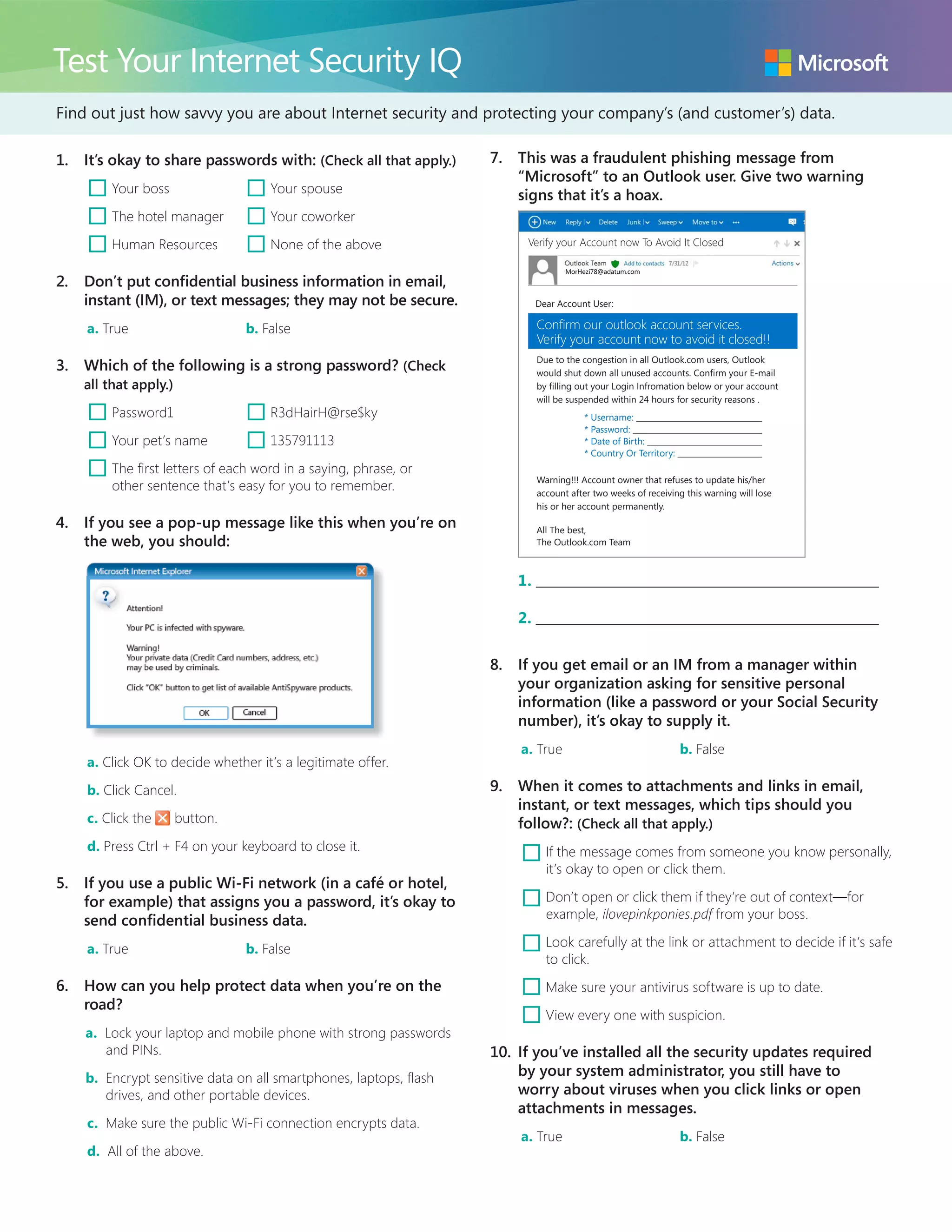
7.	 This was a fraudulent phishing message from
“Microsoft” to an Outlook user. Give two warning
signs that it’s a hoax.
Due to the congestion in all Outlook.com users, Outlook
would shut down all unused accounts. Confirm your E-mail
by filling out your Login Infromation below or your account
will be suspended within 24 hours for security reasons .
* Username:
* Password:
* Date of Birth:
* Country Or Territory:
Warning!!! Account owner that refuses to update his/her
account after two weeks of receiving this warning will lose
his or her account permanently.
All The best,
The Outlook.com Team
Verify your Account now To Avoid It Closed
MorHezi78@adatum.com
Confirm our outlook account services.
Verify your account now to avoid it closed!!
Dear Account User:
1. 	
2. 	
8.	 If you get email or an IM from a manager within
your organization asking for sensitive personal
information (like a password or your Social Security
number), it’s okay to supply it.
a. True	 b. False
9.	 When it comes to attachments and links in email,
instant, or text messages, which tips should you
follow?: (Check all that apply.)
¨ If the message comes from someone you know personally,
it’s okay to open or click them.
¨ Don’t open or click them if they’re out of context—for
example, ilovepinkponies.pdf from your boss.
¨ Look carefully at the link or attachment to decide if it’s safe
to click.
¨ Make sure your antivirus software is up to date.
¨ View every one with suspicion.
10.	 If you’ve installed all the security updates required
by your system administrator, you still have to
worry about viruses when you click links or open
attachments in messages.
a. True	 b. False
Answers
Smarter Online = Safer Online
1.	 None of the above. Treat your passwords with as
much care as the information they protect.
2.	 True. Avoid putting confidential information in email
unless it is encrypted, or in instant or text messages,
which are not reliably secure.
3.	 Correct:
R3dHairH@rse$ky
Uses words (RedHairHorseSky) that do not make
sense grammatically, but mean something to the
person who made up the password. Also, the
password is long and mixes capital and lowercase
letters, numbers, and symbols.
The first letters of each word in a sentence that’s
memorable to you—a line of a favorite poem, a
popular saying, etc. It’s easy for you to remember,
but difficult for others to guess.
Incorrect:
Password1: This is most common business password
and is at the top of criminal lists to test.
Your pet’s name.
135791113: Avoid sequences of numbers.
4.	 (d) Anything you can click in a pop-up message—even
the Windows Close button ( )—can be reprogrammed
to download malicious software.
5.	 False. When you use public wireless connections, it’s
safer to assume that it’s not secure, so don’t enter any
sensitive information or download software.
6.	 (d)
7.	
Due to the congestion in all Outlook.com users, Outlook
would shut down all unused accounts. Confirm your E-mail
by filling out your Login Infromation below or your account
will be suspended within 24 hours for security reasons .
* Username:
* Password:
* Date of Birth:
* Country Or Territory:
Warning!!! Account owner that refuses to update his/her
account after two weeks of receiving this warning will lose
his or her account permanently.
All The best,
The Outlook.com Team
Verify your Account now To Avoid It Closed
MorHezi78@adatum.com
Confirm our outlook account services.
Verify your account now to avoid it closed!!
Dear Account User:
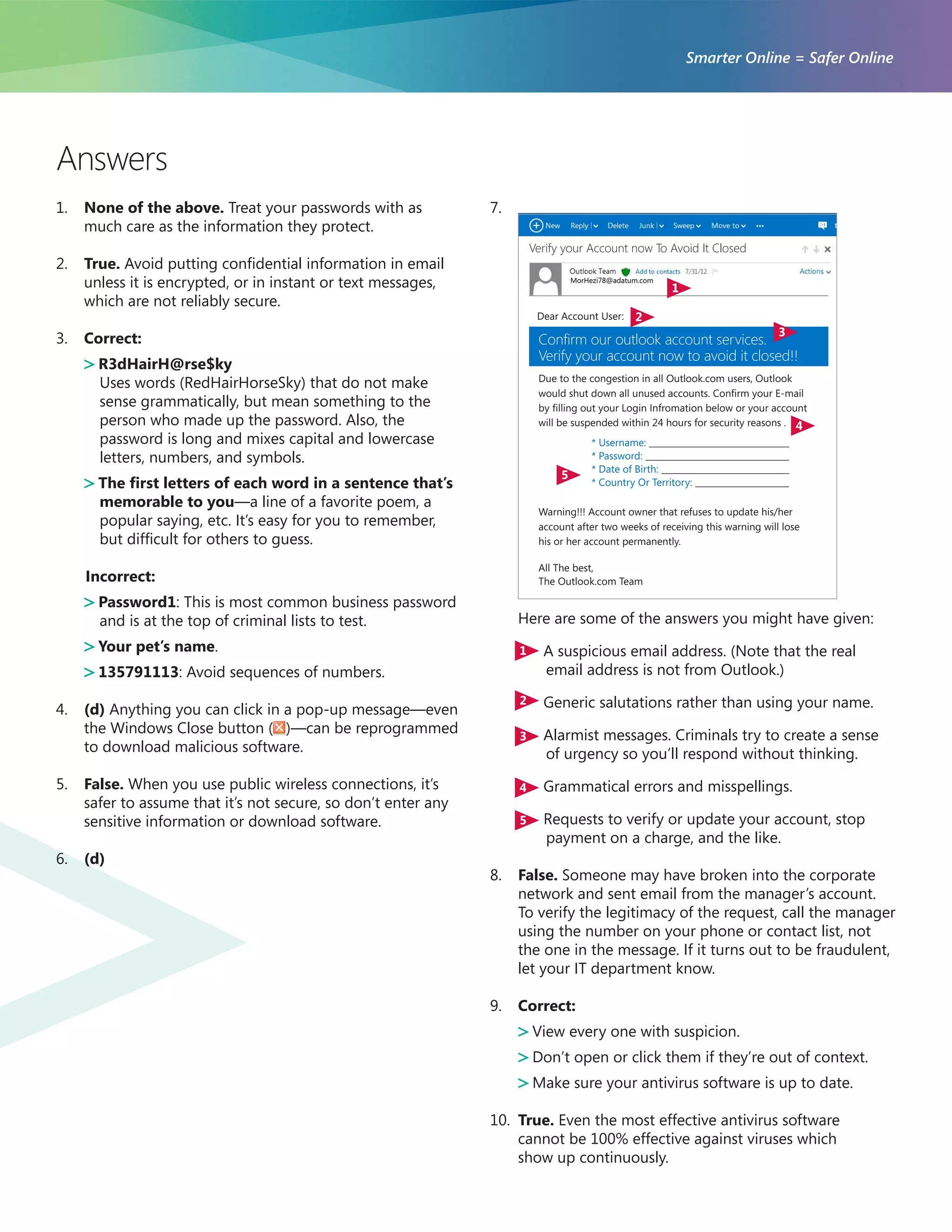
Here are some of the answers you might have given:
1 A suspicious email address. (Note that the real
email address is not from Outlook.)
2 Generic salutations rather than using your name.
3 Alarmist messages. Criminals try to create a sense
of urgency so you’ll respond without thinking.
4 Grammatical errors and misspellings.
5 Requests to verify or update your account, stop
payment on a charge, and the like.
8.	 False. Someone may have broken into the corporate
network and sent email from the manager’s account.
To verify the legitimacy of the request, call the manager
using the number on your phone or contact list, not
the one in the message. If it turns out to be fraudulent,
let your IT department know.
9.	 Correct:
View every one with suspicion.
Don’t open or click them if they’re out of context.
Make sure your antivirus software is up to date.
10.	 True. Even the most effective antivirus software
cannot be 100% effective against viruses which
show up continuously.
1
2
3
4
5

Test Your Internet Security IQ Quiz

  • 1.
    Find out justhow savvy you are about Internet security and protecting your company’s (and customer’s) data. Test Your Internet Security IQ 1. It’s okay to share passwords with: (Check all that apply.) ¨ Your boss ¨ Your spouse ¨ The hotel manager ¨ Your coworker ¨ Human Resources ¨ None of the above 2. Don’t put confidential business information in email, instant (IM), or text messages; they may not be secure. a. True b. False 3. Which of the following is a strong password? (Check all that apply.) ¨ Password1 ¨ R3dHairH@rse$ky ¨ Your pet’s name ¨ 135791113 ¨ The first letters of each word in a saying, phrase, or other sentence that’s easy for you to remember. 4. If you see a pop-up message like this when you’re on the web, you should: a. Click OK to decide whether it’s a legitimate offer. b. Click Cancel. c. Click the button. d. Press Ctrl + F4 on your keyboard to close it. 5. If you use a public Wi-Fi network (in a café or hotel, for example) that assigns you a password, it’s okay to send confidential business data. a. True b. False 6. How can you help protect data when you’re on the road? a. Lock your laptop and mobile phone with strong passwords and PINs. b. Encrypt sensitive data on all smartphones, laptops, flash drives, and other portable devices. c. Make sure the public Wi-Fi connection encrypts data. d. All of the above. 7. This was a fraudulent phishing message from “Microsoft” to an Outlook user. Give two warning signs that it’s a hoax. Due to the congestion in all Outlook.com users, Outlook would shut down all unused accounts. Confirm your E-mail by filling out your Login Infromation below or your account will be suspended within 24 hours for security reasons . * Username: * Password: * Date of Birth: * Country Or Territory: Warning!!! Account owner that refuses to update his/her account after two weeks of receiving this warning will lose his or her account permanently. All The best, The Outlook.com Team Verify your Account now To Avoid It Closed MorHezi78@adatum.com Confirm our outlook account services. Verify your account now to avoid it closed!! Dear Account User: 1. 2. 8. If you get email or an IM from a manager within your organization asking for sensitive personal information (like a password or your Social Security number), it’s okay to supply it. a. True b. False 9. When it comes to attachments and links in email, instant, or text messages, which tips should you follow?: (Check all that apply.) ¨ If the message comes from someone you know personally, it’s okay to open or click them. ¨ Don’t open or click them if they’re out of context—for example, ilovepinkponies.pdf from your boss. ¨ Look carefully at the link or attachment to decide if it’s safe to click. ¨ Make sure your antivirus software is up to date. ¨ View every one with suspicion. 10. If you’ve installed all the security updates required by your system administrator, you still have to worry about viruses when you click links or open attachments in messages. a. True b. False
  • 2.
    Answers Smarter Online =Safer Online 1. None of the above. Treat your passwords with as much care as the information they protect. 2. True. Avoid putting confidential information in email unless it is encrypted, or in instant or text messages, which are not reliably secure. 3. Correct: R3dHairH@rse$ky Uses words (RedHairHorseSky) that do not make sense grammatically, but mean something to the person who made up the password. Also, the password is long and mixes capital and lowercase letters, numbers, and symbols. The first letters of each word in a sentence that’s memorable to you—a line of a favorite poem, a popular saying, etc. It’s easy for you to remember, but difficult for others to guess. Incorrect: Password1: This is most common business password and is at the top of criminal lists to test. Your pet’s name. 135791113: Avoid sequences of numbers. 4. (d) Anything you can click in a pop-up message—even the Windows Close button ( )—can be reprogrammed to download malicious software. 5. False. When you use public wireless connections, it’s safer to assume that it’s not secure, so don’t enter any sensitive information or download software. 6. (d) 7. Due to the congestion in all Outlook.com users, Outlook would shut down all unused accounts. Confirm your E-mail by filling out your Login Infromation below or your account will be suspended within 24 hours for security reasons . * Username: * Password: * Date of Birth: * Country Or Territory: Warning!!! Account owner that refuses to update his/her account after two weeks of receiving this warning will lose his or her account permanently. All The best, The Outlook.com Team Verify your Account now To Avoid It Closed MorHezi78@adatum.com Confirm our outlook account services. Verify your account now to avoid it closed!! Dear Account User: Here are some of the answers you might have given: 1 A suspicious email address. (Note that the real email address is not from Outlook.) 2 Generic salutations rather than using your name. 3 Alarmist messages. Criminals try to create a sense of urgency so you’ll respond without thinking. 4 Grammatical errors and misspellings. 5 Requests to verify or update your account, stop payment on a charge, and the like. 8. False. Someone may have broken into the corporate network and sent email from the manager’s account. To verify the legitimacy of the request, call the manager using the number on your phone or contact list, not the one in the message. If it turns out to be fraudulent, let your IT department know. 9. Correct: View every one with suspicion. Don’t open or click them if they’re out of context. Make sure your antivirus software is up to date. 10. True. Even the most effective antivirus software cannot be 100% effective against viruses which show up continuously. 1 2 3 4 5