Sharing Computing Solution
Agenda
 Part I-Introduction to Shared computing
 Part II- How Vcloudpoint is better than other Shared computing solution
 Part III-About Products
 Part IV – Customer Base
Part I
SHARED COMPUTING AND ITS BENEFITS
INTRODUCTION
4
INTRODUCTION
A brief introduction and overview
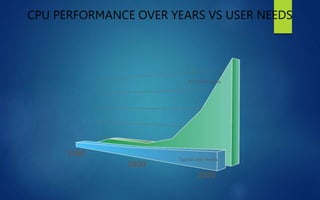
CPU PERFORMANCE OVER YEARS VS USER NEEDS
PC Performance
Typical User Needs
2020
2000
1980
H
I
G
H
P
E
R
F
O
R
M
A
N
C
E
6
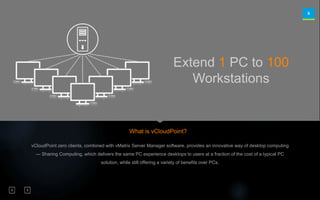
Extend 1 PC to 100
Workstations
vCloudPoint zero clients, combined with vMatrix Server Manager software, provides an innovative way of desktop computing
— Sharing Computing, which delivers the same PC experience desktops to users at a fraction of the cost of a typical PC
solution, while still offering a variety of benefits over PCs.
What is vCloudPoint?
7
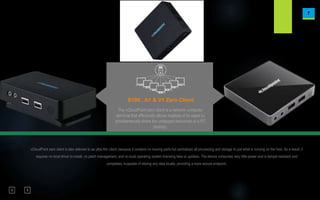
S100 , A1 & V1 Zero Client
The vCloudPoint zero client is a network computer
terminal that effectively allows multiple of its users to
simultaneously share the untapped resources of a PC
desktop.
vCloudPoint zero client is also referred to as ultra thin client, because it contains no moving parts but centralizes all processing and storage to just what is running on the host. As a result, it
requires no local driver to install, no patch management, and no local operating system licensing fees or updates. The device consumes very little power and is tamper-resistant and
completely incapable of storing any data locally, providing a more secure endpoint.
8
vCloudPoint Management Software
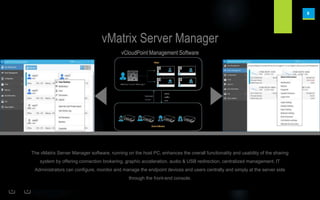
vMatrix Server Manager
The vMatrix Server Manager software, running on the host PC, enhances the overall functionality and usability of the sharing
system by offering connection brokering, graphic acceleration, audio & USB redirection, centralized management. IT
Administrators can configure, monitor and manage the endpoint devices and users centrally and simply at the server side
through the front-end console.
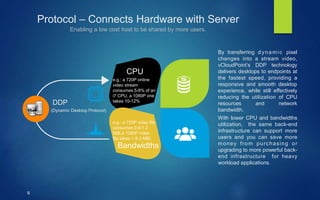
Protocol – Connects Hardware with Server
Enabling a low cost host to be shared by more users.
9
Bandwidths
CPU
DDP
By transferring dynamic pixel
changes into a stream video,
vCloudPoint’s DDP technology
delivers desktops to endpoints at
the fastest speed, providing a
responsive and smooth desktop
experience, while still effectively
reducing the utilization of CPU
resources and network
bandwidth.
With lower CPU and bandwidths
utilization, the same back-end
infrastructure can support more
users and you can save more
money from purchasing or
upgrading to more powerful back-
end infrastructure for heavy
workload applications.
(Dynamic Desktop Protocol)
e.g.: a 720P online
video stream
consumes 5-8% of an
i7 CPU, a 1080P one
takes 10-12%
e.g.: a 720P video file
consumes 0.6-1.2
MiB,a 1080P video
file takes 1.5-3 MiB.
10
BENEFITS
Core benefits compared to the use of traditional PCs.
11
Reduced Costs
70%
Savings in Capitial Cost
95%
Savings in Power Consumption
95%
Savings in Maintenance Cost
90%
Savings in Future Up-gradation
Reduce initial and ongoing IT costs
Part II
VCLOUDPOINT
HOW IT IS BETTER THAN OTHER SOLUTIONS?
Technologies
The new generation solution
and technologies from
vCloudPoint
Dynamic Desktop Protocol (DDP)
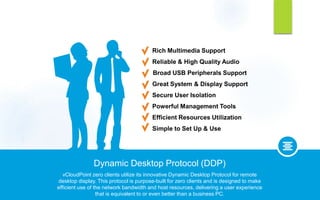
vCloudPoint zero clients utilize its innovative Dynamic Desktop Protocol for remote
desktop display. This protocol is purpose-built for zero clients and is designed to make
efficient use of the network bandwidth and host resources, delivering a user experience
that is equivalent to or even better than a business PC.
Great System & Display Support
Broad USB Peripherals Support
Reliable & High Quality Audio
Rich Multimedia Support
Simple to Set Up & Use
Efficient Resources Utilization
Powerful Management Tools
Secure User Isolation
15
Invisible Space Public Space Private Space
System Storage Configuration
Administrator User
Users
Protecting your privacy & confidential data.
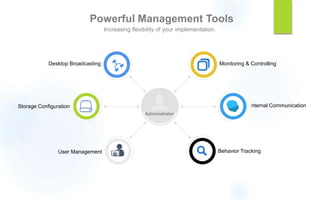
Powerful Management Tools
Increasing flexibility of your implementation.
16
Administrator
User Management
Internal Communication
Behavior Tracking
Storage Configuration
Desktop Broadcasting Monitoring & Controlling
Simple to Set Up & Use
17
vMatrix Installation
User Creation
Management
Setting up the system is just a few minutes
with vMatrix installation and user creation,
then users can login to their desktops with
vCloudPoint zero clients and the administrator
can management the system remotely at the
host side. To setup and use the system is
simple & intuitive. No additional configuration
is needed, no technical training is required.
vMatrix
Server
Manager
vCloudPoint
Zero Clients
Getting your desktops up and running in minutes.
18
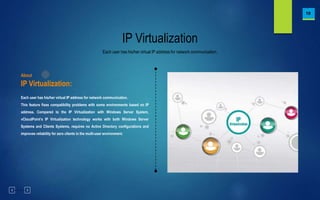
IP Virtualization
Each user has his/her virtual IP address for network communication.
This feature fixes compatibility problems with some environments based on IP
address. Compared to the IP Virtualization with Windows Server System,
vCloudPoint’s IP Virtualization technology works with both Windows Server
Systems and Clients Systems, requires no Active Directory configurations and
improves reliability for zero clients in the multi-user environment.
About
IP Virtualization:
WEB CAMERA SUPPORT
Part III
ABOUT PRODUCTS
Products
A close look at the
vCloudPoint products & its
features.
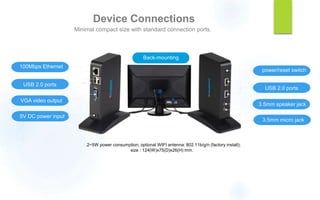
Device Connections
Minimal compact size with standard connection ports.
22
0.2~5W power consumption; optional WIFI antenna: 802.11b/g/n (factory install);
size : 124(W)x75(D)x26(H) mm.
3.5mm micro jack
power/reset switch
USB 2.0 ports
3.5mm speaker jack
5V DC power input
100Mbps Ethernet
USB 2.0 ports
VGA video output
Back-mounting
23
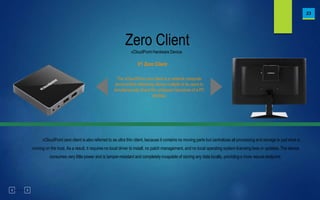
vCloudPoint Hardware Device
Zero Client
V1 Zero Client
The vCloudPoint zero client is a network computer
terminal that effectively allows multiple of its users to
simultaneously share the untapped resources of a PC
desktop.
vCloudPoint zero client is also referred to as ultra thin client, because it contains no moving parts but centralizes all processing and storage to just what is
running on the host. As a result, it requires no local driver to install, no patch management, and no local operating system licensing fees or updates. The device
consumes very little power and is tamper-resistant and completely incapable of storing any data locally, providing a more secure endpoint.
24
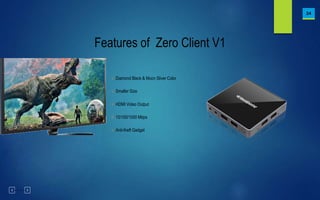
Features of Zero Client V1
√ Diamond Black & Moon Sliver Color
√ Smaller Size
√ HDMI Video Output
√ 10/100/1000 Mbps
√ Anti-theft Gadget
25
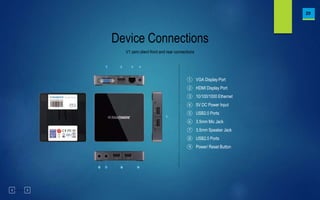
V1 zero client front and rear connections
Device Connections
① VGA Display Port
② HDMI Display Port
③ 10/100/1000 Ethernet
④ 5V DC Power Input
⑤ USB2.0 Ports
⑥ 3.5mm Mic Jack
⑦ 3.5mm Speaker Jack
⑧ USB2.0 Ports
⑨ Power/ Reset Button
26
A1 zero client front and rear connections
Device Connections
① HDMI Display Port
② 10/100 Ethernet
③ 5V DC Power Input
④ USB2.0 Ports
⑤ 3.5mm Mic Jack
⑥ 3.5mm Speaker Jack
⑦ USB2.0 Ports
⑧ Power/ Reset Button
Part IV
CUSTOMER BASE IN INDIA
28
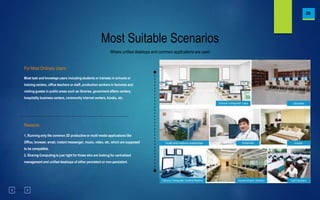
Where unified desktops and common applications are used
Most Suitable Scenarios
Most task and knowlege users including students or trainees in schools or
training centers, office teachers or staff, production workers in factories and
visiting guests in public areas such as libraries, govenment affairs centers,
hospitality business centers, community internet centers, kiosks, etc.
For Most Ordinary Users:
1, Running only the common 2D productive or multi media applications like
Office, browser, email, instant messenger, music, video, etc, which are supposed
to be compatible.
2, Sharing Computing is just right for those who are looking for centralized
management and unified desktops of either persistent or non-persistent.
Reasons:
29
Various Global Product Certificates(1)
FCC, CE, RoHs, CCC, ISO 9001:2015, ISO 14001:2015 ...
30
Various Global Product Certificates(2)
FCC, CE, RoHs, CCC, ISO 9001:2015, ISO 14001:2015 ...
FINALLY IMPORTANT DETAILS RELATED TO VCLOUDPOINT INDIA TEAM
 VCLOUDPOINT H.O FOR INDIA LOCATED AT CHENNAI.
 NATIONAL DISTRIBUTOR HAVING OFFICES AT 11 LOCATIONS
COVERING PAN INDIA, H.O AT CHENNAI
 VCLOUDPOINT SUPPORT AND REPLACEMENT TEAM LOCTAED AT H.O
 WE HAVE 10 REGIONAL DISTRIBUTER COVERING PAN INDIA WITH
MORE THAN 200 ++ CERTIFIED PARTNERS COVERING PAN INDIA
BUSINESS

TechG vCloudPoint V1 Zero Client 2024 PPT

  • 1.
  • 2.
    Agenda  Part I-Introductionto Shared computing  Part II- How Vcloudpoint is better than other Shared computing solution  Part III-About Products  Part IV – Customer Base
  • 3.
    Part I SHARED COMPUTINGAND ITS BENEFITS INTRODUCTION
  • 4.
  • 5.
    CPU PERFORMANCE OVERYEARS VS USER NEEDS PC Performance Typical User Needs 2020 2000 1980 H I G H P E R F O R M A N C E
  • 6.
    6 Extend 1 PCto 100 Workstations vCloudPoint zero clients, combined with vMatrix Server Manager software, provides an innovative way of desktop computing — Sharing Computing, which delivers the same PC experience desktops to users at a fraction of the cost of a typical PC solution, while still offering a variety of benefits over PCs. What is vCloudPoint?
  • 7.
    7 S100 , A1& V1 Zero Client The vCloudPoint zero client is a network computer terminal that effectively allows multiple of its users to simultaneously share the untapped resources of a PC desktop. vCloudPoint zero client is also referred to as ultra thin client, because it contains no moving parts but centralizes all processing and storage to just what is running on the host. As a result, it requires no local driver to install, no patch management, and no local operating system licensing fees or updates. The device consumes very little power and is tamper-resistant and completely incapable of storing any data locally, providing a more secure endpoint.
  • 8.
    8 vCloudPoint Management Software vMatrixServer Manager The vMatrix Server Manager software, running on the host PC, enhances the overall functionality and usability of the sharing system by offering connection brokering, graphic acceleration, audio & USB redirection, centralized management. IT Administrators can configure, monitor and manage the endpoint devices and users centrally and simply at the server side through the front-end console.
  • 9.
    Protocol – ConnectsHardware with Server Enabling a low cost host to be shared by more users. 9 Bandwidths CPU DDP By transferring dynamic pixel changes into a stream video, vCloudPoint’s DDP technology delivers desktops to endpoints at the fastest speed, providing a responsive and smooth desktop experience, while still effectively reducing the utilization of CPU resources and network bandwidth. With lower CPU and bandwidths utilization, the same back-end infrastructure can support more users and you can save more money from purchasing or upgrading to more powerful back- end infrastructure for heavy workload applications. (Dynamic Desktop Protocol) e.g.: a 720P online video stream consumes 5-8% of an i7 CPU, a 1080P one takes 10-12% e.g.: a 720P video file consumes 0.6-1.2 MiB,a 1080P video file takes 1.5-3 MiB.
  • 10.
    10 BENEFITS Core benefits comparedto the use of traditional PCs.
  • 11.
    11 Reduced Costs 70% Savings inCapitial Cost 95% Savings in Power Consumption 95% Savings in Maintenance Cost 90% Savings in Future Up-gradation Reduce initial and ongoing IT costs
  • 12.
    Part II VCLOUDPOINT HOW ITIS BETTER THAN OTHER SOLUTIONS?
  • 13.
    Technologies The new generationsolution and technologies from vCloudPoint
  • 14.
    Dynamic Desktop Protocol(DDP) vCloudPoint zero clients utilize its innovative Dynamic Desktop Protocol for remote desktop display. This protocol is purpose-built for zero clients and is designed to make efficient use of the network bandwidth and host resources, delivering a user experience that is equivalent to or even better than a business PC. Great System & Display Support Broad USB Peripherals Support Reliable & High Quality Audio Rich Multimedia Support Simple to Set Up & Use Efficient Resources Utilization Powerful Management Tools Secure User Isolation
  • 15.
    Secure User Isolation 15 InvisibleSpace Public Space Private Space System Storage Configuration Administrator User Users Protecting your privacy & confidential data.
  • 16.
    Powerful Management Tools Increasingflexibility of your implementation. 16 Administrator User Management Internal Communication Behavior Tracking Storage Configuration Desktop Broadcasting Monitoring & Controlling
  • 17.
    Simple to SetUp & Use 17 vMatrix Installation User Creation Management Setting up the system is just a few minutes with vMatrix installation and user creation, then users can login to their desktops with vCloudPoint zero clients and the administrator can management the system remotely at the host side. To setup and use the system is simple & intuitive. No additional configuration is needed, no technical training is required. vMatrix Server Manager vCloudPoint Zero Clients Getting your desktops up and running in minutes.
  • 18.
    18 IP Virtualization Each userhas his/her virtual IP address for network communication. Each user has his/her virtual IP address for network communication. This feature fixes compatibility problems with some environments based on IP address. Compared to the IP Virtualization with Windows Server System, vCloudPoint’s IP Virtualization technology works with both Windows Server Systems and Clients Systems, requires no Active Directory configurations and improves reliability for zero clients in the multi-user environment. About IP Virtualization:
  • 19.
  • 20.
  • 21.
    Products A close lookat the vCloudPoint products & its features.
  • 22.
    Device Connections Minimal compactsize with standard connection ports. 22 0.2~5W power consumption; optional WIFI antenna: 802.11b/g/n (factory install); size : 124(W)x75(D)x26(H) mm. 3.5mm micro jack power/reset switch USB 2.0 ports 3.5mm speaker jack 5V DC power input 100Mbps Ethernet USB 2.0 ports VGA video output Back-mounting
  • 23.
    23 vCloudPoint Hardware Device ZeroClient V1 Zero Client The vCloudPoint zero client is a network computer terminal that effectively allows multiple of its users to simultaneously share the untapped resources of a PC desktop. vCloudPoint zero client is also referred to as ultra thin client, because it contains no moving parts but centralizes all processing and storage to just what is running on the host. As a result, it requires no local driver to install, no patch management, and no local operating system licensing fees or updates. The device consumes very little power and is tamper-resistant and completely incapable of storing any data locally, providing a more secure endpoint.
  • 24.
    24 Features of ZeroClient V1 √ Diamond Black & Moon Sliver Color √ Smaller Size √ HDMI Video Output √ 10/100/1000 Mbps √ Anti-theft Gadget
  • 25.
    25 V1 zero clientfront and rear connections Device Connections ① VGA Display Port ② HDMI Display Port ③ 10/100/1000 Ethernet ④ 5V DC Power Input ⑤ USB2.0 Ports ⑥ 3.5mm Mic Jack ⑦ 3.5mm Speaker Jack ⑧ USB2.0 Ports ⑨ Power/ Reset Button
  • 26.
    26 A1 zero clientfront and rear connections Device Connections ① HDMI Display Port ② 10/100 Ethernet ③ 5V DC Power Input ④ USB2.0 Ports ⑤ 3.5mm Mic Jack ⑥ 3.5mm Speaker Jack ⑦ USB2.0 Ports ⑧ Power/ Reset Button
  • 27.
  • 28.
    28 Where unified desktopsand common applications are used Most Suitable Scenarios Most task and knowlege users including students or trainees in schools or training centers, office teachers or staff, production workers in factories and visiting guests in public areas such as libraries, govenment affairs centers, hospitality business centers, community internet centers, kiosks, etc. For Most Ordinary Users: 1, Running only the common 2D productive or multi media applications like Office, browser, email, instant messenger, music, video, etc, which are supposed to be compatible. 2, Sharing Computing is just right for those who are looking for centralized management and unified desktops of either persistent or non-persistent. Reasons:
  • 29.
    29 Various Global ProductCertificates(1) FCC, CE, RoHs, CCC, ISO 9001:2015, ISO 14001:2015 ...
  • 30.
    30 Various Global ProductCertificates(2) FCC, CE, RoHs, CCC, ISO 9001:2015, ISO 14001:2015 ...
  • 31.
    FINALLY IMPORTANT DETAILSRELATED TO VCLOUDPOINT INDIA TEAM  VCLOUDPOINT H.O FOR INDIA LOCATED AT CHENNAI.  NATIONAL DISTRIBUTOR HAVING OFFICES AT 11 LOCATIONS COVERING PAN INDIA, H.O AT CHENNAI  VCLOUDPOINT SUPPORT AND REPLACEMENT TEAM LOCTAED AT H.O  WE HAVE 10 REGIONAL DISTRIBUTER COVERING PAN INDIA WITH MORE THAN 200 ++ CERTIFIED PARTNERS COVERING PAN INDIA BUSINESS

Editor's Notes

  • #10 The vCloudPont DDP is much more effective and efficient at streaming that RDP or other technologies. It uses an optimized video pipeline implementations to achieve high performance and includes an additional optimization that can reduce host CPU and network bandwidths overhead. With each 720p online video takes 5-8% of an i7 CPU and 0.6-1.2 Mbps, a vCloudPoint workstation consumes 1/2, even 1/3 resources when compared to other solutions.
  • #15 The vCloudPoint Sharing solution comes from a combination of insight, innovation, and deep knowledge of computing technologies that no other solution can match.
  • #16 The vMatrix Server Manager overcomes the privacy weakness of traditional sharing solution by putting each user session into a self-container. Each vCloudPoint user has his/her private work-space on a disk partition which cannot be accessed by other users while the rest disk partitions still can be configured visible or invisible to the users. This brings high security to every user with a self-own work-space as well as increased efficiency with a shared center.
  • #17 The vMatrix Server Manager Center provides the IT administrators a user-friendly interface with increased manageability. Besides the general user and desktop management, IT administrators can broadcast his desktop to the endpoint users, communicate with them through the internal Chatting Tool, provide support through monitoring and control over the endpoint desktop, and go down in detail to configure each vCloudPoint zero client user, such as USB, audio, resolution, video, password, etc.
  • #18 We put a lot of effort to make sure that working with the vCloudPoint zero clients will be a great fun for you, as it is for us. You will love the way how easily things can be done, just in few clicks. We tried to do everything as much intuitive as it only can be. Easy software installation, zero configuration and plug-and-play devices – all to make your work easier. There is only the server suite software to run on the host computer for setting up the system The whole installation process is just a few next-and-finish steps plus user creation. Whether it is a 100 or 1000 seats deployment, it can be completed in just a few minutes. The vCloudPoint zero client provides a hands-on working experience to users. Its login interface allows discovery and inventory of in-LAN hosts, and automatic login. Only a click-on, they are ready to work.
  • #23 The S100 zero client supports a number of peripherals including: Two dedicated USB mouse and keyboard ports Stereo speaker or headphone and microphone ports A 100 Mbps Ethernet port A VGA port supporting monitor resolutions as high as 1920x1080 Two USB 2.0 ports for attaching USB peripherals HDMI (DVI compatible) video output will be available in the coming release And with a convenient back mounting option. By attaching the mounting plate with the provided screws, users may secure the S100 device to the back of the display making a clean, zero-footprint installation.