6. WHAT HAVE YOU
LEARNT ABOUT
TECHNOLOGIES FROM
THE PROCESS OF
CONSTRUCTING THIS
PRODUCT?
Kane Bossendorfer
Introduction
Technology played a massive part in the pre-
production, production and post production of
my film opening. Without technology, I would
not be able to complete the task. In this
presentation I will go through each piece of
technology I used and how it helped me. I will
also say what I had learned from using that
piece of technology.
Pre-Production
Research - YouTube
 I did most of my research using YouTube, as it
gives me the chance to view other AS Media
film openings and see what is good about
them. I also used it to gain knowledge on
camera shots, angles and various conventions
to include in my opening. As anyone can
upload to YouTube, I looked at many AS
opening and even some Hollywood openings
to see what I could implement into my work.
Blogging - Blogger
 Throughout the production of my film opening I
used blogger to talk about what I was doing
and how progress was going with the
production of my opening. It is owned by
Google and is free to use. It allows the user to
blog and create free posts to share and show
anyone. It has enabled me to organise my
work well, and have all of my posts in 1 place
without a messy, disorganised page.
Research - Google
 Some of my research was done with Google,
the most popular search engine on the
internet. I searched for many different things to
help me with my opening. These include what
camera shots and angles are most prominent
in my genre of opening and sound effects for
my final product. I learned from this website
that research is very easy to do and is a vital
part of production.
Production
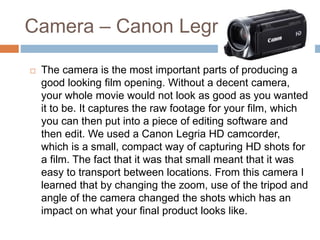
Camera – Canon Legria
 The camera is the most important parts of producing a
good looking film opening. Without a decent camera,
your whole movie would not look as good as you wanted
it to be. It captures the raw footage for your film, which
you can then put into a piece of editing software and
then edit. We used a Canon Legria HD camcorder,
which is a small, compact way of capturing HD shots for
a film. The fact that it was that small meant that it was
easy to transport between locations. From this camera I
learned that by changing the zoom, use of the tripod and
angle of the camera changed the shots which has an
impact on what your final product looks like.
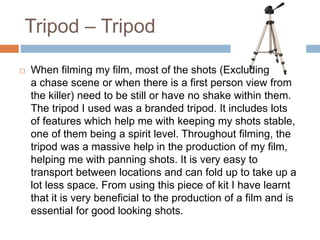
Tripod – Tripod
 When filming my film, most of the shots (Excluding
a chase scene or when there is a first person view from
the killer) need to be still or have no shake within them.
The tripod I used was a branded tripod. It includes lots
of features which help me with keeping my shots stable,
one of them being a spirit level. Throughout filming, the
tripod was a massive help in the production of my film,
helping me with panning shots. It is very easy to
transport between locations and can fold up to take up a
lot less space. From using this piece of kit I have learnt
that it is very beneficial to the production of a film and is
essential for good looking shots.
Post-Production
Editing – iMovie for Mac
 I used iMovie for mac to do the main editing for my film.
The program comes free with any Apple Mac that you
buy and is fairly easy to use. The process for editing my
media product mainly consisted of adding clips to a
timeline, cutting them down and then adding in effects,
sound clips and music where I saw fit. Although, there
were some problems when using it. I found that the
layout of the buttons was not very clear, and also there
was no way of hovering over the button and telling what
it does. On the plus side, importing clips from my
camera was easy and adding music and sound effects
was relatively easy. From using this product I learned
that getting to grips with your editing software is vital to
knowing how to create the perfect film opening.

Tech

  • 1.
    6. WHAT HAVEYOU LEARNT ABOUT TECHNOLOGIES FROM THE PROCESS OF CONSTRUCTING THIS PRODUCT? Kane Bossendorfer
  • 2.
    Introduction Technology played amassive part in the pre- production, production and post production of my film opening. Without technology, I would not be able to complete the task. In this presentation I will go through each piece of technology I used and how it helped me. I will also say what I had learned from using that piece of technology.
  • 3.
  • 4.
    Research - YouTube I did most of my research using YouTube, as it gives me the chance to view other AS Media film openings and see what is good about them. I also used it to gain knowledge on camera shots, angles and various conventions to include in my opening. As anyone can upload to YouTube, I looked at many AS opening and even some Hollywood openings to see what I could implement into my work.
  • 5.
    Blogging - Blogger Throughout the production of my film opening I used blogger to talk about what I was doing and how progress was going with the production of my opening. It is owned by Google and is free to use. It allows the user to blog and create free posts to share and show anyone. It has enabled me to organise my work well, and have all of my posts in 1 place without a messy, disorganised page.
  • 6.
    Research - Google Some of my research was done with Google, the most popular search engine on the internet. I searched for many different things to help me with my opening. These include what camera shots and angles are most prominent in my genre of opening and sound effects for my final product. I learned from this website that research is very easy to do and is a vital part of production.
  • 7.
  • 8.
    Camera – CanonLegria  The camera is the most important parts of producing a good looking film opening. Without a decent camera, your whole movie would not look as good as you wanted it to be. It captures the raw footage for your film, which you can then put into a piece of editing software and then edit. We used a Canon Legria HD camcorder, which is a small, compact way of capturing HD shots for a film. The fact that it was that small meant that it was easy to transport between locations. From this camera I learned that by changing the zoom, use of the tripod and angle of the camera changed the shots which has an impact on what your final product looks like.
  • 9.
    Tripod – Tripod When filming my film, most of the shots (Excluding a chase scene or when there is a first person view from the killer) need to be still or have no shake within them. The tripod I used was a branded tripod. It includes lots of features which help me with keeping my shots stable, one of them being a spirit level. Throughout filming, the tripod was a massive help in the production of my film, helping me with panning shots. It is very easy to transport between locations and can fold up to take up a lot less space. From using this piece of kit I have learnt that it is very beneficial to the production of a film and is essential for good looking shots.
  • 10.
  • 11.
    Editing – iMoviefor Mac  I used iMovie for mac to do the main editing for my film. The program comes free with any Apple Mac that you buy and is fairly easy to use. The process for editing my media product mainly consisted of adding clips to a timeline, cutting them down and then adding in effects, sound clips and music where I saw fit. Although, there were some problems when using it. I found that the layout of the buttons was not very clear, and also there was no way of hovering over the button and telling what it does. On the plus side, importing clips from my camera was easy and adding music and sound effects was relatively easy. From using this product I learned that getting to grips with your editing software is vital to knowing how to create the perfect film opening.