Prof. Martin Christen
FHNW – University of Applied Sciences and Arts Northwestern Switzerland
School of Architecture, Civil Engineering and Geomatics
Institute Geomatics
martin.christen@fhnw.ch
Teaching with JupyterHub - lessons
learned
MartinChristen
GitHub: MartinChristen
GitLab: martin.christen
31 August 2018Institute Geomatics 2
https://github.com/martinchristen/EuroSciPy-2018-JupyterHub
https://github.com/jupyterhub
31 August 2018Institute Geomatics 3
What am I teaching ? (Python related courses only)
Bachelor Programme
Introduction to Python (1st Semester)
Programming I (2nd Semester)
Programming II (3rd Semester)
Open (Geo-)Data Seminar (5th Semester)
Masters Programme
Geoprocessing (14 Lessons)
31 August 2018Institute Geomatics 4
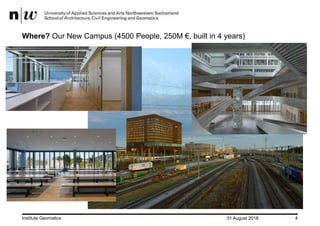
Where? Our New Campus (4500 People, 250M €, built in 4 years)
31 August 2018Institute Geomatics 5
What am I teaching ? (Python related courses only)
Bachelor Programme
Introduction to Python (1st Semester)
Programming I (2nd Semester)
Programming II (3rd Semester)
Open (Geo-)Data Seminar (5th Semester)
Masters Programme
Geoprocessing (14 Lessons)
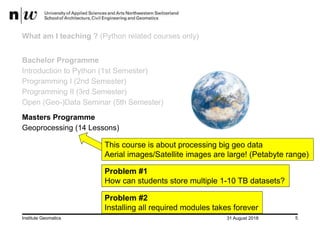
This course is about processing big geo data
Aerial images/Satellite images are large! (Petabyte range)
Problem #1
How can students store multiple 1-10 TB datasets?
Problem #2
Installing all required modules takes forever
31 August 2018Institute Geomatics 6
About JupyterHub
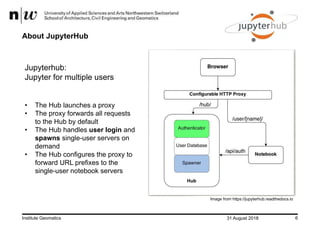
Jupyterhub:
Jupyter for multiple users
• The Hub launches a proxy
• The proxy forwards all requests
to the Hub by default
• The Hub handles user login and
spawns single-user servers on
demand
• The Hub configures the proxy to
forward URL prefixes to the
single-user notebook servers
Image from https://jupyterhub.readthedocs.io
31 August 2018Institute Geomatics 7
Authenticators – User Login
• Local User
• OAuthenticator: GitHub/BitBucket/MediaWiki/CILogon/Google OAuth/…
• Dummy Authenticator (For testing only! Not for production use.)
• LDAP Authenticator
• Kerberos Authenticator
• REMOTE_USER Authenticator (For when intermediate login infrastructure such as
Apache offloads authentication and forwards REMOTE_USER header.)
• JSONWebToken Authenticator (For Authenticating/Authorising users based on a
JSONWebToken forwarded in an Authorization: bearer <token> header.)
• HashAuthenticator (Each user comes with a predefined password which is a hash of
their username. A separate authenticator may be used for admins.)
• CASAuthenticator for CAS Single Sign-on SSO
31 August 2018Institute Geomatics 8
Spawners
• BatchSpawner for spawning remote servers using batch systems (Torque, PBS, Slurm, etc)
• DockerSpawner, which actually has two different spawners in it:
• dockerspawner.DockerSpawner, for spawning identical Docker containers for each user
• dockerspawner.SystemUserSpawner, for spawning Docker containers with an environment and home
directory for each user
• ImageSpawner for allowing users to choose which Docker image to spawn.
• KubeSpawner for use with Kubernetes.
• MarathonSpawner for spawning instances on Marathon.
• UCRSpawner for spawning GPU instances on Marathon.
• RemoteSpawner
• SimpleSpawner, for testing purposes.
• SystemdSpawner, spawns notebooks with the isolation / security benefits of containers without the complexity
of image management.
• SudoSpawner uses sudo. SystemdSpawner is recommended instead of SudoSpawner, if it is available to you.
• WrapSpawner allows spawner class and options to be chosen at runtime. Includes ProfilesSpawner for doing
this from a spawner options form. Formerly part of BatchSpawner.
31 August 2018Institute Geomatics 9
Installation
Installation is easy if you read the docs:
https://jupyterhub.readthedocs.io/en/stable/installation-guide.html
• You need Linux
• You can use Docker
• You can install Jupyterhub without Docker
Cluster? GPU?
https://zero-to-jupyterhub-with-kubernetes.readthedocs.io/en/latest/index.html
https://github.com/gifford-lab/jupyterhub
https://ritazh.com/running-jupyter-notebook-and-tensorboard-on-gpu-on-azure-using-kubernetes-e4c43948e9a8
http://mathalope.co.uk/2017/09/25/how-to-setup-tensorflow-jupyter-notebook-on-intel-nervana-ai-cluster-colfax-for-deep-learning/
…and much more…
31 August 2018Institute Geomatics 10
Configuration
/opt/anaconda3/bin/jupyterhub_config.py
# Custom Logo
c.JupyterHub.logo_file = "/path/to/logo.png"
# for Jupyter Lab
c.Spawner.cmd = ["jupyter-labhub"]
c.Spawner.default_url = '/lab‘
c.Spawner.environment = {'JUPYTER_ENABLE_LAB': 'yes' }
31 August 2018Institute Geomatics 11
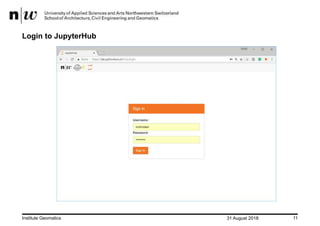
Login to JupyterHub
31 August 2018Institute Geomatics 12
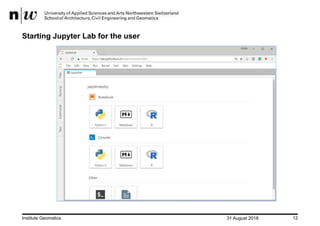
Starting Jupyter Lab for the user
31 August 2018Institute Geomatics 13
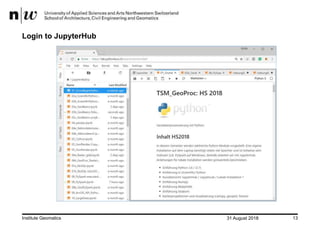
Login to JupyterHub
31 August 2018Institute Geomatics 14
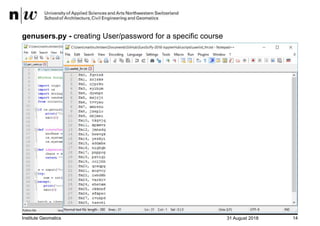
genusers.py - creating User/password for a specific course
Create Users and passwords
31 August 2018Institute Geomatics 15
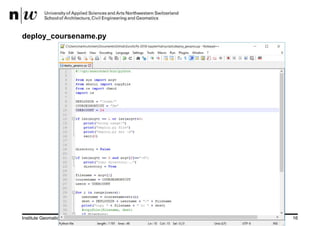
deploy_coursename.py
During the course:
• Every week there is a new (or serveral new) Jupyter Notebooks available and
an Exercise Notebook.
• The notebooks are deployed to all students 72h before the next lesson
• Also included is a general solution for the exercise
• I created a simple deploy script which copies new files to all course members
(using the course id created in genusers.py).
• Also directories with all contents can be copied (for small datasets, pdf, …)
31 August 2018Institute Geomatics 16
deploy_coursename.py
31 August 2018Institute Geomatics 17
Large Data Files
Data is just located globally at /data/ and all users have read access.
This way multi TB datasets can be read by all without problems
Example: /data/landsat.tif
Previously I tried to use symbolic links but it didn’t really work well
31 August 2018Institute Geomatics 18
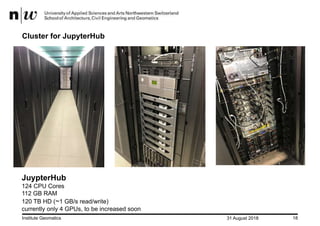
Cluster for JupyterHub
JuypterHub
124 CPU Cores
112 GB RAM
120 TB HD (~1 GB/s read/write)
currently only 4 GPUs, to be increased soon
31 August 2018Institute Geomatics 19
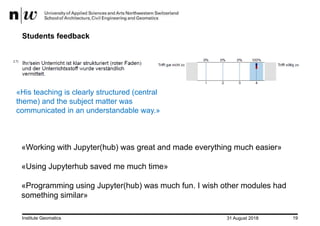
Students feedback
«His teaching is clearly structured (central
theme) and the subject matter was
communicated in an understandable way.»
«Working with Jupyter(hub) was great and made everything much easier»
«Using Jupyterhub saved me much time»
«Programming using Jupyter(hub) was much fun. I wish other modules had
something similar»
31 August 2018Institute Geomatics 20
Conclusion & Outlook
• JupyterHub solves my major problems:
• Doing exercises with really large datasets (1-10 TB)
• No installation of modules / No time wasted in first lesson
• Students don’t need space on their laptop for anaconda/modules/data
(if they don’t want to install it locally)
• I don’t have to write installation instructions for each OS / Python Version
• GPUs can be used even if students don’t have a high-end graphics card.
• Students like it
In future:
• Add more GPUs (GPU cluster in 2nd Rack)
• Also use JupyterHub for Research Projects
31 August 2018Institute Geomatics 21
http://2019.geopython.net•Python in General
•GIS/Mapping
•Geography / Geophysics / Geodesy / Geomatics
•Earth Sciences / Environmental Sciences
•Geovisualization
•Smart Cities
•Spatial Data / Geodata
•Geospatial Webservices
•Big Data
•Data Processing
•(Spatial) Databases
•Computer Vision
•Remote Sensing
•Image Processing
•(Geo-)Machine Learning / (Geo-)Deep Learning
@GeoPythonConf
31 August 2018Institute Geomatics 22
Questions

Teaching with JupyterHub - lessons learned

  • 1.
    Prof. Martin Christen FHNW– University of Applied Sciences and Arts Northwestern Switzerland School of Architecture, Civil Engineering and Geomatics Institute Geomatics martin.christen@fhnw.ch Teaching with JupyterHub - lessons learned MartinChristen GitHub: MartinChristen GitLab: martin.christen
  • 2.
    31 August 2018InstituteGeomatics 2 https://github.com/martinchristen/EuroSciPy-2018-JupyterHub https://github.com/jupyterhub
  • 3.
    31 August 2018InstituteGeomatics 3 What am I teaching ? (Python related courses only) Bachelor Programme Introduction to Python (1st Semester) Programming I (2nd Semester) Programming II (3rd Semester) Open (Geo-)Data Seminar (5th Semester) Masters Programme Geoprocessing (14 Lessons)
  • 4.
    31 August 2018InstituteGeomatics 4 Where? Our New Campus (4500 People, 250M €, built in 4 years)
  • 5.
    31 August 2018InstituteGeomatics 5 What am I teaching ? (Python related courses only) Bachelor Programme Introduction to Python (1st Semester) Programming I (2nd Semester) Programming II (3rd Semester) Open (Geo-)Data Seminar (5th Semester) Masters Programme Geoprocessing (14 Lessons) This course is about processing big geo data Aerial images/Satellite images are large! (Petabyte range) Problem #1 How can students store multiple 1-10 TB datasets? Problem #2 Installing all required modules takes forever
  • 6.
    31 August 2018InstituteGeomatics 6 About JupyterHub Jupyterhub: Jupyter for multiple users • The Hub launches a proxy • The proxy forwards all requests to the Hub by default • The Hub handles user login and spawns single-user servers on demand • The Hub configures the proxy to forward URL prefixes to the single-user notebook servers Image from https://jupyterhub.readthedocs.io
  • 7.
    31 August 2018InstituteGeomatics 7 Authenticators – User Login • Local User • OAuthenticator: GitHub/BitBucket/MediaWiki/CILogon/Google OAuth/… • Dummy Authenticator (For testing only! Not for production use.) • LDAP Authenticator • Kerberos Authenticator • REMOTE_USER Authenticator (For when intermediate login infrastructure such as Apache offloads authentication and forwards REMOTE_USER header.) • JSONWebToken Authenticator (For Authenticating/Authorising users based on a JSONWebToken forwarded in an Authorization: bearer <token> header.) • HashAuthenticator (Each user comes with a predefined password which is a hash of their username. A separate authenticator may be used for admins.) • CASAuthenticator for CAS Single Sign-on SSO
  • 8.
    31 August 2018InstituteGeomatics 8 Spawners • BatchSpawner for spawning remote servers using batch systems (Torque, PBS, Slurm, etc) • DockerSpawner, which actually has two different spawners in it: • dockerspawner.DockerSpawner, for spawning identical Docker containers for each user • dockerspawner.SystemUserSpawner, for spawning Docker containers with an environment and home directory for each user • ImageSpawner for allowing users to choose which Docker image to spawn. • KubeSpawner for use with Kubernetes. • MarathonSpawner for spawning instances on Marathon. • UCRSpawner for spawning GPU instances on Marathon. • RemoteSpawner • SimpleSpawner, for testing purposes. • SystemdSpawner, spawns notebooks with the isolation / security benefits of containers without the complexity of image management. • SudoSpawner uses sudo. SystemdSpawner is recommended instead of SudoSpawner, if it is available to you. • WrapSpawner allows spawner class and options to be chosen at runtime. Includes ProfilesSpawner for doing this from a spawner options form. Formerly part of BatchSpawner.
  • 9.
    31 August 2018InstituteGeomatics 9 Installation Installation is easy if you read the docs: https://jupyterhub.readthedocs.io/en/stable/installation-guide.html • You need Linux • You can use Docker • You can install Jupyterhub without Docker Cluster? GPU? https://zero-to-jupyterhub-with-kubernetes.readthedocs.io/en/latest/index.html https://github.com/gifford-lab/jupyterhub https://ritazh.com/running-jupyter-notebook-and-tensorboard-on-gpu-on-azure-using-kubernetes-e4c43948e9a8 http://mathalope.co.uk/2017/09/25/how-to-setup-tensorflow-jupyter-notebook-on-intel-nervana-ai-cluster-colfax-for-deep-learning/ …and much more…
  • 10.
    31 August 2018InstituteGeomatics 10 Configuration /opt/anaconda3/bin/jupyterhub_config.py # Custom Logo c.JupyterHub.logo_file = "/path/to/logo.png" # for Jupyter Lab c.Spawner.cmd = ["jupyter-labhub"] c.Spawner.default_url = '/lab‘ c.Spawner.environment = {'JUPYTER_ENABLE_LAB': 'yes' }
  • 11.
    31 August 2018InstituteGeomatics 11 Login to JupyterHub
  • 12.
    31 August 2018InstituteGeomatics 12 Starting Jupyter Lab for the user
  • 13.
    31 August 2018InstituteGeomatics 13 Login to JupyterHub
  • 14.
    31 August 2018InstituteGeomatics 14 genusers.py - creating User/password for a specific course Create Users and passwords
  • 15.
    31 August 2018InstituteGeomatics 15 deploy_coursename.py During the course: • Every week there is a new (or serveral new) Jupyter Notebooks available and an Exercise Notebook. • The notebooks are deployed to all students 72h before the next lesson • Also included is a general solution for the exercise • I created a simple deploy script which copies new files to all course members (using the course id created in genusers.py). • Also directories with all contents can be copied (for small datasets, pdf, …)
  • 16.
    31 August 2018InstituteGeomatics 16 deploy_coursename.py
  • 17.
    31 August 2018InstituteGeomatics 17 Large Data Files Data is just located globally at /data/ and all users have read access. This way multi TB datasets can be read by all without problems Example: /data/landsat.tif Previously I tried to use symbolic links but it didn’t really work well
  • 18.
    31 August 2018InstituteGeomatics 18 Cluster for JupyterHub JuypterHub 124 CPU Cores 112 GB RAM 120 TB HD (~1 GB/s read/write) currently only 4 GPUs, to be increased soon
  • 19.
    31 August 2018InstituteGeomatics 19 Students feedback «His teaching is clearly structured (central theme) and the subject matter was communicated in an understandable way.» «Working with Jupyter(hub) was great and made everything much easier» «Using Jupyterhub saved me much time» «Programming using Jupyter(hub) was much fun. I wish other modules had something similar»
  • 20.
    31 August 2018InstituteGeomatics 20 Conclusion & Outlook • JupyterHub solves my major problems: • Doing exercises with really large datasets (1-10 TB) • No installation of modules / No time wasted in first lesson • Students don’t need space on their laptop for anaconda/modules/data (if they don’t want to install it locally) • I don’t have to write installation instructions for each OS / Python Version • GPUs can be used even if students don’t have a high-end graphics card. • Students like it In future: • Add more GPUs (GPU cluster in 2nd Rack) • Also use JupyterHub for Research Projects
  • 21.
    31 August 2018InstituteGeomatics 21 http://2019.geopython.net•Python in General •GIS/Mapping •Geography / Geophysics / Geodesy / Geomatics •Earth Sciences / Environmental Sciences •Geovisualization •Smart Cities •Spatial Data / Geodata •Geospatial Webservices •Big Data •Data Processing •(Spatial) Databases •Computer Vision •Remote Sensing •Image Processing •(Geo-)Machine Learning / (Geo-)Deep Learning @GeoPythonConf
  • 22.
    31 August 2018InstituteGeomatics 22 Questions