Welcome to Computer Class
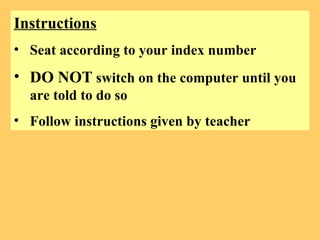
Instructions Seat according to your index number DO NOT  switch on the computer until you are told to do so Follow instructions given by teacher
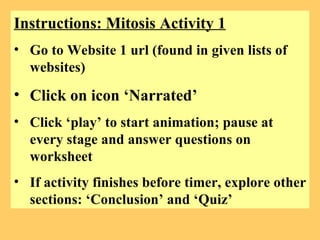
Instructions: Mitosis Activity 1 Go to Website 1 url (found in given lists of websites) Click on icon ‘Narrated’ Click ‘play’ to start animation; pause at every stage and answer questions on worksheet If activity finishes before timer, explore other sections: ‘Conclusion’ and ‘Quiz’
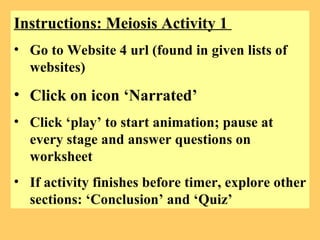
Instructions: Meiosis Activity 1  Go to Website 4 url (found in given lists of websites) Click on icon ‘Narrated’ Click ‘play’ to start animation; pause at every stage and answer questions on worksheet If activity finishes before timer, explore other sections: ‘Conclusion’ and ‘Quiz’
Instructions: Meiosis Activity 3  Go to Website 6 url (found in given lists of websites) Click on cell icon ‘Practice meiosis’ Follow instructions on left column Once completed, draw finished diagram on worksheet If activity finishes before timer, explore the other section ‘Practice mitosis’
Instructions: Mitosis & Meiosis Activity 4 Go to Website 7 url (found in given lists of websites) Find a partner Go through each step of comparison in the website & fill up graphic organizer on worksheet.  You will be give  15 mins  to discuss & fill up the worksheets with your partner Class sharing and discussion
Instructions: Mitosis & Meiosis Activity 5 QUIZ TIME! Go to website 8 url  Complete the quiz within  10 mins 3) No copying or peeping answers from classmate. It’s a quiz!  4) Completed the quiz? Go to website 9 url and view the video. Do not disturb your classmates.
After watching the video…  So you think you can dance too?! Let’s have dance competition! And, the theme is on Mitosis and Meiosis!  Refer to instructional sheet 4 groups – 2 mitosis & 2 meiosis Upload your dance video onto pbwiki  Everyone has to comment on the video on pbwiki You will be judged by your teacher(70%) and peers (30%) Prizes will be awarded for the 2 best teams!

Teacher's powerpoint

  • 1.
  • 2.
    Instructions Seat accordingto your index number DO NOT switch on the computer until you are told to do so Follow instructions given by teacher
  • 3.
    Instructions: Mitosis Activity1 Go to Website 1 url (found in given lists of websites) Click on icon ‘Narrated’ Click ‘play’ to start animation; pause at every stage and answer questions on worksheet If activity finishes before timer, explore other sections: ‘Conclusion’ and ‘Quiz’
  • 4.
    Instructions: Meiosis Activity1 Go to Website 4 url (found in given lists of websites) Click on icon ‘Narrated’ Click ‘play’ to start animation; pause at every stage and answer questions on worksheet If activity finishes before timer, explore other sections: ‘Conclusion’ and ‘Quiz’
  • 5.
    Instructions: Meiosis Activity3 Go to Website 6 url (found in given lists of websites) Click on cell icon ‘Practice meiosis’ Follow instructions on left column Once completed, draw finished diagram on worksheet If activity finishes before timer, explore the other section ‘Practice mitosis’
  • 6.
    Instructions: Mitosis &Meiosis Activity 4 Go to Website 7 url (found in given lists of websites) Find a partner Go through each step of comparison in the website & fill up graphic organizer on worksheet. You will be give 15 mins to discuss & fill up the worksheets with your partner Class sharing and discussion
  • 7.
    Instructions: Mitosis &Meiosis Activity 5 QUIZ TIME! Go to website 8 url Complete the quiz within 10 mins 3) No copying or peeping answers from classmate. It’s a quiz! 4) Completed the quiz? Go to website 9 url and view the video. Do not disturb your classmates.
  • 8.
    After watching thevideo… So you think you can dance too?! Let’s have dance competition! And, the theme is on Mitosis and Meiosis! Refer to instructional sheet 4 groups – 2 mitosis & 2 meiosis Upload your dance video onto pbwiki Everyone has to comment on the video on pbwiki You will be judged by your teacher(70%) and peers (30%) Prizes will be awarded for the 2 best teams!