Task 4- How did you use new
media technologies in the
construction and research,
planning and evaluation stages?
Final Cut Pro
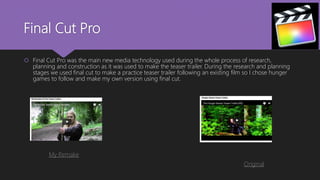
 Final Cut Pro was the main new media technology used during the whole process of research,
planning and construction as it was used to make the teaser trailer. During the research and planning
stages we used final cut to make a practice teaser trailer following an existing film so I chose hunger
games to follow and make my own version using final cut.
My Remake
Original
Final Cut Pro
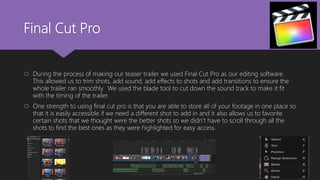
 During the process of making our teaser trailer we used Final Cut Pro as our editing software.
This allowed us to trim shots, add sound, add effects to shots and add transitions to ensure the
whole trailer ran smoothly. We used the blade tool to cut down the sound track to make it fit
with the timing of the trailer.
 One strength to using final cut pro is that you are able to store all of your footage in one place so
that it is easily accessible if we need a different shot to add in and it also allows us to favorite
certain shots that we thought were the better shots so we didn’t have to scroll through all the
shots to find the best ones as they were highlighted for easy access.
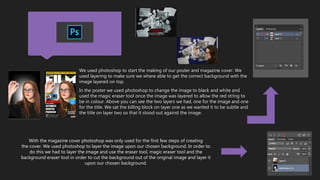
We used photoshop to start the making of our poster and magazine cover. We
used layering to make sure we where able to get the correct background with the
image layered on top.
In the poster we used photoshop to change the image to black and white and
used the magic eraser tool once the image was layered to allow the red string to
be in colour. Above you can see the two layers we had, one for the image and one
for the title. We sat the billing block on layer one as we wanted it to be subtle and
the title on layer two so that it stood out against the image.
With the magazine cover photoshop was only used for the first few steps of creating
the cover. We used photoshop to layer the image upon our chosen background. In order to
do this we had to layer the image and use the eraser tool, magic eraser tool and the
background eraser tool in order to cut the background out of the original image and layer it
upon our chosen background.
With the poster most of the work was
done in photoshop as it was only minimal
tasks that needed doing to change the
image to the way we wanted. But
we transferred the image to
illustrator when we had finished with the
poster and we made some slight changes
after feedback such as making the black
box around the title slightly bigger to
ensure the title stood out and making
the actress title smaller so that it didn’t
overpower the image.
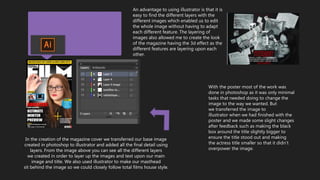
In the creation of the magazine cover we transferred our base image
created in photoshop to illustrator and added all the final detail using
layers. From the image above you can see all the different layers
we created in order to layer up the images and text upon our main
image and title. We also used illustrator to make our masthead
sit behind the image so we could closely follow total films house style.
An advantage to using illustrator is that it is
easy to find the different layers with the
different images which enabled us to edit
the whole image without having to adapt
each different feature. The layering of
images also allowed me to create the look
of the magazine having the 3d effect as the
different features are layering upon each
other.
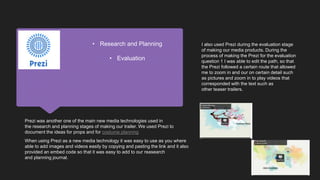
I also used Prezi during the evaluation stage
of making our media products. During the
process of making the Prezi for the evaluation
question 1 I was able to edit the path, so that
the Prezi followed a certain route that allowed
me to zoom in and our on certain detail such
as pictures and zoom in to play videos that
corresponded with the text such as
other teaser trailers.
Prezi was another one of the main new media technologies used in
the research and planning stages of making our trailer. We used Prezi to
document the ideas for props and for costume planning
When using Prezi as a new media technology it was easy to use as you where
able to add images and videos easily by copying and pasting the link and it also
provided an embed code so that it was easy to add to our reasearch
and planning journal.
• Research and Planning
• Evaluation
As well as this I used moovly as a technology to present
one of my evaluation tasks. It allowed me to present my
information in a unique way that engages the audience
more so than a blank presentation.
Moovly was one of the new media
technologies I used in the process of
research and planning. I used it to
illustrate a film poster similar to
the style we wanted to follow for our
own. It was an easy way to create an
interactive presentation. When
making the video I had to create
transitions for each image and text to
ensure that all the detail appeared at
the right time and in sync with
the music that I embedded using a
copyright free music.
https://youtu.be/6rtPjN3Qbmc
PowerPoint & SlideShare
PowerPoint was used through out my evaluation
process as a new media technology to present my
evaluation question. PowerPoint
enabled me to present and organize all my information
on to different slides as well as being able
to insert images to illustrate my points.
Furthermore, to enable me to
share my presentation on to my blog page I have
to use a new media technology soft wear called slide
share. This enables me to share my PowerPoint by
generating an embed code that allows me to embed
the presentation into my blog so that it can be
accessed easily.
One disadvantage to using power point is that
when using the online version it has minimal
features so you cant edit the PowerPoint as
much as you could do in the offline version.
Moreover, as I use PowerPoint online it is
dependant on having a good internet
connection which isn’t always accessible.
Emaze
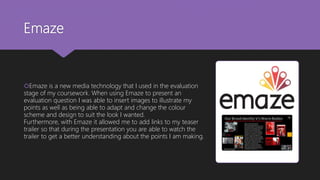
Emaze is a new media technology that I used in the evaluation
stage of my coursework. When using Emaze to present an
evaluation question I was able to insert images to illustrate my
points as well as being able to adapt and change the colour
scheme and design to suit the look I wanted.
Furthermore, with Emaze it allowed me to add links to my teaser
trailer so that during the presentation you are able to watch the
trailer to get a better understanding about the points I am making.
Mahara & OneDrive
Mahara is the main new media technology that I have used during the process of making
my media products. Mahara allowed me to make note of everything we have done at every
step of the way by embedding videos, images, text and presentations. Mahara also allowed
me to keep track of all the work I have completed by storing it all in one blog which enables
me to access it wherever.
One drive was used alongside mahara, as once we had filled up our storage on mahara
we had to use one drive to insert images into mahara. One drive allowed me to keep all
my images in one place and was easily accessible wherever I was. Moreover, OneDrive
enable me to share images and documents between the members of my group so
that we all had access to the same images that we needed and the same
documents. For example we were all able to access the poster images in order to chose
the best one as we were able to use one drive to share the images with one another in
a group file.
You Tube
I used You Tube through the whole process
of making my media products because I had
to use it to generate videos to enable me to
get an embed and share code to place videos
such as moovly videos into my journal.
Furthermore, You Tube also enabled us to
present our final teaser trailer and receive our
feedback via the you tube comments
as everyone has access to the trailer and is
able to watch it freely.
Digital Camera
 In order to shoot the correct footage we used a digital camera that allowed us to focus on
certain features in the shots and then blur out the rest. Furthermore, the camera also allowed us
to take the images for our poster and magazine cover by using different settings on the camera,
for example when we were recording we had the camera on film setting which enabled us to
capture more of the mise en scene and when taking the pictures we were able to change the
setting onto portrait mode which enabled us to just capture the image we wanted and it supplied
all focus onto the characters face.
 One weakness to using the digital camera is that the battery life isn’t very good as it uses a lot of
power in order to get the best footage and you have to be aware of the battery life so that you
don’t loose footage when filiming due to the battery dying.
Task 4

Task 4

  • 1.
    Task 4- Howdid you use new media technologies in the construction and research, planning and evaluation stages?
  • 2.
    Final Cut Pro Final Cut Pro was the main new media technology used during the whole process of research, planning and construction as it was used to make the teaser trailer. During the research and planning stages we used final cut to make a practice teaser trailer following an existing film so I chose hunger games to follow and make my own version using final cut. My Remake Original
  • 3.
    Final Cut Pro During the process of making our teaser trailer we used Final Cut Pro as our editing software. This allowed us to trim shots, add sound, add effects to shots and add transitions to ensure the whole trailer ran smoothly. We used the blade tool to cut down the sound track to make it fit with the timing of the trailer.  One strength to using final cut pro is that you are able to store all of your footage in one place so that it is easily accessible if we need a different shot to add in and it also allows us to favorite certain shots that we thought were the better shots so we didn’t have to scroll through all the shots to find the best ones as they were highlighted for easy access.
  • 4.
    We used photoshopto start the making of our poster and magazine cover. We used layering to make sure we where able to get the correct background with the image layered on top. In the poster we used photoshop to change the image to black and white and used the magic eraser tool once the image was layered to allow the red string to be in colour. Above you can see the two layers we had, one for the image and one for the title. We sat the billing block on layer one as we wanted it to be subtle and the title on layer two so that it stood out against the image. With the magazine cover photoshop was only used for the first few steps of creating the cover. We used photoshop to layer the image upon our chosen background. In order to do this we had to layer the image and use the eraser tool, magic eraser tool and the background eraser tool in order to cut the background out of the original image and layer it upon our chosen background.
  • 5.
    With the postermost of the work was done in photoshop as it was only minimal tasks that needed doing to change the image to the way we wanted. But we transferred the image to illustrator when we had finished with the poster and we made some slight changes after feedback such as making the black box around the title slightly bigger to ensure the title stood out and making the actress title smaller so that it didn’t overpower the image. In the creation of the magazine cover we transferred our base image created in photoshop to illustrator and added all the final detail using layers. From the image above you can see all the different layers we created in order to layer up the images and text upon our main image and title. We also used illustrator to make our masthead sit behind the image so we could closely follow total films house style. An advantage to using illustrator is that it is easy to find the different layers with the different images which enabled us to edit the whole image without having to adapt each different feature. The layering of images also allowed me to create the look of the magazine having the 3d effect as the different features are layering upon each other.
  • 6.
    I also usedPrezi during the evaluation stage of making our media products. During the process of making the Prezi for the evaluation question 1 I was able to edit the path, so that the Prezi followed a certain route that allowed me to zoom in and our on certain detail such as pictures and zoom in to play videos that corresponded with the text such as other teaser trailers. Prezi was another one of the main new media technologies used in the research and planning stages of making our trailer. We used Prezi to document the ideas for props and for costume planning When using Prezi as a new media technology it was easy to use as you where able to add images and videos easily by copying and pasting the link and it also provided an embed code so that it was easy to add to our reasearch and planning journal. • Research and Planning • Evaluation
  • 7.
    As well asthis I used moovly as a technology to present one of my evaluation tasks. It allowed me to present my information in a unique way that engages the audience more so than a blank presentation. Moovly was one of the new media technologies I used in the process of research and planning. I used it to illustrate a film poster similar to the style we wanted to follow for our own. It was an easy way to create an interactive presentation. When making the video I had to create transitions for each image and text to ensure that all the detail appeared at the right time and in sync with the music that I embedded using a copyright free music. https://youtu.be/6rtPjN3Qbmc
  • 8.
    PowerPoint & SlideShare PowerPointwas used through out my evaluation process as a new media technology to present my evaluation question. PowerPoint enabled me to present and organize all my information on to different slides as well as being able to insert images to illustrate my points. Furthermore, to enable me to share my presentation on to my blog page I have to use a new media technology soft wear called slide share. This enables me to share my PowerPoint by generating an embed code that allows me to embed the presentation into my blog so that it can be accessed easily. One disadvantage to using power point is that when using the online version it has minimal features so you cant edit the PowerPoint as much as you could do in the offline version. Moreover, as I use PowerPoint online it is dependant on having a good internet connection which isn’t always accessible.
  • 9.
    Emaze Emaze is anew media technology that I used in the evaluation stage of my coursework. When using Emaze to present an evaluation question I was able to insert images to illustrate my points as well as being able to adapt and change the colour scheme and design to suit the look I wanted. Furthermore, with Emaze it allowed me to add links to my teaser trailer so that during the presentation you are able to watch the trailer to get a better understanding about the points I am making.
  • 10.
    Mahara & OneDrive Maharais the main new media technology that I have used during the process of making my media products. Mahara allowed me to make note of everything we have done at every step of the way by embedding videos, images, text and presentations. Mahara also allowed me to keep track of all the work I have completed by storing it all in one blog which enables me to access it wherever. One drive was used alongside mahara, as once we had filled up our storage on mahara we had to use one drive to insert images into mahara. One drive allowed me to keep all my images in one place and was easily accessible wherever I was. Moreover, OneDrive enable me to share images and documents between the members of my group so that we all had access to the same images that we needed and the same documents. For example we were all able to access the poster images in order to chose the best one as we were able to use one drive to share the images with one another in a group file.
  • 11.
    You Tube I usedYou Tube through the whole process of making my media products because I had to use it to generate videos to enable me to get an embed and share code to place videos such as moovly videos into my journal. Furthermore, You Tube also enabled us to present our final teaser trailer and receive our feedback via the you tube comments as everyone has access to the trailer and is able to watch it freely.
  • 12.
    Digital Camera  Inorder to shoot the correct footage we used a digital camera that allowed us to focus on certain features in the shots and then blur out the rest. Furthermore, the camera also allowed us to take the images for our poster and magazine cover by using different settings on the camera, for example when we were recording we had the camera on film setting which enabled us to capture more of the mise en scene and when taking the pictures we were able to change the setting onto portrait mode which enabled us to just capture the image we wanted and it supplied all focus onto the characters face.  One weakness to using the digital camera is that the battery life isn’t very good as it uses a lot of power in order to get the best footage and you have to be aware of the battery life so that you don’t loose footage when filiming due to the battery dying.