System
Administration
and
Maintenance
Presented by: Mr. Rexcies Valentin
Who is System Administrator?
System Administration and Maintenance
• A person responsible for maintaining
and operating a computer and/or
network
• System administrators are NOT
software engineers or developers
2
Required
Qualities or
Skills
System Administration and Maintenance 3
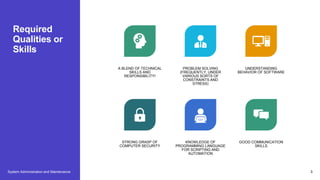
A BLEND OF TECHNICAL
SKILLS AND
RESPONSIBILITY!
PROBLEM SOLVING
(FREQUENTLY, UNDER
VARIOUS SORTS OF
CONSTRAINTS AND
STRESS)
UNDERSTANDING
BEHAVIOR OF SOFTWARE
STRONG GRASP OF
COMPUTER SECURITY
KNOWLEDGE OF
PROGRAMMING LANGUAGE
FOR SCRIPTING AND
AUTOMATION
GOOD COMMUNICATION
SKILLS
Basic Task
• Configuring
• Troubleshooting
• Maintaining local documentation
• Helping and educating users
• Baselining
• Problem solving
4
• Planning and preparation
• Installation
• Maintaining
• Installing/upgrading/removing software
• Backup and archives
System Admin Duties
vs Company Size
• 20 people – everything, alone… (including
nose-wiping for users)
• 200 people – everything, but with specialty
in something (you get colleagues you can
refer to case you don’t want to deal with
smth)
• 2000 or more – very specific task/duties
(get 5 signatures before sneezing before
sneezing near a company server)
System Administration and Maintenance 5
Specializations or
Related Fields
• Database Administrator (DBA)
• Network Administrator
• Security Administrator
• Web Administrator
• Technical Support
• Computer Operator
System Administration and Maintenance 6
Backup
Bottomline: Skip your breakfast and payroll, not backup!
System Administration and Maintenance 7
Maintaining
Software
• Software is not perfect, so it needs
to be maintained
• Updating to new version/release
• Fixing bugs if possible
• Performing housekeeping (log
cleanups)
System Administration and Maintenance 8
Maintaining
Software
Realize you
are not the
only user on
the system
• Don't install something you cannot maintain (do your
research before installing)
• Always remove all unnecessary software: every
piece of software you leave is a potential cause of
crash or security breach
• Do not remove things you do not understand :- )
• Never EVER play with production systems! Always
test things on test environment
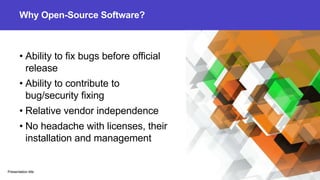
Why Open-Source Software?
• Ability to fix bugs before official
release
• Ability to contribute to
bug/security fixing
• Relative vendor independence
• No headache with licenses, their
installation and management
Presentation title 10
Problem Solving
• Renaming directory caused 10% drop in
performance
• Restarting computer causes random fluctuations
of benchmarks
• Hardware upgrade makes things slower
• Moving test system to another building causes a
slowdown
Presentation title 11
Monitoring
Spend time monitoring, so you don't have to spend time restoring Demo :-)
Presentation title 12
Always have a
Backup Plan
Mila Kunis
System Administration and Maintenance 13
Thank you
Mr. Rexcies Valentin
valentin.rexcies@col
m.edu.ph
System Administration and Maintenance 14

System-Administration.pptx

  • 1.
  • 2.
    Who is SystemAdministrator? System Administration and Maintenance • A person responsible for maintaining and operating a computer and/or network • System administrators are NOT software engineers or developers 2
  • 3.
    Required Qualities or Skills System Administrationand Maintenance 3 A BLEND OF TECHNICAL SKILLS AND RESPONSIBILITY! PROBLEM SOLVING (FREQUENTLY, UNDER VARIOUS SORTS OF CONSTRAINTS AND STRESS) UNDERSTANDING BEHAVIOR OF SOFTWARE STRONG GRASP OF COMPUTER SECURITY KNOWLEDGE OF PROGRAMMING LANGUAGE FOR SCRIPTING AND AUTOMATION GOOD COMMUNICATION SKILLS
  • 4.
    Basic Task • Configuring •Troubleshooting • Maintaining local documentation • Helping and educating users • Baselining • Problem solving 4 • Planning and preparation • Installation • Maintaining • Installing/upgrading/removing software • Backup and archives
  • 5.
    System Admin Duties vsCompany Size • 20 people – everything, alone… (including nose-wiping for users) • 200 people – everything, but with specialty in something (you get colleagues you can refer to case you don’t want to deal with smth) • 2000 or more – very specific task/duties (get 5 signatures before sneezing before sneezing near a company server) System Administration and Maintenance 5
  • 6.
    Specializations or Related Fields •Database Administrator (DBA) • Network Administrator • Security Administrator • Web Administrator • Technical Support • Computer Operator System Administration and Maintenance 6
  • 7.
    Backup Bottomline: Skip yourbreakfast and payroll, not backup! System Administration and Maintenance 7
  • 8.
    Maintaining Software • Software isnot perfect, so it needs to be maintained • Updating to new version/release • Fixing bugs if possible • Performing housekeeping (log cleanups) System Administration and Maintenance 8
  • 9.
    Maintaining Software Realize you are notthe only user on the system • Don't install something you cannot maintain (do your research before installing) • Always remove all unnecessary software: every piece of software you leave is a potential cause of crash or security breach • Do not remove things you do not understand :- ) • Never EVER play with production systems! Always test things on test environment
  • 10.
    Why Open-Source Software? •Ability to fix bugs before official release • Ability to contribute to bug/security fixing • Relative vendor independence • No headache with licenses, their installation and management Presentation title 10
  • 11.
    Problem Solving • Renamingdirectory caused 10% drop in performance • Restarting computer causes random fluctuations of benchmarks • Hardware upgrade makes things slower • Moving test system to another building causes a slowdown Presentation title 11
  • 12.
    Monitoring Spend time monitoring,so you don't have to spend time restoring Demo :-) Presentation title 12
  • 13.
    Always have a BackupPlan Mila Kunis System Administration and Maintenance 13
  • 14.
    Thank you Mr. RexciesValentin valentin.rexcies@col m.edu.ph System Administration and Maintenance 14