System Calls in
Operating System
Process Control :
This system calls perform the task of process creation, process termination, etc.
The Linux System calls under this are fork() , exit() , exec().
fork() or vfork()
A new process is created by the fork() system call.
A new process may be created with fork() without a new program being run-the new sub-process
simply continues to execute exactly the same program that the first (parent) process was running.
It is one of the most widely used system calls under process management.
exit()
The exit() system call is used by a program to terminate its execution.
The operating system reclaims resources that were used by the process after the exit() system call.
exec()
A new program will start executing after a call to exec()
Running a new program does not require that a new process be created first: any process may call
exec() at any time. The currently running program is immediately terminated, and the new program
starts executing in the context of the existing process.
File Management :
System calls handle file manipulation jobs like creating a file, reading, and writing, etc.
The Linux System calls under this are open(), read(), write(), close().
open():
It is the system call to open a file.
This system call just opens the file, to perform operations such as read and write, we need to execute
different system call to perform the operations.
read():
This system call opens the file in reading mode
We can not edit the files with this system call.
Multiple processes can execute the read() system call on the same file simultaneously.
write():
This system call opens the file in writing mode
We can edit the files with this system call.
Multiple processes can not execute the write() system call on the same file simultaneously.
close():
This system call closes the opened file.
Information Maintenance:
• It handles information and its transfer between the OS and the user program.
• In addition, OS keeps the information about all its processes and system calls are used
to access this information.
• The System calls under this are getpid(), alarm(), sleep().
getpid():
• getpid stands for Get the Process ID.
• The getpid() function shall return the process ID of the calling process.
• The getpid() function shall always be successful and no return value is reserved to indicate an error.
alarm():
• This system call sets an alarm clock for the delivery of a signal that when it has to be reached.
• It arranges for a signal to be delivered to the calling process.
sleep():
• This System call suspends the execution of the currently running process for some interval of time
• Meanwhile, during this interval, another process is given chance to execute
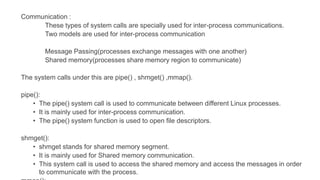
Communication :
These types of system calls are specially used for inter-process communications.
Two models are used for inter-process communication
Message Passing(processes exchange messages with one another)
Shared memory(processes share memory region to communicate)
The system calls under this are pipe() , shmget() ,mmap().
pipe():
• The pipe() system call is used to communicate between different Linux processes.
• It is mainly used for inter-process communication.
• The pipe() system function is used to open file descriptors.
shmget():
• shmget stands for shared memory segment.
• It is mainly used for Shared memory communication.
• This system call is used to access the shared memory and access the messages in order
to communicate with the process.
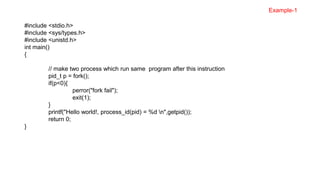
#include <stdio.h>
#include <sys/types.h>
#include <unistd.h>
int main()
{
// make two process which run same program after this instruction
pid_t p = fork();
if(p<0){
perror("fork fail");
exit(1);
}
printf("Hello world!, process_id(pid) = %d n",getpid());
return 0;
}
Example-1
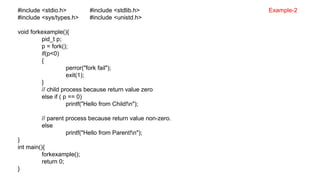
#include <stdio.h> #include <stdlib.h>
#include <sys/types.h> #include <unistd.h>
void forkexample(){
pid_t p;
p = fork();
if(p<0)
{
perror("fork fail");
exit(1);
}
// child process because return value zero
else if ( p == 0)
printf("Hello from Child!n");
// parent process because return value non-zero.
else
printf("Hello from Parent!n");
}
int main(){
forkexample();
return 0;
}
Example-2
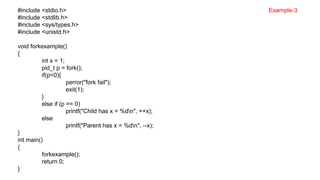
#include <stdio.h>
#include <stdlib.h>
#include <sys/types.h>
#include <unistd.h>
void forkexample()
{
int x = 1;
pid_t p = fork();
if(p<0){
perror("fork fail");
exit(1);
}
else if (p == 0)
printf("Child has x = %dn", ++x);
else
printf("Parent has x = %dn", --x);
}
int main()
{
forkexample();
return 0;
}
Example-3
exec() :
• It is used to execute a file which is residing in an active process. When exec is called the
previous executable file is replaced and new file.
• Exec system call is a collection of functions and in C programming language, the standard
names for these functions are as follows:
• execl
• execle
• execlp
• execv
• execve
• execvp
int execl(const char* path, const char* arg, …)
int execlp(const char* file, const char* arg, …)
int execle(const char* path, const char* arg, …, char* const envp[])
int execv(const char* path, const char* argv[])
int execvp(const char* file, const char* argv[])
int execvpe(const char* file, const char* argv[], char *const envp[])
exec() : int execl(const char* path, const char* arg, …)
int execlp(const char* file, const char* arg, …)
int execle(const char* path, const char* arg, …, char* const envp[])
int execv(const char* path, const char* argv[])
int execvp(const char* file, const char* argv[])
int execvpe(const char* file, const char* argv[], char *const envp[])
• path is used to specify the full path name of the file which is to be executes.
• arg is the argument passed. It is actually the name of the file which will be executed in the process. Most
of the times the value of arg and path is same.
• const char* arg in functions execl(), execlp() and execle() is considered as arg0, arg1, arg2, …, argn. It
is basically a list of pointers to null terminated strings. Here the first argument points to the filename which
will be executed.
• envp is an array which contains pointers that point to the environment variables.
• file is used to specify the path name which will identify the path of new process image file.
• The functions of exec call that end with e are used to change the environment for the new process image.
These functions pass list of environment setting by using the argument envp. This argument is an array of
characters which points to null terminated String and defines environment variable.
exec() :
#include <stdio.h>
#include <unistd.h>
#include <stdlib.h>
int main(int argc, char *argv[])
{
printf("PID of example.c = %dn", getpid());
char *args[] = {"Hello", "C", "Programming", NULL};
execv("./hello", args);
printf("Back to example.c");
return 0;
}
#include <stdio.h>
#include <unistd.h>
#include <stdlib.h>
int main(int argc, char *argv[])
{
printf("We are in Hello.cn");
printf("PID of hello.c = %dn", getpid());
return 0;
}
Hello.c
exec() :
#include <stdio.h>
#include <sys/types.h>
#include <unistd.h>
int main(int argc, char *argv[]) {
printf("PID of example.c = %dn", getpid());
pid_t p;
p = fork();
if(p==-1) printf("There is an error while calling fork()");
if(p==0) {
printf("We are in the child processn");
printf("Calling hello.c from child processn");
char *args[] = {"Hello", "C", "Programming", NULL};
execv("./hello", args);
}
else
printf("We are in the parent process");
return 0;
}
#include <stdio.h>
#include <unistd.h>
#include <stdlib.h>
int main(int argc, char *argv[])
{
printf("We are in Hello.cn");
printf("PID of hello.c = %dn", getpid());
return 0;
}
Hello.c
exec() :
#include <stdio.h> #include <sys/types.h>
#include <unistd.h> #include <stdlib.h>
int main(int argc, char*argv[]) {
pid_t pid; int i;
if (argc != 3){
printf("nInsufficient arguments to load program");
printf("nUsage: ./a.out <path> <cmd>n"); exit(-1);
}
switch(pid = fork()){
case -1: printf("Fork failed"); exit(-1);
case 0: printf("Child processn");
i = execl(argv[1], argv[2],0);
if (i < 0) {
printf("%s program not loaded using exec system calln", argv[2]);
exit(-1);
}
default:
wait(NULL);
printf("Child Terminatedn"); exit(0);
}
#include <stdio.h>
#include <unistd.h>
#include <stdlib.h>
int main(int argc, char *argv[])
{
printf("We are in Hello.cn");
printf("PID of hello.c = %dn", getpid());
return 0;
}
Hello.c
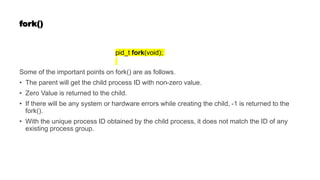
fork()
pid_t fork(void);
Some of the important points on fork() are as follows.
• The parent will get the child process ID with non-zero value.
• Zero Value is returned to the child.
• If there will be any system or hardware errors while creating the child, -1 is returned to the
fork().
• With the unique process ID obtained by the child process, it does not match the ID of any
existing process group.
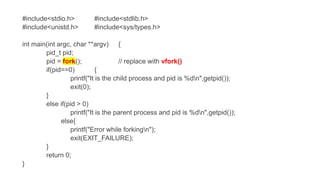
#include<stdio.h> #include<stdlib.h>
#include<unistd.h> #include<sys/types.h>
int main(int argc, char **argv) {
pid_t pid;
pid = (); // replace with vfork()
if(pid==0) {
printf("It is the child process and pid is %dn",getpid());
exit(0);
}
else if(pid > 0)
printf("It is the parent process and pid is %dn",getpid());
else{
printf("Error while forkingn");
exit(EXIT_FAILURE);
}
return 0;
}
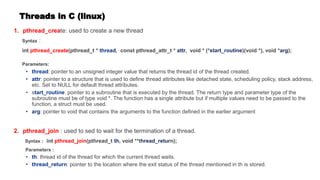
Threads in C (linux)
1. pthread_create: used to create a new thread
Syntax :
int pthread_create(pthread_t * , const pthread_attr_t * , void * (* )(void *), void * );
Parameters:
: pointer to an unsigned integer value that returns the thread id of the thread created.
: pointer to a structure that is used to define thread attributes like detached state, scheduling policy, stack address,
etc. Set to NULL for default thread attributes.
• s : pointer to a subroutine that is executed by the thread. The return type and parameter type of the
subroutine must be of type void *. The function has a single attribute but if multiple values need to be passed to the
function, a struct must be used.
: pointer to void that contains the arguments to the function defined in the earlier argument
2. pthread_join : used to sed to wait for the termination of a thread.
Syntax : int pthread_join(pthread_t , void **t n);
Parameters :
: thread id of the thread for which the current thread waits.
: pointer to the location where the exit status of the thread mentioned in th is stored.
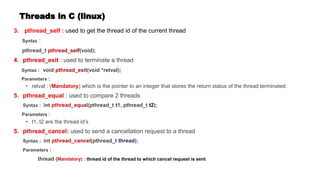
Threads in C (linux)
3. pthread_self : used to get the thread id of the current thread
Syntax :
pthread_t (void);
: used to terminate a thread
Syntax : void t(void *retval);
Parameters :
• retval : ( ) which is the pointer to an integer that stores the return status of the thread terminated.
: used to compare 2 threads
Syntax : int l(pthread_t , pthread_t t2);
Parameters :
• t1, t2 are the thread id’s
: used to send a cancellation request to a thread
Syntax : int (pthread_t );
Parameters :
thread ( thread id of the thread to which cancel request is sent
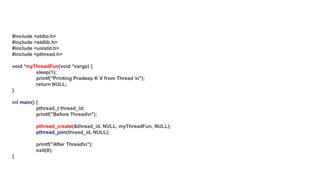
#include <stdio.h>
#include <stdlib.h>
#include <unistd.h>
#include <pthread.h>
void *myThreadFun(void *vargp) {
sleep(1);
printf("Printing Pradeep K V from Thread n");
return NULL;
}
int () {
pthread_t thread_id;
printf("Before Threadn");
pthread_create(&thread_id, NULL, myThreadFun, NULL);
(thread_id, NULL);
printf("After Threadn");
exit(0);
}

System Calls.pptxnsjsnssbhsbbebdbdbshshsbshsbbs

  • 1.
  • 2.
    Process Control : Thissystem calls perform the task of process creation, process termination, etc. The Linux System calls under this are fork() , exit() , exec(). fork() or vfork() A new process is created by the fork() system call. A new process may be created with fork() without a new program being run-the new sub-process simply continues to execute exactly the same program that the first (parent) process was running. It is one of the most widely used system calls under process management. exit() The exit() system call is used by a program to terminate its execution. The operating system reclaims resources that were used by the process after the exit() system call. exec() A new program will start executing after a call to exec() Running a new program does not require that a new process be created first: any process may call exec() at any time. The currently running program is immediately terminated, and the new program starts executing in the context of the existing process.
  • 3.
    File Management : Systemcalls handle file manipulation jobs like creating a file, reading, and writing, etc. The Linux System calls under this are open(), read(), write(), close(). open(): It is the system call to open a file. This system call just opens the file, to perform operations such as read and write, we need to execute different system call to perform the operations. read(): This system call opens the file in reading mode We can not edit the files with this system call. Multiple processes can execute the read() system call on the same file simultaneously. write(): This system call opens the file in writing mode We can edit the files with this system call. Multiple processes can not execute the write() system call on the same file simultaneously. close(): This system call closes the opened file.
  • 4.
    Information Maintenance: • Ithandles information and its transfer between the OS and the user program. • In addition, OS keeps the information about all its processes and system calls are used to access this information. • The System calls under this are getpid(), alarm(), sleep(). getpid(): • getpid stands for Get the Process ID. • The getpid() function shall return the process ID of the calling process. • The getpid() function shall always be successful and no return value is reserved to indicate an error. alarm(): • This system call sets an alarm clock for the delivery of a signal that when it has to be reached. • It arranges for a signal to be delivered to the calling process. sleep(): • This System call suspends the execution of the currently running process for some interval of time • Meanwhile, during this interval, another process is given chance to execute
  • 5.
    Communication : These typesof system calls are specially used for inter-process communications. Two models are used for inter-process communication Message Passing(processes exchange messages with one another) Shared memory(processes share memory region to communicate) The system calls under this are pipe() , shmget() ,mmap(). pipe(): • The pipe() system call is used to communicate between different Linux processes. • It is mainly used for inter-process communication. • The pipe() system function is used to open file descriptors. shmget(): • shmget stands for shared memory segment. • It is mainly used for Shared memory communication. • This system call is used to access the shared memory and access the messages in order to communicate with the process.
  • 6.
    #include <stdio.h> #include <sys/types.h> #include<unistd.h> int main() { // make two process which run same program after this instruction pid_t p = fork(); if(p<0){ perror("fork fail"); exit(1); } printf("Hello world!, process_id(pid) = %d n",getpid()); return 0; } Example-1
  • 7.
    #include <stdio.h> #include<stdlib.h> #include <sys/types.h> #include <unistd.h> void forkexample(){ pid_t p; p = fork(); if(p<0) { perror("fork fail"); exit(1); } // child process because return value zero else if ( p == 0) printf("Hello from Child!n"); // parent process because return value non-zero. else printf("Hello from Parent!n"); } int main(){ forkexample(); return 0; } Example-2
  • 8.
    #include <stdio.h> #include <stdlib.h> #include<sys/types.h> #include <unistd.h> void forkexample() { int x = 1; pid_t p = fork(); if(p<0){ perror("fork fail"); exit(1); } else if (p == 0) printf("Child has x = %dn", ++x); else printf("Parent has x = %dn", --x); } int main() { forkexample(); return 0; } Example-3
  • 9.
    exec() : • Itis used to execute a file which is residing in an active process. When exec is called the previous executable file is replaced and new file. • Exec system call is a collection of functions and in C programming language, the standard names for these functions are as follows: • execl • execle • execlp • execv • execve • execvp int execl(const char* path, const char* arg, …) int execlp(const char* file, const char* arg, …) int execle(const char* path, const char* arg, …, char* const envp[]) int execv(const char* path, const char* argv[]) int execvp(const char* file, const char* argv[]) int execvpe(const char* file, const char* argv[], char *const envp[])
  • 10.
    exec() : intexecl(const char* path, const char* arg, …) int execlp(const char* file, const char* arg, …) int execle(const char* path, const char* arg, …, char* const envp[]) int execv(const char* path, const char* argv[]) int execvp(const char* file, const char* argv[]) int execvpe(const char* file, const char* argv[], char *const envp[]) • path is used to specify the full path name of the file which is to be executes. • arg is the argument passed. It is actually the name of the file which will be executed in the process. Most of the times the value of arg and path is same. • const char* arg in functions execl(), execlp() and execle() is considered as arg0, arg1, arg2, …, argn. It is basically a list of pointers to null terminated strings. Here the first argument points to the filename which will be executed. • envp is an array which contains pointers that point to the environment variables. • file is used to specify the path name which will identify the path of new process image file. • The functions of exec call that end with e are used to change the environment for the new process image. These functions pass list of environment setting by using the argument envp. This argument is an array of characters which points to null terminated String and defines environment variable.
  • 11.
    exec() : #include <stdio.h> #include<unistd.h> #include <stdlib.h> int main(int argc, char *argv[]) { printf("PID of example.c = %dn", getpid()); char *args[] = {"Hello", "C", "Programming", NULL}; execv("./hello", args); printf("Back to example.c"); return 0; } #include <stdio.h> #include <unistd.h> #include <stdlib.h> int main(int argc, char *argv[]) { printf("We are in Hello.cn"); printf("PID of hello.c = %dn", getpid()); return 0; } Hello.c
  • 12.
    exec() : #include <stdio.h> #include<sys/types.h> #include <unistd.h> int main(int argc, char *argv[]) { printf("PID of example.c = %dn", getpid()); pid_t p; p = fork(); if(p==-1) printf("There is an error while calling fork()"); if(p==0) { printf("We are in the child processn"); printf("Calling hello.c from child processn"); char *args[] = {"Hello", "C", "Programming", NULL}; execv("./hello", args); } else printf("We are in the parent process"); return 0; } #include <stdio.h> #include <unistd.h> #include <stdlib.h> int main(int argc, char *argv[]) { printf("We are in Hello.cn"); printf("PID of hello.c = %dn", getpid()); return 0; } Hello.c
  • 13.
    exec() : #include <stdio.h>#include <sys/types.h> #include <unistd.h> #include <stdlib.h> int main(int argc, char*argv[]) { pid_t pid; int i; if (argc != 3){ printf("nInsufficient arguments to load program"); printf("nUsage: ./a.out <path> <cmd>n"); exit(-1); } switch(pid = fork()){ case -1: printf("Fork failed"); exit(-1); case 0: printf("Child processn"); i = execl(argv[1], argv[2],0); if (i < 0) { printf("%s program not loaded using exec system calln", argv[2]); exit(-1); } default: wait(NULL); printf("Child Terminatedn"); exit(0); } #include <stdio.h> #include <unistd.h> #include <stdlib.h> int main(int argc, char *argv[]) { printf("We are in Hello.cn"); printf("PID of hello.c = %dn", getpid()); return 0; } Hello.c
  • 14.
    fork() pid_t fork(void); Some ofthe important points on fork() are as follows. • The parent will get the child process ID with non-zero value. • Zero Value is returned to the child. • If there will be any system or hardware errors while creating the child, -1 is returned to the fork(). • With the unique process ID obtained by the child process, it does not match the ID of any existing process group.
  • 15.
    #include<stdio.h> #include<stdlib.h> #include<unistd.h> #include<sys/types.h> intmain(int argc, char **argv) { pid_t pid; pid = (); // replace with vfork() if(pid==0) { printf("It is the child process and pid is %dn",getpid()); exit(0); } else if(pid > 0) printf("It is the parent process and pid is %dn",getpid()); else{ printf("Error while forkingn"); exit(EXIT_FAILURE); } return 0; }
  • 16.
    Threads in C(linux) 1. pthread_create: used to create a new thread Syntax : int pthread_create(pthread_t * , const pthread_attr_t * , void * (* )(void *), void * ); Parameters: : pointer to an unsigned integer value that returns the thread id of the thread created. : pointer to a structure that is used to define thread attributes like detached state, scheduling policy, stack address, etc. Set to NULL for default thread attributes. • s : pointer to a subroutine that is executed by the thread. The return type and parameter type of the subroutine must be of type void *. The function has a single attribute but if multiple values need to be passed to the function, a struct must be used. : pointer to void that contains the arguments to the function defined in the earlier argument 2. pthread_join : used to sed to wait for the termination of a thread. Syntax : int pthread_join(pthread_t , void **t n); Parameters : : thread id of the thread for which the current thread waits. : pointer to the location where the exit status of the thread mentioned in th is stored.
  • 17.
    Threads in C(linux) 3. pthread_self : used to get the thread id of the current thread Syntax : pthread_t (void); : used to terminate a thread Syntax : void t(void *retval); Parameters : • retval : ( ) which is the pointer to an integer that stores the return status of the thread terminated. : used to compare 2 threads Syntax : int l(pthread_t , pthread_t t2); Parameters : • t1, t2 are the thread id’s : used to send a cancellation request to a thread Syntax : int (pthread_t ); Parameters : thread ( thread id of the thread to which cancel request is sent
  • 18.
    #include <stdio.h> #include <stdlib.h> #include<unistd.h> #include <pthread.h> void *myThreadFun(void *vargp) { sleep(1); printf("Printing Pradeep K V from Thread n"); return NULL; } int () { pthread_t thread_id; printf("Before Threadn"); pthread_create(&thread_id, NULL, myThreadFun, NULL); (thread_id, NULL); printf("After Threadn"); exit(0); }