Documenting Your
Virtual Infrastructure with
PowerShell & PowerCLI
Tim Carman
Thomas Duryea Logicalis
Team Lead – Hybrid Infrastructure
Twitter @tpcarman
Blog www.timcarman.net
GitHub github.com/tpcarman
2
Matt Allford
Parallo
Platform Practice Lead
Twitter @mattallford
Blog www.virtualtassie.com
GitHub github.com/mattallford
3
Everyone wants current
as-built documentation
…but it’s always been difficult to keep accurate and up to date.
The common problem
● Missing, incomplete or outdated documentation
● Lack of comprehensive reporting tools
● Reporting tools are inconsistent in output, style and formatting
● Manually generating documentation is time consuming and
error prone
● Every environment is different
5
● Be simple to build, maintain, deploy and use
● Be consistent in operation, styling and output formats
● Be modular to work with different vendors and technologies
● Be granular to provide diverse levels of detail
● Be automated to generate documents quickly and easily
6
🔨
As Built
Report
A configuration document framework
which uses Windows PowerShell to
generate as-built documentation in
multiple document formats.
7
PowerShell Modules
As Built Report is installable from
the PowerShell Gallery, providing a
quick and simple method to install
and update
What’s new with
As Built Report?
GitHub Organization
Moving to a GitHub organization
allows each report to have its own
repository, management and
project independence
8
Multiple Document Formats
DOC, HTML, XML, Text
Custom Formatting
Style documents to your look & feel
Tailor the report information detail level
Health Checks
Highlight configuration issues
Timestamps
Append date and time to filename
Email Delivery
Attach and send reports via email
9
As Built Report
Customise the style &
configuration
As Built Configuration
Configure settings of the
report such as company
information, user folder
and email settings.
Report Configuration
Set the level of detail to
report on by section.
Enable or disable health
checks to highlight
configuration issues.
Configure additional
options for the report
type.
Report Styles
Use a default style or
create your own to match
your corporate identity.
Set page orientation, text
and table formatting with
fonts, colours, borders
and highlighted
cells/rows.
10
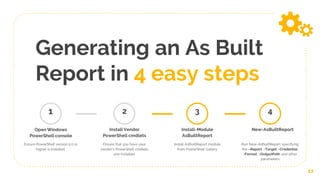
Generating an As Built
Report in 4 easy steps
11
1
Open Windows
PowerShell console
Ensure PowerShell version 5.0 or
higher is installed.
Install Vendor
PowerShell cmdlets
Ensure that you have your
vendor’s PowerShell cmdlets
pre-installed
2
Install-Module
AsBuiltReport
Install AsBuiltReport module
from PowerShell Gallery
3
New-AsBuiltReport
Run New-AsBuiltReport specifying
the –Report, -Target, -Credential,
-Format, -OutputPath and other
parameters
4
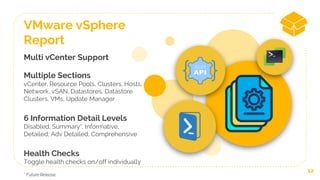
Multi vCenter Support
Multiple Sections
vCenter, Resource Pools, Clusters, Hosts,
Network, vSAN, Datastores, Datastore
Clusters, VMs, Update Manager
6 Information Detail Levels
Disabled, Summary*, Informative,
Detailed, Adv Detailed, Comprehensive
Health Checks
Toggle health checks on/off individually
12
VMware vSphere
Report
* Future Release
As Built Report
Live Demo
Technical Preview – AsBuiltReport PowerShell Modules
Place your screenshot here
14
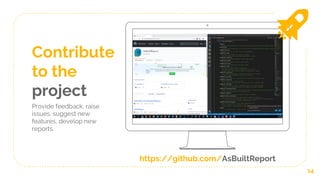
Contribute
to the
project
Provide feedback, raise
issues, suggest new
features, develop new
reports.
https://github.com/AsBuiltReport
Let’s review some concepts
Simple to Deploy & Use
Installable from the
PowerShell Gallery.
Uses common toolsets which
are widely available and
adopted.
Supports Multiple
Reports
As Built Report is a
configuration document
framework that can support
one to many reports.
Supports Multiple
Document Formats
Generate reports in MS Word,
HTML, XML or Text.
MS Word does not need to be
installed to generate reports.
15
Customisable
Customise the look and feel of
the report.
Specify different
configurations for different
environments.
Fully Automated
Generate documentation
which is accurate and
current in a consistent
and automated fashion.
Open Source
Free to use.
Contribute to the project
to improve it’s
functionality and
capabilities.
What’s next?
● Rewrite existing as built reports
○ Nutanix
○ Cisco UCS
● Develop new as built reports (these are some on the ToDo list)
○ VMware Site Recovery Manager, vRealize Operations &
vRealize Automation
○ HPE Nimble & iLO
○ DELL EMC Isilon, iDRAC, OpenManage
● PowerShell Core Functionality Testing
16
17
Thanks!
Want more information?
Twitter @AsBuiltReport
Blog www.timcarman.net/as-built-report
Slack VMware {code} or PowerShell Slack
GitHub github.com/AsBuiltReport

Documenting Your Virtual Infrastructure with PowerShell & PowerCLI

  • 1.
    Documenting Your Virtual Infrastructurewith PowerShell & PowerCLI
  • 2.
    Tim Carman Thomas DuryeaLogicalis Team Lead – Hybrid Infrastructure Twitter @tpcarman Blog www.timcarman.net GitHub github.com/tpcarman 2
  • 3.
    Matt Allford Parallo Platform PracticeLead Twitter @mattallford Blog www.virtualtassie.com GitHub github.com/mattallford 3
  • 4.
    Everyone wants current as-builtdocumentation …but it’s always been difficult to keep accurate and up to date.
  • 5.
    The common problem ●Missing, incomplete or outdated documentation ● Lack of comprehensive reporting tools ● Reporting tools are inconsistent in output, style and formatting ● Manually generating documentation is time consuming and error prone ● Every environment is different 5
  • 6.
    ● Be simpleto build, maintain, deploy and use ● Be consistent in operation, styling and output formats ● Be modular to work with different vendors and technologies ● Be granular to provide diverse levels of detail ● Be automated to generate documents quickly and easily 6 🔨
  • 7.
    As Built Report A configurationdocument framework which uses Windows PowerShell to generate as-built documentation in multiple document formats. 7
  • 8.
    PowerShell Modules As BuiltReport is installable from the PowerShell Gallery, providing a quick and simple method to install and update What’s new with As Built Report? GitHub Organization Moving to a GitHub organization allows each report to have its own repository, management and project independence 8
  • 9.
    Multiple Document Formats DOC,HTML, XML, Text Custom Formatting Style documents to your look & feel Tailor the report information detail level Health Checks Highlight configuration issues Timestamps Append date and time to filename Email Delivery Attach and send reports via email 9 As Built Report
  • 10.
    Customise the style& configuration As Built Configuration Configure settings of the report such as company information, user folder and email settings. Report Configuration Set the level of detail to report on by section. Enable or disable health checks to highlight configuration issues. Configure additional options for the report type. Report Styles Use a default style or create your own to match your corporate identity. Set page orientation, text and table formatting with fonts, colours, borders and highlighted cells/rows. 10
  • 11.
    Generating an AsBuilt Report in 4 easy steps 11 1 Open Windows PowerShell console Ensure PowerShell version 5.0 or higher is installed. Install Vendor PowerShell cmdlets Ensure that you have your vendor’s PowerShell cmdlets pre-installed 2 Install-Module AsBuiltReport Install AsBuiltReport module from PowerShell Gallery 3 New-AsBuiltReport Run New-AsBuiltReport specifying the –Report, -Target, -Credential, -Format, -OutputPath and other parameters 4
  • 12.
    Multi vCenter Support MultipleSections vCenter, Resource Pools, Clusters, Hosts, Network, vSAN, Datastores, Datastore Clusters, VMs, Update Manager 6 Information Detail Levels Disabled, Summary*, Informative, Detailed, Adv Detailed, Comprehensive Health Checks Toggle health checks on/off individually 12 VMware vSphere Report * Future Release
  • 13.
    As Built Report LiveDemo Technical Preview – AsBuiltReport PowerShell Modules
  • 14.
    Place your screenshothere 14 Contribute to the project Provide feedback, raise issues, suggest new features, develop new reports. https://github.com/AsBuiltReport
  • 15.
    Let’s review someconcepts Simple to Deploy & Use Installable from the PowerShell Gallery. Uses common toolsets which are widely available and adopted. Supports Multiple Reports As Built Report is a configuration document framework that can support one to many reports. Supports Multiple Document Formats Generate reports in MS Word, HTML, XML or Text. MS Word does not need to be installed to generate reports. 15 Customisable Customise the look and feel of the report. Specify different configurations for different environments. Fully Automated Generate documentation which is accurate and current in a consistent and automated fashion. Open Source Free to use. Contribute to the project to improve it’s functionality and capabilities.
  • 16.
    What’s next? ● Rewriteexisting as built reports ○ Nutanix ○ Cisco UCS ● Develop new as built reports (these are some on the ToDo list) ○ VMware Site Recovery Manager, vRealize Operations & vRealize Automation ○ HPE Nimble & iLO ○ DELL EMC Isilon, iDRAC, OpenManage ● PowerShell Core Functionality Testing 16
  • 17.
    17 Thanks! Want more information? Twitter@AsBuiltReport Blog www.timcarman.net/as-built-report Slack VMware {code} or PowerShell Slack GitHub github.com/AsBuiltReport