Switching	
 Search	
 to	
 
       SOLR
             Brad Blake
 Drupalcamp Atlanta 2011 ( 10/1/2011 )
The	
 Good
➡   Ships with Drupal
➡   AND/OR, exact phrase matching
➡   Many extension modules, including
    facets, word stemming
➡   Indexes default display, but can
    configure search_index display
The	
 Bad
➡   Memory/CPU intensive for searching
    and indexing
➡   Doesn’t scale well
➡   Dead End ( advanced search, but not
    intuitive )
➡   Exact keyword matching
What	
 is	
 SOLR?
➡   Open-Source Search Platform
➡   Apache Lucene search library
➡   Standalone Search Server
➡   Runs within servlet container ( Tomcat )
➡   XML/JSON API’s
Why	
 Use	
 SOLR?
➡   Performance
    ➡   Optimized for search
    ➡   Distributed Search / Index Replication
    ➡   Reduces load on Drupal site
    ➡   Faster = Better
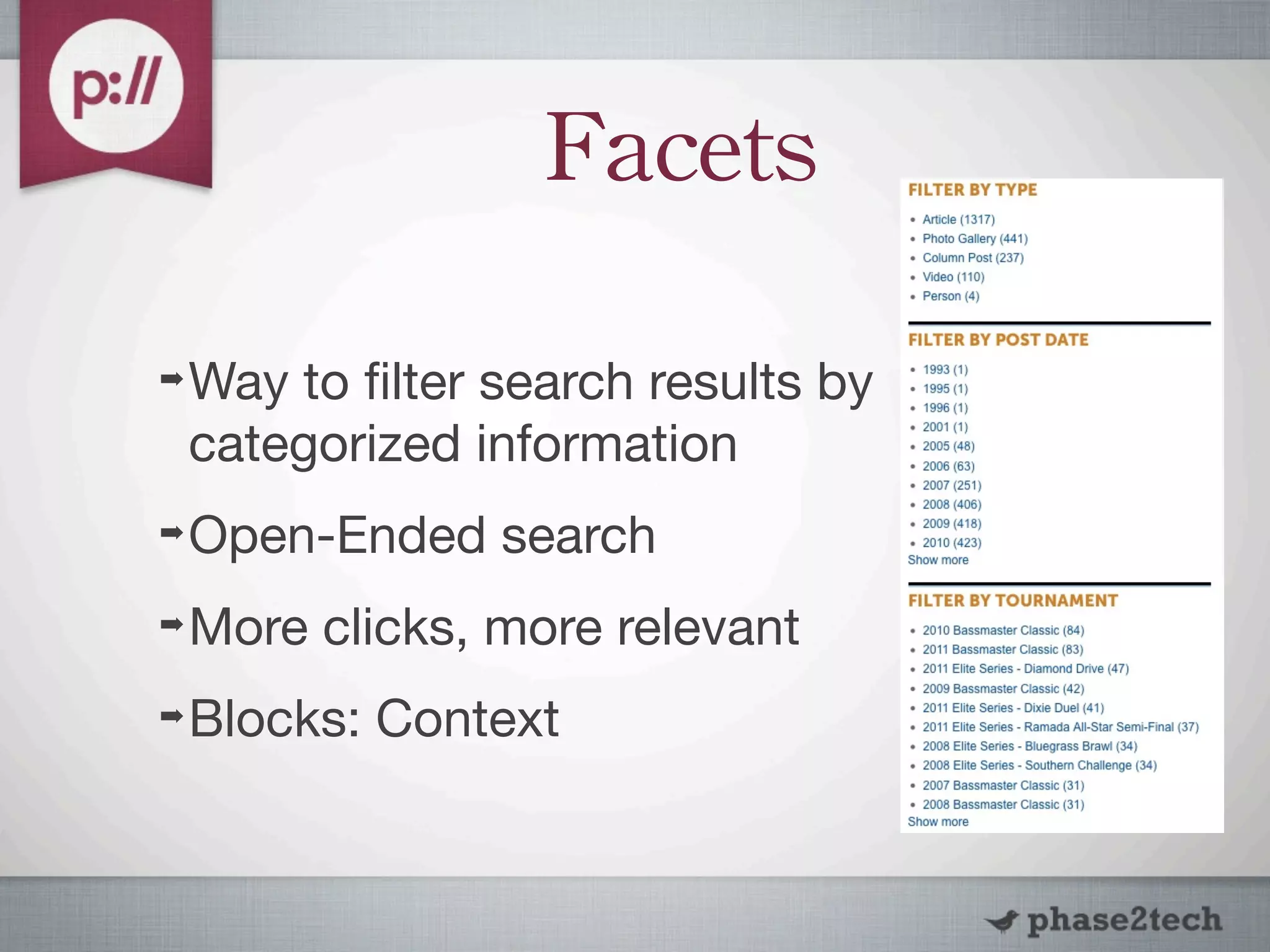
Facets

➡   Way to filter search results by
    categorized information
➡   Open-Ended search
➡   More clicks, more relevant
➡   Blocks: Context
Why	
 Use	
 SOLR?
➡   Document Handling ( PDF / Word, etc)
➡   Better Search Algorithms
    ➡   Full-text search
    ➡   Word Stemming, Splitting, etc
    ➡   Highly Configurable
Drawbacks

➡   Hosted website = more $$$
➡   Requires hosting provider to install
➡   Maintenance / overhead
➡   Java / Tomcat experience
How	
 to	
 Install?
➡   Same Server / Own Server
➡   http://wiki.apache.org/solr/SolrTomcat
➡   Hosting Providers
    ➡   Acquia
    ➡   Others
ApacheSolr
➡   http://drupal.org/project/apachesolr
➡   Copy schema.xml / solrconfig.xml into
    solr conf directory
➡   Enable apachesolr, apachesolr_search
➡   Change default and available searches
    under Configuration -> Search Settings
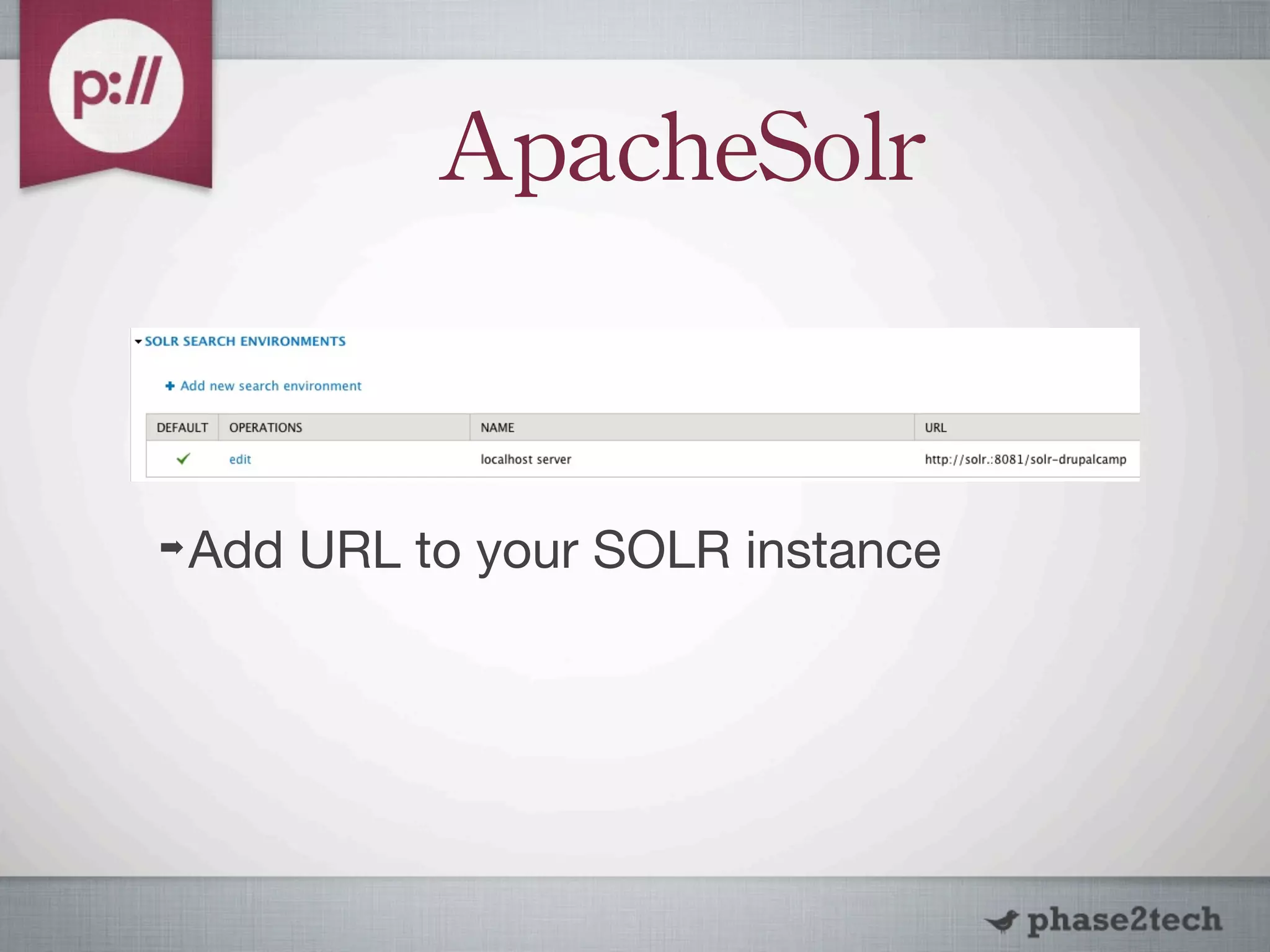
ApacheSolr


➡   Add URL to your SOLR instance
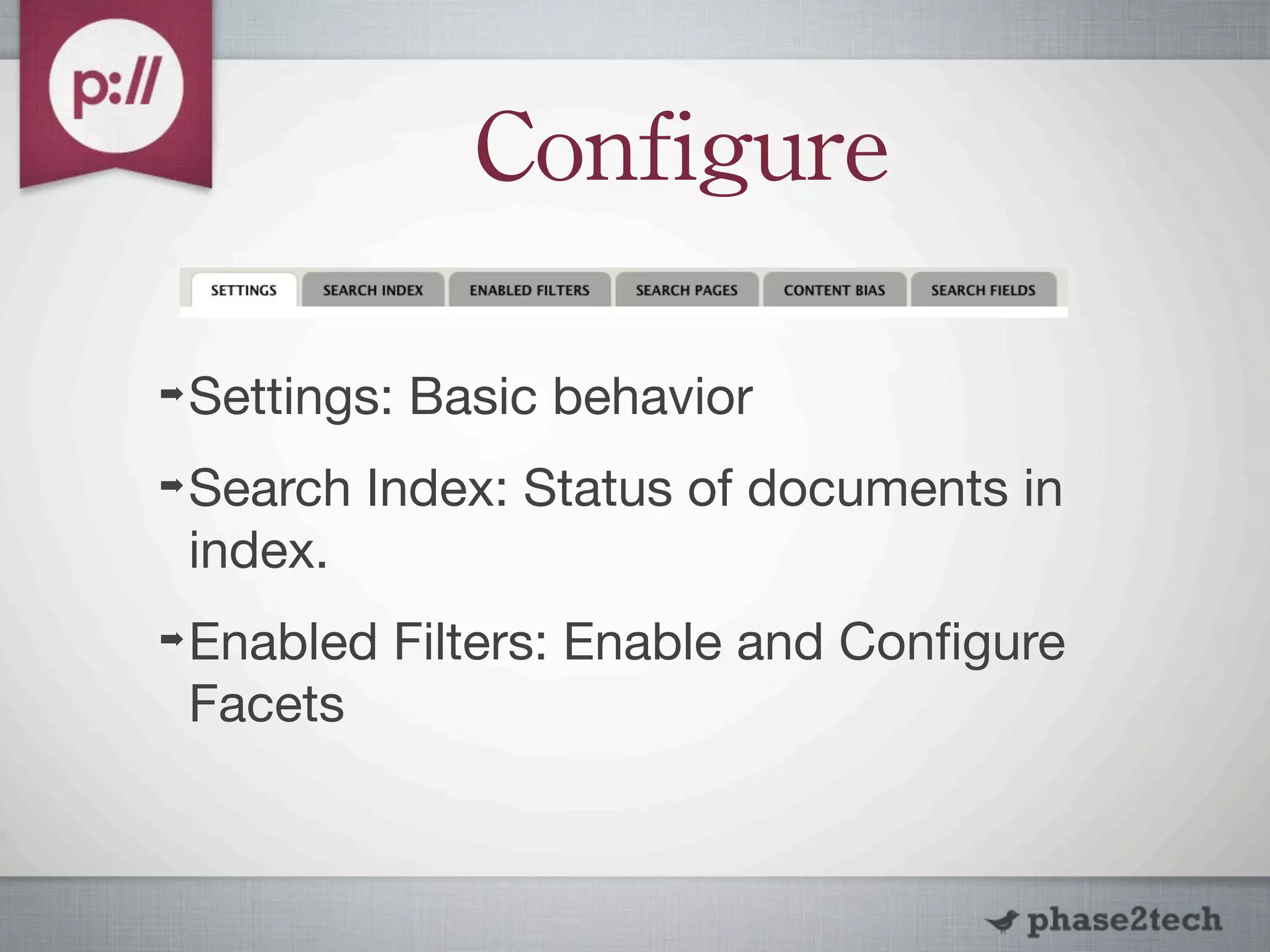
Configure

➡   Settings: Basic behavior
➡   Search Index: Status of documents in
    index.
➡   Enabled Filters: Enable and Configure
    Facets
Configure

➡   Search Pages: Create custom search
    pages, i.e. taxonomy
➡   Content Bias: Property and Content
    Type weighting, Content Type exclusion
➡   Search Fields: Field weighting
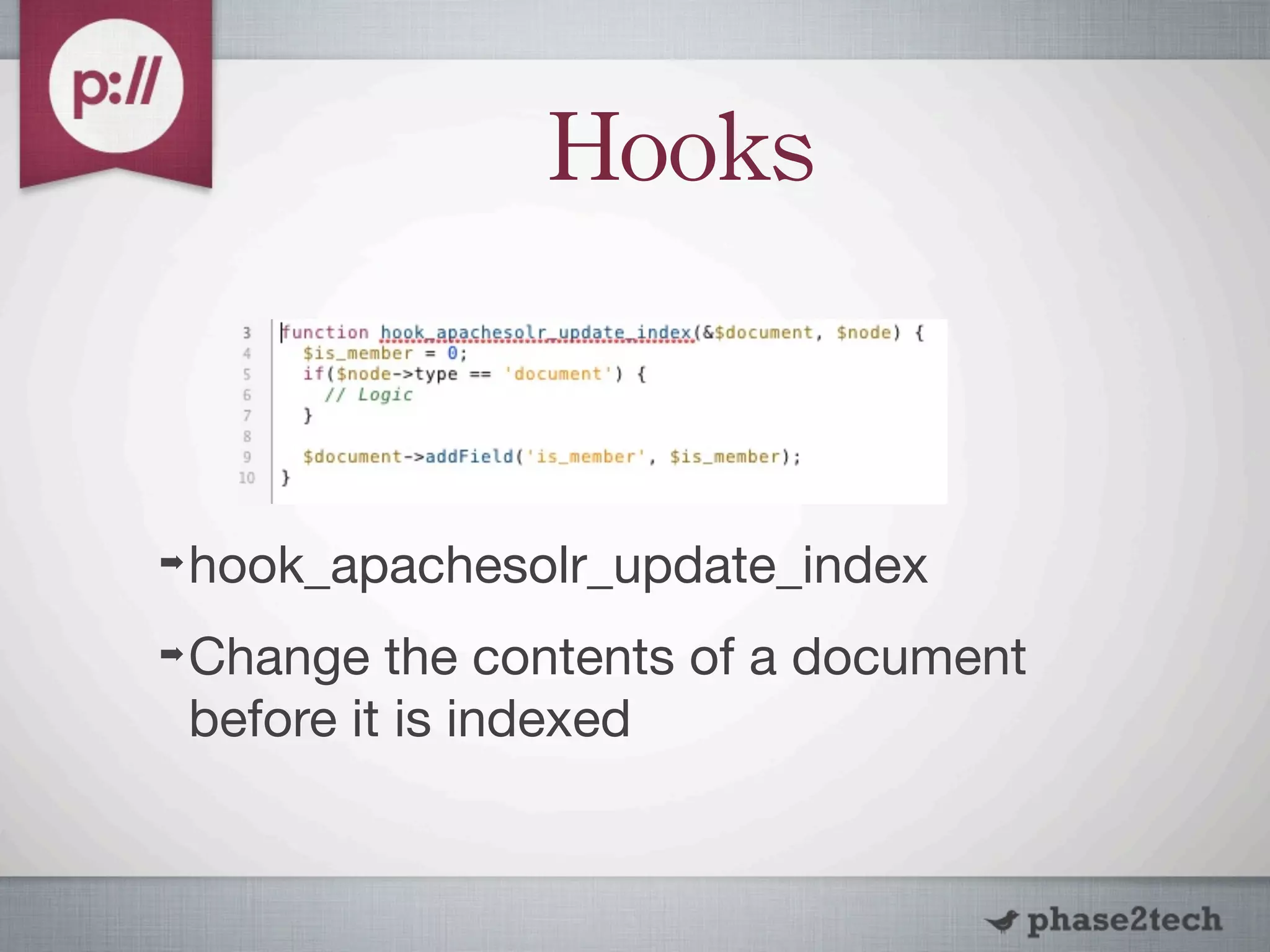
Hooks


➡   hook_apachesolr_update_index
➡   Change the contents of a document
    before it is indexed
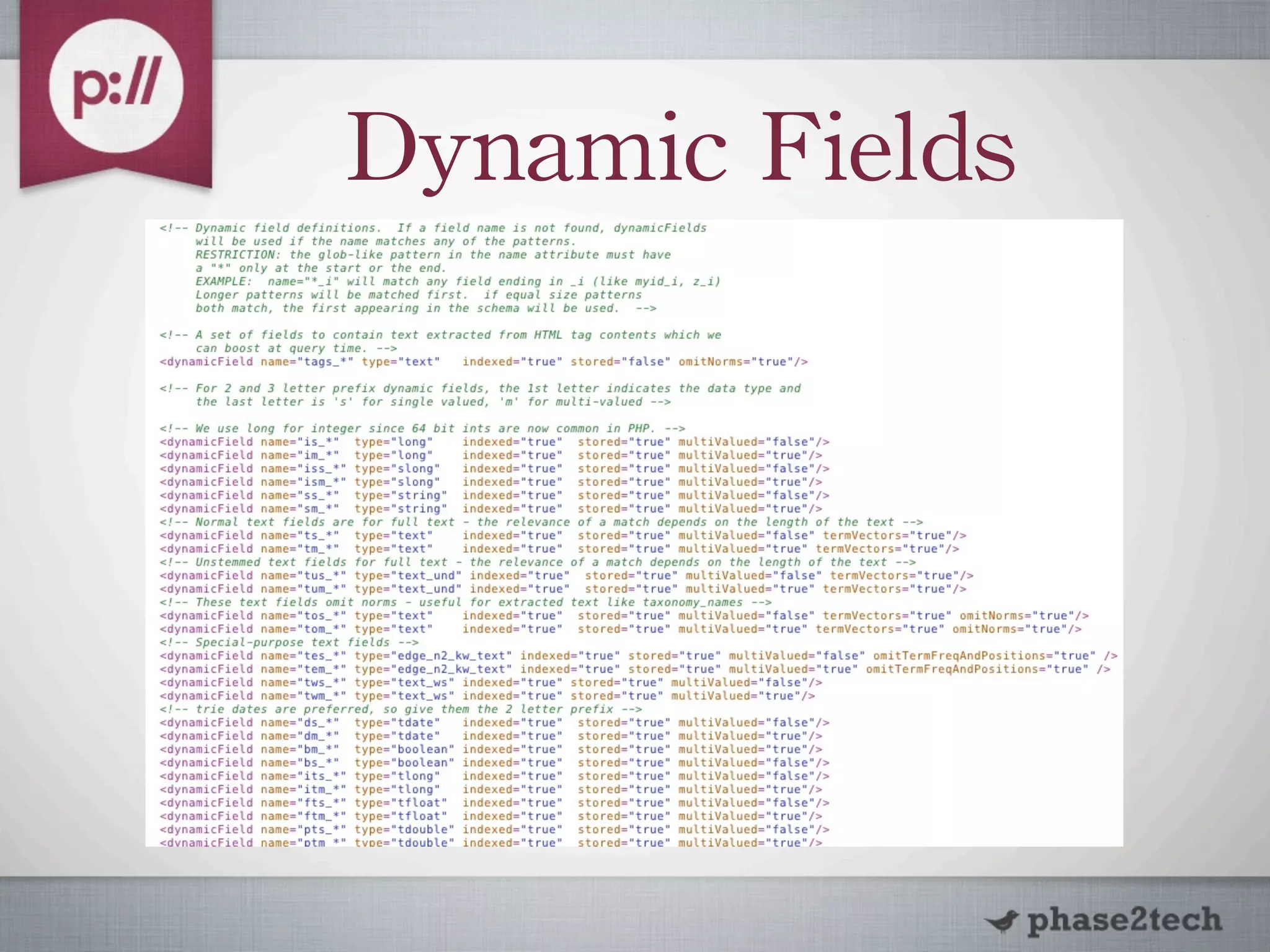
Dynamic	
 Fields
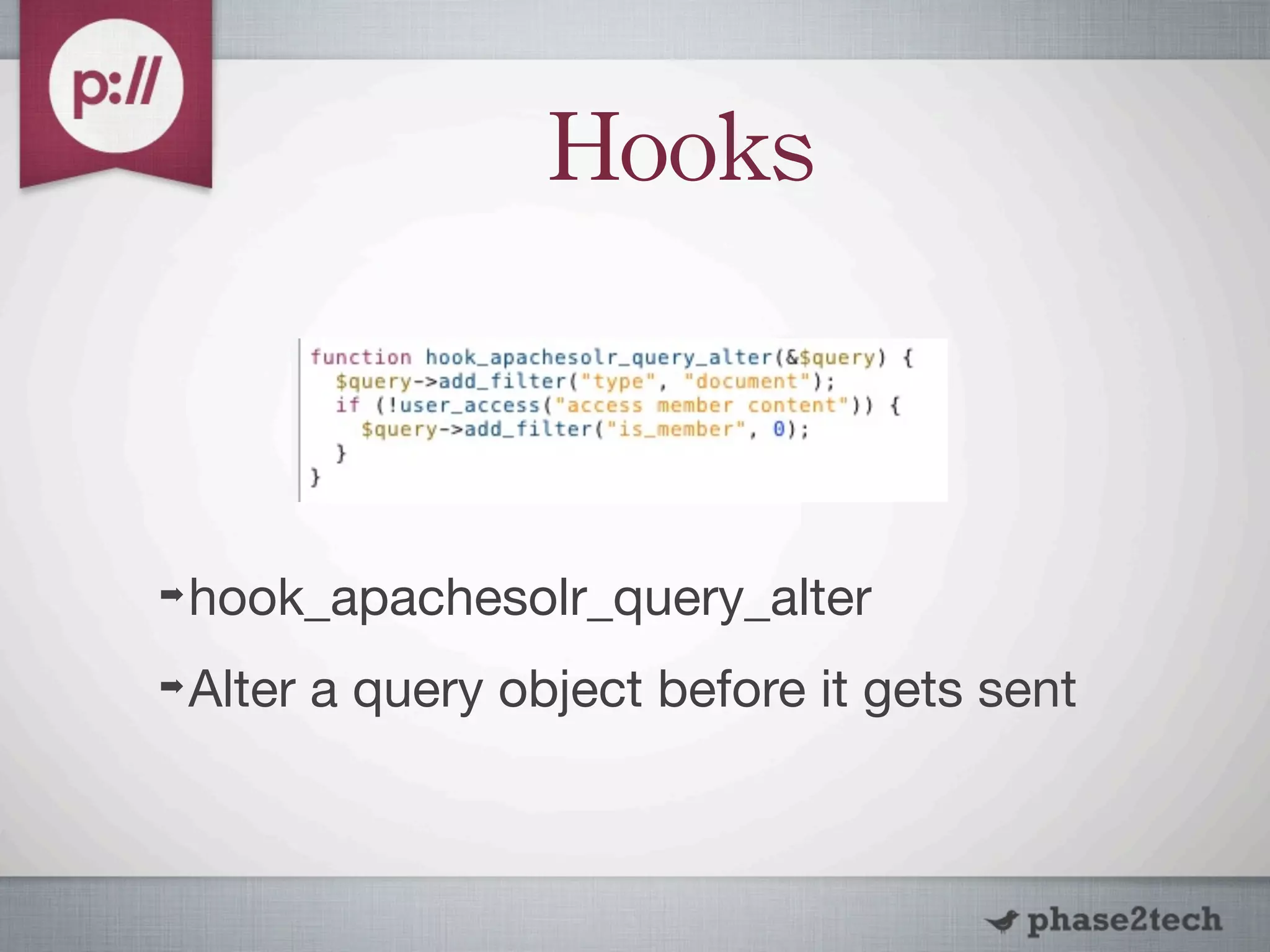
Hooks


➡   hook_apachesolr_query_alter
➡   Alter a query object before it gets sent
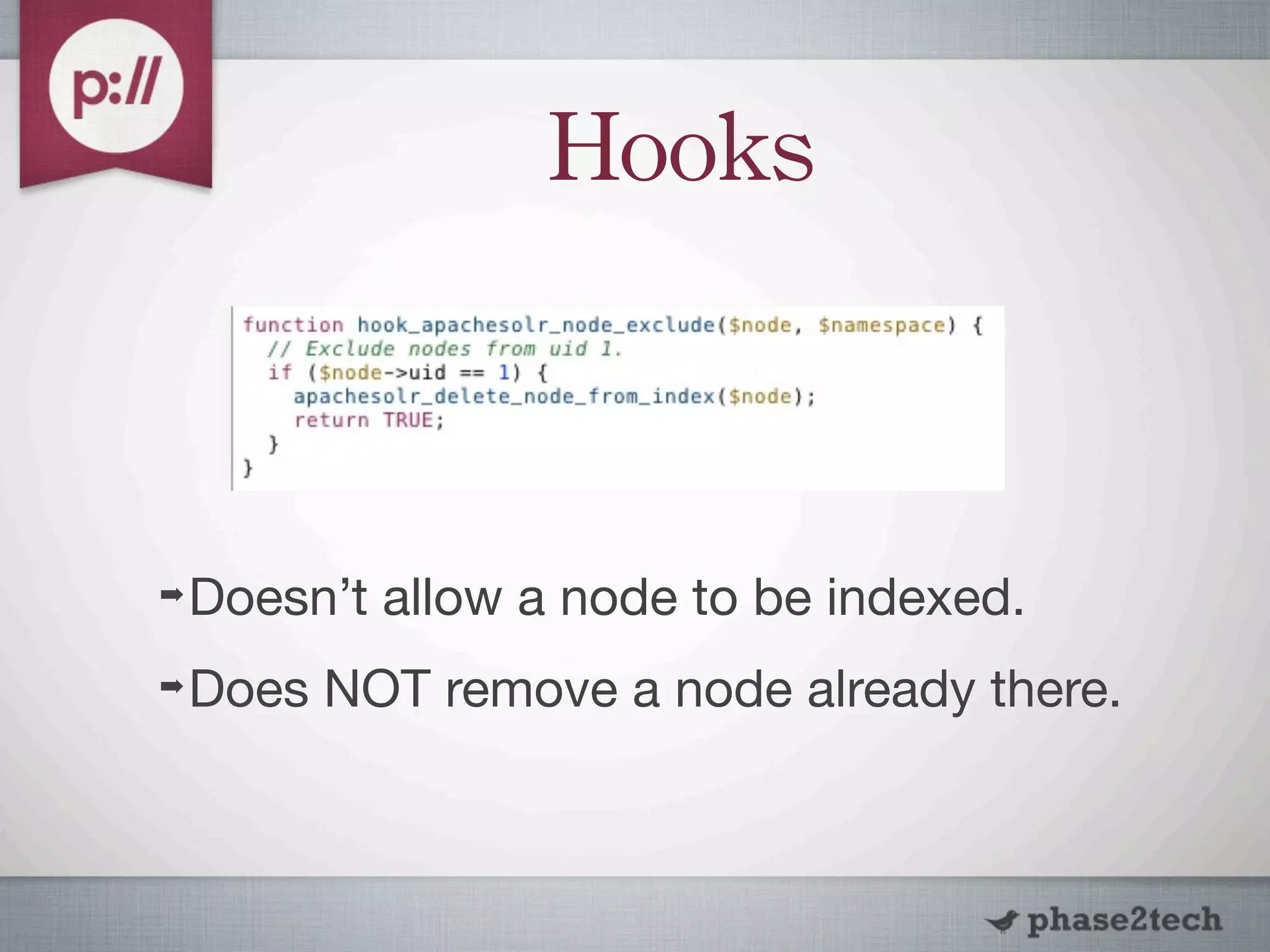
Hooks


➡   Doesn’t allow a node to be indexed.
➡   Does NOT remove a node already there.
Hooks

➡   hook_apachesolr_search_result_alter($d
    oc) { }
➡   hook_apachesolr_sort_links_alter(&
    $sort_links) {}
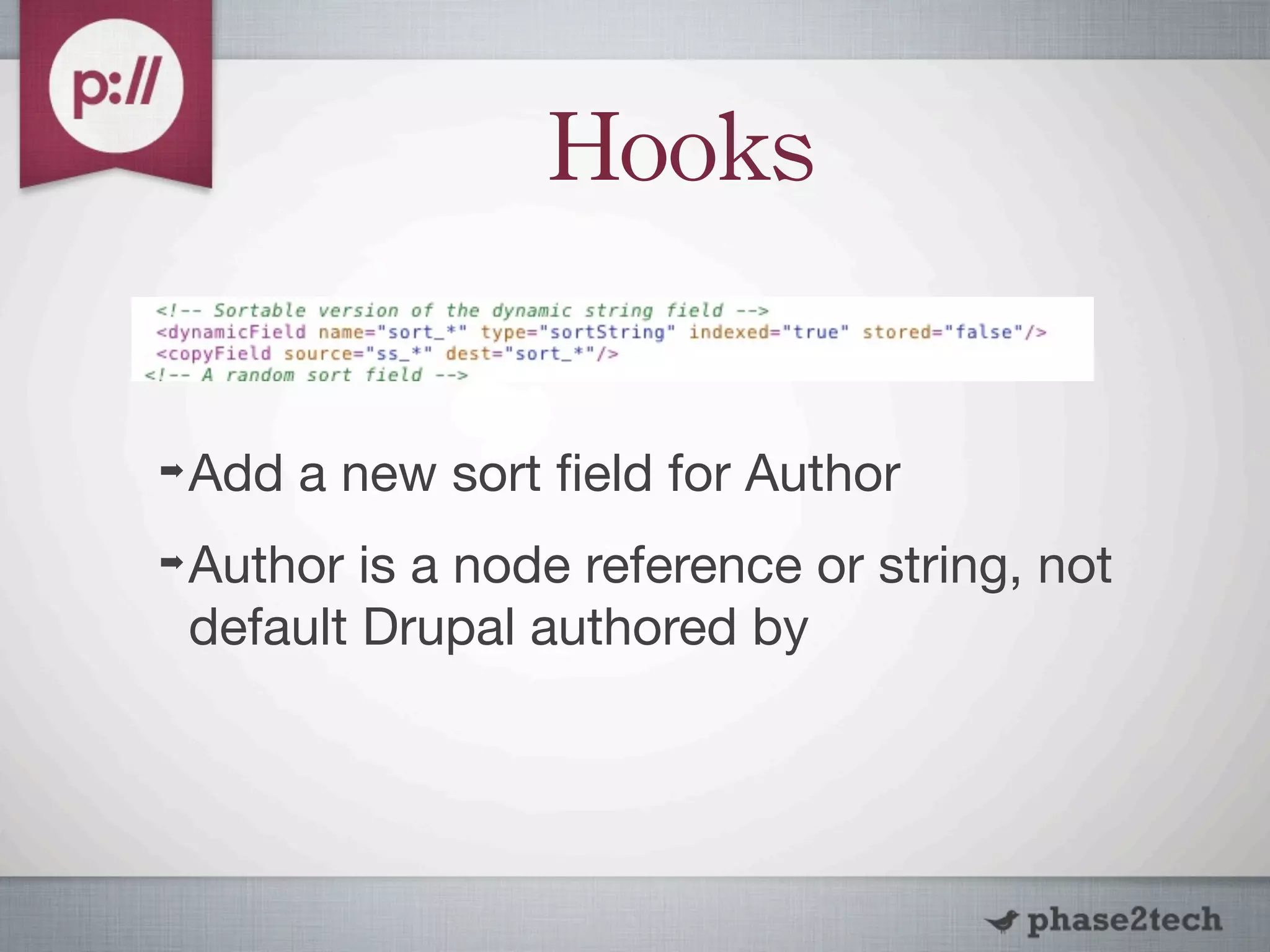
Hooks

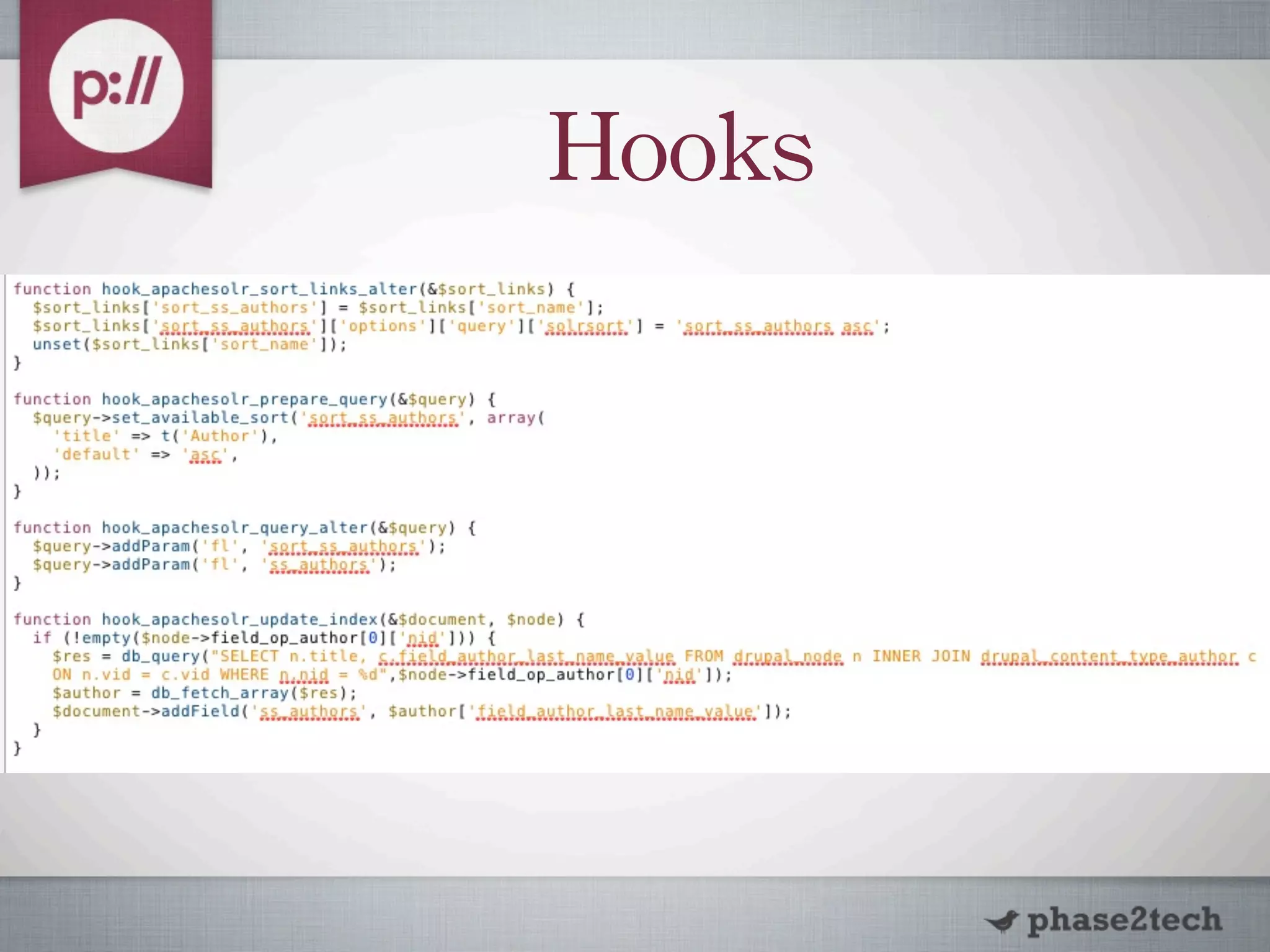
➡   Add a new sort field for Author
➡   Author is a node reference or string, not
    default Drupal authored by
Hooks
Theme


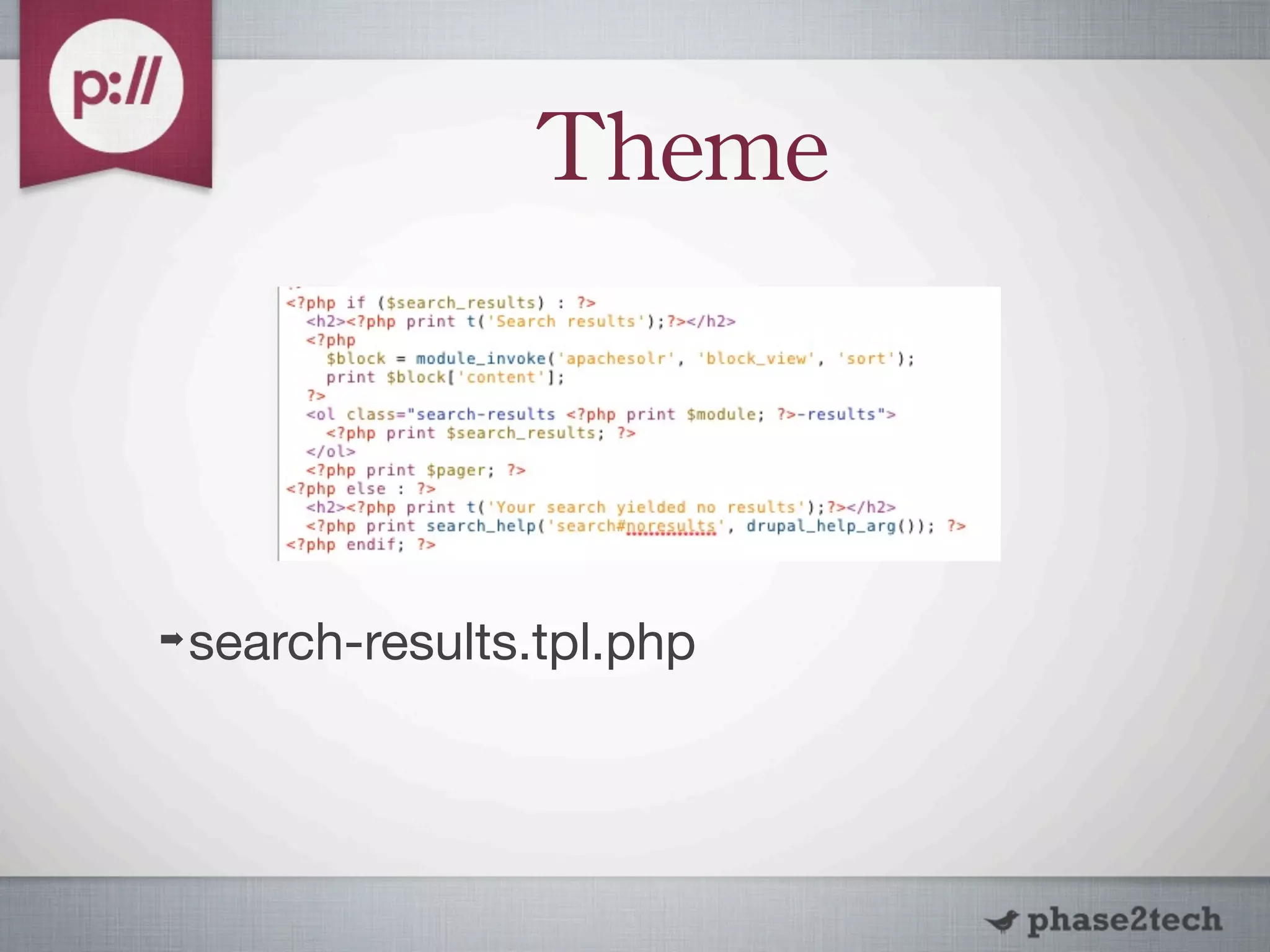
➡   search-results.tpl.php
Theme

➡   Default search-result.tpl.php
➡   $result contains a lot of information
➡   Contains data valid at the time of
    indexing
➡   Not all fields are present
Theme


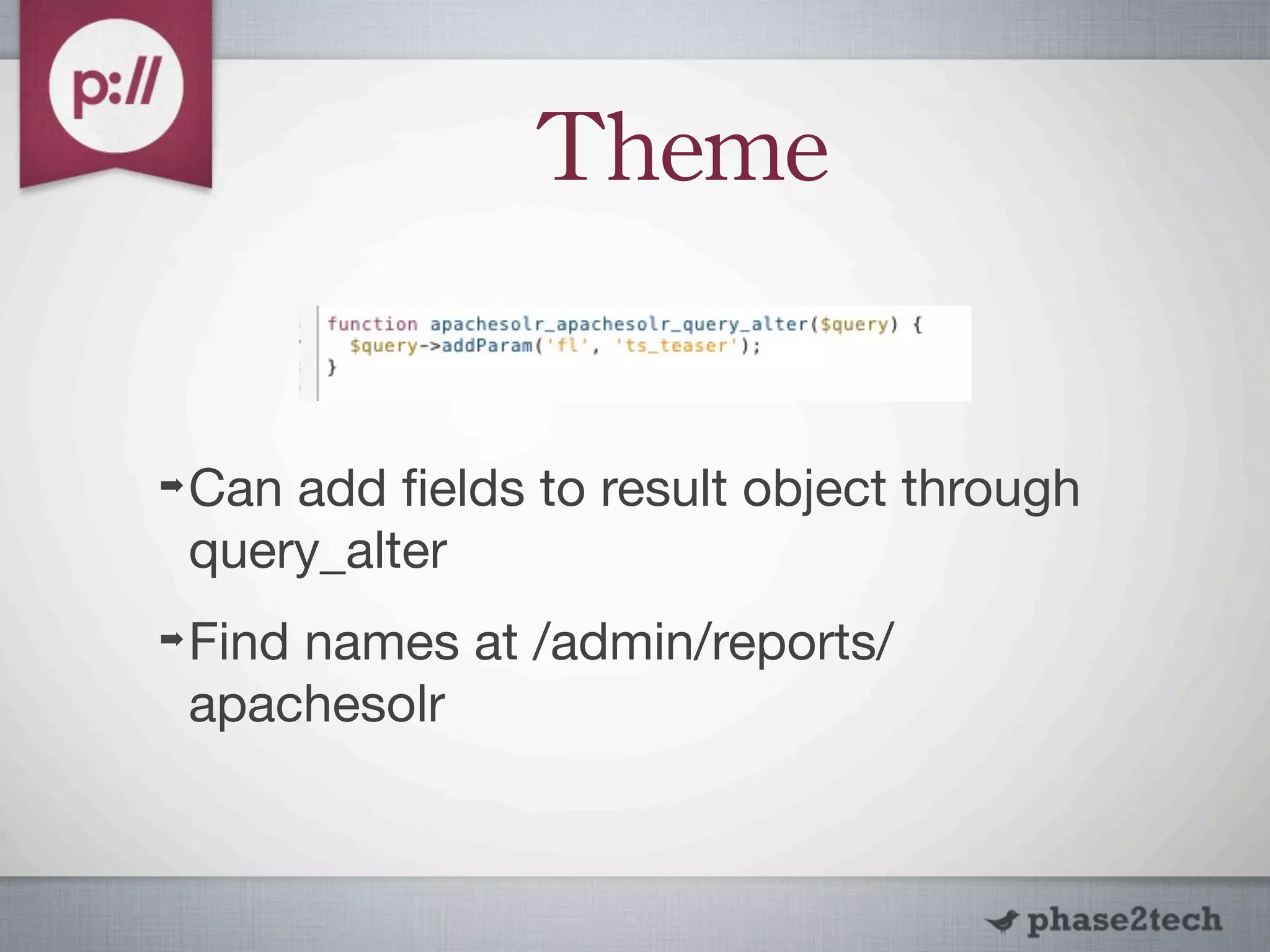
➡   Can add fields to result object through
    query_alter
➡   Find names at /admin/reports/
    apachesolr
Theme
Attachments
➡   Install Apache Tika locally or in SOLR
➡   http://drupal.org/project/
    apachesolr_attachments
➡   Indexes attachments and extracts text if
    possible.
➡   Read the README
Attachments
➡   Creates File attachment ‘node’ in the
    index.
➡   Can theme these to link back to parent
    node.
➡   hook_apachesolr_attachment_index_alte
    r($document, $node, $file) {}
Search	
 API

➡   http://drupal.org/project/search_api
➡   Search framework to search on any
    entity, with any backend
The	
 Good
➡   Abstraction of search engine layer ( DB /
    Mongo / SOLR, etc )
➡   Views integration
➡   Faceted search
➡   Ability for multiple backends
➡   Set up additional search pages
The	
 Good

➡   Many extension modules ( AJAX,
    Autocomplete, Attachments, etc )
➡   Control over which fields are indexed
    ( Index level, not Content Type level )
The	
 Bad
➡   Not compatible with all versions of
    SOLR
➡   Sorts module not as good as apachesolr
    module’s
➡   Performance depends on backend used
➡   Field weights not as granular
➡   Takes getting used to
Thank	
 You	


➡   Questions?

Switching search to SOLR

  • 1.
    Switching Search to SOLR Brad Blake Drupalcamp Atlanta 2011 ( 10/1/2011 )
  • 2.
    The Good ➡ Ships with Drupal ➡ AND/OR, exact phrase matching ➡ Many extension modules, including facets, word stemming ➡ Indexes default display, but can configure search_index display
  • 3.
    The Bad ➡ Memory/CPU intensive for searching and indexing ➡ Doesn’t scale well ➡ Dead End ( advanced search, but not intuitive ) ➡ Exact keyword matching
  • 4.
    What is SOLR? ➡ Open-Source Search Platform ➡ Apache Lucene search library ➡ Standalone Search Server ➡ Runs within servlet container ( Tomcat ) ➡ XML/JSON API’s
  • 5.
    Why Use SOLR? ➡ Performance ➡ Optimized for search ➡ Distributed Search / Index Replication ➡ Reduces load on Drupal site ➡ Faster = Better
  • 6.
    Facets ➡ Way to filter search results by categorized information ➡ Open-Ended search ➡ More clicks, more relevant ➡ Blocks: Context
  • 7.
    Why Use SOLR? ➡ Document Handling ( PDF / Word, etc) ➡ Better Search Algorithms ➡ Full-text search ➡ Word Stemming, Splitting, etc ➡ Highly Configurable
  • 8.
    Drawbacks ➡ Hosted website = more $$$ ➡ Requires hosting provider to install ➡ Maintenance / overhead ➡ Java / Tomcat experience
  • 9.
    How to Install? ➡ Same Server / Own Server ➡ http://wiki.apache.org/solr/SolrTomcat ➡ Hosting Providers ➡ Acquia ➡ Others
  • 10.
    ApacheSolr ➡ http://drupal.org/project/apachesolr ➡ Copy schema.xml / solrconfig.xml into solr conf directory ➡ Enable apachesolr, apachesolr_search ➡ Change default and available searches under Configuration -> Search Settings
  • 11.
    ApacheSolr ➡ Add URL to your SOLR instance
  • 12.
    Configure ➡ Settings: Basic behavior ➡ Search Index: Status of documents in index. ➡ Enabled Filters: Enable and Configure Facets
  • 13.
    Configure ➡ Search Pages: Create custom search pages, i.e. taxonomy ➡ Content Bias: Property and Content Type weighting, Content Type exclusion ➡ Search Fields: Field weighting
  • 14.
    Hooks ➡ hook_apachesolr_update_index ➡ Change the contents of a document before it is indexed
  • 15.
  • 16.
    Hooks ➡ hook_apachesolr_query_alter ➡ Alter a query object before it gets sent
  • 17.
    Hooks ➡ Doesn’t allow a node to be indexed. ➡ Does NOT remove a node already there.
  • 18.
    Hooks ➡ hook_apachesolr_search_result_alter($d oc) { } ➡ hook_apachesolr_sort_links_alter(& $sort_links) {}
  • 19.
    Hooks ➡ Add a new sort field for Author ➡ Author is a node reference or string, not default Drupal authored by
  • 20.
  • 21.
    Theme ➡ search-results.tpl.php
  • 22.
    Theme ➡ Default search-result.tpl.php ➡ $result contains a lot of information ➡ Contains data valid at the time of indexing ➡ Not all fields are present
  • 23.
    Theme ➡ Can add fields to result object through query_alter ➡ Find names at /admin/reports/ apachesolr
  • 24.
  • 25.
    Attachments ➡ Install Apache Tika locally or in SOLR ➡ http://drupal.org/project/ apachesolr_attachments ➡ Indexes attachments and extracts text if possible. ➡ Read the README
  • 26.
    Attachments ➡ Creates File attachment ‘node’ in the index. ➡ Can theme these to link back to parent node. ➡ hook_apachesolr_attachment_index_alte r($document, $node, $file) {}
  • 27.
    Search API ➡ http://drupal.org/project/search_api ➡ Search framework to search on any entity, with any backend
  • 28.
    The Good ➡ Abstraction of search engine layer ( DB / Mongo / SOLR, etc ) ➡ Views integration ➡ Faceted search ➡ Ability for multiple backends ➡ Set up additional search pages
  • 29.
    The Good ➡ Many extension modules ( AJAX, Autocomplete, Attachments, etc ) ➡ Control over which fields are indexed ( Index level, not Content Type level )
  • 30.
    The Bad ➡ Not compatible with all versions of SOLR ➡ Sorts module not as good as apachesolr module’s ➡ Performance depends on backend used ➡ Field weights not as granular ➡ Takes getting used to
  • 31.
    Thank You ➡ Questions?