SEARCH ENGINES:
BEST PRACTICE
BY YULIYA
PRACH
“EPAM SYSTEMS”
8 BASIC PRINCIPLES OF EFFECTIVE ON-SITE
SEARCH
1) Search Box Prominence
2) Search Box Text
3) High-Quality Thumbnails in
Search Results
4) Auto Suggestion and Spell
Correction
5) Fuzzy Matching
6) Grid vs. List View
7) Quick Preview
8) Reviews and Rating
Displayed in Search Result
• INSTALL SOLR
• APACHE SOLR SEARCH
• SEARCH API SOLR SEARCH
Solr
Open source enterprise search platform
Written in Java
Solr 4 adds NoSQL features
Near Real Time Search
Optimistic Concurrency Control
Atomic updates
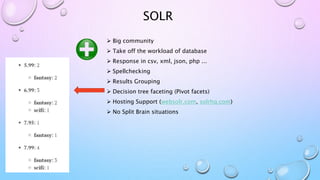
SOLR
 Big community
 Take off the workload of database
 Response in csv, xml, json, php ...
 Spellchecking
 Results Grouping
 Decision tree faceting (Pivot facets)
 Hosting Support (websolr.com, solrhq.com)
 No Split Brain situations
Need a schema
No Ability to search across multiple
indexes
No Support for multiple document
types per schema
SOLR
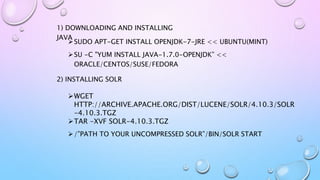
HOW TO INSTALL SOLR?
SUDO APT-GET INSTALL OPENJDK-7-JRE << UBUNTU(MINT)
SU -C "YUM INSTALL JAVA-1.7.0-OPENJDK” <<
ORACLE/CENTOS/SUSE/FEDORA
2) INSTALLING SOLR
1) DOWNLOADING AND INSTALLING
JAVA
WGET
HTTP://ARCHIVE.APACHE.ORG/DIST/LUCENE/SOLR/4.10.3/SOLR
-4.10.3.TGZ
TAR -XVF SOLR-4.10.3.TGZ
/”PATH TO YOUR UNCOMPRESSED SOLR”/BIN/SOLR START
3) CHECKING
http://localhost:8983/solr
4) COPY FILES FROM /”module_name”/solr-conf/solr-4.x TO
solr/collection1/conf
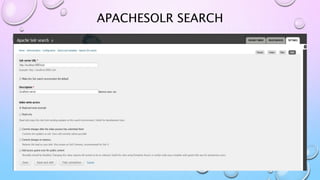
APACHE SOLR SEARCH
VS
SEARCH API SOLR SEARCH
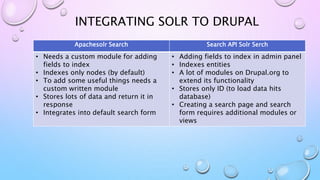
INTEGRATING SOLR TO DRUPAL
Apachesolr Search Search API Solr Serch
• Needs a custom module for adding
fields to index
• Indexes only nodes (by default)
• To add some useful things needs a
custom written module
• Stores lots of data and return it in
response
• Integrates into default search form
• Adding fields to index in admin panel
• Indexes entities
• A lot of modules on Drupal.org to
extend its functionality
• Stores only ID (to load data hits
database)
• Creating a search page and search
form requires additional modules or
views
APACHESOLR SEARCH
SEARCH API SOLR SEARCH
FACETED SEARCH
Facet API & Facet Slider (Apache Solr Search)
Search facets & Search API ranges (Search API Solr
Search)
EXTENDING SEARCH
Search API Pages & Search API Page Block
Search API Autocomplete/Apache Solr Autocomplete
Rich Snippets
Search Api Live Result
Searchcloud Block
Display suite
Fuzzy Search
SEARCH PAGE EXAMPLE
Elastic Search Connector
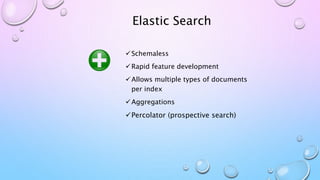
Elastic Search
Schemaless
Rapid feature development
Allows multiple types of documents
per index
Aggregations
Percolator (prospective search)
Prone to 'Split Brain' Situations
Poor documentation
Some missing features (Results
Grouping, Decision Tree Faceting)
Only json response
Elastic Search
INSTALLING ELASTICSEARCH
1) Download and install the latest version of OPENJDK
2) Download needed version from
http://www.elasticsearch.org/overview/elkdownloads/
3) Unzip it in the destination folder
4) Run bin/elasticsearch in Linux or bin/elasticsearch.bat in Windows
5) Go to localhost:9200 to check whether it works
ELASTICSEARCH CONNECTOR
THANKS FOR
YOUR ATTENTION!
E-mail:
Yuliya_Prach@epam.com
Skype: yulichka_lviv

Search Engines: Best Practice

  • 1.
    SEARCH ENGINES: BEST PRACTICE BYYULIYA PRACH “EPAM SYSTEMS”
  • 2.
    8 BASIC PRINCIPLESOF EFFECTIVE ON-SITE SEARCH 1) Search Box Prominence 2) Search Box Text 3) High-Quality Thumbnails in Search Results 4) Auto Suggestion and Spell Correction 5) Fuzzy Matching 6) Grid vs. List View 7) Quick Preview 8) Reviews and Rating Displayed in Search Result
  • 3.
    • INSTALL SOLR •APACHE SOLR SEARCH • SEARCH API SOLR SEARCH
  • 4.
    Solr Open source enterprisesearch platform Written in Java Solr 4 adds NoSQL features Near Real Time Search Optimistic Concurrency Control Atomic updates
  • 5.
    SOLR  Big community Take off the workload of database  Response in csv, xml, json, php ...  Spellchecking  Results Grouping  Decision tree faceting (Pivot facets)  Hosting Support (websolr.com, solrhq.com)  No Split Brain situations
  • 6.
    Need a schema NoAbility to search across multiple indexes No Support for multiple document types per schema SOLR
  • 7.
  • 8.
    SUDO APT-GET INSTALLOPENJDK-7-JRE << UBUNTU(MINT) SU -C "YUM INSTALL JAVA-1.7.0-OPENJDK” << ORACLE/CENTOS/SUSE/FEDORA 2) INSTALLING SOLR 1) DOWNLOADING AND INSTALLING JAVA WGET HTTP://ARCHIVE.APACHE.ORG/DIST/LUCENE/SOLR/4.10.3/SOLR -4.10.3.TGZ TAR -XVF SOLR-4.10.3.TGZ /”PATH TO YOUR UNCOMPRESSED SOLR”/BIN/SOLR START
  • 9.
    3) CHECKING http://localhost:8983/solr 4) COPYFILES FROM /”module_name”/solr-conf/solr-4.x TO solr/collection1/conf
  • 10.
  • 11.
    INTEGRATING SOLR TODRUPAL Apachesolr Search Search API Solr Serch • Needs a custom module for adding fields to index • Indexes only nodes (by default) • To add some useful things needs a custom written module • Stores lots of data and return it in response • Integrates into default search form • Adding fields to index in admin panel • Indexes entities • A lot of modules on Drupal.org to extend its functionality • Stores only ID (to load data hits database) • Creating a search page and search form requires additional modules or views
  • 12.
  • 13.
  • 14.
    FACETED SEARCH Facet API& Facet Slider (Apache Solr Search) Search facets & Search API ranges (Search API Solr Search)
  • 15.
    EXTENDING SEARCH Search APIPages & Search API Page Block Search API Autocomplete/Apache Solr Autocomplete Rich Snippets Search Api Live Result Searchcloud Block Display suite Fuzzy Search
  • 16.
  • 17.
  • 18.
    Elastic Search Schemaless Rapid featuredevelopment Allows multiple types of documents per index Aggregations Percolator (prospective search)
  • 19.
    Prone to 'SplitBrain' Situations Poor documentation Some missing features (Results Grouping, Decision Tree Faceting) Only json response Elastic Search
  • 20.
  • 21.
    INSTALLING ELASTICSEARCH 1) Downloadand install the latest version of OPENJDK 2) Download needed version from http://www.elasticsearch.org/overview/elkdownloads/ 3) Unzip it in the destination folder 4) Run bin/elasticsearch in Linux or bin/elasticsearch.bat in Windows 5) Go to localhost:9200 to check whether it works
  • 22.
  • 23.