The document explains the switch statement in programming, detailing its syntax and functionality in selecting actions based on the values of a variable. It describes the components of a switch statement, including cases, break statements, and default options, along with example code to illustrate its application. Additionally, it notes the flexibility of the switch statement compared to if statements, especially for handling multiple discrete values.

![Switch Case Statement
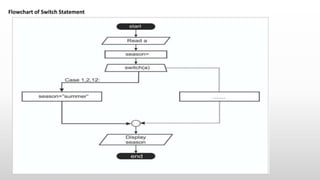
When a value requires different actions for a fixed set of values, the if might get more complex, the more the
set of values increases. In this case the more suitable statement is the switch statement.
Syntax
switch ([onvar]) {
case [option]:
[statement;]
break;
…
default:
[statement;]
}](https://image.slidesharecdn.com/switchcasestatement-211122065019/85/Switch-Case-Statement-2-320.jpg)
![The terms in square brackets are detailed in the following list.
• [onvar] is the variable that is tested against the case statements to select a statement. It can be of any primitive type,
enumerations and starting with Java 7, String. Clearly the switch statement is not limited by conditions evaluated to
boolean results, which allows for a lot of flexibility.
• case [option] is a value the variable is matched upon to make a decision regarding the statement to execute. A case as
the keyword states.
• [statement] is a statement or a groups of statements to execute when [onvar] == [option]. Considering that there is no
else branch, we have to make sure that only the statement(s) corresponding to the first match is executed, which is
where the break; statement comes in. The break statement stops the current execution path and moves the execution
point to the next statement outside the statement that contains it. I’ll cover it later in the chapter. Without it, after the
first match, all subsequent cases are traversed, and statements corresponding to them are executed.
• So, if we execute the preceding program and we provide number 7 as an argument, the text Summer is printed. But if
the break statements for case 7 and 8 are commented, the output changes to Autumn.
• default [statement;] is a statement that is executed when no match on a case has been found, the default case does not
need a break statement. If the previous program is run with any number outside the [1-12] interval, Error is printed
because the default statement is executed.
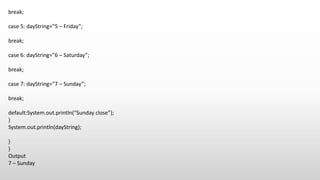
• Now that you understand how switch works, let’s look at how we can reduce the previous statement. The month
example is suitable here, because it can further be modified to show how the switch statement can be simplified,
when a single statement should be executed for multiple cases. In our code, writing each assignment statement three
times is a little redundant. switch can be written in a different way to avoid that by grouping the cases.](https://image.slidesharecdn.com/switchcasestatement-211122065019/85/Switch-Case-Statement-3-320.jpg)
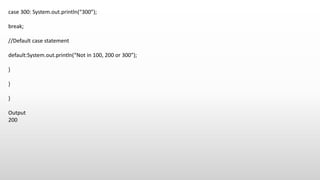
![Example
public class SwitchExample {
public static void main(String[] args) {
//Declaring a variable for switch expression
int number=200;
//Switch expression
switch(number){
//Case statements
case 100: System.out.println(“100”);
break;
case 200: System.out.println(“200”);
break;](https://image.slidesharecdn.com/switchcasestatement-211122065019/85/Switch-Case-Statement-4-320.jpg)
![Example
public class SwitchDayExample {
public static void main(String[] args) {
int day=7;
String dayString=””;
switch(day){
case 1: dayString=”1 – Monday”;
break;
case 2: dayString=”2 – Teusday”;
break;
case 3: dayString=”3 – Wednesday”;
break;
case 4: dayString=”4 – Thursday”;](https://image.slidesharecdn.com/switchcasestatement-211122065019/85/Switch-Case-Statement-7-320.jpg)