Surveon VMS Update
NVR EC 3.3 / 4.0 / SCC 2.7 / SurveOne Phase 1.2
Content
2
Feature Summary
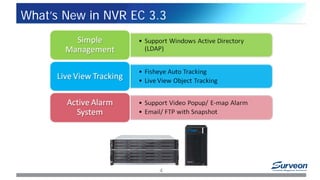
What’s New in NVR EC 3.3
What’s New in NVR EC 4.0
What’s New in SCC 2.7
What’s New in SurveOne Phase 1.2
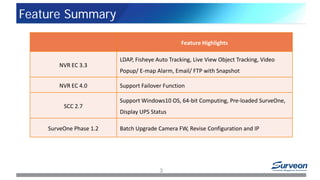
Feature Summary
3
Feature Highlights
NVR EC 3.3
LDAP, Fisheye Auto Tracking, Live View Object Tracking, Video
Popup/ E-map Alarm, Email/ FTP with Snapshot
NVR EC 4.0 Support Failover Function
SCC 2.7
Support Windows10 OS, 64-bit Computing, Pre-loaded SurveOne,
Display UPS Status
SurveOne Phase 1.2 Batch Upgrade Camera FW, Revise Configuration and IP
What’s New in NVR EC 3.3
4
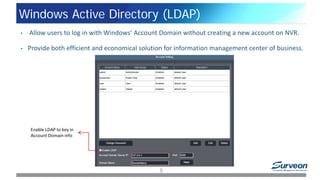
Windows Active Directory (LDAP)
5
• Allow users to log in with Windows’ Account Domain without creating a new account on NVR.
• Provide both efficient and economical solution for information management center of business.
Enable LDAP to key in
Account Domain info
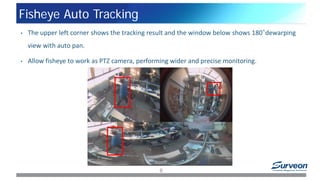
Fisheye Auto Tracking
6
• The upper left corner shows the tracking result and the window below shows 180°dewarping
view with auto pan.
• Allow fisheye to work as PTZ camera, performing wider and precise monitoring.
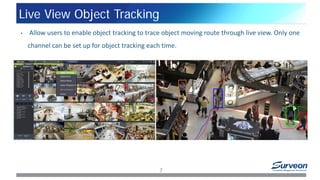
Live View Object Tracking
7
• Allow users to enable object tracking to trace object moving route through live view. Only one
channel can be set up for object tracking each time.
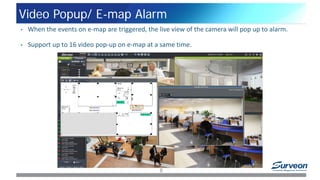
Video Popup/ E-map Alarm
8
• When the events on e-map are triggered, the live view of the camera will pop up to alarm.
• Support up to 16 video pop-up on e-map at a same time.
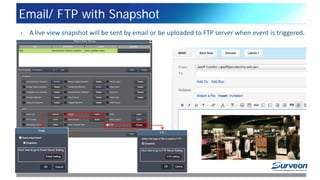
Email/ FTP with Snapshot
9
• A live view snapshot will be sent by email or be uploaded to FTP server when event is triggered.
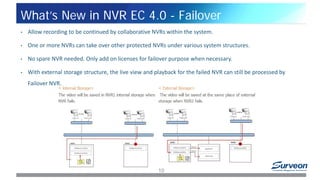
What’s New in NVR EC 4.0 - Failover
10
• Allow recording to be continued by collaborative NVRs within the system.
• One or more NVRs can take over other protected NVRs under various system structures.
• No spare NVR needed. Only add on licenses for failover purpose when necessary.
• With external storage structure, the live view and playback for the failed NVR can still be processed by
Failover NVR.
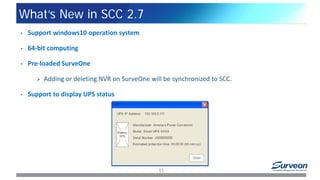
What’s New in SCC 2.7
11
• Support windows10 operation system
• 64-bit computing
• Pre-loaded SurveOne
 Adding or deleting NVR on SurveOne will be synchronized to SCC.
• Support to display UPS status
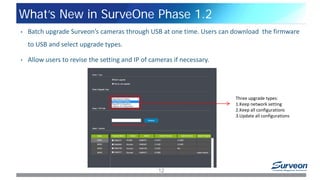
What’s New in SurveOne Phase 1.2
12
• Batch upgrade Surveon’s cameras through USB at one time. Users can download the firmware
to USB and select upgrade types.
• Allow users to revise the setting and IP of cameras if necessary.
Three upgrade types:
1.Keep network setting
2.Keep all configurations
3.Update all configurations
Ask Surveon
www.surveon.com
sales@surveon.com
13
14
Thank You
Surveon, your reliable partner for growth

Surveon VMS Update

  • 1.
    Surveon VMS Update NVREC 3.3 / 4.0 / SCC 2.7 / SurveOne Phase 1.2
  • 2.
    Content 2 Feature Summary What’s Newin NVR EC 3.3 What’s New in NVR EC 4.0 What’s New in SCC 2.7 What’s New in SurveOne Phase 1.2
  • 3.
    Feature Summary 3 Feature Highlights NVREC 3.3 LDAP, Fisheye Auto Tracking, Live View Object Tracking, Video Popup/ E-map Alarm, Email/ FTP with Snapshot NVR EC 4.0 Support Failover Function SCC 2.7 Support Windows10 OS, 64-bit Computing, Pre-loaded SurveOne, Display UPS Status SurveOne Phase 1.2 Batch Upgrade Camera FW, Revise Configuration and IP
  • 4.
    What’s New inNVR EC 3.3 4
  • 5.
    Windows Active Directory(LDAP) 5 • Allow users to log in with Windows’ Account Domain without creating a new account on NVR. • Provide both efficient and economical solution for information management center of business. Enable LDAP to key in Account Domain info
  • 6.
    Fisheye Auto Tracking 6 •The upper left corner shows the tracking result and the window below shows 180°dewarping view with auto pan. • Allow fisheye to work as PTZ camera, performing wider and precise monitoring.
  • 7.
    Live View ObjectTracking 7 • Allow users to enable object tracking to trace object moving route through live view. Only one channel can be set up for object tracking each time.
  • 8.
    Video Popup/ E-mapAlarm 8 • When the events on e-map are triggered, the live view of the camera will pop up to alarm. • Support up to 16 video pop-up on e-map at a same time.
  • 9.
    Email/ FTP withSnapshot 9 • A live view snapshot will be sent by email or be uploaded to FTP server when event is triggered.
  • 10.
    What’s New inNVR EC 4.0 - Failover 10 • Allow recording to be continued by collaborative NVRs within the system. • One or more NVRs can take over other protected NVRs under various system structures. • No spare NVR needed. Only add on licenses for failover purpose when necessary. • With external storage structure, the live view and playback for the failed NVR can still be processed by Failover NVR.
  • 11.
    What’s New inSCC 2.7 11 • Support windows10 operation system • 64-bit computing • Pre-loaded SurveOne  Adding or deleting NVR on SurveOne will be synchronized to SCC. • Support to display UPS status
  • 12.
    What’s New inSurveOne Phase 1.2 12 • Batch upgrade Surveon’s cameras through USB at one time. Users can download the firmware to USB and select upgrade types. • Allow users to revise the setting and IP of cameras if necessary. Three upgrade types: 1.Keep network setting 2.Keep all configurations 3.Update all configurations
  • 13.
  • 14.
    14 Thank You Surveon, yourreliable partner for growth