Substance look and feel
JavaOne 2007 Community Corner
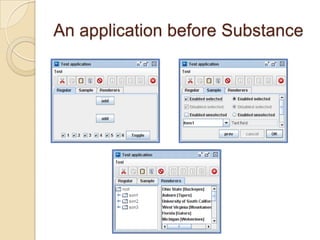
An application before Substance
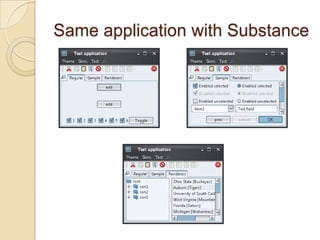
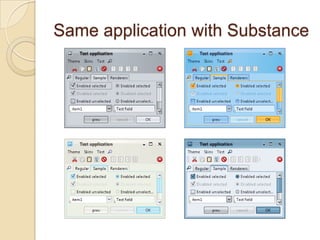
Same application with Substance
Using Substance in you app
 Go to https://substance.dev.java.net
 Download the latest substance.jar
 Use one of the three options:
    ◦ UIManager.setLookAndFeel(
        new SubstanceLookAndFeel())
    ◦ UIManager.setLookAndFeel(
        “org.jvnet.substance.SubstanceLookAndFeel”)
    ◦ -Dswing.defaultlaf=
        org.jvnet.substance.SubstanceLookAndFeel
Substance themes
 Contains information on control colors
  for different visual states (disabled,
  default, active)
 Base class – SubstanceTheme
 Use bundled core themes
 Use APIs to create derived themes
 Extend and create a custom theme
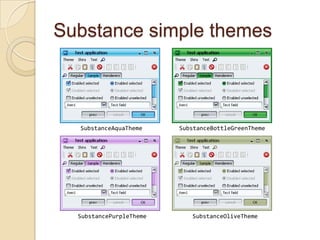
Substance simple themes


  SubstanceAquaTheme     SubstanceBottleGreenTheme


  SubstancePurpleTheme      SubstanceOliveTheme
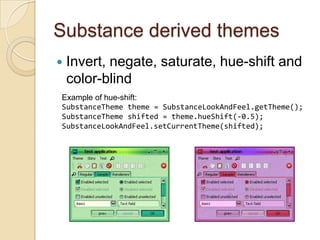
Substance derived themes
   Invert, negate, saturate, hue-shift and
    color-blind
Example of hue-shift:
SubstanceTheme theme = SubstanceLookAndFeel.getTheme();
SubstanceTheme shifted = theme.hueShift(-0.5);
SubstanceLookAndFeel.setCurrentTheme(shifted);
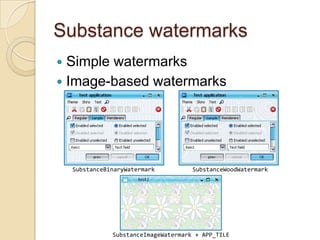
Substance watermarks
 Simple watermarks
 Image-based watermarks


    SubstanceBinaryWatermark          SubstanceWoodWatermark


               SubstanceImageWatermark + APP_TILE
Substance skins
 A collection of various settings (theme,
  watermark, painters, shapers etc).
 In org.jvnet.substance.skin
  package
 Can set as
    ◦ SubstanceLookAndFeel.setSkin(…)
    ◦ Derived look and feel classes based on a
      specific skin (set with UIManager or VM
      flag)
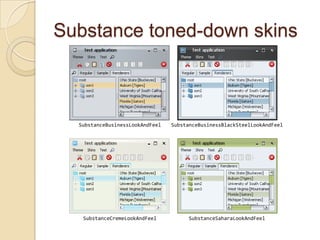
Substance toned-down skins


  SubstanceBusinessLookAndFeel   SubstanceBusinessBlackSteelLookAndFeel


   SubstanceCremeLookAndFeel          SubstanceSaharaLookAndFeel
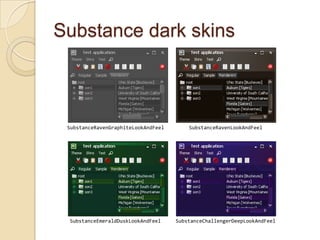
Substance dark skins


 SubstanceRavenGraphiteLookAndFeel       SubstanceRavenLookAndFeel


 SubstanceEmeraldDuskLookAndFeel     SubstanceChallengerDeepLookAndFeel
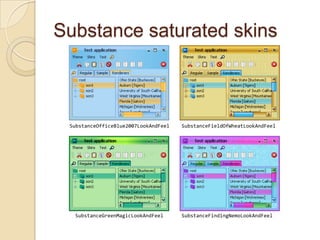
Substance saturated skins


 SubstanceOfficeBlue2007LookAndFeel   SubstanceFieldOfWheatLookAndFeel


  SubstanceGreenMagicLookAndFeel      SubstanceFindingNemoLookAndFeel
Configuring animations
 LafWidget.ANIMATION_KIND –
  controls animation speed (0.5 sec for
  a transition by default)
 FadeConfigurationManager APIs –
  to enable / disable animations
    ◦ On a specific control
    ◦ On control class (JTree, for example)
    ◦ Globally
Custom appearance
 Theme – extend SubstanceTheme or
  use derivation APIs
 Watermark – implement
  SubstanceWatermark
 Skin – implement SubstanceSkin or
  extend SubstanceAbstractSkin
  (provides basic functionality)
 See existing core implementation and
  test app for examples
Additional UI elements
 Substance provides additional “feel”
  part for some Swing components
 These are called widgets
 Some widgets are turned on by default
 Most widgets are configurable
 Some widgets are not visible –
  behavior only
Widget examples
 Menu search panel on big menus
 Lock icon on non-editable text
  components
 Auto-completion on editable
  comboboxes
 Password strength checker
 Tab overview panel
 Tree smart scroll
Substance plugins
 Substance provides a plugin
  mechanism for third-party components
 No need to change the code – just
  drop the plugin jar in the classpath
 Available plugins for:
    ◦ NetBeans – module supports 5.0 and 5.5
    ◦ SwingX at https://swingx.dev.java.net
    ◦ Flamingo at https://flamingo.dev.java.net
SwingX plugin
   Provides consistent appearance
    (colors, fonts, animation) for
    ◦   Task pane container and task panes
    ◦   Status bar
    ◦   Month view
    ◦   Date picker
    ◦   Translucency on JXPanel
   More to come as SwingX matures and
    reaches the first release
Q&A
Visit https://substance.dev.java.net

Mail kirillcool@yahoo.com

See http://javootoo.com for a list of
 other third-party look and feels

Substance Java One 2007 Community Corner

  • 1.
    Substance look andfeel JavaOne 2007 Community Corner
  • 2.
  • 3.
  • 4.
  • 5.
    Using Substance inyou app  Go to https://substance.dev.java.net  Download the latest substance.jar  Use one of the three options: ◦ UIManager.setLookAndFeel( new SubstanceLookAndFeel()) ◦ UIManager.setLookAndFeel( “org.jvnet.substance.SubstanceLookAndFeel”) ◦ -Dswing.defaultlaf= org.jvnet.substance.SubstanceLookAndFeel
  • 6.
    Substance themes  Containsinformation on control colors for different visual states (disabled, default, active)  Base class – SubstanceTheme  Use bundled core themes  Use APIs to create derived themes  Extend and create a custom theme
  • 7.
    Substance simple themes SubstanceAquaTheme SubstanceBottleGreenTheme SubstancePurpleTheme SubstanceOliveTheme
  • 8.
    Substance derived themes  Invert, negate, saturate, hue-shift and color-blind Example of hue-shift: SubstanceTheme theme = SubstanceLookAndFeel.getTheme(); SubstanceTheme shifted = theme.hueShift(-0.5); SubstanceLookAndFeel.setCurrentTheme(shifted);
  • 9.
    Substance watermarks  Simplewatermarks  Image-based watermarks SubstanceBinaryWatermark SubstanceWoodWatermark SubstanceImageWatermark + APP_TILE
  • 10.
    Substance skins  Acollection of various settings (theme, watermark, painters, shapers etc).  In org.jvnet.substance.skin package  Can set as ◦ SubstanceLookAndFeel.setSkin(…) ◦ Derived look and feel classes based on a specific skin (set with UIManager or VM flag)
  • 11.
    Substance toned-down skins SubstanceBusinessLookAndFeel SubstanceBusinessBlackSteelLookAndFeel SubstanceCremeLookAndFeel SubstanceSaharaLookAndFeel
  • 12.
    Substance dark skins SubstanceRavenGraphiteLookAndFeel SubstanceRavenLookAndFeel SubstanceEmeraldDuskLookAndFeel SubstanceChallengerDeepLookAndFeel
  • 13.
    Substance saturated skins SubstanceOfficeBlue2007LookAndFeel SubstanceFieldOfWheatLookAndFeel SubstanceGreenMagicLookAndFeel SubstanceFindingNemoLookAndFeel
  • 14.
    Configuring animations  LafWidget.ANIMATION_KIND– controls animation speed (0.5 sec for a transition by default)  FadeConfigurationManager APIs – to enable / disable animations ◦ On a specific control ◦ On control class (JTree, for example) ◦ Globally
  • 15.
    Custom appearance  Theme– extend SubstanceTheme or use derivation APIs  Watermark – implement SubstanceWatermark  Skin – implement SubstanceSkin or extend SubstanceAbstractSkin (provides basic functionality)  See existing core implementation and test app for examples
  • 16.
    Additional UI elements Substance provides additional “feel” part for some Swing components  These are called widgets  Some widgets are turned on by default  Most widgets are configurable  Some widgets are not visible – behavior only
  • 17.
    Widget examples  Menusearch panel on big menus  Lock icon on non-editable text components  Auto-completion on editable comboboxes  Password strength checker  Tab overview panel  Tree smart scroll
  • 18.
    Substance plugins  Substanceprovides a plugin mechanism for third-party components  No need to change the code – just drop the plugin jar in the classpath  Available plugins for: ◦ NetBeans – module supports 5.0 and 5.5 ◦ SwingX at https://swingx.dev.java.net ◦ Flamingo at https://flamingo.dev.java.net
  • 19.
    SwingX plugin  Provides consistent appearance (colors, fonts, animation) for ◦ Task pane container and task panes ◦ Status bar ◦ Month view ◦ Date picker ◦ Translucency on JXPanel  More to come as SwingX matures and reaches the first release
  • 20.
    Q&A Visit https://substance.dev.java.net Mail kirillcool@yahoo.com Seehttp://javootoo.com for a list of other third-party look and feels